


A SIP MESSAGE is a request defined in RFC 3428 that carries an instant message payload between two SIP user agents, typically as plain text or JSON, outside the normal call setup flow. It is the standard way to add chat, alerts, and custom signaling to VoIP and WebRTC applications. VideoSDK bridges SIP MESSAGE traffic into its WebRTC rooms through its telephony and SIP integration, so developers can combine phone-network messaging with real-time app communication.
Instant messaging is often treated as an afterthought in voice and video applications, yet it is one of the most requested features in production VoIP products. Support agents want to send a link mid-call. Tutors want to share a correction without interrupting the lesson. Field workers on poor connections need a fallback channel when audio drops. In all of these cases, the Session Initiation Protocol already has an answer: the SIP MESSAGE method.
SIP MESSAGE, standardized in RFC 3428, extends SIP beyond call setup and teardown into the world of instant messaging. Because nearly every SIP stack, softswitch, and carrier network already understands it, you can add messaging to a telephony application without inventing a parallel transport. This guide covers what a SIP MESSAGE is, how it flows through a network, how to implement it in a modern application, and how to keep it secure and debuggable. By the end, you will understand the full lifecycle of a SIP MESSAGE, from payload preparation to response handling, and how it fits alongside WebRTC-based communication.
What Is a SIP MESSAGE?
A SIP MESSAGE is defined as an extension to the SIP protocol that transports an instant message payload between user agents, using the same routing, authentication, and response machinery that SIP uses for calls. RFC 3428 introduced the MESSAGE method specifically so that paging-style, near-real-time messaging could ride on existing SIP infrastructure rather than requiring a separate protocol.
SIP MESSAGE works by carrying an opaque payload in the message body, with the Content-Type header declaring the format. The receiving user agent decides what to do with the body: render it as chat text, parse it as structured data, or reject it if the media type is unsupported.
It is worth distinguishing MESSAGE from its neighbors. SIP NOTIFY, part of the event notification framework in RFC 3265, pushes state changes to subscribers, such as presence updates, and is not designed for free-form user content. SIP INFO sends application-level information inside an existing dialog, which makes it unsuitable for standalone messaging. MESSAGE, by contrast, can be sent outside any dialog, which is exactly what instant messaging requires.
Typical use-cases include in-call chat between two parties, machine-to-machine alerts delivered to a softphone, custom signaling between application components, and carrying structured JSON payloads that drive application logic.
SIP MESSAGE Anatomy
Every SIP MESSAGE request is built from the standard SIP header set plus a body. The From, To, Call-ID, and CSeq headers identify the sender, the intended recipient, the transaction, and the sequence position within it. The Via headers record the path the request has taken so responses can find their way back. The Max-Forwards header limits hop count to prevent routing loops.
Two headers matter more for MESSAGE than for other methods. The first is Content-Type, which declares the payload format. Plain-text chat typically uses text/plain with a character set such as UTF-8. Structured messaging increasingly uses application/json, letting the payload carry fields like a message identifier, a timestamp, or a display name alongside the text itself. The second is Content-Length, which tells the receiver how many bytes of body to expect.
A minimal SIP MESSAGE, described in prose, looks like this: the sender issues a MESSAGE request addressed to the recipient's SIP URI, with a From header naming the sender, a To header naming the recipient, a fresh Call-ID and CSeq, a Content-Type of text/plain, and a short body containing the chat text. The recipient's user agent accepts the request and returns a final response, most commonly 200 OK, indicating the message was delivered and rendered.
The payload is deliberately opaque to the SIP layer. Routers and proxies forward the body without inspecting it, which means your application fully controls the format, as long as both ends agree on the Content-Type.
How SIP MESSAGE Works in a Call Flow
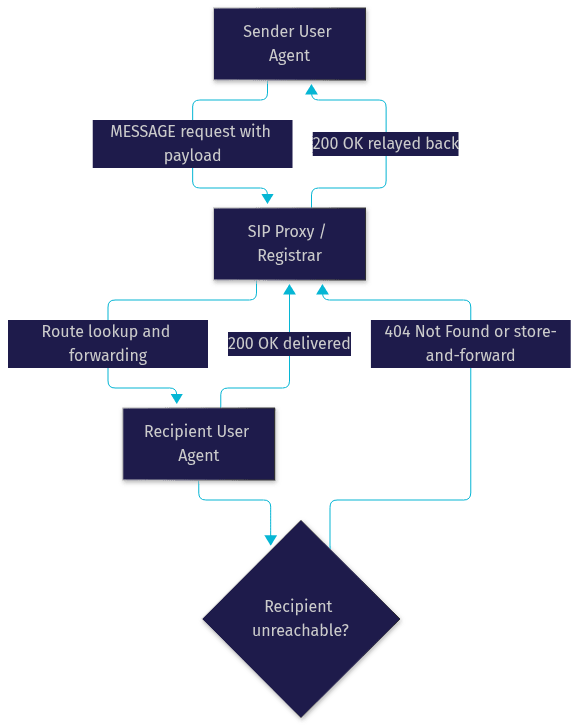
A SIP MESSAGE exchange follows the same transaction model as any other SIP request, which is one of its greatest strengths. The sender constructs the request and sends it to its outbound proxy or registrar. The proxy examines the Request-URI, applies its routing rules, and forwards the request toward the recipient, potentially through several intermediate hops. Each hop adds a Via header so the response can traverse the same path in reverse.
When the request arrives at the recipient's user agent, several things can happen. If the recipient is registered and reachable, the user agent processes the payload and returns a 200 OK. If the payload's Content-Type is not supported, the agent returns 415 Unsupported Media Type. If the recipient's policy forbids messages from the sender, a 403 Forbidden comes back. If the recipient is not registered, the proxy may return 404 Not Found or store-and-forward the message depending on configuration.
Authentication interacts with this flow in a familiar way. A proxy or registrar can challenge the MESSAGE request with a 401 Unauthorized, requiring the sender to reissue the request with digest credentials. This is identical to the challenge-response used for REGISTER and INVITE, so your authentication code can be shared across request types.
The diagram below shows the full round trip:
During an active call, MESSAGE requests can travel inside the existing dialog or outside it. Sending within the dialog reuses the route set established by the INVITE, which simplifies traversal through NATs and proxies that already pinholed a path for media. Sending outside the dialog is more common for first-contact chat, before any call exists.
Implementing SIP MESSAGE in a Modern Application
Choosing the right SIP stack is the first decision. In browser or Node.js environments, sip.js is the most common choice and supports sending and receiving MESSAGE requests directly. On embedded or native platforms, baresip offers a lightweight C user agent with MESSAGE support. On the server side, Asterisk and FreeSWITCH both accept MESSAGE requests, route them between endpoints, and can bridge them to other channels, including external APIs and chat systems.
Once a stack is chosen, the implementation follows a consistent pattern. First, set up a listener for incoming MESSAGE requests. When a request arrives, inspect the Content-Type, validate the payload, render or process it, and respond with 200 OK. Responding promptly matters: SIP transactions time out, and an unanswered MESSAGE will be retransmitted by the sender's stack.
Second, prepare outgoing messages correctly. The required headers are the same as any SIP request: From, To, Call-ID, CSeq, Via, and Max-Forwards. Set the Content-Type to match your payload format, and keep the body within reasonable size limits, since many proxies and user agents reject bodies above a few kilobytes. If you are carrying JSON, keep the structure compact and versioned so both ends can evolve the schema.
Third, handle responses deliberately. A 200 OK means delivered. A 415 Unsupported Media Type means your Content-Type was rejected, and you should either fall back to plain text or negotiate the format out of band. A 403 Forbidden usually means a policy or permission problem. A 401 challenge means you must re-authenticate and resend. Treat timeout and 477 or 480-class responses as delivery failures and surface them in your application's UI rather than silently dropping the message.
Production considerations deserve their own attention. NAT traversal for MESSAGE follows the same rules as other SIP traffic, so keepalives and outbound proxies matter when user agents sit behind restrictive firewalls. Use TLS for transport so message bodies are not readable on the wire. Ensure your authentication logic covers MESSAGE requests, not just REGISTER and INVITE, because some deployments accidentally leave MESSAGE unauthenticated, which becomes an open relay for spam.
The following diagram shows where a SIP MESSAGE listener sits in a typical application architecture:
Common Pitfalls and How to Avoid Them
The most frequent mistake is forgetting to advertise MESSAGE in the Allow header. User agents list the methods they understand in Allow, and if MESSAGE is absent, remote parties and proxies may refuse to send messages your way or reject yours. Always include MESSAGE in the methods your user agent declares.
Mismatched Content-Type is the second most common failure. If the sender marks the body as application/json but the receiver only handles text/plain, the result is a 415 Unsupported Media Type response. Agree on supported media types at design time, and implement a graceful fallback to plain text when structured payloads are rejected.
Ignoring authentication challenges is a subtle trap. A stack that handles 401 challenges for REGISTER but not for MESSAGE will silently fail when a proxy challenges a message request. Make sure your challenge-response logic is applied uniformly across all request types.
Finally, overlooking message size limits causes intermittent failures that are hard to reproduce. SIP is not a file transfer protocol. Proxies, user agents, and carrier networks each impose their own body size ceilings, and a message that works on your test bench may be dropped in production. Keep payloads small, and split large content into multiple messages or move it to a separate channel.
Security Best Practices for SIP MESSAGE
Transport encryption comes first. Send MESSAGE traffic over TLS rather than plain UDP or TCP, because message bodies are otherwise readable by anyone on the path. In carrier and IMS environments, TLS or IPsec is typically mandated anyway.
Validate and sanitize every payload before processing it. A MESSAGE body is untrusted input, exactly like an HTTP request body. If you render message text in a web UI, escape it to prevent cross-site scripting. If you parse JSON, enforce a strict schema and reject unexpected fields, because injection attacks through message payloads are a real vector in multi-tenant telephony systems.
Implement digest authentication for senders, or mutual TLS where the infrastructure supports it, so that only authenticated users can inject messages into your system. Unauthenticated MESSAGE handling is one of the most common ways SIP platforms become spam relays.
Rate-limit incoming messages per sender. A compromised account that can emit thousands of MESSAGE requests per second can degrade your proxies and flood recipients. Per-user and per-destination limits, combined with monitoring for abnormal volumes, keep the channel usable under abuse.
Testing and Debugging SIP MESSAGE
Wireshark remains the definitive tool for inspecting SIP traffic, including MESSAGE transactions. Its SIP dissector shows the full header set, decodes the payload, and correlates requests with responses so you can see exactly where a message stalled. sngrep offers a lighter, terminal-friendly alternative that groups SIP dialogs and messages into readable flows, which is often faster for diagnosing routing problems.
SIPp is the tool of choice for simulating MESSAGE traffic. It can generate sustained message loads against a test user agent or proxy, letting you verify rate limiting, measure response latency, and confirm your stack survives retransmissions and error responses.
For logging, record both inbound and outbound MESSAGE requests with their transaction identifiers, Content-Type, and response codes, while being careful with payload logging in systems that carry private user content. Correlating logs by Call-ID makes it possible to trace a single message from the sender's client through every proxy hop to the recipient.
A useful test environment pattern is to run a local proxy, two test user agents, and a scripted sender that produces both valid and deliberately malformed messages. Verifying that malformed payloads are rejected cleanly, and that valid ones are delivered with correct responses, gives you confidence before production deployment.
Real-World Example: Chat Feature in a WebRTC App
Consider a telehealth startup building a consultation platform. The core experience is a WebRTC video call, but clinicians also need to share links, dosage notes, and follow-up instructions without interrupting the conversation. The team decides to power this side channel with SIP MESSAGE.
The architecture works like this. The browser client uses a JavaScript SIP stack to register with a SIP proxy over WebSocket and TLS. When a clinician types a chat message, the application wraps the text in a small JSON payload that includes a message identifier, a timestamp, and the sender's display role, then sends it as a MESSAGE request addressed to the patient's SIP URI. The proxy authenticates the request, routes it to the patient's client, and the patient's MESSAGE listener parses the JSON and renders the chat bubble. The 200 OK confirms delivery, and the application marks the message as sent.
The interaction with the WebRTC signaling flow is worth noting. The SIP MESSAGE channel runs parallel to the video session rather than inside it. The video call itself is established and maintained by the platform's real-time communication layer, while the SIP MESSAGE channel handles text. This separation means chat keeps working even if the video session is being re-established, and it lets the same messaging path serve users who join by phone.
This is also where a platform like VideoSDK fits naturally. VideoSDK's video calling SDKs handle the real-time audio and video room, while its SIP and telephony integration bridges traditional SIP endpoints, including SIP MESSAGE traffic, into the same session. A patient joining from a desk phone or a legacy SIP client can exchange messages with a browser participant, with the gateway translating between the SIP and WebRTC worlds. Developers building AI-driven voice experiences can extend this further with VideoSDK's AI voice agents, which participate in the same rooms and can receive or trigger message-driven events.
For teams that want messaging without managing SIP infrastructure at all, VideoSDK's built-in in-meeting chat provides the same outcome on the SDK side, with the SIP MESSAGE path reserved for interoperability with phone networks and legacy systems.
Definitions Glossary
SIP MESSAGE: The SIP request method defined in RFC 3428 that carries an instant message payload between user agents, usable both inside and outside an existing call dialog.
RFC 3428: The IETF specification that extends the Session Initiation Protocol with the MESSAGE method for paging-style instant messaging.
Content-Type: The SIP header that declares the payload format of a MESSAGE body, such as text/plain for chat text or application/json for structured data.
415 Unsupported Media Type: The SIP error response returned when a recipient cannot process the payload format declared in the Content-Type header of a MESSAGE request.
SIP Proxy: A network intermediary that receives SIP requests, applies routing and authentication policy, and forwards them toward the recipient, adding Via headers so responses can return along the same path.
SIP NOTIFY: The SIP method used within the event notification framework to push state changes, such as presence, to subscribed user agents, distinct from MESSAGE which carries user content.
Key Takeaways
- SIP MESSAGE, defined in RFC 3428, is the standard method for carrying instant message payloads over SIP, usable inside or outside an active call dialog.
- The payload is opaque to the SIP layer, so your application controls the format, with Content-Type declaring whether the body is plain text or JSON.
- Correct response handling separates working implementations from broken ones: 200 OK means delivered, 415 signals a Content-Type mismatch, and 401 or 403 indicate authentication or policy failures.
- Security requires TLS transport, strict payload validation, authenticated senders, and rate limiting, because unauthenticated MESSAGE handling turns SIP platforms into spam relays.
- In modern applications, SIP MESSAGE pairs naturally with WebRTC: real-time SDKs like VideoSDK's handle audio and video rooms while SIP integration bridges phone-network messaging into the same session.
Conclusion
The SIP MESSAGE method is a small part of the SIP specification with an outsized role in real applications. It powers in-call chat, machine alerts, and structured signaling, all while reusing the authentication, routing, and response machinery your telephony stack already has. Get the headers right, agree on payload formats, handle every response class, and secure the channel, and messaging becomes one of the most reliable features in your product.
If you are combining SIP messaging with real-time WebRTC communication, explore VideoSDK's SIP integration guide and the code samples to see how phone-network endpoints join the same rooms as browser and mobile participants. You can start free at app.videosdk.live/login and join the VideoSDK Discord community to compare notes with other developers building telephony and real-time communication products.
What are you building with SIP MESSAGE? Drop a comment, I would love to hear what kind of messaging use case you are working on.
Free $20 Balance for AI Voice Agents & Video Calls
FAQ