


A Sarvam voice agent is a voice-native AI assistant built on Sarvam AI's speech stack, designed specifically for Indian languages and telephony-grade audio. Unlike generic TTS or ASR services, it handles code-switching between Hindi, English, Tamil, and other languages, runs with sub-250 ms first-byte latency, and connects directly to phone networks via SIP. If you are building for Indian callers, this guide walks you through the full journey from architecture to deployment, and shows how platforms like VideoSDK complement it for real-time media transport.
India's next hundred million internet users do not type in English. They speak in Hindi, Tamil, Telugu, Bengali, and a hybrid mix of all of these with English layered on top. Any voice product built for this audience fails the moment it assumes a single, cleanly separated language per call. This is exactly the gap Sarvam AI built its voice stack to close, with code-switching speech models and telephony-optimized audio as first-class design constraints rather than afterthoughts.
In this article, you will learn what a Sarvam voice agent actually is, how its architecture fits together, how to build and iterate on one, how to tune latency and audio quality, how to wire it into your business systems, and when it beats the global alternatives. By the end, you will have a complete mental model for shipping a production voice agent for Indian callers.
What Is a Sarvam Voice Agent?
A Sarvam voice agent is defined as a conversational AI system that listens to a human caller, understands mixed-language Indian speech, decides on a response, and speaks back in a natural voice, all within the tight timing window of a live phone conversation. It is not a single model but an orchestrated pipeline of speech-to-text, dialogue reasoning, and text-to-speech components, connected through a telephony bridge that carries the audio.
The core components are fourfold. The STT engine transcribes incoming caller audio, including Hinglish and other code-switched speech that trips up global models. The dialogue engine, which can be an LLM or a deterministic flow, decides what the agent says next. The TTS engine renders the response in a natural, human-sounding voice tuned for Indian names, accents, and prosody. Finally, the telephony bridge connects the whole loop to the public phone network or a SIP endpoint, so the agent can receive and place real calls.
A Sarvam voice agent differs from generic TTS or ASR services in one crucial way: those services give you building blocks, while Sarvam's stack is optimized end-to-end for the Indian caller. The models are trained on Indian-language speech data, the audio output is tuned for 8 kHz telephony lines rather than studio playback, and the pipeline is engineered so the full listen-think-speak loop stays inside the latency budget of a natural conversation. Generic providers treat Hindi or Tamil as one locale among dozens; Sarvam treats them as the primary product.
Core Architecture of a Sarvam Voice Agent
Every production Sarvam voice agent follows the same high-level flow: caller audio enters through a telephony gateway, gets processed by the speech and dialogue layers, and responses return as synthesized speech, with business APIs consulted along the way.
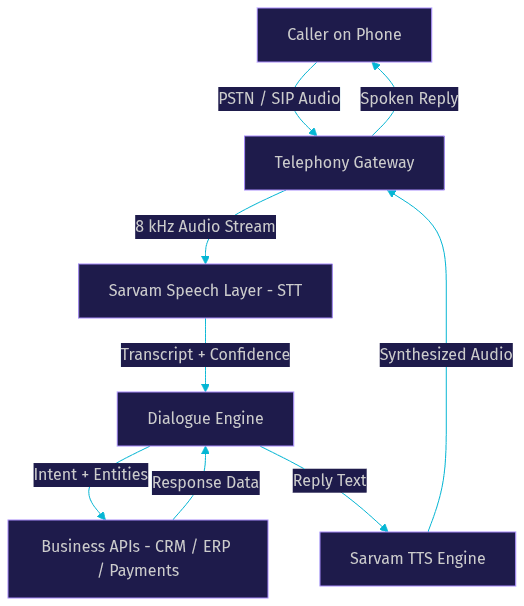
The telephony gateway is the entry point. It converts phone-network audio into a stream the speech layer can consume, and it handles call setup, teardown, and DTMF tones from keypad presses. Behind it, the Sarvam speech layer runs transcription and synthesis, and the dialogue engine sits between them, holding conversation state and deciding the next action.
On-device versus cloud is a real architectural decision. Sarvam offers compact speech models that can run at the edge, closer to the caller, which cuts network round-trips and keeps sensitive audio on local infrastructure. The cloud path gives you the full model quality and easier scaling. Many production deployments use a hybrid: edge inference for the latency-critical transcription step, cloud fallback for complex reasoning or when edge capacity is exhausted.
Authentication follows a standard API key and token pattern. Your server holds the Sarvam API key, generates short-lived session tokens for each call or agent session, and passes those tokens when initiating the speech and dialogue requests. Never embed the master key in a client application or expose it in call-handling logic that runs on untrusted infrastructure. Rotate keys regularly and scope tokens to a single session so a leaked token cannot be replayed across calls.
If you need to bridge this agent into a broader real-time application, such as a web dashboard where a human supervisor can listen in or take over the call, platforms like VideoSDK's AI agent infrastructure handle the WebRTC media transport, and its telephony and SIP integration connects the same agent to phone networks with DTMF support and call transfer built in.
Building a Voice Agent in Minutes
The fastest path from idea to a working Sarvam voice agent follows five steps, and none of them require writing a full application from scratch.
Step 1: Define the business goal. Write down, in one sentence, what a successful call accomplishes. "Confirm the caller's loan application status and escalate to a human if the account is flagged." A crisp goal keeps the conversation script focused and makes success measurable.
Step 2: Choose a voice. Sarvam offers multiple prebuilt voices tuned for Indian languages, varying in gender, tone, and pace. Pick one that matches your brand and test it on real telephony audio, because a voice that sounds great on studio headphones can sound muffled on a phone line.
Step 3: Draft the conversation script. Map the greeting, the main intents, the follow-up questions, and the fallback branches. Include what the agent says when it does not understand, and how it hands off to a human. This script is your product spec.
Step 4: Test with the built-in simulator. Before connecting a real phone number, run the script through Sarvam's testing environment, such as the Genie interface, where you can simulate caller utterances, including code-switched ones, and watch the agent respond. Iterate here until the flow feels natural.
Step 5: Deploy to a phone number or SIP endpoint. Once the flow passes simulation, attach it to a rented phone number or a SIP endpoint so real callers can reach it. Start with a small pilot batch of calls before scaling.
For rapid iteration, lean on AI-assisted test case generation: ask the tooling to produce adversarial caller phrases, mixed-language inputs, and edge cases like background noise or abrupt hang-ups. Teams that iterate inside the simulator ship in days rather than weeks.
The most common pitfalls are predictable. Missing intent mapping, where a caller says something the script never anticipated, is the number one cause of dead-air moments. Latency expectations are the second: budget for the full round trip, not just the TTS render, and test on real cellular connections, not just office Wi-Fi.
Designing Conversational Flows for Indian Languages
Indian callers code-switch constantly, mid-sentence and without warning. A caller asking about a loan might say "Mera loan application ka status kya hai?" in one breath and "Actually, can you check the disbursal date also?" in the next. A Sarvam voice agent handles this natively because its speech models are trained on code-switched data, so the transcript reflects the mixed utterance faithfully rather than forcing it into one language bucket.
When designing flows, do not build separate Hindi and English branches. Build one flow per business intent and let the speech layer handle the language. The dialogue engine should respond in the caller's dominant language pattern, and Sarvam's TTS handles mixed-script output, so a reply can naturally blend "Aapka loan approved hai" with an English transaction ID.
Sarvam's built-in entity extraction covers the fields that matter in Indian business flows: person names across scripts, addresses with Indian pin codes, amounts in rupees, dates, and phone numbers. Use these instead of asking the LLM to parse raw text, because the dedicated extractors are more reliable and faster. For example, in a loan-status flow, the agent asks for the application number, the extractor validates the format, and only a clean entity triggers the API lookup.
Branching logic needs three special cases. Pauses: if the caller goes silent, the agent should nudge gently after a couple of seconds rather than hanging up. Nudges: a soft re-ask when confidence is low, phrased differently from the original question. Voicemail detection: if the call lands on an answering machine, the agent should either leave a scripted message or hang up and retry later, not attempt a conversation.
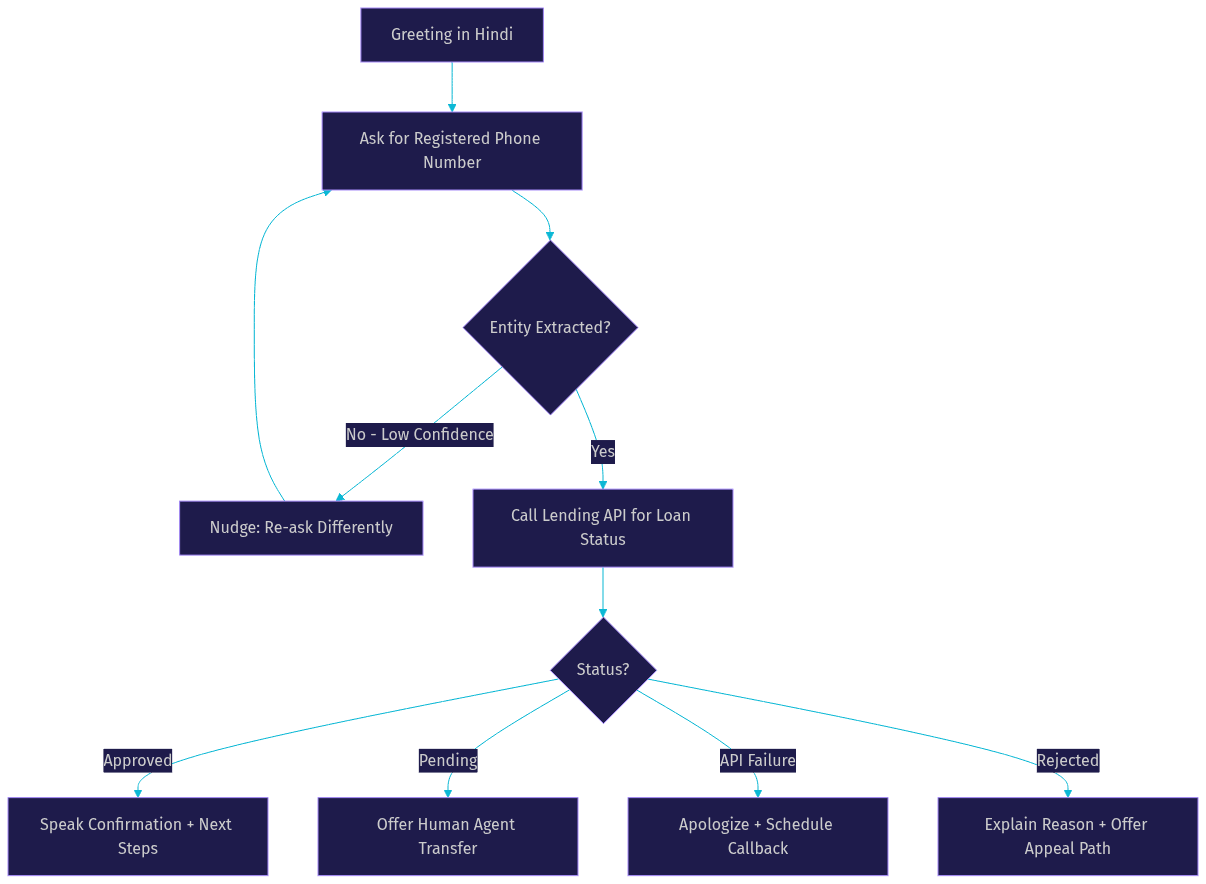
Here is a loan-status flow in prose. The agent greets the caller in Hindi and asks for the registered phone number. The extractor pulls the ten-digit number, the dialogue engine calls the lending API, and the agent speaks the status: approved, pending, or rejected. If pending, it offers to connect a human agent. If the caller code-switches to English mid-flow, the agent follows. If the API fails, the agent apologizes, offers a callback, and logs the failure for the monitoring dashboard.
Optimising Latency and Audio Quality
Sub-250 ms first-byte latency is the threshold where a voice conversation feels natural rather than robotic. Human conversational gaps run around 200 to 300 milliseconds; if your agent's first spoken syllable arrives later than that, callers perceive a lag, start talking over the agent, and the conversation degrades. Every optimization decision should be measured against this budget.
The single biggest audio decision is sample rate. Telephony lines carry 8 kHz audio, and Sarvam offers TTS output specifically optimized for that band. Choosing the telephony-optimized output instead of higher-rate studio audio does two things: it cuts synthesis and transfer time, and it avoids the quality loss that happens when wideband audio gets downsampled onto a phone line anyway. Use higher-rate output only when the agent's voice also plays through a web or app interface.
Network-adaptive streaming matters on Indian cellular networks, where bandwidth fluctuates within a single call. Structure the pipeline so audio streams out as it is synthesized, in small chunks, rather than waiting for the full response to render. This gets the first syllable to the caller as early as possible and lets the pipeline adjust bitrate if the connection degrades.
Monitor latency continuously through Sarvam's analytics dashboard, tracking first-byte latency, end-to-end response time, and transcription confidence per call. Set thresholds and alert when p95 latency crosses your budget, because averages hide the worst caller experiences. For teams running agents over WebRTC in parallel with telephony, VideoSDK's network-adaptive streaming applies the same principle to real-time media, adjusting bitrate and resolution as bandwidth changes.
Integrating Business Systems
A voice agent is only as useful as the data it can reach. The integration pattern that works best during a live call is the real-time fetch: the dialogue engine identifies an intent, your server calls the relevant business API, and the agent speaks the result back with confirmation.
The pattern has three beats. Request: the agent collects the entity it needs, such as an order number. Fetch: your backend calls the CRM, ERP, or payment gateway via REST, with a strict timeout, because a slow API silently destroys your latency budget. Confirm: the agent speaks the result and asks the caller to verify before taking any irreversible action, such as a payment or cancellation.
Consider an order-status integration narratively. A caller asks about a recent purchase. The agent extracts the order ID, your server queries the e-commerce API, and the agent responds: "Your order shipped yesterday and arrives Thursday. Anything else?" If the caller wants to cancel, the agent confirms the order details first, then triggers the cancellation endpoint, then reads back the confirmation number. Every state-changing action gets a spoken confirmation loop.
Security considerations are serious because voice agents handle personal and financial data. Keep data residency in mind: Sarvam operates with India-hosted infrastructure, which matters for RBI-regulated financial data and government workloads. Verify the current compliance posture directly, including SOC 2 and ISO 27001 status, before signing off on regulated deployments. On your side, never let raw API credentials live inside the conversation script; route all business API calls through your own backend, which authenticates to Sarvam with scoped tokens and to internal systems with its own credentials. Log transcripts with PII redaction, and set retention policies that match your compliance obligations.
For teams that also need human escalation, session analytics, or programmatic recording control, VideoSDK's REST APIs provide room management, participant control, and recording endpoints that pair well with an agent backend.
Testing, Monitoring, and Continuous Improvement
Ship your first version fast, then improve it with a disciplined loop. The built-in test harness lets you simulate caller intents without burning real phone minutes: feed it scripted utterances, mixed-language phrases, and hostile inputs like background noise or rapid interruptions, and review how the agent branches.
After every call, review the artifacts. Transcripts show what the caller actually said, including code-switched segments the STT captured. Speaker diarisation, where available, separates agent speech from caller speech, which is essential for debugging turn-taking issues. Confidence scores flag the utterances where transcription was uncertain, and those are exactly the phrases to add as test cases.
Set up alerts for the failure modes that hurt most: call setup failures, API timeouts inside flows, high average latency, and rising rates of low-confidence transcriptions. A dashboard that only shows green averages will hide a flow that fails for Tamil-speaking callers while succeeding for Hindi speakers, so segment your metrics by language.
The improvement loop is simple and relentless: update the script or flow, re-run the test harness against the new version, compare transcripts and branch rates against the previous run, then redeploy. Teams that run this loop weekly see steady gains in task completion rates; teams that deploy and forget see silent decay as caller behavior drifts.
Pricing, Limits, and Enterprise SLA
Sarvam's commercial model is pay-as-you-go, built around character volume for speech workloads, with a reported baseline in the region of ₹30 per 10,000 characters for TTS usage, plus a free tier for evaluation. Verify current rates on Sarvam's official pricing page before budgeting, because per-character and per-minute pricing for voice workloads changes as new models ship.
Beyond per-character costs, plan for the operational limits. Concurrent call caps determine how many simultaneous conversations your deployment can carry, and exceeding them causes failed call setups at exactly the wrong moment. Phone number rental carries a recurring fee per number, and outbound calling may be billed separately from inbound. Model your peak-hour concurrency, not your average, when estimating cost.
For enterprise deployments, the SLA highlights that matter are 99.9 percent uptime commitments, SOC 2 Type II attestation, and ISO 27001 certification, which together cover availability, security process maturity, and information security management. Confirm the current attestation dates and the specific SLA tiers attached to your contract, since enterprise terms are negotiated per deployment.
When to Choose Sarvam Over Other Voice Platforms
The decision comes down to where your callers are and what they speak. Use this matrix when comparing Sarvam against global voice platforms:
- Indian language coverage: Sarvam covers major Indian languages with production-grade quality; global providers treat them as long-tail locales with uneven accuracy.
- Code-switching: Sarvam's models handle Hinglish, Tanglish, and mid-sentence switching natively; most global stacks force a single-language session.
- Edge deployment: Sarvam offers compact models that run closer to the caller; most global providers are cloud-only.
- Data residency: India-hosted infrastructure simplifies compliance for RBI-regulated and government workloads.
- Latency on telephony: 8 kHz-optimized output and telephony-tuned pipelines hit the sub-250 ms budget more reliably than studio-audio pipelines downsampled onto phone lines.
Sarvam is the clear fit for banking and lending hotlines serving Hindi and regional-language customers, government citizen services that must reach every state's language, and multilingual e-commerce support where callers switch languages mid-conversation. Choose a global provider instead when your caller base is primarily English-speaking outside India, or when you need a single vendor for dozens of non-Indian languages. And when your use case needs real-time video, web-based agent sessions, or human supervisor barge-in alongside the voice agent, pairing Sarvam's speech stack with VideoSDK's agent and telephony infrastructure covers both worlds.
Definitions Glossary
Sarvam Voice Agent: A voice-native conversational AI system built on Sarvam AI's speech stack, combining Indian-language STT, dialogue orchestration, and telephony-optimized TTS into a single call-handling pipeline.
Code-Switching: The natural mixing of two or more languages within a single utterance, such as Hindi and English in one sentence, which is the default speech pattern for many Indian callers.
First-Byte Latency: The time between a caller finishing their utterance and the agent's first spoken syllable arriving; staying under roughly 250 ms keeps conversation feeling natural.
Telephony-Optimized TTS: Speech synthesis tuned for 8 kHz phone-line audio, which avoids the quality loss and extra processing of downsampled studio-grade output.
Entity Extraction: The automatic identification of structured data in caller speech, such as names, rupee amounts, addresses, and phone numbers, used to trigger business API lookups reliably.
SIP Endpoint: A telephony address that lets voice traffic flow between traditional phone networks and internet-based systems, enabling an agent to receive and place real calls.
Key Takeaways
- A Sarvam voice agent is an end-to-end pipeline, STT plus dialogue plus telephony-optimized TTS, purpose-built for Indian languages and code-switched speech rather than adapted to them.
- Keep first-byte latency under roughly 250 ms by choosing 8 kHz telephony-optimized output, streaming audio in chunks, and enforcing strict timeouts on every business API call inside a flow.
- Design one flow per business intent and let the speech layer handle language, with built-in entity extraction for names, amounts, and addresses doing the structured-data work.
- Test in the simulator before connecting real numbers, then run a weekly loop of script updates, harness re-tests, and segmented monitoring by language.
- Choose Sarvam when your callers speak Indian languages and code-switch; pair it with VideoSDK's real-time infrastructure when you also need web sessions, human escalation, or WebRTC media transport.
Conclusion
Building a Sarvam voice agent in 2026 is a well-lit path: define the goal, pick a voice, script the flow, simulate, deploy to a number, then iterate with transcripts and latency metrics. The end-to-end journey from this guide, architecture, conversational design, latency tuning, business integration, and monitoring, is everything you need to ship a production voice agent for Indian callers. Start with Sarvam's free tier and the Genie interface to prototype your first flow this week, and if your use case needs real-time web sessions, supervisor barge-in, or WebRTC media alongside telephony, explore VideoSDK's AI agent docs and grab a free account at app.videosdk.live/login. What are you building with a Sarvam voice agent? Drop a comment, I'd love to hear which Indian-language use case you're tackling.
Free $20 Balance for AI Voice Agents & Video Calls
FAQ