


An OpenAI voice agent is a real-time conversational AI system that processes spoken audio input, reasons through a language model, and generates spoken audio output with sub-second latency. VideoSDK provides an AI Agent SDK that connects OpenAI Realtime models to WebRTC-based rooms, enabling developers to build production-grade voice agents with built-in turn detection, transcription, and telephony integration. Start with the VideoSDK AI Agents documentation to integrate OpenAI voice capabilities into your application.
Building a voice agent that feels natural requires more than wiring a speech-to-text engine to a chatbot. The moment you add real-time audio to an LLM, you face a new set of constraints: latency budgets measured in milliseconds, turn detection that handles interruptions gracefully, and transport layers that maintain audio quality across unpredictable networks. OpenAI voice agents address these challenges through two primary architectures, each with distinct tradeoffs.
Whether you are building a customer support line, a voice-driven scheduling assistant, or an interactive telemedicine triage bot, the architectural decisions you make early on will determine whether your agent feels responsive or frustrating. This guide walks through the core concepts, architecture choices, implementation steps, and production considerations for building OpenAI voice agents, with practical guidance on how VideoSDK's infrastructure simplifies the hardest parts.
Understanding OpenAI Voice Agents
An OpenAI voice agent is a conversational AI system that uses OpenAI's real-time models to process spoken language and respond with synthesized speech in real time. Unlike text-only agents that wait for a complete user message before processing, voice agents must handle streaming audio, detect when a user has finished speaking, and begin generating a response almost immediately to maintain conversational flow.
The defining characteristic of a voice agent is latency. Human conversation tolerates roughly 500 milliseconds of silence before it starts feeling awkward. If your agent takes longer than that to produce its first audio sample after the user stops speaking, the interaction begins to feel broken. OpenAI's Realtime API is designed to operate within this constraint by processing audio in chunks and streaming responses back as they are generated.
VideoSDK extends this capability by providing the transport layer, room management, and agent orchestration that production voice applications require. Through the VideoSDK AI Agent SDK, developers can connect OpenAI Realtime models to WebRTC rooms, enabling sub-second voice interactions across web, mobile, and telephony endpoints.
Choosing the Right OpenAI Voice Agent Architecture
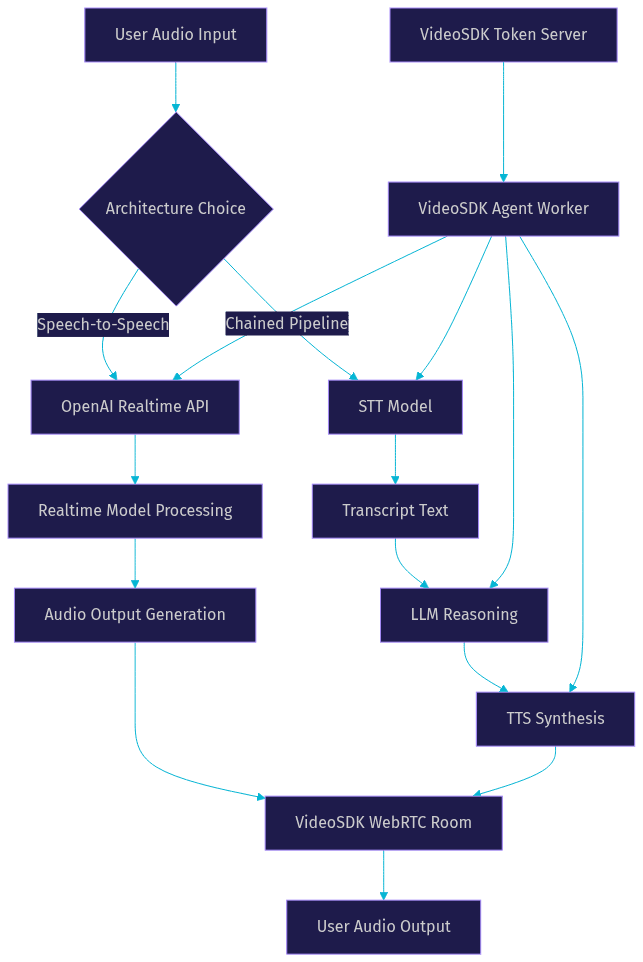
The first and most consequential decision when building an OpenAI voice agent is choosing between two architectural patterns: speech-to-speech and the chained voice pipeline. Each pattern handles audio differently, and the choice affects latency, transcript accuracy, tool integration, and compliance posture.
Speech-to-speech architecture sends raw audio directly to a real-time multimodal model like OpenAI Realtime. The model processes incoming audio, reasons about it, and generates audio output without an intermediate text representation. This approach minimizes latency because there is no transcription step between input and response generation.
The chained voice pipeline, by contrast, breaks the process into three discrete stages: speech-to-text transcription, LLM reasoning, and text-to-speech synthesis. Each stage runs independently, which gives you more control over individual components but adds cumulative latency.
| Dimension | Speech-to-Speech | Chained Pipeline |
|---|---|---|
| Latency | Sub-500ms first audio | 800ms to 2s depending on models |
| Transcript accuracy | Lower (derived from audio) | Higher (dedicated STT model) |
| Tool integration | Native function calling | Full agent framework support |
| Barge-in support | Built-in | Requires custom implementation |
| Compliance logging | Limited | Full text transcripts at each stage |
| Best for | Real-time assistance, interactive apps | Compliance-driven flows, durable records |
[LINKABLE ASSET: architecture decision table]
The table above captures the core tradeoffs. The most important row is latency, because it directly shapes user perception. Speech-to-speech wins on responsiveness, while the chained pipeline wins on control and auditability.
When to Prefer Speech-to-Speech
Speech-to-speech is the right choice when responsiveness matters more than transcript precision. Real-time assistance applications, such as voice-controlled dashboards or interactive tutoring systems, benefit from the sub-500-millisecond response window that direct audio processing enables.
Barge-in, the ability for a user to interrupt the agent mid-sentence and have the agent immediately stop and listen, is built into the speech-to-speech pattern. OpenAI Realtime handles this natively by detecting overlapping audio and canceling in-progress responses. If your use case requires natural conversational dynamics where users can cut in, correct themselves, or change topics mid-response, speech-to-speech is the clear winner.
Tool use also works more naturally in speech-to-speech mode. The OpenAI Realtime API supports function calling, which means the agent can trigger external actions like checking a calendar, looking up inventory, or transferring a call while maintaining the audio conversation stream. The chained pipeline can support tools too, but the latency penalty compounds with each additional step.
When to Use a Chained Pipeline
The chained pipeline shines in scenarios where you need durable, accurate transcripts at every stage of the conversation. Compliance-driven industries like healthcare, finance, and legal services often require precise text records of what was said and what the agent decided. A dedicated STT model like OpenAI Whisper produces more accurate transcripts than the derived transcripts from a speech-to-speech model.
If you are extending an existing text-based agent with voice capabilities, the chained pipeline lets you reuse your current agent logic, prompt engineering, and tool definitions. You simply add a transcription step at the input and a synthesis step at the output. This incremental approach reduces migration risk and lets you swap voice components independently.
The chained pipeline also gives you granular control over each model choice. You can pair a fast STT model with a powerful reasoning model and a high-quality TTS engine, optimizing each stage for its specific task. VideoSDK's Agent SDK supports this pattern through its Pipeline component, which orchestrates STT, LLM, and TTS providers in a configurable chain.
Core Components of an OpenAI Voice Agent
Regardless of which architecture you choose, every OpenAI voice agent shares a set of core components that handle audio transport, model orchestration, and conversation management. Understanding these components helps you debug issues, optimize performance, and extend functionality.
Realtime Session Layer
The session layer manages the audio transport between the user's device and the OpenAI model. Two transport options dominate: WebRTC and WebSocket. WebRTC is designed for real-time media and includes built-in mechanisms for network adaptation, packet loss recovery, and bandwidth estimation. WebSocket is simpler to implement but lacks these media-specific optimizations.
For production voice agents, WebRTC is almost always the better choice. It handles network variability gracefully, which is critical when users are on mobile networks or unreliable connections. VideoSDK uses WebRTC as its primary transport, and the VideoSDK AI Agent SDK builds on this foundation to provide room-based audio routing, participant management, and automatic reconnection.
Latency at the session layer depends on several factors: the geographic distance between the user and the server, the number of relay hops, and whether TURN servers are needed for firewall traversal. VideoSDK operates a global edge network that minimizes the first-hop latency, and its built-in TURN infrastructure handles corporate firewall scenarios without additional configuration. The W3C WebRTC specification defines the standards that make this interoperable across browsers and devices.
VoicePipeline Workflow
The VoicePipeline is the orchestration layer that connects your STT, LLM, and TTS components into a coherent processing chain. In a typical configuration, the pipeline receives an audio stream from the session layer, passes it through a speech-to-text model to produce a transcript, sends that transcript to the reasoning model for processing, and then routes the text response through a text-to-speech model to produce audio output.
Each stage of the pipeline runs asynchronously, which means the system can start processing the next user utterance while the previous response is still being synthesized. This pipelining reduces perceived latency but requires careful handling of turn boundaries to avoid overlapping audio.
VideoSDK's Pipeline component includes hooks for each stage, allowing developers to inject custom logic for post-processing transcripts, modifying LLM prompts dynamically, or applying audio effects to TTS output. The pipeline also includes observability hooks that emit timing metrics for each stage, which is essential for diagnosing latency bottlenecks in production.
Step-by-Step Implementation Guide
Building a production-ready OpenAI voice agent involves several interconnected steps, from provisioning API credentials to configuring turn detection behavior. This walkthrough describes each step in practical terms, focusing on what happens at each stage and what outcomes to expect.
Provisioning and Authentication
Every OpenAI voice agent starts with API key provisioning. You need an OpenAI API key with access to the Realtime API or the specific STT and TTS models you plan to use. This key must be stored securely on your server, never exposed to the frontend application.
For the Realtime API, OpenAI uses ephemeral tokens that are generated server-side and passed to the client for session establishment. The token is short-lived, typically valid for a few minutes, and scoped to a specific session. This design prevents token reuse and limits the blast radius of a compromised token.
VideoSDK adds its own authentication layer on top. You generate a VideoSDK token using your API key and secret, then use that token to create a room and authorize participants. The VideoSDK authentication guide covers this process in detail. The agent worker, which is the Python process that runs your AI agent, authenticates to the VideoSDK room using this token and then connects to OpenAI using the ephemeral token.
The expected outcome of this step is a secure session where the user's device connects to a VideoSDK room, and the agent worker joins the same room with elevated permissions to process audio and generate responses. Both the user and the agent are now participants in the same real-time audio context.
Selecting Models and Configuring Latency
Model selection directly impacts both response quality and latency. For speech-to-speech architectures, the OpenAI Realtime API offers models that process audio natively. The realtime models handle transcription, reasoning, and synthesis in a single endpoint, which keeps latency low but limits your ability to customize individual stages.
For chained pipelines, you select each component independently. A common configuration pairs a fast STT model for transcription, a capable LLM for reasoning, and a high-quality TTS model for synthesis. The tradeoff is that each model adds its own latency, and the cumulative delay can push first-audio response times beyond one second.
VideoSDK's Agent SDK supports both OpenAI Realtime models and individual STT, LLM, and TTS providers. This flexibility means you can start with a speech-to-speech configuration for minimal latency, then switch to a chained pipeline if you need more control over transcripts or tool integration. The SDK abstracts the connection management so you can swap providers without rewriting your agent logic.
Latency configuration also involves setting audio chunk sizes and buffer parameters. Smaller chunks reduce latency but increase overhead. Larger chunks improve throughput but add buffering delay. The optimal chunk size depends on your network conditions and quality requirements. VideoSDK's network-adaptive streaming automatically adjusts these parameters based on real-time bandwidth detection, so you do not have to manually tune for every network condition.
Managing Turns and Interruptions
Turn detection is the mechanism that decides when a user has finished speaking and the agent should begin responding. This is one of the hardest problems in voice agent development because human speech includes pauses, filler words, and mid-sentence corrections that can trigger false turn endings.
OpenAI's Realtime API includes built-in voice activity detection that distinguishes between speech and silence. The VAD model is tuned for conversational patterns and handles common edge cases like brief pauses between sentences. However, you can configure the silence threshold and minimum speech duration to match your use case.
For more complex scenarios, VideoSDK's Agent SDK provides configurable turn detection with options for semantic turn detection, which uses the LLM to decide if a turn is complete based on content, and acoustic turn detection, which relies purely on audio silence. Semantic detection is more accurate but adds a small latency penalty because it requires an LLM inference call.
Interruption handling, or barge-in, requires the agent to stop its current audio output immediately when the user starts speaking. In a speech-to-speech architecture, this is handled natively by the Realtime API. In a chained pipeline, you need to implement cancellation logic that stops the TTS synthesis and discards any pending LLM output. VideoSDK's Speech Handle component manages this lifecycle, ensuring that interrupted responses are cleanly canceled without leaving orphaned audio streams.
Custom Voice Integration
A custom voice gives your OpenAI voice agent a distinct sonic identity that aligns with your brand. OpenAI offers voice customization through its TTS models, and third-party providers like ElevenLabs and Cartesia offer additional options for creating highly realistic custom voices.
The process of creating a custom voice typically involves providing audio samples of the target voice, obtaining consent from the voice owner, and training a voice model on those samples. Consent is a critical requirement: OpenAI and most TTS providers require explicit, documented consent from the person whose voice is being cloned. This is both a legal requirement in many jurisdictions and an ethical baseline for voice synthesis technology.
Once you have a custom voice model, integrating it into your voice agent depends on your architecture. In a chained pipeline, you simply configure your TTS stage to use the custom voice model. VideoSDK's Agent SDK supports multiple TTS providers, so you can route synthesis through ElevenLabs, Cartesia, OpenAI TTS, or any supported provider without changing your agent logic.
For speech-to-speech architectures, custom voice integration is more constrained because the Realtime API generates audio directly. You can select from the built-in voices offered by OpenAI, but true custom voice cloning requires routing through a separate TTS provider, which means falling back to a chained pipeline for that specific stage.
VideoSDK's TTS caching feature helps mitigate the latency impact of using external TTS providers for custom voices. Frequently used responses are cached and served instantly, which brings custom voice latency closer to native speech-to-speech performance for common phrases and greetings.
Production-Ready Considerations
Moving an OpenAI voice agent from development to production introduces a set of infrastructure and operational challenges that local testing does not expose. Addressing these early prevents costly rework.
HTTPS is non-negotiable for production voice applications. Browsers require secure contexts to access microphones and audio devices. Your frontend must be served over HTTPS, and your WebSocket or WebRTC connections must use secure protocols. VideoSDK handles this automatically when using its managed infrastructure, but self-hosted deployments need proper TLS certificate configuration.
TURN servers are essential for users behind corporate firewalls or restrictive NATs. Without a TURN relay, WebRTC connections fail silently in these environments. VideoSDK includes managed TURN infrastructure as part of its platform, so connections succeed regardless of the user's network configuration. If you are self-hosting, you need to provision and maintain your own TURN servers.
Scaling concurrent sessions requires horizontal scaling of your agent workers. Each agent worker is a Python process that handles one conversation session. As your user base grows, you need to run multiple worker processes across multiple machines. VideoSDK's Agent Cloud handles this scaling automatically, but self-hosted deployments need a container orchestration system like Kubernetes to manage worker lifecycle.
Monitoring latency in production is critical for maintaining quality. You should track first-audio latency (time from user silence to first audio sample), end-to-end latency (time from user speech start to response completion), and interruption response time (how quickly the agent stops when interrupted). VideoSDK's Pipeline Observability component emits these metrics, which you can route to monitoring systems for real-time alerting.
Privacy compliance for voice data depends on your jurisdiction and use case. Voice agents process potentially sensitive audio, and regulations like GDPR, HIPAA, and CCPA impose specific requirements for data retention, consent, and deletion. VideoSDK supports end-to-end encryption for media streams and provides configurable recording and transcription retention policies.
Common Pitfalls and Troubleshooting
Even with a solid architecture, voice agent development surfaces a set of recurring issues. Here are the most common problems and their practical fixes.
Invalid token errors typically occur when the ephemeral token has expired or when the token is generated with incorrect API key permissions. The fix is to generate tokens on demand, immediately before session establishment, and to verify that your API key has the necessary model access scopes. VideoSDK's token management handles refresh automatically, but if you are managing tokens manually, implement a refresh flow that requests a new token before the current one expires.
Audio dropout, where the agent's voice cuts in and out during a response, usually stems from network instability or buffer underruns. Check your WebRTC connection quality metrics and ensure your TURN servers are reachable. If the issue persists, increase the audio buffer size slightly to absorb network jitter, at the cost of a small latency increase. VideoSDK's network-adaptive streaming handles this automatically by adjusting bitrate and buffer parameters based on real-time conditions.
Mismatched sample rates between your STT input and TTS output produce distorted audio or cause the pipeline to fail entirely. OpenAI's models typically use 24kHz audio, but some TTS providers default to 44.1kHz or 48kHz. Ensure all audio components in your pipeline are configured to use the same sample rate, or implement resampling at the boundaries between components. VideoSDK's Agent SDK handles sample rate conversion automatically when routing audio between providers.
Turn detection false positives, where the agent responds before the user has finished speaking, are common in noisy environments. Increase the silence threshold duration to require a longer pause before triggering a turn end, or switch to semantic turn detection if the issue persists. Semantic detection uses the LLM to evaluate whether the user's utterance is complete, which is more robust against background noise but adds latency.
Summary and Next Steps
Building an OpenAI voice agent requires careful architectural decisions, model selection, and production infrastructure. The speech-to-speech pattern offers the lowest latency for interactive applications, while the chained pipeline provides the control and transcript accuracy needed for compliance-driven use cases. VideoSDK's AI Agent SDK supports both patterns and handles the transport, authentication, and orchestration layers that make production deployment feasible.
To go deeper, explore the VideoSDK AI Agents documentation for complete integration guides, the Conversational Graph documentation for building deterministic voice flows, and the VideoSDK Telephony guide for connecting your voice agent to phone networks. The VideoSDK GitHub repository includes open-source agent examples and quickstart repos. You can also join the VideoSDK Discord community to connect with other developers building voice agents.
Definitions Glossary
Speech-to-Speech: A voice agent architecture where raw audio is sent directly to a real-time multimodal model that processes input and generates audio output without intermediate text representation, minimizing latency.
Chained Voice Pipeline: A voice agent architecture that breaks processing into three stages (STT, LLM reasoning, TTS), offering more control over each component at the cost of higher cumulative latency.
Voice Activity Detection (VAD): The mechanism that distinguishes between speech and silence in an audio stream, used to detect when a user has started or finished speaking.
Turn Detection: The process of deciding when a user has completed their conversational turn and the agent should begin responding, using either acoustic silence thresholds or semantic content analysis.
Agent Worker: The Python process that runs a VideoSDK AI agent, managing its session lifecycle, pipeline execution, and connection to the VideoSDK room.
Barge-in: The ability for a user to interrupt the agent mid-response, causing the agent to immediately stop its current audio output and listen to the new input.
RealtimeSession: The transport and connection layer that manages audio streaming between the user's device and the OpenAI model, typically using WebRTC or WebSocket protocols.
Key Takeaways
- Speech-to-speech architecture delivers sub-500ms latency for interactive voice agents, while the chained pipeline offers superior transcript accuracy and component flexibility for compliance-driven applications.
- VideoSDK's AI Agent SDK supports both OpenAI Realtime models and individual STT, LLM, and TTS providers, letting you switch architectures without rewriting agent logic.
- Turn detection and barge-in handling are the hardest problems in voice agent development, and VideoSDK's configurable turn detection with semantic and acoustic modes addresses both noisy environments and natural conversation dynamics.
- Production deployment requires HTTPS, TURN servers, horizontal scaling of agent workers, and latency monitoring, all of which VideoSDK's managed infrastructure handles automatically.
- Custom voice integration requires documented consent from the voice owner and typically routes through external TTS providers, with VideoSDK's TTS caching helping to offset the latency impact.
Conclusion
OpenAI voice agents represent a significant leap forward in conversational AI, but their production success depends on architectural choices, infrastructure quality, and attention to latency at every layer. By understanding the tradeoffs between speech-to-speech and chained pipeline architectures, selecting the right models for your latency budget, and leveraging VideoSDK's agent infrastructure for transport, authentication, and orchestration, you can build voice agents that feel natural and responsive. Start building today with the VideoSDK AI Agents quickstart or sign up at app.videosdk.live/login to get your free credits. What are you building with VideoSDK? Drop a comment below, I would love to hear what kind of voice agent use case you are working on.
Free $20 Balance for AI Voice Agents & Video Calls
FAQ