


An LLM for voice assistant is a large language model designed or orchestrated to process spoken input, reason conversationally, and generate spoken output in real time. VideoSDK provides an open-source AI Agent SDK that connects STT, LLM, and TTS providers into a unified pipeline, letting developers build production-grade voice assistants with sub-second latency. Start with the VideoSDK AI Agents documentation to integrate your first voice agent.
Developers building voice assistants today face a familiar set of frustrations. Traditional pipelines chain together a speech-to-text engine, a text-based LLM, and a text-to-speech synthesizer, each with its own latency budget, error modes, and context limitations. The result is often a laggy, brittle experience where users wait 1.5 seconds or more for a response, interruptions break the flow, and context disappears between turns.
The shift toward a unified LLM for voice assistant architecture addresses these problems head-on. By treating speech as a first-class input and output modality, modern voice LLMs reduce round-trip latency, preserve conversational context naturally, and enable full-duplex interactions where users can speak and listen simultaneously. This guide walks through the architecture, model selection criteria, integration steps, and production considerations you need to ship a reliable voice assistant.
What Is an LLM for Voice Assistant?
An LLM for voice assistant is defined as a large language model system that accepts audio input, performs natural language reasoning, and produces audio output, either natively or through a tightly coupled pipeline of speech-to-text, LLM, and text-to-speech components. Unlike traditional voice pipelines where each stage operates independently with no shared context, a voice-optimized LLM architecture maintains conversational state across turns and handles turn-taking, interruptions, and barge-in events.
A voice LLM works by receiving an audio stream from the user's microphone, converting it to text (or processing audio tokens directly in the case of multimodal models), generating a response using its language reasoning capabilities, and converting that response back to speech. The critical difference from older architectures is that the LLM controls the conversational flow rather than acting as a stateless text-in, text-out function.
The core components remain consistent across implementations: a speech-to-text (STT) layer for transcription, the LLM itself for reasoning and response generation, and a text-to-speech (TTS) layer for audio synthesis. Some newer models, such as OpenAI's realtime models and Google Gemini Live, process audio natively without a separate STT step, reducing latency further. VideoSDK's AI Agent SDK supports both pipeline-based and native multimodal approaches, letting you swap providers based on your latency and quality requirements.
Popular models in this space as of 2026 include OpenAI's realtime models, Google Gemini Live, AWS Nova Sonic, and smaller on-device options like Meta's Llama voice variants. The right choice depends on your latency budget, deployment constraints, and whether you need cloud-hosted processing or local inference.
Architecture Overview
A well-designed LLM for voice assistant architecture routes audio through a series of processing stages, each optimized for a specific task, while maintaining a shared conversational context that persists across turns.
The pipeline begins at the user's microphone, where audio is captured and chunked into small frames. A voice activity detection (VAD) module filters out silence and noise, sending only meaningful speech segments to the speech-to-text engine. The transcribed text (or raw audio tokens, for multimodal models) feeds into the LLM, which generates a response based on the current conversation context. That response is then passed to the TTS engine for audio synthesis, and the resulting audio plays through the user's speaker.
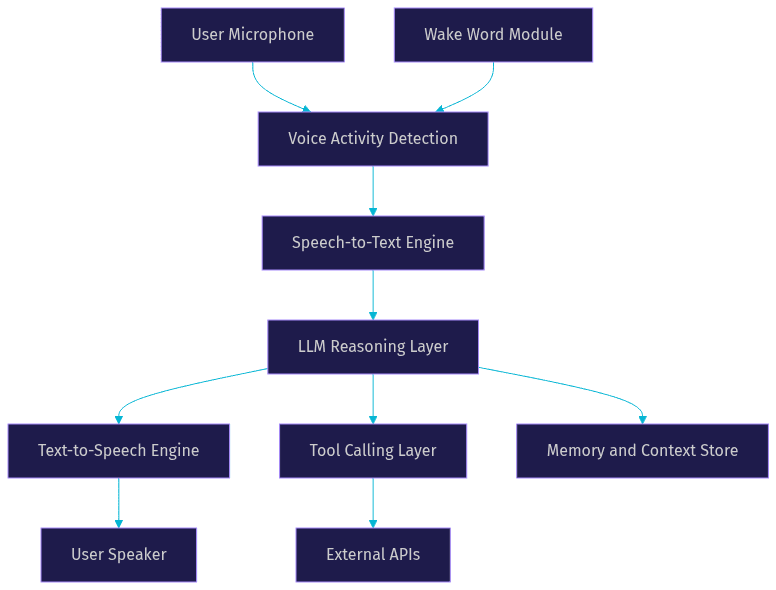
Turn-taking and full-duplex handling are what separate a good voice assistant from a great one. In a full-duplex system, the assistant can listen and speak at the same time, allowing users to interrupt mid-response (barge-in) without waiting for the assistant to finish. This requires the VAD module to run continuously, even while the TTS is producing output, and the LLM to handle interruption events by truncating its current response and processing the new input.
An optional wake-word module sits at the front of the pipeline, listening for a specific trigger phrase before activating the rest of the system. This reduces constant audio streaming and improves privacy by only sending audio to the cloud after the wake word is detected. A tool-calling layer extends the LLM's capabilities beyond conversation, allowing it to invoke external APIs for web searches, calendar lookups, home automation commands, or database queries.
VideoSDK's AI Agent SDK handles this orchestration through its Pipeline architecture, where each stage (STT, LLM, TTS) is a pluggable component with built-in observability and fallback handling. The VideoSDK AI Agents introduction covers the full component model in detail.
Choosing the Right LLM Model
Selecting the right LLM for voice assistant deployment requires balancing latency, parameter count, on-device feasibility, licensing terms, and multilingual support. No single model wins on every axis, so your choice should be driven by your specific use case constraints.
Cloud-hosted models like OpenAI's realtime API and Google Gemini Live offer the lowest latency for full-duplex voice because they process audio natively without a separate STT step. They handle turn-taking, interruptions, and context retention at the model level. The trade-off is that every audio frame leaves the user's device, which raises privacy concerns and introduces network dependency.
Local models, such as smaller Llama voice variants or purpose-built on-device models, keep all audio processing on the user's hardware. This eliminates network latency and addresses privacy requirements, but demands sufficient GPU or NPU resources. For edge deployments on phones or IoT devices, models in the 300M to 1B parameter range are typically the practical ceiling.
| Model | Parameters | Latency Profile | Deployment | Multilingual | Best For |
|---|---|---|---|---|---|
| OpenAI Realtime API | Cloud-hosted | Sub-500ms full-duplex | Cloud only | Yes (30+ languages) | Production voice agents needing lowest latency |
| Google Gemini Live | Cloud-hosted | Sub-500ms full-duplex | Cloud only | Yes (40+ languages) | Multimodal assistants with vision capabilities |
| Llama Voice (on-device) | 1B-8B | 300-800ms pipeline | Local or cloud | Limited | Privacy-first or offline deployments |
[LINKABLE ASSET: comparison table]
The comparison above illustrates the core trade-off: cloud models win on latency and language coverage, while local models win on privacy and offline capability. For hybrid deployments, VideoSDK's Agent SDK supports fallback adapters that can switch between cloud and local models based on network conditions, ensuring the assistant degrades gracefully rather than failing outright.
Integrating the LLM into Your Voice Assistant
Building a production voice assistant requires wiring together multiple components into a coherent pipeline. The integration approach depends on whether you use a managed SDK like VideoSDK's AI Agent SDK or build a custom orchestration layer in Python.
Step 1: Select Your ASR Backend
Your speech-to-text engine determines transcription accuracy and contributes significantly to overall latency. Deepgram's Nova models and OpenAI Whisper are popular cloud options, while faster-whisper and Silero VAD work well for local deployments. The key considerations are language coverage, word error rate on conversational audio, and whether the engine supports streaming transcription (partial results as the user speaks) or only batch processing (full transcription after the user stops speaking). Streaming ASR is essential for low-latency assistants because it lets the LLM begin processing before the user finishes their sentence.
Step 2: Configure the LLM Endpoint
Your LLM endpoint needs an API key, a base URL, and a model identifier. For cloud-hosted models, this is typically a simple HTTP endpoint. For local models, you need a serving framework running on your GPU hardware. The critical configuration detail is setting an appropriate system prompt that defines the assistant's persona, available tools, and behavioral constraints. Token expiration is a common pitfall here: if your API key rotates or expires mid-session, the assistant will silently fail. Implement key rotation and usage monitoring from the start.
Step 3: Select a TTS Engine
Your text-to-speech engine converts the LLM's text response into audio. OpenAI TTS, ElevenLabs, and Cartesia Sonic are strong cloud options, while Piper and VITS models work locally. The critical factor is whether the TTS engine supports streaming output (beginning audio playback before the full response is generated). Streaming TTS can reduce perceived latency by 200-400ms compared to batch synthesis. Audio format mismatches between the TTS output and the playback layer are a frequent integration bug: ensure sample rates, channel counts, and encoding formats are consistent across your pipeline.
Step 4: Wire the Pipeline Together
The final step connects all components into a unified pipeline. VideoSDK's AI Agent SDK provides a Pipeline abstraction where you define your STT, LLM, and TTS providers as sequential stages, and the SDK handles audio routing, context management, and error recovery. The VideoSDK AI Agents documentation walks through this configuration in detail. Alternatively, you can build a custom Python orchestration layer, but you will need to handle audio buffering, VAD integration, and error recovery yourself.
Production deployments require HTTPS for secure audio transport, TURN servers for WebRTC connectivity when users are behind restrictive firewalls, and careful GPU allocation if running local models. Network jitter causes audio artifacts and dropped frames, so implement jitter buffers and adaptive bitrate streaming. VideoSDK handles these concerns automatically when you use its SDK, but custom pipelines need explicit handling.
Enhancing the Assistant with Tools and Memory
A voice assistant that only converses is limited. Real production assistants need to take actions, retrieve information, and remember context across sessions. Tool-calling and memory transform a chatbot into a functional agent.
Tool-Calling Capabilities
Tool-calling lets the LLM delegate tasks to external systems. When a user says "book a meeting tomorrow at 3pm," the LLM can invoke a calendar API with structured parameters rather than just generating a text response. Common tool integrations include web search, calendar management, home automation controls, database queries, and CRM lookups. The LLM decides when to call a tool based on the user's intent, passes structured arguments to the tool, and incorporates the tool's response into its conversational reply.
VideoSDK's AI Agent SDK supports function tools natively, letting you register callable functions that the LLM can invoke during a conversation. The SDK also supports MCP (Model Context Protocol) integration, which standardizes how tools are exposed to LLMs across different providers.
Deterministic Conversation Flows
For compliance-driven use cases like loan applications, insurance claims, or appointment booking, you cannot rely on the LLM to control conversation flow. A missed step or out-of-order question creates regulatory risk. VideoSDK's Conversational Graph solves this by letting you define the conversation as a directed graph where nodes represent steps, transitions enforce ordering, and the LLM only handles natural language generation within each node. This hybrid approach gives you deterministic business logic with natural conversational interaction.
Memory Persistence
Multi-turn context retention is essential for assistants that handle complex tasks. Short-term memory (the current conversation) is typically managed by the LLM's context window. Long-term memory requires external storage. For simple use cases, a local JSON file or SQLite database suffices. For semantic search over past conversations, a vector store like Pinecone or Chroma lets the assistant retrieve relevant past interactions based on similarity rather than exact matches. VideoSDK's Agent SDK includes built-in memory and context management features, including context window optimization to prevent token overflow on long conversations.
Performance and Latency Optimisation
Round-trip latency is the single most important metric for voice assistant quality. Users perceive responses under 500ms as instantaneous, 500-800ms as responsive, and anything above 1 second as laggy. Measuring latency requires breaking down the pipeline into its constituent stages: ASR processing time, LLM first-token time, LLM completion time, and TTS first-audio time.
Several techniques can reduce each stage's contribution. Model quantisation (converting model weights from 16-bit to 8-bit or 4-bit) reduces memory usage and inference time at a small cost to accuracy. Batch-size tuning ensures the GPU processes requests efficiently without introducing queuing delays. Speculative decoding uses a smaller draft model to predict tokens that the larger model then verifies, reducing LLM latency by 30-50% in some benchmarks. Background pre-fill starts processing the LLM's response while the TTS is still synthesizing the previous segment, overlapping pipeline stages.
According to Artificial Analysis's Speech Arena benchmark, cloud-hosted realtime models like OpenAI's Realtime API achieve sub-500ms full-duplex latency on standard cloud infrastructure. Local pipeline-based systems on an RTX 4090 can achieve 600-900ms with optimized quantisation and streaming TTS. VideoSDK's Agent SDK includes TTS caching, which stores previously synthesized audio clips and reuses them when the assistant repeats common phrases, cutting TTS latency to near zero for frequent responses.
Security, Privacy, and Deployment Options
Voice data is sensitive. Every spoken interaction contains biometric information, personal details, and potentially regulated health or financial data. Your deployment architecture directly determines your security and compliance posture.
On-device processing keeps audio within the user's hardware, eliminating data transmission risks. This is essential for GDPR-compliant deployments in the EU and HIPAA-compliant healthcare applications. Cloud-hosted models offer better performance but require end-to-end encryption for audio streams, data processing agreements with your model provider, and careful attention to data residency requirements. VideoSDK supports end-to-end encryption for all audio streams and provides geo-fencing controls to restrict where audio data is processed.
Deployment options range from straightforward single-server setups suitable for development and small-scale production, to distributed multi-node clusters that provide automatic failover and horizontal scaling. Lightweight orchestration layers can be hosted on serverless platforms, though these are generally unsuitable for GPU-intensive local model inference due to cold-start latency and limited hardware access. VideoSDK's Agent Cloud provides a managed deployment option that handles scaling, monitoring, and infrastructure management, while also supporting self-hosted deployments for teams that need full control over their infrastructure.
For telephony-based voice assistants, VideoSDK's SIP integration bridges traditional phone networks with WebRTC rooms, enabling AI voice agents that can make and receive phone calls through providers like Twilio, Telnyx, or Plivo.
Common Issues and Troubleshooting
Even well-architected voice assistants encounter recurring problems. Knowing the common failure modes and their fixes saves hours of debugging.
Audio clipping and echo typically result from missing acoustic echo cancellation (AEC) or aggressive noise suppression settings. If users hear their own voice played back, enable AEC in your audio processing pipeline. If the assistant's audio sounds choppy, reduce the noise suppression aggressiveness or implement a jitter buffer to smooth out network-induced timing variations. VideoSDK's SDK includes built-in noise suppression and de-noise features that handle these issues automatically.
Unexpected interruptions where the assistant stops mid-sentence or responds to background noise indicate that your VAD thresholds are too sensitive. Tune the VAD's minimum speech duration and silence threshold to require a longer period of continuous speech before triggering a response. Conversely, if the assistant ignores legitimate interruptions, your VAD thresholds may be too conservative.
Model hallucinations occur when the LLM generates confident but incorrect information. Mitigate this with strong system prompts that define what the assistant knows and does not know, implement tool verification for factual claims (always check a database or API rather than relying on the LLM's parametric knowledge), and use the Conversational Graph to constrain responses in compliance-sensitive flows.
Token-related errors surface as authentication failures or rate limit exceeded messages. Rotate API keys regularly, monitor usage against provider quotas, and implement graceful degradation that falls back to a simpler model or cached response when the primary provider is unavailable. VideoSDK's fallback adapter system handles this automatically by switching to a secondary provider when the primary fails.
Definitions Glossary
Speech-to-Text (STT): The component that converts spoken audio into text, enabling the LLM to process user input. VideoSDK supports multiple STT providers including Deepgram, OpenAI Whisper, and AssemblyAI as pluggable pipeline stages.
Text-to-Speech (TTS): The component that converts the LLM's text response into spoken audio for the user. Streaming TTS engines reduce perceived latency by beginning playback before the full response is synthesized.
Voice Activity Detection (VAD): A module that detects when a user is speaking versus silent, preventing the assistant from processing background noise. Proper VAD threshold tuning is critical for handling interruptions and barge-in events.
Full-Duplex Voice: A communication mode where the assistant can listen and speak simultaneously, allowing users to interrupt mid-response. This requires continuous VAD monitoring even during TTS output.
Conversational Graph: VideoSDK's deterministic flow engine that defines conversation steps as a directed graph, ensuring compliance-driven conversations follow a required order while the LLM handles natural language generation within each step.
Agent Worker: The Python process that runs a VideoSDK AI agent and manages its session lifecycle, including pipeline execution, tool calls, and memory management within a VideoSDK room.
Key Takeaways
- An LLM for voice assistant unifies speech input, language reasoning, and speech output into a single coherent pipeline, reducing latency and preserving context compared to fragmented STT-LLM-TTS chains.
- Cloud-hosted realtime models achieve the lowest latency (sub-500ms) but require audio to leave the device, while local models prioritize privacy and offline capability at the cost of higher latency.
- Tool-calling and memory persistence transform a conversational assistant into a functional agent that can take actions and remember context across sessions.
- VideoSDK's AI Agent SDK provides the pipeline orchestration, fallback handling, TTS caching, and Conversational Graph needed to ship production voice assistants without building infrastructure from scratch.
- Production deployments require attention to HTTPS, TURN servers, GPU allocation, VAD tuning, and compliance with GDPR and HIPAA when handling voice data.
Conclusion
The shift from fragmented voice pipelines to a unified LLM for voice assistant architecture is not a future trend. It is happening now, and developers who adopt it gain measurable improvements in latency, context retention, and user experience. VideoSDK's open-source AI Agent SDK gives you the pipeline orchestration, provider integrations, and deployment flexibility to build and ship a production voice assistant without reinventing the infrastructure layer. Explore the VideoSDK AI Agents documentation to start building, or join the VideoSDK Discord community to connect with 3,000+ developers working on voice AI. What are you building with VideoSDK? Drop a comment below, I'd love to hear what kind of voice assistant use case you're working on.
Free $20 Balance for AI Voice Agents & Video Calls
FAQ