


An LLM for virtual assistants is a large language model that serves as the reasoning engine behind conversational agents, handling natural-language understanding, context management, and response generation. VideoSDK extends this capability by connecting LLMs to real-time voice and video rooms through its AI Voice Agent SDK, enabling developers to build assistants that speak, listen, and act. Start with model selection, then wire up memory, tools, and deployment infrastructure to ship a production-ready assistant.
Developers are moving away from rigid rule-based chatbots toward assistants that actually understand what users say. The shift is driven by improvements in large language model inference speed, dropping API costs, and the maturation of agent frameworks that handle tool calling, memory, and safety. An LLM-powered virtual assistant can parse intent, maintain context across turns, call external APIs, and generate natural responses without hardcoded decision trees.
This guide walks through the full stack: what an LLM-driven assistant is, how its architecture works, how to choose the right model, how to integrate tools, how to deploy it, and what production pitfalls to avoid. By the end, you will have a clear mental model of every component needed to build and ship a virtual assistant powered by an LLM.
What Is an LLM-Powered Virtual Assistant?
An LLM for virtual assistants is defined as a large language model that serves as the brain behind conversational agents, handling natural-language understanding, reasoning, and response generation. Instead of matching keywords to canned responses, the model processes the full semantic meaning of user input and produces contextually appropriate replies.
The core components of an LLM-based assistant include model inference (the LLM itself generating text), memory (storing conversation history and user preferences), tool integration (calling external APIs to take actions), and a safety layer (filtering harmful content and preventing unauthorized actions). These four pieces work together in a loop that runs every time the user sends a message or speaks a command.
Where rule-based bots fail is in handling unexpected inputs. If a user phrases something slightly differently than the bot expects, the conversation breaks. An LLM-powered assistant handles paraphrasing, follow-up questions, topic switching, and multi-intent queries naturally because it understands language at a semantic level rather than matching patterns.
VideoSDK provides the real-time communication layer that connects these LLM-powered assistants to users through voice and video channels. The AI Voice Agent SDK handles the audio streaming, turn detection, and session management while the LLM handles the reasoning.
Core Architecture of an LLM-Based Assistant
Building a production-grade virtual assistant requires understanding how each architectural component interacts. The system is not just a model endpoint you ping with text. It is a coordinated pipeline of perception, reasoning, action, and memory that cycles on every user interaction.
The Agent Loop
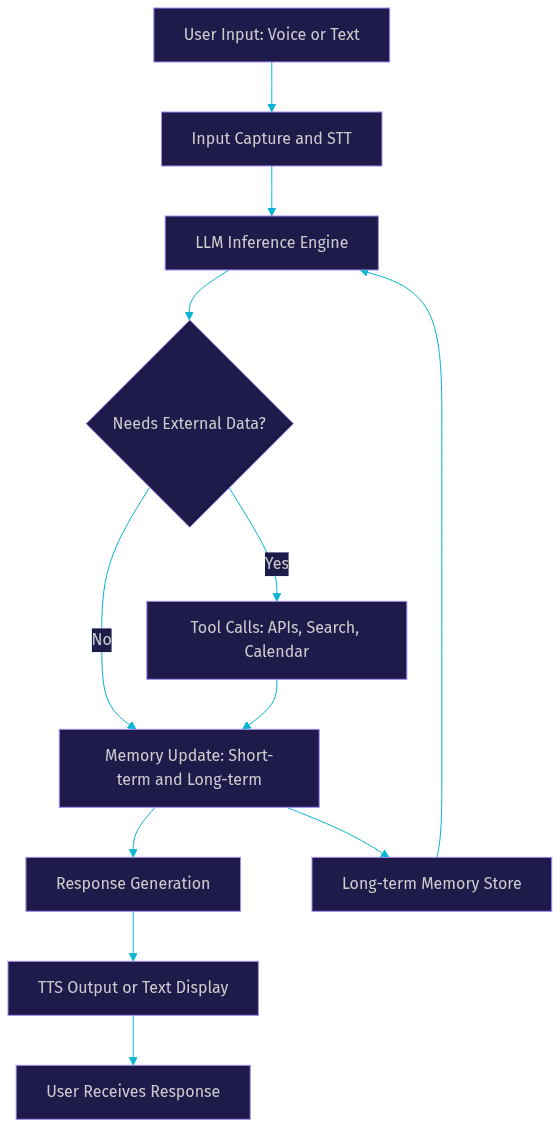
The agent loop is the perception-reason-act cycle that drives every LLM-powered virtual assistant. When a user sends input, the assistant first perceives it through speech-to-text transcription or direct text ingestion. The LLM then reasons over the input, considering the current conversation context, user history, and available tools. Finally, the assistant acts by generating a response, calling an external API, or updating its memory store.
Turn detection plays a critical role in this loop, especially for voice-based assistants. The system must determine when the user has finished speaking before triggering LLM inference. VideoSDK handles this through built-in voice activity detection that signals the agent worker when a user's speech segment is complete. Without accurate turn detection, the assistant either interrupts the user or waits too long to respond, both of which degrade the experience significantly.
Response generation is the final step in the loop. The LLM produces text that is either displayed in a chat interface or passed through a text-to-speech engine for voice output. The entire loop, from user input to response delivery, should complete in under one second for voice assistants to feel conversational.
Memory Management
Memory is what separates a one-shot question answering tool from a persistent virtual assistant. Short-term memory holds the current conversation context, typically the last several turns of dialogue. Long-term memory stores user preferences, past interactions, and extracted facts that persist across sessions.
The challenge with LLM memory is the context window limit. Every model has a maximum number of tokens it can process in a single inference call. As conversations grow longer, the raw transcript eventually exceeds this limit. Developers solve this through summarization (compressing older turns into a summary) and retrieval (storing facts in a vector database and pulling only relevant ones into the context window for each turn).
For example, a productivity assistant might remember that a user prefers morning meetings, works in Pacific Time, and has a standing 1:1 every Tuesday. These facts are extracted from early conversations, stored in a persistent memory layer, and injected into the LLM context on every subsequent interaction without re-explaining them.
The following diagram illustrates the core agent loop and memory flow:
Choosing the Right LLM for Your Assistant
Selecting the right model is the highest-leverage decision you will make when building an LLM-powered virtual assistant. The model determines your latency ceiling, cost per interaction, privacy posture, and the complexity of responses your assistant can produce.
Model Families and Trade-Offs
The landscape splits into two broad categories: open-source models and hosted API models. Open-source options include Meta's Llama family, Mistral's models, and Google's Gemma. These give you full control over inference infrastructure, data privacy, and customization through fine-tuning. You can run them on your own GPUs or through managed inference providers. The trade-off is operational overhead: you manage scaling, latency optimization, and model updates yourself.
Hosted API models include OpenAI's GPT-4o, Anthropic's Claude family, and Google's Gemini. These offer lower operational burden, consistent latency, and regular updates without infrastructure management. The trade-off is cost per token, data leaving your infrastructure, and less control over model behavior customization.
For voice-based assistants where sub-second response time matters, the inference latency of your chosen model becomes the critical bottleneck. According to Artificial Analysis, hosted models typically achieve time-to-first-token between 200 and 600 milliseconds depending on the provider and load. Open-source models running on optimized inference servers can match or beat these numbers when properly configured, but require significant engineering effort to do so.
Evaluation Criteria
When evaluating models for your virtual assistant, focus on five dimensions. Accuracy measures how often the model produces correct, useful responses. Hallucination risk tracks how frequently the model fabricates information, which is especially dangerous for assistants that take actions. Inference speed determines your end-to-end response latency. Fine-tuning support matters if you need domain-specific behavior that prompt engineering alone cannot achieve. Cost per interaction directly affects your unit economics at scale.
A practical approach is to test three to five candidate models against a curated set of representative user queries, measuring response quality, latency, and cost per interaction. Pick the model that balances all five dimensions for your specific use case rather than optimizing for any single metric.
Integrating LLMs with Tooling and APIs
An LLM that only generates text is a chatbot. An LLM that can call APIs, search the web, manage calendars, and execute code is a virtual assistant. Tool integration is the bridge between language understanding and real-world action.
Built-in Tool Calling
Modern LLMs support function calling, a mechanism where the model receives a list of available tools with their parameter schemas and decides when to invoke them. Common built-in tools for virtual assistants include web search for real-time information, calendar APIs for scheduling, email services for drafting and sending messages, web scraping for retrieving specific page content, and code execution sandboxes for calculations and data processing.
The flow works as follows: the user asks a question, the LLM determines that external data is needed, the model outputs a structured tool call with parameters, your application executes that call against the real API, and the result is fed back into the LLM context for final response generation. This entire cycle typically happens within a single user interaction and is invisible to the end user.
VideoSDK's AI Voice Agent SDK supports function tools natively, allowing your voice assistant to call external services during a live conversation. The agent worker manages the tool execution lifecycle while maintaining the real-time audio stream with the user.
Extending with Custom Plugins
Beyond built-in tools, most production assistants need to interact with internal company services. The approach is to expose your internal APIs through a standardized interface that the LLM can understand. Each custom plugin defines a name, description, parameter schema, and the endpoint to call when invoked.
For example, a customer support assistant might have plugins for looking up order status, initiating refunds, creating support tickets, and checking warranty coverage. Each plugin wraps an internal API endpoint and presents it to the LLM as a callable function. The LLM decides which plugin to use based on the user's request, and your application handles the actual API call.
The key design principle is to keep plugin descriptions clear and specific. The LLM chooses tools based on their descriptions, so vague descriptions lead to incorrect tool selection. Treat plugin descriptions as you would treat API documentation for human developers.
Security and Safety Considerations
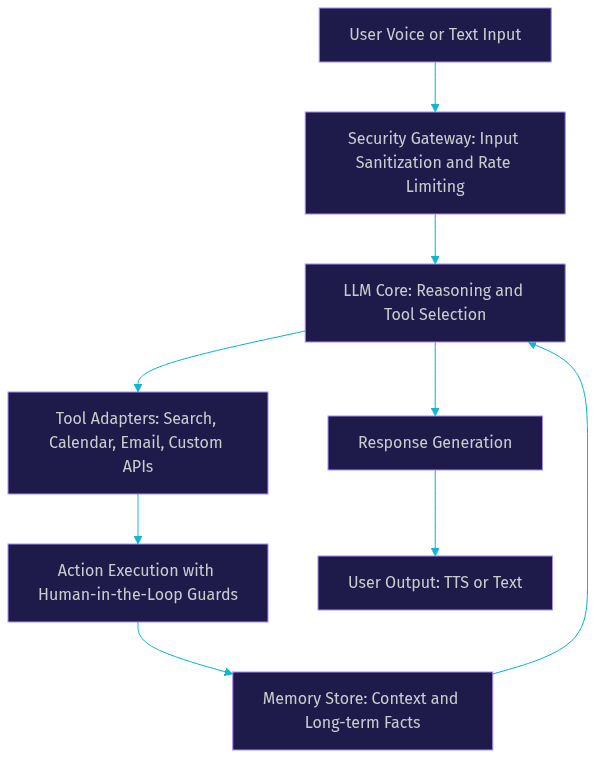
Tool-calling LLMs can take real actions in your systems, which means security is not optional. Input sanitization prevents prompt injection attacks where malicious user input tricks the LLM into calling tools it should not. Rate limiting prevents runaway tool calls from overwhelming your APIs. Human-in-the-loop confirmation gates sensitive actions like refunds, payments, or data deletion behind explicit user approval.
The architecture diagram below shows how these components fit together:
Deployment Options: Cloud vs On-Device
Where your LLM runs affects latency, cost, privacy, and reliability. Three deployment patterns dominate production virtual assistant architectures.
Cloud-hosted inference is the most common starting point. You call a managed API from OpenAI, Anthropic, or Google, or you use a managed inference provider like Together AI or Anyscale to serve open-source models. The advantages are fast setup, elastic scaling, and no GPU management. The trade-offs are per-token costs that scale linearly with usage, network latency that adds to your response time, and data leaving your infrastructure.
Edge or on-device inference runs the model directly on the user's device. This approach maximizes privacy since no data leaves the device, eliminates network latency, and works offline. The trade-off is hardware requirements: running a capable LLM locally requires significant RAM and compute, limiting model size. Apple's Intelligence platform and Google's on-device Gemini Nano are pushing this direction, but on-device models currently cannot match the reasoning quality of larger cloud-hosted models.
Hybrid approaches combine both. The assistant tries on-device inference first for simple queries and falls back to a cloud-hosted model for complex reasoning. This pattern optimizes for both privacy and capability, though it adds implementation complexity in routing logic and maintaining two model pipelines.
For voice assistants built with VideoSDK, the agent worker runs in the cloud by default through VideoSDK Agent Cloud, which manages the inference pipeline, STT, TTS, and room connection. Self-hosted deployment via Docker or Kubernetes is also available when you need full control over the inference infrastructure.
Real-World Use Cases
Customer Support Chatbots
Customer support is the most mature use case for LLM-powered virtual assistants. An LLM-based support agent can understand customer complaints in natural language, look up order history through tool calls, route complex issues to human agents, and provide 24/7 coverage without a massive support team. The key advantage over rule-based support bots is handling the long tail of edge-case questions that hardcoded flows cannot anticipate. Companies deploying LLM-based support assistants report significant reductions in first-response time and ticket deflection rates.
Personal Productivity Assistants
Productivity assistants use LLMs to help users manage their workday. Common capabilities include drafting email responses in the user's voice, summarizing meeting transcripts into action items, scheduling tasks based on natural-language requests, and generating reports from scattered data sources. The assistant maintains a memory of user preferences, writing style, and recurring commitments. VideoSDK's real-time transcription and post-call summary features integrate naturally here, feeding meeting audio through the pipeline and producing structured summaries without manual note-taking.
Home Automation and IoT
Voice-controlled home automation is evolving from fixed command sets to natural language interfaces powered by LLMs. Instead of memorizing exact phrases, users can say something like "make the living room cozy for movie night" and the LLM interprets the intent, calls the relevant smart home APIs to dim lights, lower blinds, and start the TV. Context-aware actions are where LLMs shine: the assistant knows that "movie night" means specific device states without the user specifying each one. VideoSDK's IoT SDK support enables these assistants to connect through low-latency audio channels on embedded devices.
Best Practices and Common Pitfalls
Building an LLM-powered virtual assistant that works in production requires more than wiring an API endpoint. Several practices separate prototypes from reliable systems.
Prompt engineering for consistency means developing a system prompt that defines the assistant's persona, capabilities, and boundaries, then testing it against edge cases. A common pitfall is writing a vague system prompt and discovering in production that the assistant hallucinates capabilities it does not have or responds in an inconsistent tone across sessions. Treat your system prompt as code: version it, test it, and review changes before deploying.
Managing token limits and context windows is an ongoing operational challenge. As conversations grow, you must decide what to keep, what to summarize, and what to drop. A pitfall is naively truncating old messages, which can cause the assistant to forget critical context mid-conversation. A better approach is to summarize older turns into a compact representation and store extractable facts in a retrieval system.
Avoiding over-reliance on the LLM for factual data is essential. LLMs hallucinate, and using them as a source of truth for prices, inventory, or policy details leads to incorrect information reaching users. Route factual queries through tool calls to authoritative data sources whenever possible, and use the LLM for formatting and natural language presentation of the retrieved data.
Monitoring latency and cost in production prevents surprises. Track your end-to-end response time, token usage per interaction, and tool call frequency. Set alerts for latency spikes and cost anomalies. A pitfall is assuming that development-time performance scales to production load; inference latency can degrade significantly under concurrent requests, especially with self-hosted models.
Future Trends for LLMs in Virtual Assistants
The LLM landscape is moving fast, and three trends will shape virtual assistant development through 2026 and beyond.
Multimodal models that process vision and audio alongside text are becoming production-ready. OpenAI's GPT-4o, Google's Gemini, and Anthropic's Claude all support image understanding, and real-time audio models are following. For virtual assistants, this means the ability to analyze a photo a user shares, understand screen content during a support call, or react to visual context during a video session. VideoSDK's vision and multi-modality support in the AI Agent SDK positions assistants to leverage these capabilities in real-time voice and video interactions.
Real-time streaming LLM APIs are replacing batch inference for conversational use cases. Instead of waiting for the full response to generate before sending it to TTS, streaming APIs send tokens as they are produced, reducing perceived latency significantly. This is particularly impactful for voice assistants where every 100 milliseconds of delay is noticeable.
Federated learning and on-device fine-tuning are emerging as privacy-preserving approaches to personalization. Instead of sending user data to a central server for model training, the model learns locally on the user's device and only shares learned weights. This allows assistants to personalize to individual users without compromising data privacy, though the technology is still maturing.
Definitions Glossary
LLM (Large Language Model): A neural network model trained on vast text corpora that generates human-like text by predicting the next token in a sequence. For virtual assistants, the LLM serves as the reasoning engine that processes user input and generates responses.
Agent Loop: The perception-reason-act cycle that an LLM-powered virtual assistant executes on every user interaction, involving input capture, LLM inference, optional tool calls, memory updates, and response generation.
Context Window: The maximum number of tokens an LLM can process in a single inference call, including the system prompt, conversation history, and user input. Managing this limit is a core engineering challenge for production assistants.
Tool Calling: A mechanism where the LLM receives descriptions of available external tools and their parameter schemas, then decides when and how to invoke them during a conversation to fetch data or take actions.
Turn Detection: The process of determining when a user has finished speaking in a voice-based assistant, triggering LLM inference. VideoSDK provides built-in voice activity detection for this purpose.
Agent Worker: The Python process that runs a VideoSDK AI agent, managing the session lifecycle, pipeline execution, and room connection. It orchestrates the STT, LLM, and TTS components.
Key Takeaways
- An LLM for virtual assistants replaces rigid rule-based logic with semantic understanding, enabling assistants to handle paraphrasing, multi-intent queries, and unexpected inputs naturally.
- The core architecture consists of an agent loop (perception, reasoning, action), memory management (short-term context and long-term retrieval), tool integration, and a safety layer.
- Model selection involves balancing accuracy, latency, cost, privacy, and fine-tuning support across open-source and hosted API options, with no single model winning on all dimensions.
- Tool calling transforms a text generator into an action-taking assistant, but requires input sanitization, rate limiting, and human-in-the-loop guards for sensitive operations.
- VideoSDK's AI Voice Agent SDK connects LLMs to real-time voice and video rooms, handling audio streaming, turn detection, and session management so developers can focus on assistant logic.
Conclusion
Mastering the LLM stack for virtual assistants is a strategic advantage for developers building the next generation of conversational interfaces. The combination of semantic understanding, tool integration, and persistent memory creates assistants that feel genuinely helpful rather than frustratingly limited. As multimodal models and real-time streaming APIs mature through 2026, the gap between prototype and production will shrink, but the architectural fundamentals covered here remain constant. If you are ready to build a voice-powered assistant, explore VideoSDK's AI Voice Agent SDK for rapid prototyping, or check out the Conversational Graph for deterministic flow control. Sign up free at app.videosdk.live/login to start building. What are you building with VideoSDK? Drop a comment below, I would love to hear what kind of virtual assistant use case you are working on.
Free $20 Balance for AI Voice Agents & Video Calls
FAQ