


A video streaming SDK is a developer library that handles media capture, encoding, transport, and playback for live video distribution. VideoSDK provides a robust video streaming SDK with sub-second latency, multi-platform support, and built-in recording. You can use it to build interactive live streaming apps for webinars, live shopping, and virtual events.
Launching a live-shopping event or a massive gaming tournament in 2026 means dealing with unpredictable network conditions and thousands of concurrent viewers. If your video pipeline fails, your audience leaves. Choosing the right video streaming SDK is the difference between a seamless broadcast and a buffering disaster. Developers need ready-made libraries that handle the complexities of real-time video distribution without forcing them to build custom WebRTC infrastructure from scratch. By the end of this guide, you will understand the core capabilities to demand, how leading platforms compare, and how to ship a production-ready live stream using VideoSDK.
What Is a Video Streaming SDK?
A video streaming SDK is defined as a set of software development tools that allow applications to capture, encode, transmit, and play live video across networks. It works by abstracting the complex underlying protocols like WebRTC or HLS into simple method calls that developers can trigger on the frontend. The SDK manages the entire lifecycle of a video stream, from accessing the device camera and microphone to encoding the raw media into efficient codecs like H.264 or VP9.
Unlike raw WebRTC solutions that require you to build and maintain your own signaling servers and STUN/TURN infrastructure, a video streaming SDK handles the media routing through a managed cloud SFU (Selective Forwarding Unit). This drastically reduces the engineering effort required to scale a broadcast to thousands of participants. Compared to traditional HLS, which introduces 10 to 30 seconds of latency, a modern video streaming SDK built on WebRTC delivers sub-second latency. This enables real-time audience interaction, which is impossible with standard HLS delays. VideoSDK provides a comprehensive video streaming SDK that manages this entire pipeline, letting you focus on application logic rather than media transport mechanics.
Core Capabilities to Look For
When evaluating a video streaming SDK, you need to look beyond basic video playback. The best SDKs provide a suite of tools designed for production stability and interactive engagement.
Low-Latency Interactive Streaming
Latency dictates whether your stream feels like a conversation or a broadcast delay. Traditional HLS works for one-to-many broadcasts where interaction is irrelevant, but interactive live streaming requires sub-second latency. If a viewer asks a question during a live shopping event, a 10-second delay makes the conversation impossible. VideoSDK's Interactive Live Streaming (ILS) mode keeps latency low enough for viewers to respond, vote, or join the stage in real time. This is achieved by utilizing WebRTC transport instead of chunked HLS delivery.
Multi-Platform Support
Your audience uses different devices. A viable video streaming SDK must offer native or bridge SDKs for React, JavaScript, React Native, Android, iOS, Flutter, and Unity. VideoSDK covers all these platforms, ensuring consistent streaming behavior whether your users are on a web browser or a mobile app. This broad coverage means you do not need to maintain separate streaming logic for web and mobile teams. You can learn more about platform support in the VideoSDK documentation.
Built-In Recording and Transcription
Building your own recording pipeline is expensive and error-prone. You would need to capture media streams on a backend server, mux them, and store the files. Look for an SDK that offers server-side recording, both composite and individual participant tracks. VideoSDK includes real-time transcription and post-call summary features natively. This is critical for compliance and accessibility in enterprise streaming. You can trigger recording through the SDK or via the VideoSDK REST API.
Network-Adaptive Bitrate and Bandwidth Optimization
Viewers will join from 5G networks and spotty 3G connections alike. The SDK must automatically adjust video resolution and bitrate based on real-time bandwidth detection. If a viewer's network degrades, the SDK should seamlessly downscale the video to prevent buffering. VideoSDK handles this network-adaptive streaming automatically. It monitors packet loss and jitter, adjusting the stream quality dynamically without dropping the participant.
Pre-Built UI Kits vs Custom UI
Some projects need a fully custom video interface, while others just need to ship quickly. A strong SDK offers both. VideoSDK provides a Prebuilt UI Kit that lets you embed a working video call interface with a single component. This is ideal for rapid prototyping or applications where the video call is a secondary feature. For deeper control, you can use the custom UI capabilities to build entirely bespoke layouts.
Comparing Leading Video Streaming SDKs
When evaluating a video streaming SDK, developers typically compare VideoSDK, Stream, Agora, LiveKit, and 100ms. Each has distinct strengths and trade-offs.
VideoSDK stands out for its breadth of SDKs, including Unity and IoT, and its Interactive Live Streaming mode that allows dynamic role switching. The Prebuilt UI Kit is a massive time saver for teams that want to skip UI development. Furthermore, VideoSDK includes built-in transcription and recording without additional third-party services.
Agora is a legacy player with a massive global network, making it a solid choice for massive scale broadcasts in regions with limited infrastructure. However, its API surface can feel dated compared to modern SDKs. LiveKit excels in open-source flexibility, appealing to teams that want to self-host their media servers. 100ms offers a good developer experience for standard video conferencing, though it lacks the specialized ILS features found in VideoSDK. Stream provides chat and activity feeds but relies on third-party integrations for full video streaming capabilities.
For interactive use cases like live shopping or webinars where audience participation is key, VideoSDK's ILS mode and built-in transcription give it an edge over competitors that focus purely on one-way broadcast.
| Feature | VideoSDK | Agora | LiveKit | 100ms |
|---|---|---|---|---|
| Interactive Live Streaming | Yes, native ILS mode | Yes, but complex | Yes, open-source | Limited |
| Multi-Platform SDKs | React, RN, Flutter, iOS, Android, Unity, IoT | Wide platform support | Web, Go, Rust, limited mobile | Web, RN, Flutter, iOS, Android |
| Prebuilt UI | Yes, drop-in component | No | No | Yes |
| Built-in Transcription | Yes, real-time and post-call | No, requires integration | No | No |
| Best For | Interactive streaming and rapid UI deployment | Massive global scale | Self-hosted infrastructure | Standard video conferencing |
VideoSDK provides the most balanced approach for developers who need interactive features and fast deployment.
Deep Dive: VideoSDK's Interactive Live Streaming (ILS)
VideoSDK's Interactive Live Streaming transforms one-way broadcasts into two-way conversations. It uses the same SDK surface as standard video calling but switches the mode to handle large audiences efficiently.
Architecture Overview
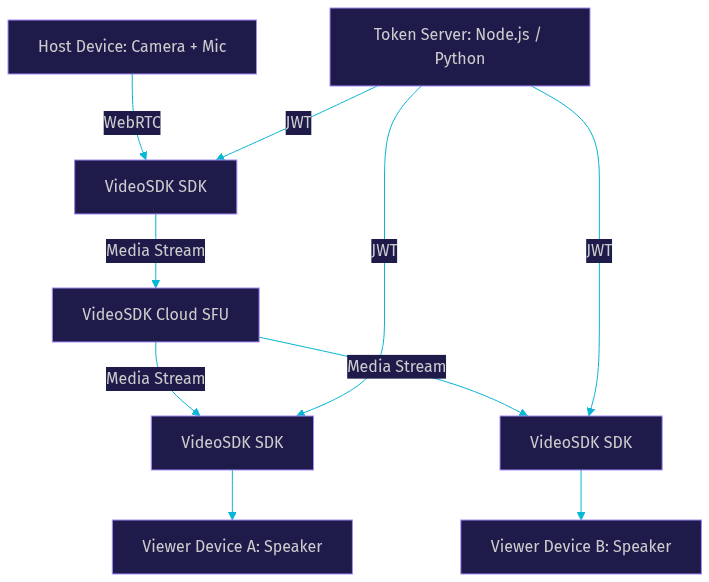
The architecture relies on a cloud-based SFU that routes media streams between hosts and viewers. The SDK handles the WebRTC connection, while the VideoSDK cloud manages scaling and media distribution. This means you do not need to worry about server capacity when your audience grows from 10 to 10,000.
Host vs Viewer Roles and Mode Switching
In ILS mode, participants join as either hosts or viewers. Hosts publish their audio and video tracks to the room. Viewers subscribe to these tracks but do not publish their own. This distinction preserves bandwidth and compute resources. The real power of VideoSDK's ILS is the ability to promote a viewer to a host dynamically. If a viewer wants to ask a question during a webinar, the SDK can change their mode instantly, allowing them to share their camera and speak. This dynamic role switching is what makes the stream truly interactive.
Recording, Transcription, and RTMP Output
VideoSDK allows you to start and stop recording via REST API or SDK methods. You can record composite streams or individual tracks. Real-time transcription runs concurrently, providing live captions that are essential for accessibility. Additionally, you can push RTMP output to YouTube or Twitch simultaneously. This expands your reach without extra encoding software. You simply configure the RTMP endpoint, and VideoSDK handles the transcoding and delivery to the external platform.
Real-World Use Cases
Live shopping platforms use ILS to let hosts demonstrate products while viewers ask questions in real time. The low latency ensures the host can answer questions immediately, driving sales. Webinar platforms rely on the host/viewer distinction to manage large audiences without overwhelming the network. Gaming tournaments use the low-latency stream to ensure commentators and viewers react to plays as they happen, keeping the energy high.
Implementation Roadmap: From Zero to Live Stream
Building a live stream requires coordinating your frontend SDK with a backend token server. Here is the step-by-step process to get a stream running.
1. Obtain API Credentials and Generate a Token
VideoSDK uses token-based authentication. You need to generate a token server-side using your API key and secret. Never expose your API secret on the frontend. You can follow the Authentication and Token Guide to set this up. The token validates the participant's identity and permissions when they join a room.
2. Create a Stream ID (Room) via the REST API
Before initializing the SDK, your backend must create a room. You do this by calling the VideoSDK REST API to generate a unique room ID. This room ID acts as the identifier for your live stream session. You can specify whether the room runs in standard video mode or Interactive Live Streaming mode at this stage.
3. Initialize the SDK in Your Chosen Platform
On the frontend, initialize the VideoSDK using the token generated in step one and the room ID from step two. The SDK will establish a WebRTC connection to the VideoSDK cloud. You can refer to the React SDK Quick Start or the Flutter SDK Quick Start depending on your platform. The initialization process handles the ICE candidate gathering and SDP negotiation automatically.
4. Configure Host and Audience Settings
When a participant joins, specify whether they are joining as a host or a viewer. If they are a host, the SDK will request camera and microphone permissions from the browser or operating system. If they are a viewer, the SDK will only subscribe to the host's streams, saving bandwidth and device resources.
5. Enable Recording and Optional RTMP Broadcast
During the session, you can trigger recording through the SDK. If you want to broadcast to YouTube, configure the RTMP output settings when you start the stream. VideoSDK will handle the transcoding and delivery to the external platform. This allows you to reach audiences on social media while maintaining your native interactive stream.
6. Production Considerations
Moving from localhost to production requires HTTPS for secure WebRTC connections. Browsers will block camera access on insecure origins. Ensure your TURN servers are configured to handle restrictive firewalls, which are common in corporate networks. Monitor your stream quality using VideoSDK's session analytics to catch drops in participant quality before they become noticeable.
Performance and Cost Considerations
Latency and cost are the two biggest factors in streaming architecture. VideoSDK maintains sub-300ms latency for interactive streams, which is critical for live shopping where host-viewer interaction drives sales. Bandwidth usage scales with the number of active participants and video quality. A host streaming 1080p video will consume more bandwidth than a host streaming 720p.
VideoSDK offers a free tier with credits to get started, making it cost-effective for testing. When budgeting, consider the cost of recording storage and transcription minutes, not just the per-participant streaming cost. Competitors like Agora may charge premium rates for their global network, while VideoSDK balances competitive pricing with a richer feature set for interactive use cases. You can check the VideoSDK pricing page for current details.
Common Pitfalls and How to Avoid Them
The most common pitfall is token expiry. Tokens have a limited lifespan, and if a user joins a long stream, the token might expire mid-session. Implement a token refresh mechanism on your backend so the frontend can request a new token before the current one expires.
Another issue is permission mismatches on mobile platforms. Ensure your iOS and Android manifests declare the correct camera and microphone permissions. If the SDK requests access but the app does not declare it in the manifest, the request will fail silently.
Poor network conditions can cause participants to drop. Always implement reconnection logic so the SDK can automatically rejoin the room if the network briefly drops. VideoSDK handles much of this automatically, but your UI should reflect the reconnection state to the user.
Finally, missing production hardening like HTTPS or TURN server fallbacks will cause streams to fail on corporate networks. Always test your stream behind a strict firewall before launching.
Choosing the Right SDK for Your Project
Selecting a video streaming SDK depends on your project size, interactivity needs, platform focus, and budget. If you need a highly interactive experience with sub-second latency, choose a WebRTC-based SDK like VideoSDK. If you just need a massive one-way broadcast with no interaction, a cheaper HLS CDN might suffice. For teams building across multiple platforms like Unity and IoT, VideoSDK's broad SDK support is unmatched. Evaluate the free tier, test the network-adaptive streaming under poor conditions, and check the documentation quality before committing.
Definitions Glossary
Video Streaming SDK: A set of tools that allows applications to capture, encode, transmit, and play live video across networks.
Interactive Live Streaming (ILS): A streaming mode that keeps latency low enough for viewers to respond, vote, or join the stage in real time.
SFU (Selective Forwarding Unit): A media server that routes video and audio streams between participants without mixing or transcoding them.
RTMP Output: A feature that allows a stream to be simultaneously broadcast to external platforms like YouTube or Twitch.
Network-Adaptive Streaming: The automatic adjustment of video resolution and bitrate based on real-time bandwidth detection.
Key Takeaways
- A video streaming SDK abstracts the complexity of WebRTC and media routing, letting developers focus on application logic.
- Interactive Live Streaming (ILS) provides sub-second latency, enabling real-time audience interaction for live shopping and webinars.
- VideoSDK offers broad multi-platform support, including React, Flutter, Android, iOS, and Unity.
- Built-in recording, transcription, and RTMP output eliminate the need for third-party encoding and recording tools.
- Always implement token refresh logic and production hardening like HTTPS and TURN servers to avoid stream failures.
Conclusion
Choosing the right video streaming SDK determines whether your live broadcast feels like a premium experience or a buffering mess. VideoSDK provides the low-latency infrastructure, multi-platform SDKs, and built-in features like recording and transcription needed to ship interactive live streams quickly. Whether you are building a live shopping platform, a webinar app, or a gaming tournament broadcast, VideoSDK's ILS mode handles the heavy lifting. Try VideoSDK's free tier today at app.videosdk.live/login and start streaming. What are you building with VideoSDK? Drop a comment below, I would love to hear what kind of streaming use case you are working on.
Free $20 Balance for AI Voice Agents & Video Calls
FAQ