


A media streaming protocols comparison evaluates how protocols like HLS, WebRTC, SRT, RTMP, and MPEG-DASH differ across latency, scalability, device support, and cost. VideoSDK supports WebRTC-based real-time streaming with sub-second latency alongside HLS output for large audiences, letting developers combine protocols for optimal delivery. The right choice depends on your latency target, audience size, and interactivity requirements.
Global live streaming traffic is projected to account for over 25% of all internet video traffic by 2026, driven by live commerce, sports, gaming, and interactive events. Yet many engineering teams still pick streaming protocols based on familiarity rather than fit, leading to latency problems at scale, ballooning egress costs, or playback failures on certain devices.
A thorough media streaming protocols comparison matters now more than ever. The landscape has shifted: low-latency HLS variants have closed the gap with WebRTC for semi-interactive use cases, SRT has matured for contribution workflows, and Media over QUIC is emerging as a potential unified transport. Developers building streaming products in 2026 need to understand not just which protocol exists, but how each one performs across the dimensions that determine real-world success.
This guide breaks down eight major protocols across six evaluation dimensions, with a decision framework for matching protocols to your specific use case. Whether you are building a live auction platform with VideoSDK's interactive live streaming or a million-viewer sports broadcast, you will find the comparison data you need here.
What Is a Media Streaming Protocol?
A media streaming protocol is a set of rules governing how audio and video data is packaged, transported, and delivered from a source to a destination across a network. It defines the signaling, segmentation, transport mechanism, and playback behavior that make real-time and on-demand media delivery possible.
Protocols are often confused with codecs and containers, but they serve distinct roles. A codec like H.264 or AV1 compresses raw video into a smaller bitstream. A container like MP4 or WebM wraps that compressed bitstream with audio and metadata into a single file. A streaming protocol like HLS or WebRTC then governs how that containerized media moves over the network in real time. According to the W3C WebRTC specification, WebRTC defines both the media transport and the signaling layer, while HLS operates purely at the application layer over HTTP.
The eight major protocols covered in this comparison are HLS, Low-Latency HLS, MPEG-DASH, Low-Latency DASH, WebRTC (including WHIP and WHEP), SRT, RTMP, and Media over QUIC. Each sits at a different layer of the streaming stack and makes different tradeoffs between latency, scale, and complexity.
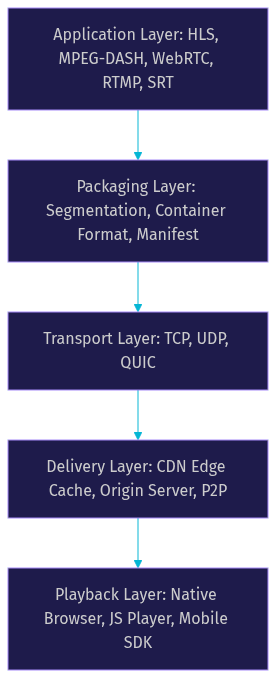
VideoSDK provides streaming capabilities through its interactive live streaming mode, which uses WebRTC for sub-second participant interaction and can output to HLS for large audience delivery. This dual-protocol approach is one of the most common architectures in modern streaming products.
Core Evaluation Dimensions for a Media Streaming Protocols Comparison
Every meaningful media streaming protocols comparison evaluates protocols against the same core dimensions. Focusing on a single metric like latency without considering scale or cost leads to poor architectural decisions.
Latency measures the glass-to-glass delay from camera capture to viewer screen. WebRTC achieves sub-500ms latency, standard HLS sits at 10 to 30 seconds, and Low-Latency HLS brings that down to 2 to 5 seconds. Your latency target determines whether real-time interaction is possible or whether you are delivering a one-way broadcast with a delay buffer.
Scalability refers to how many concurrent viewers a protocol can support efficiently. HTTP-based protocols like HLS and DASH scale to millions via CDN edge caching because each segment is a standard HTTP request. WebRTC scales differently, typically through SFU (Selective Forwarding Unit) architectures that cap concurrent viewers per server, requiring cascading or hybrid approaches for large audiences.
Device and browser support determines where your stream plays without custom plugins or polyfills. HLS plays natively on iOS Safari and most mobile devices. WebRTC is supported in all modern desktop browsers but requires native SDKs for iOS and Android apps. MPEG-DASH relies on JavaScript-based players like Shaka Player or dash.js for browser playback.
Operational cost includes per-viewer egress fees, infrastructure provisioning, and engineering overhead. CDN-delivered HLS benefits from cheap HTTP egress and aggressive caching. WebRTC requires more CPU per stream on the media server, increasing infrastructure costs at scale. SRT and RTMP sit somewhere in between, with RTMP increasingly deprecated for playback but still common for ingestion.
DRM and content protection matters for premium content. HLS and DASH have mature DRM ecosystems with support for FairPlay, Widevine, and PlayReady. WebRTC has limited native DRM support, which restricts its use in premium video-on-demand scenarios.
Transport choice (TCP vs UDP vs QUIC) fundamentally shapes protocol behavior. TCP guarantees delivery but adds head-of-line blocking latency. UDP drops packets rather than waiting, enabling low latency but requiring error resilience at the application layer. QUIC combines UDP's speed with TCP-like reliability and multiplexing, which is why Media over QUIC is gaining attention.
Protocol Deep-Dive Matrix
Each protocol in this comparison has distinct strengths and weaknesses across the core evaluation dimensions. The table below summarizes the eight protocols, followed by a narrative breakdown of each.
| Protocol | Latency | Scale | Browser Support | Cost | DRM | Transport |
|---|---|---|---|---|---|---|
| HLS | 10-30s | Millions via CDN | Native iOS, JS elsewhere | Low egress | Mature | TCP |
| LL-HLS | 2-5s | Millions via CDN | Native iOS, JS elsewhere | Low egress | Mature | TCP |
| MPEG-DASH | 10-30s | Millions via CDN | JS player required | Low egress | Mature | TCP |
| LL-DASH | 2-5s | Millions via CDN | JS player required | Low egress | Mature | TCP |
| WebRTC | <1s | Hundreds to thousands per SFU | Native modern browsers | Higher CPU cost | Limited | UDP/SRTP |
| SRT | 0.5-2s | Thousands with tuning | No native, needs SDK | Moderate | Limited | UDP |
| RTMP | 2-5s | Declining for playback | Flash deprecated, needs server | Low | Limited | TCP |
| Media over QUIC | 1-3s target | Emerging, not yet proven | Experimental | TBD | TBD | QUIC |
[LINKABLE ASSET: comparison table]
HLS remains the workhorse for large-scale broadcasting. Its segment-based HTTP delivery caches perfectly on CDNs, making it the cheapest option for million-viewer events. The tradeoff is high latency, which makes it unsuitable for interactive scenarios.
Low-Latency HLS narrows the gap by using shorter segments and partial segment delivery through CMAF chunks. It retains CDN cacheability while bringing latency into the 2 to 5 second range. This makes it viable for semi-interactive use cases like live shopping and social streaming.
MPEG-DASH is functionally similar to HLS but uses a different manifest format and segment structure. It offers better codec flexibility and is codec-agnostic, but lacks native iOS Safari support, requiring a JavaScript player. Low-Latency DASH mirrors the LL-HLS improvements.
WebRTC is the lowest-latency protocol available, achieving sub-second glass-to-glass delay. It powers real-time communication platforms, interactive live streaming, and any scenario where viewers need to respond, vote, or join as active participants. VideoSDK's video calling SDK is built on WebRTC, providing sub-300ms latency for interactive experiences. The limitation is scalability, as each viewer requires an active media connection to an SFU.
SRT (Secure Reliable Transport) excels in contribution workflows where a remote camera or encoder sends video back to a production studio. It handles packet loss gracefully over unreliable networks and supports encryption natively. It is not designed for last-mile delivery to viewers.
RTMP was once the dominant streaming protocol but has been largely deprecated for playback. It remains relevant for ingestion, as most encoders and streaming platforms still accept RTMP input. Its TCP-based transport adds latency and limits scalability compared to modern alternatives.
Media over QUIC (MoQ) is the newest entrant, leveraging QUIC's multiplexed, low-latency transport to potentially unify contribution and delivery. As of 2026, it remains experimental with limited production deployments, but the IETF MoQ working group is actively developing the standard.
Latency Profiles
Latency differences across protocols stem from their transport mechanisms and segmentation strategies. WebRTC uses UDP with no buffering, sending media packets as they are captured, which keeps glass-to-glass latency under one second. HLS and DASH segment media into multi-second chunks that must be fully written before delivery, adding inherent delay. Low-latency variants use CMAF chunked transfer to stream partial segments, cutting latency significantly but not to WebRTC levels. SRT sits between WebRTC and LL-HLS because it uses UDP but includes buffering for reliability over lossy links.
Scale and CDN Compatibility
HTTP-based protocols scale effortlessly because CDNs cache segments at edge locations, serving millions of viewers from cached HTTP responses. WebRTC requires an active SFU connection per viewer, meaning each media server handles a limited number of concurrent streams before requiring additional servers or cascading topologies. For large audiences, hybrid architectures pair WebRTC for interactive participants with HLS for the long tail of viewers. VideoSDK supports this pattern through its interactive live streaming mode, where active participants use WebRTC and passive viewers switch to HLS delivery.
Browser and Device Support
HLS enjoys native support on iOS Safari, macOS Safari, and most smart TVs, making it the safest choice for mobile-first audiences. Android supports HLS through ExoPlayer. WebRTC is natively supported in Chrome, Firefox, Safari, and Edge on desktop, but iOS Safari's WebRTC implementation has historically had quirks around simultaneous audio and video tracks. MPEG-DASH requires a JavaScript player in all browsers, adding a dependency but offering codec flexibility. SRT and RTMP have no native browser support and require server-side processing or native mobile SDKs.
Operational Cost Overview
Cost breaks down into three buckets: egress bandwidth, compute infrastructure, and engineering effort. HLS and DASH benefit from cheap HTTP CDN egress, often costing fractions of a cent per viewer-hour at scale. WebRTC requires more CPU per concurrent viewer on the media server, as each stream requires encoding, forwarding, and bandwidth adaptation. A typical WebRTC SFU might handle 200 to 500 concurrent viewers per server core, compared to thousands for an HLS origin server. Engineering effort is highest for WebRTC due to NAT traversal, TURN server management, and reconnection logic. VideoSDK abstracts much of this complexity, handling TURN servers, network adaptation, and reconnection automatically.
Choosing the Right Protocol: A Decision Guide
Selecting a streaming protocol is a multi-factor decision that should follow a structured evaluation path. Start with your latency target, then narrow by audience size, then factor in interactivity requirements, and finally weigh team expertise.
First, define your latency ceiling. If viewers must react in real time (under one second), WebRTC is your only viable option. If a 2 to 5 second delay is acceptable, Low-Latency HLS or LL-DASH opens up CDN-scale delivery. If latency is not critical (10+ seconds is fine), standard HLS or DASH gives you the cheapest, most scalable path.
Second, estimate your peak concurrent audience. Under 500 interactive viewers can be served by a single WebRTC SFU. Between 500 and 5,000 viewers, you need cascading SFUs or a hybrid WebRTC-plus-HLS approach. Above 10,000 viewers, HTTP-based delivery via CDN is the only cost-effective option for the majority of your audience.
Third, determine whether interactivity is required. If viewers only watch, HLS or DASH suffices. If viewers need to chat, vote, or be promoted to speakers, you need WebRTC for the interactive layer. VideoSDK's Prebuilt UI Kit handles this promotion from viewer to speaker natively through its mode-switching capability.
Fourth, assess your team's expertise. WebRTC requires knowledge of STUN/TURN servers, ICE negotiation, and media pipeline debugging. HLS requires understanding manifest generation, segmenting, and CDN configuration. If your team lacks real-time media experience, a managed solution like VideoSDK reduces the engineering burden significantly.
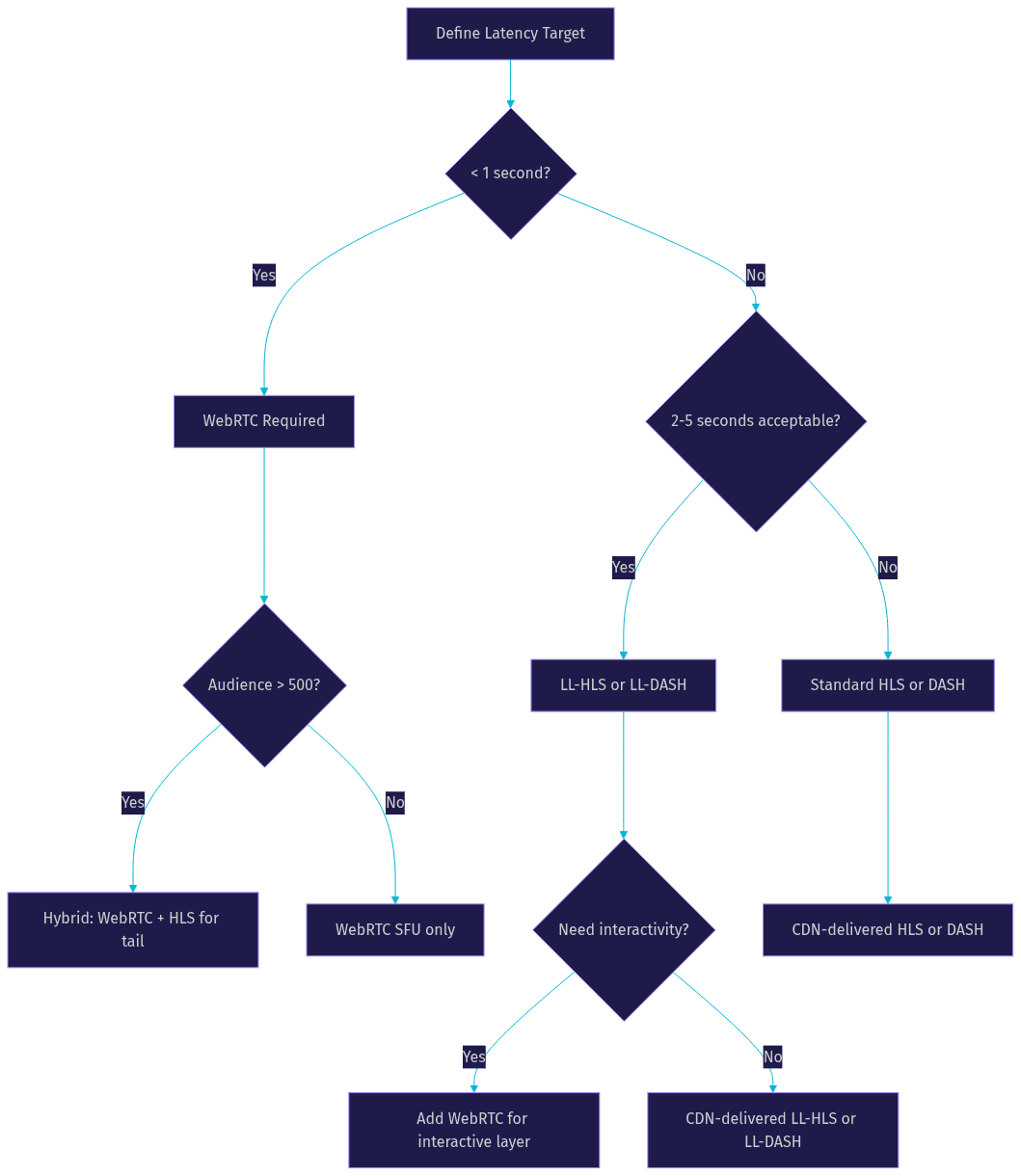
Common stack combinations include WebRTC plus LL-HLS for interactive events with large tail audiences, SRT for contribution feeding into HLS for distribution, and pure HLS for one-way broadcasts at massive scale.
Real-World Use-Case Scenarios
Three concrete scenarios illustrate how the media streaming protocols comparison maps to real product decisions.
Live Auction Platform
A live auction requires real-time bidding where a 5-second delay could mean a missed bid. The audience is typically under 1,000 concurrent viewers, all of whom need to see and hear the auctioneer in real time. WebRTC is the optimal protocol here, as sub-second latency is non-negotiable. VideoSDK's interactive live streaming mode handles this directly, with viewers who can be promoted to speakers to place bids verbally. The VideoSDK React SDK provides the hooks needed to manage participant roles and real-time media streams.
Massive Sports Broadcast
A sports streaming service delivering a championship match to 2 million concurrent viewers needs maximum scalability at the lowest possible cost. Latency of 10 to 15 seconds is acceptable since viewers are not interacting with the stream. Standard HLS delivered through a CDN is the clear winner, with per-viewer egress costs measured in fractions of a cent. For viewers who want a lower-latency experience, a Low-Latency HLS tier could serve a subset of the audience willing to tolerate slightly higher costs.
Remote Camera Contribution
A news organization needs to receive live video feeds from field reporters on unreliable mobile networks. The feed goes to a production studio, not directly to viewers. SRT is purpose-built for this scenario, handling packet loss and network fluctuations gracefully while maintaining sub-2-second latency. The studio then processes the SRT feed and redistributes it to viewers via HLS or WebRTC depending on the audience size and interactivity needs.
Common Pitfalls in Media Streaming Protocols Comparison
Many teams make avoidable mistakes when evaluating streaming protocols. The most common pitfall is cherry-picking a single metric, usually latency, without considering the full picture. A protocol with sub-second latency that cannot scale past 500 viewers is useless for a million-viewer event, regardless of how fast it is.
Another frequent mistake is ignoring transport layer implications. TCP-based protocols suffer from head-of-line blocking, where a single lost packet stalls all subsequent data until retransmission succeeds. This affects HLS segment delivery under poor network conditions. UDP-based protocols like WebRTC and SRT handle loss differently, dropping packets or using forward error correction, which changes the viewer experience on congested networks.
Overlooking CDN cacheability is a third pitfall. WebRTC media flows are not cacheable because each viewer has a unique media connection. This means WebRTC cannot leverage CDN edge caching, dramatically increasing origin server load and egress costs at scale. Teams that assume CDN infrastructure handles WebRTC the same way it handles HLS are surprised by infrastructure costs when audience sizes grow.
Future Trends Impacting Protocol Choice
The streaming protocol landscape continues to evolve. Media over QUIC (MoQ) is the most significant emerging standard, with the IETF MoQ working group actively developing specifications as of 2026. MoQ aims to unify contribution and delivery over QUIC's multiplexed transport, potentially replacing the current patchwork of SRT for contribution and HLS for delivery. Early implementations show promise, but production readiness is still 12 to 18 months away for most teams.
Low-Latency HLS continues to mature, with broader CDN support and shorter chunk durations pushing latency closer to the 2-second mark. Apple's ongoing investment in LL-HLS through CMAF and partial segment loading suggests it will remain a dominant delivery protocol for years.
WebRTC is also evolving, with WHIP (WebRTC HTTP Ingestion Protocol) and WHEP (WebRTC HTTP Egress Protocol) standardizing WebRTC ingestion and egress over HTTP signaling. This simplifies WebRTC integration for developers who do not want to implement full signaling stacks, making WebRTC more accessible for use cases where low latency matters but full real-time interactivity is not required.
Quick Reference Cheat Sheet
- Sub-second latency, small audience: WebRTC
- Sub-second latency, large audience: WebRTC for interactive viewers, HLS for the tail
- 2 to 5 second latency, massive scale: Low-Latency HLS
- 10+ second latency, maximum scale, minimum cost: Standard HLS
- Remote contribution over unreliable networks: SRT
- Encoder ingestion to streaming platform: RTMP (still widely supported)
- Future-proof unified transport: Media over QUIC (experimental, monitor closely)
Definitions Glossary
Glass-to-glass latency: The total time from light hitting a camera sensor to light appearing on a viewer's screen, encompassing capture, encoding, transport, decoding, and display.
SFU (Selective Forwarding Unit): A media server architecture that receives media streams from participants and selectively forwards them to other participants without transcoding, used in WebRTC scaling.
CMAF (Common Media Application Format): A standardized segment format that enables both HLS and DASH delivery from the same encoded segments, supporting chunked transfer for low-latency delivery.
Adaptive Bitrate (ABR): A technique where the player dynamically switches between different quality levels based on available bandwidth, supported natively by HLS and DASH manifests.
TURN server: A relay server that facilitates WebRTC connections when direct peer-to-peer connectivity fails due to NAT or firewall restrictions, adding infrastructure cost but ensuring reliability.
WHIP/WHEP: WebRTC HTTP Ingestion Protocol and WebRTC HTTP Egress Protocol, emerging standards that simplify WebRTC publish and subscribe workflows using HTTP signaling instead of custom WebSocket signaling.
Key Takeaways
- No single streaming protocol wins across all dimensions; the right choice depends on your latency target, audience size, and interactivity requirements.
- WebRTC delivers sub-second latency but scales to hundreds or low thousands per SFU, while HLS scales to millions via CDN caching at the cost of 10 to 30 seconds of latency.
- Low-Latency HLS bridges the gap with 2 to 5 second latency while retaining CDN cacheability, making it the best compromise for semi-interactive large-scale streaming.
- Hybrid stacks combining WebRTC for interactive participants and HLS for passive viewers are the most common architecture for modern streaming products.
- VideoSDK supports this hybrid approach natively through its interactive live streaming mode, handling WebRTC for real-time participants and HLS output for large tail audiences.
Conclusion
A thorough media streaming protocols comparison is essential for building streaming products that scale, perform, and stay cost-effective. The protocol you choose shapes your latency ceiling, your infrastructure costs, and your viewer experience. As the landscape evolves with Low-Latency HLS maturity, WHIP/WHEP standardization, and Media over QUIC emergence, staying informed about protocol tradeoffs gives your team a competitive edge. VideoSDK's multi-protocol support lets you combine WebRTC's sub-second interactivity with HLS's massive scale, all managed through a single SDK. Explore the VideoSDK documentation to start building, or join the VideoSDK Discord community to discuss your streaming architecture with fellow developers. What are you building with VideoSDK? Drop a comment below with your streaming use case.
Free $20 Balance for AI Voice Agents & Video Calls
FAQ