


OpenAI text to speech is a neural speech synthesis service that converts written text into natural-sounding audio using models like tts-1, tts-1-hd, and gpt-4o-mini-tts. Developers send text to the OpenAI audio endpoint, select a voice and model, and receive an audio stream or file in formats such as mp3, wav, or opus. For real-time voice applications, VideoSDK's AI Voice Agent pipeline can integrate OpenAI TTS as the speech output layer, routing generated audio directly into live rooms.
AI-generated audio has moved from a novelty to a production-grade infrastructure layer. Developers building e-learning platforms, podcast tools, accessibility features, and voice assistants now expect speech synthesis that sounds human, responds in under a second, and scales across languages. OpenAI text to speech has become one of the most popular choices for this workload because it combines a straightforward API with high-quality neural voices and multilingual coverage.
This guide walks through everything a developer needs to know to evaluate and integrate OpenAI TTS in 2026: how the API works conceptually, which model and voice to pick, how to control output, what compliance obligations apply, and how it compares on cost and latency. Whether you are wiring TTS into a standalone application or feeding it into a real-time communication pipeline like VideoSDK's audio calling SDK, the decisions you make at each step directly affect user experience.
What Is OpenAI Text to Speech?
OpenAI text to speech is a cloud-based speech synthesis service that converts written text into spoken audio using neural network models trained on large-scale voice data. It sits within OpenAI's broader audio API portfolio alongside transcription (Whisper) and translation services, giving developers a single endpoint for generating natural-sounding speech from arbitrary text input.
The service provides several built-in voices, supports multiple languages, and offers both file-based and streaming response modes. Developers choose a model based on their latency and quality requirements, select a voice from the catalog, and receive audio in their preferred format. The gpt-4o-mini-tts model, introduced as a newer addition, adds support for style instructions that let you shape tone and delivery without switching voices.
Think of it the way VideoSDK handles real-time communication: a client sends a request to a managed service, the service processes it through an optimized pipeline, and the result streams back to the application. In VideoSDK, that pipeline carries video and audio tracks between participants in a room. With OpenAI TTS, the pipeline carries text in and audio out. The architectural pattern is the same: you focus on your application logic while the managed service handles the heavy lifting of media processing.
How the API Works: Conceptual Flow
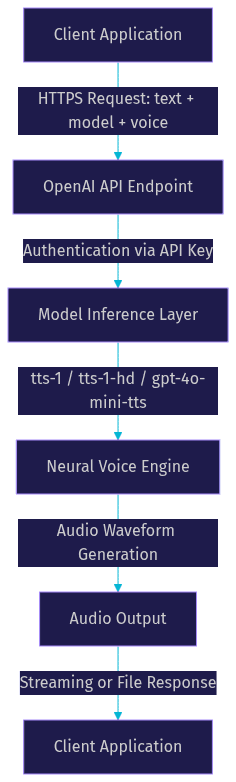
The OpenAI text to speech API follows a straightforward request-response cycle that developers can reason about without touching low-level audio processing. You send a text string to the audio speech endpoint, specify a model and voice, and the service returns rendered audio either as a complete file or as a streaming byte sequence.
The flow begins on the client or server side of your application. Your code constructs a request containing the text to synthesize, the model identifier, the voice name, and optional parameters like output format and speed. That request travels over HTTPS to OpenAI's API, which authenticates it using your API key. Once authenticated, the request enters the model inference layer where the neural network processes the text and generates audio waveforms. The rendered audio then returns to your application as a binary stream or file.
Request Components
Every OpenAI TTS request requires three essential pieces of information. The first is the text string itself, which can range from a single sentence to several paragraphs. The second is the model identifier, which determines the balance between latency and audio quality. The third is the voice name, selected from OpenAI's built-in catalog of neural voices.
Optional parameters include the output format (mp3, opus, aac, flac, wav, or pcm), the speech speed multiplier, and style instructions for models that support them. These three core components are the minimum required to get a successful response, and most production applications add the optional parameters to fine-tune the output.
Response Options
The API returns audio in two modes. The first is a complete file response, where the entire audio payload is generated and returned as a single binary blob. This is suitable for pre-generated content like podcast episodes or e-learning modules where latency is not critical.
The second mode is real-time streaming, where audio chunks are sent as they are generated. This is essential for interactive applications like voice assistants and AI phone agents, where the user expects to hear speech begin within a few hundred milliseconds of the request. Streaming reduces perceived latency because playback can start before the full audio is rendered. For developers building real-time voice experiences with VideoSDK AI Voice Agents, streaming TTS is the preferred mode because it feeds audio directly into the agent pipeline without waiting for the entire response to complete.
Choosing a Model and Voice
Selecting the right model and voice is the single most impactful decision when integrating OpenAI text to speech, because it determines the tradeoff between latency, quality, cost, and feature availability.
OpenAI offers three primary TTS models. The tts-1 model is optimized for low latency and is the default choice for real-time applications where responsiveness matters more than perfect audio fidelity. The tts-1-hd model prioritizes audio quality, producing richer and more natural speech at the cost of higher latency and slightly higher pricing. The gpt-4o-mini-tts model is the newest addition, offering a middle ground with support for style instructions that let developers shape tone, emotion, and delivery characteristics without changing the base voice.
The built-in voice catalog includes several distinct voices, each with its own tonal characteristics. As of 2026, OpenAI provides voices like alloy, echo, fable, nova, onyx, and shimmer, each covering multiple languages. The voices are not language-specific, meaning the same voice can speak in English, Spanish, French, and other supported languages, though naturalness may vary by language.
Voice Selection Tips
When choosing a voice, consider three criteria. First, match the voice to your target language and verify that it sounds natural to native speakers through user testing. Second, align the voice tone with your application context: a warm, conversational voice suits e-learning, while a crisp, authoritative voice works better for news or compliance-related content. Third, consider your audience demographics, since users perceive voice characteristics like pitch and pacing differently based on age and cultural background.
If your application serves multiple regions, test each voice across all supported languages rather than assuming a voice that performs well in English will perform equally well in Japanese or Arabic.
Controlling Output: Speed, Format, and Instructions
OpenAI text to speech gives developers several levers to shape the audio output beyond the base model and voice selection. Understanding these controls helps you fine-tune the listening experience without needing to switch models or voices.
The speed parameter lets you accelerate or decelerate speech by a multiplier. The default is 1.0, and you can adjust it to make speech faster for skimmable content or slower for instructional material. Extreme values can degrade naturalness, so test with real users before shipping.
The output format parameter determines the audio encoding of the response. MP3 is the most widely compatible format and works across browsers, mobile apps, and media players. Opus is ideal for real-time streaming because it delivers good quality at low bitrates, making it the preferred choice for VideoSDK audio calling integrations. WAV and FLAC provide uncompressed or lossless audio for scenarios where quality is paramount and file size is secondary. AAC and PCM cover additional platform-specific needs.
Style instructions are available on the gpt-4o-mini-tts model and allow you to describe the desired tone in natural language. For example, you can instruct the model to speak in a whisper, with excitement, or in a calm and measured pace. This feature is not available on tts-1 or tts-1-hd, so if tone control is important to your application, gpt-4o-mini-tts is the model to use.
Best Practices and Compliance
Building with OpenAI text to speech comes with both technical and ethical responsibilities that developers must address before shipping to production.
Mandatory disclosure is the first compliance consideration. OpenAI's usage policies require that synthetic audio be clearly identified as AI-generated when it could be mistaken for a real person's voice. This means your application should include audible or visual disclosures, especially in podcasts, phone calls, and accessibility tools. Check the OpenAI usage policies for the current requirements.
Rate-limit handling is the most common technical issue. The TTS endpoint has a default rate limit of approximately 50 requests per minute, which can become a bottleneck for high-volume applications. Implement client-side queuing, exponential backoff on 429 responses, and consider batching longer texts into fewer requests to stay within limits.
API key protection is critical. Never expose your OpenAI API key in client-side code or public repositories. Generate TTS requests from a server-side endpoint, and use environment variables or a secrets manager to store credentials. Monitor your usage through the OpenAI dashboard to catch unexpected spikes that could indicate key compromise.
Error handling should account for network timeouts, model unavailability, and invalid input text. Implement fallback behavior such as cached audio for critical phrases so your application degrades gracefully when the API is unavailable.
Real-World Use Cases
OpenAI text to speech powers a growing range of production applications across industries. Three scenarios illustrate how developers are putting it to work.
E-Learning Narration
An online education platform needs to generate audio narration for thousands of course modules across multiple languages. Traditionally, this required hiring voice actors, booking studio time, and managing post-production for each language variant. With OpenAI TTS, the platform generates narration programmatically by sending course text to the API, selecting a warm and clear voice, and receiving audio files that are embedded directly into the course player.
The multilingual support is particularly valuable here. A single voice can narrate content in English, Spanish, and French without separate production pipelines. When course content updates, the platform regenerates only the affected audio segments, reducing both cost and turnaround time from weeks to minutes.
Podcast Generation
A content creation tool uses OpenAI text to speech to convert written articles into podcast episodes. The workflow takes a blog post or newsletter, processes it into a script, and sends it to the TTS API with a conversational voice and natural pacing. The resulting audio is published to podcast platforms alongside the written version.
For this use case, the tts-1-hd model is typically the right choice because listeners expect high audio quality from podcast content. The speed parameter is set slightly below 1.0 to create a relaxed, conversational pace. Developers building podcast tools should also consider adding intro and outro music, chapter markers, and metadata generation to create a complete podcast production pipeline.
Accessibility for Web Applications
A web application serving visually impaired users integrates OpenAI TTS to read on-screen content aloud. When a user navigates to an article, product description, or notification, the application sends the text to the TTS API and plays the audio response through the browser.
Low latency is essential here. The tts-1 model with streaming responses ensures the user hears the beginning of the content within a few hundred milliseconds, rather than waiting for the entire passage to render. For applications that combine TTS with real-time communication, VideoSDK's Prebuilt UI Kit can embed audio playback alongside video calling, creating a unified accessibility experience.
Performance, Cost, and Rate Limits
Understanding the performance characteristics and cost structure of OpenAI text to speech is essential for budgeting and architecture decisions.
Latency varies by model and response mode. The tts-1 model typically returns the first audio chunk in under 500 milliseconds for short text inputs, making it suitable for interactive applications. The tts-1-hd model adds noticeable latency due to higher-quality processing, often doubling the time to first audio. Streaming mode reduces perceived latency across all models by enabling playback before the full response is generated.
Pricing is based on the number of characters processed, not on audio duration. As of 2026, OpenAI charges per 1,000 characters of input text, with different rates for tts-1, tts-1-hd, and gpt-4o-mini-tts. The tts-1 model is the most affordable, while tts-1-hd carries a premium for higher fidelity. For applications generating large volumes of audio, the cost difference between models can be significant over time.
The default rate limit of 50 requests per minute applies to the TTS endpoint. High-volume applications should request a rate limit increase from OpenAI and implement server-side queuing to smooth request patterns. For real-time applications that need to generate speech on demand, consider caching common phrases and pre-generating audio for predictable content.
Custom Voices and Future Roadmap
OpenAI has introduced custom voice capabilities that allow organizations to create proprietary voices trained on their own audio samples. This feature is gated behind an eligibility process that requires explicit consent from the voice owner and compliance with OpenAI's safety guidelines. Custom voices expand brand identity for applications where a distinctive audio presence matters, such as virtual assistants, branded podcasts, and customer support lines.
The eligibility process involves submitting voice samples, verifying consent, and waiting for OpenAI to train and approve the custom voice model. Once approved, the custom voice is available through the same API endpoint as the built-in voices, with the voice name pointing to your custom identifier.
Looking ahead, the TTS roadmap points toward higher fidelity models, longer context windows for uninterrupted narration, and improved multilingual naturalness. Developers building on OpenAI TTS today should architect their integration to be model-agnostic, so swapping in a future model requires only a configuration change rather than a rewrite.
For developers building full voice agent pipelines, OpenAI TTS is one component in a larger stack that includes speech-to-text, an LLM for reasoning, and a real-time transport layer. VideoSDK's AI Voice Agent SDK orchestrates these components, letting you plug in OpenAI TTS as the speech output provider while VideoSDK handles the real-time audio transport, turn detection, and session management.
Comparison: OpenAI TTS vs Alternatives
Developers evaluating OpenAI text to speech typically compare it against two other major providers: ElevenLabs and Google Cloud TTS. Each has distinct strengths.
ElevenLabs is known for its voice cloning capabilities and highly expressive voices. It offers a larger voice library and more granular control over emotional delivery. For applications where voice variety and cloning are the top priority, ElevenLabs is a strong choice. VideoSDK's AI Agent pipeline supports ElevenLabs as a TTS provider, so developers can switch between OpenAI and ElevenLabs without changing their agent architecture.
Google Cloud TTS offers deep integration with the Google Cloud ecosystem, extensive language coverage with locale-specific voices, and enterprise-grade SLAs. It is well-suited for applications already running on Google Cloud infrastructure that need regional compliance and enterprise support.
OpenAI TTS stands out for its simplicity, competitive pricing, and tight integration with OpenAI's LLM ecosystem. If your application already uses OpenAI models for text generation or reasoning, using OpenAI TTS for speech output keeps your stack consolidated under a single provider and API key.
| Feature | OpenAI TTS | ElevenLabs | Google Cloud TTS |
|---|---|---|---|
| Voice cloning | Limited (gated) | Strong | Limited |
| Built-in voices | 6+ | 100+ | 200+ |
| Style instructions | gpt-4o-mini-tts | Yes | Limited |
| Streaming | Yes | Yes | Yes |
| Multilingual | Yes | Yes | Yes |
| Best for | LLM-stack consolidation | Voice variety and cloning | Google Cloud ecosystems |
[LINKABLE ASSET: comparison table]
The most important row is voice cloning: if your application requires a custom cloned voice, ElevenLabs currently leads. If you want style control within an OpenAI-centric stack, gpt-4o-mini-tts is the right pick.
Definitions Glossary
Text to Speech (TTS): A technology that converts written text into spoken audio using neural network models that generate human-like speech waveforms.
Neural Voice Generation: The process of using deep learning models to synthesize speech from text, producing natural-sounding audio that captures intonation, pacing, and emotion.
Streaming TTS: A response mode where audio chunks are sent as they are generated, allowing playback to begin before the full audio response is complete, reducing perceived latency.
Voice Cloning: The capability to create a custom synthetic voice from audio samples of a specific person, subject to consent and platform eligibility requirements.
Speech Speed Control: A parameter that adjusts the playback rate of generated speech using a multiplier, where 1.0 is the default natural pace.
Agent Worker: In VideoSDK's AI Voice Agent architecture, the Python process that manages an AI agent session, orchestrating the STT, LLM, and TTS pipeline within a VideoSDK room.
Key Takeaways
- OpenAI text to speech offers three models (tts-1, tts-1-hd, gpt-4o-mini-tts) that trade off latency, quality, and feature support, giving developers flexibility across real-time and pre-generated audio workloads.
- Streaming response mode is essential for interactive applications because it reduces perceived latency by starting playback before the full audio is rendered.
- The gpt-4o-mini-tts model adds style instructions for tone control, a feature unavailable on the older tts-1 and tts-1-hd models.
- Compliance with OpenAI's synthetic audio disclosure policies is mandatory, and API keys must always be protected server-side.
- For real-time voice agent pipelines, VideoSDK's AI Voice Agent SDK can integrate OpenAI TTS as the speech output layer, handling audio transport, turn detection, and session management through a unified architecture.
Conclusion
OpenAI text to speech has matured into a production-ready speech synthesis service that balances simplicity, quality, and cost for developers building audio-enabled applications. The three-model lineup covers the full spectrum from low-latency real-time responses to high-fidelity narration, and the built-in voice catalog with multilingual support handles most global use cases out of the box. By following the best practices around compliance, rate limits, and API key security, you can ship a reliable TTS integration that scales with your application.
If you are building a real-time voice experience, combining OpenAI TTS with VideoSDK's AI Voice Agent pipeline gives you a complete stack: STT for listening, an LLM for reasoning, OpenAI TTS for speaking, and VideoSDK for real-time audio transport. You can start building today by signing up at app.videosdk.live/login and exploring the VideoSDK code samples for voice agent quickstarts. For the official OpenAI TTS documentation, visit the OpenAI audio documentation.
What are you building with OpenAI text to speech? Drop a comment below, I would love to hear what kind of voice application you are working on.
Free $20 Balance for AI Voice Agents & Video Calls
FAQ