


OpenAI Live is a real-time voice API that enables full-duplex, low-latency audio conversations between humans and AI. It allows developers to build interactive voice agents that can listen and speak simultaneously, handle interruptions, and delegate tasks to a backend server. You can integrate OpenAI Live using WebRTC or WebSockets to power telephony, customer support, and tutoring applications.
The rise of real-time voice experiences is reshaping how developers build interactive applications. Instead of relying on text-based chatbots with slow response times, users now expect instant, natural-sounding voice interactions. OpenAI Live provides the infrastructure to meet this demand. Developers are increasingly looking at OpenAI Live to build voice agents that feel less like a command interface and more like a human conversation. This shift requires a deep understanding of full-duplex audio, session management, and network latency. In this guide, you will learn what OpenAI Live is, how it works under the hood, and how to build production-ready voice agents with it.
What is OpenAI Live?
OpenAI Live is defined as a real-time communication API designed for building low-latency, full-duplex voice agents. OpenAI Live works by maintaining a persistent connection between a client application and the OpenAI service, allowing audio to stream in both directions simultaneously. The key differentiator from other OpenAI voice offerings is its native support for real-time interaction. While standard ChatGPT voice features operate within the ChatGPT application, OpenAI Live exposes the underlying real-time infrastructure directly to developers via an API. This means you can embed these capabilities into your own web, mobile, or telephony applications. VideoSDK provides similar infrastructure for developers looking to build comprehensive real-time communication applications, offering AI voice agents that can connect to these models.
Core Capabilities of OpenAI Live
Full-duplex voice interaction
OpenAI Live supports full-duplex voice interaction, meaning the model can listen to a user and speak at the same time. This is a critical feature for natural conversation. In a half-duplex system, the user must finish speaking before the AI can process and respond, which feels unnatural and adds friction. Full-duplex capability allows the AI to process audio continuously while it is generating speech. If a user starts speaking while the AI is talking, the system can detect this and adjust its output in real time. This creates a fluid conversational experience that closely mimics human-to-human interaction.
Interruption handling
Built-in turn detection in OpenAI Live manages interruptions gracefully. When a user interrupts the AI, the system immediately stops generating audio for the current response and processes the new input. This is handled automatically by the server-side turn detection model. Developers do not need to build complex logic to detect when a user has finished speaking or when they want to interrupt. The API sends events indicating when a user has started speaking, when they have stopped, and when the AI's response has been truncated due to an interruption. This allows developers to focus on the application logic rather than the intricacies of voice activity detection.
Backend delegation
OpenAI Live includes a delegation model that lets a separate backend agent handle tool calls or searches. When the AI determines it needs external information, such as querying a database or calling a third-party API, it can delegate this task to a backend server. The backend server processes the request and returns the result to the OpenAI Live service, which then incorporates the information into its spoken response. This separation of concerns is powerful for developers. It allows the voice agent to remain lightweight and focused on conversation, while heavy computational tasks are handled by a dedicated backend. VideoSDK's Conversational Graph offers a similar structured approach for deterministic backend workflows.
Telephony support
OpenAI Live can run voice agents over traditional phone lines using telephony support. This is achieved by bridging the WebRTC connection used by OpenAI Live with SIP-based telephony networks. Developers can build applications that make or receive phone calls powered by AI. This opens up use cases like automated customer support lines, outbound reminder calls, and voice-based surveys. VideoSDK offers robust telephony integration that bridges SIP networks with real-time communication rooms, making it easier to connect phone calls to AI agents.
How OpenAI Live Works Under the Hood
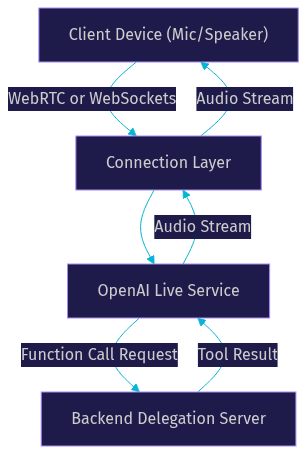
The architecture of OpenAI Live involves a client device, a connection layer, the OpenAI Live service, and an optional backend delegation server. The client device captures audio from the microphone and plays back audio from the speaker. This audio is sent over a connection layer, which can be either WebRTC or WebSockets. WebRTC is preferred for browser and mobile applications because it handles audio encoding, packet loss, and network traversal automatically. WebSockets are often used for server-to-server communication or when the developer wants more control over the audio pipeline. The OpenAI Live service processes the incoming audio, runs the turn detection, generates the response using the language model, and synthesizes the speech. If the model needs to call a tool, it sends a request to the backend delegation server.
Getting Started with OpenAI Live
Prerequisites
To start building with OpenAI Live, you need an OpenAI API key with access to the real-time models. Your application must run in an environment that supports HTTPS, as modern browsers require a secure context to access the microphone. You also need a server runtime to generate scoped tokens if you are connecting from a frontend application. This prevents exposing your main API key to the public. For telephony applications, you will need a SIP trunk provider or a telephony API service.
Creating a session
Creating a session involves sending a session-start request to the OpenAI Live API. This request must include the model you want to use, system instructions that define the agent's persona, and the audio format details. The API responds with a session object that contains a unique session ID. You use this session ID for all subsequent interactions. The system instructions are crucial for shaping the agent's behavior. You should clearly define what the agent should do, how it should speak, and what tools it has access to.
Choosing a connection type
Developers can choose between WebRTC and WebSockets for the connection type. WebRTC is the standard choice for client-side applications running in a web browser or a mobile app. It provides built-in audio processing, such as echo cancellation and noise suppression, and handles network fluctuations gracefully. WebSockets are better suited for server-side applications where you are managing the audio pipeline yourself, such as when integrating with a custom telephony system. According to the W3C WebRTC specification, WebRTC is designed for real-time media transport, making it ideal for low-latency voice.
Managing audio streams
Managing audio streams involves sending microphone input to the OpenAI Live service and receiving synthesized speech back. Over WebRTC, audio travels as media tracks. The local microphone track is added to the peer connection, and the remote audio track from the AI is played through an audio element. Over WebSockets, audio is sent as binary frames. You need to capture raw audio chunks, encode them, and send them sequentially. The API returns audio chunks as binary messages that you must decode and play. Proper handling of these streams is essential to avoid gaps in audio or high latency.
Handling events
OpenAI Live uses a JSON event channel for transcripts, session updates, and tool results. While audio streams over the media channel, events stream over the data channel or WebSocket text frames. These events include partial transcripts of what the user is saying, full transcripts when a user's turn is complete, and responses from the AI. You can also receive events when the AI starts or stops speaking, and when a tool call is made. Listening to these events allows your application to update the UI, trigger backend processes, or log the conversation.
Best Practices and Optimization
Cost optimization
Cost optimization for OpenAI Live involves careful prompt design, delegation mode selection, and monitoring duration-based billing. The API bills based on the amount of audio processed and the session duration. To reduce costs, keep system instructions concise. Use the backend delegation model to handle complex logic on cheaper compute resources instead of asking the language model to do heavy reasoning. You should also implement session timeouts to close idle connections.
Network considerations
Network considerations are critical for real-time voice applications. You need to account for ICE and TURN server configurations if you are using WebRTC behind strict firewalls. Latency expectations should be set based on the user's distance to the OpenAI servers. For poor connections, WebRTC's built-in jitter buffer and packet loss concealment help, but you should also implement client-side logic to detect high latency and prompt the user to check their connection. VideoSDK handles network-adaptive streaming automatically, which is a major advantage when building production voice apps.
Security
Security best practices dictate that you should never expose your OpenAI API key on the frontend. Always generate scoped, short-lived tokens on your backend server and pass them to the client application. If you are using backend delegation, ensure your backend server validates the origin of tool call requests. Use HTTPS for all web traffic and secure your WebSocket connections with TLS.
Real-World Use Cases
Customer support agents
OpenAI Live enables natural phone-based help desks. Instead of navigating complex IVR menus, customers can simply state their problem. The AI agent can understand the intent, look up account information using backend delegation, and provide a spoken solution. If the issue requires human intervention, the agent can transfer the call. This reduces wait times and improves customer satisfaction.
Language tutoring apps
Language tutoring apps benefit from interruption-aware conversation. Learners can practice speaking in a new language without waiting for the AI to finish a sentence. If they make a mistake, the AI can correct them immediately. The full-duplex nature of OpenAI Live makes the practice feel like a real conversation with a tutor, which is more effective for language acquisition than text-based exercises.
Voice-first assistants
Embedding OpenAI Live in smart-home or mobile assistants allows users to control devices, ask questions, and set reminders using their voice. The low latency of the API ensures the assistant responds instantly. Developers can use the backend delegation feature to connect the assistant to smart-home APIs, allowing the AI to turn on lights or adjust the thermostat based on voice commands.
Live interactive events
OpenAI Live can be used for moderated Q&A or live-shopping events. A host can speak to the AI, and the AI can respond in real time, creating an interactive experience for the audience. For live shopping, the AI can describe products, answer questions from viewers, and even process orders by delegating to a backend e-commerce system. VideoSDK's Interactive Live Streaming provides the perfect platform for hosting these live events with sub-second latency.
Comparison with Related OpenAI Offerings
Developers often need to choose between OpenAI Live, the standard Realtime API, and ChatGPT voice features. Here is a brief comparison.
| Feature | OpenAI Live | Standard Realtime API | ChatGPT Voice |
|---|---|---|---|
| Latency | Ultra-low | Low | Medium |
| Duplex Capability | Full-duplex | Full-duplex | Half-duplex |
| Integration | Custom apps via API | Custom apps via API | ChatGPT app only |
| Pricing | Duration + Audio tokens | Duration + Audio tokens | Subscription based |
| Telephony Support | Yes (with bridging) | Yes (with bridging) | No |
The main difference is that OpenAI Live is optimized for the most demanding real-time scenarios, offering the lowest latency and the most robust interruption handling. The standard Realtime API provides similar capabilities but may not have the latest optimizations found in OpenAI Live. ChatGPT voice is a consumer feature, not a developer platform.
Future Outlook and Roadmap
The future of OpenAI Live points toward multi-modal vision integration, larger model families, and expanded telephony options. In 2026, we can expect the API to support real-time video input, allowing the AI to see the user's environment and respond accordingly. This would unlock use cases in remote assistance and augmented reality. Larger model families will likely bring improved reasoning capabilities and more diverse voice options. Expanded telephony options could include native SIP support, reducing the need for third-party bridging services. As the ecosystem matures, tools like VideoSDK will continue to provide the orchestration layer needed to connect these powerful models to real-world communication networks.
Definitions Glossary
Full-duplex: A communication mode where both parties can send and receive audio simultaneously. OpenAI Live uses this to allow natural interruptions during a conversation.
Turn Detection: The process of determining when a user has finished speaking and when the AI should respond. OpenAI Live handles this server-side.
Backend Delegation: A model where the AI agent offloads tool calls and external searches to a separate backend server. This keeps the voice agent focused on conversation.
WebRTC: A web standard for real-time audio and video communication. OpenAI Live uses WebRTC for low-latency browser connections.
Session Management: The process of creating, maintaining, and closing a connection to the OpenAI Live API. Proper session management is crucial for cost control.
Key Takeaways
- OpenAI Live provides a full-duplex, low-latency voice API for building real-time conversational agents.
- The API handles interruption detection and turn management server-side, simplifying client development.
- Backend delegation allows developers to separate heavy computational tasks from the voice interaction layer.
- WebRTC is the recommended connection type for browser and mobile applications due to its built-in audio processing.
- Developers can use VideoSDK to bridge OpenAI Live with telephony networks and live streaming platforms.
Conclusion
OpenAI Live represents a significant step forward in real-time voice AI for developers. By providing full-duplex communication, robust interruption handling, and flexible backend delegation, it enables the creation of natural, responsive voice agents. Whether you are building a customer support line, a language tutor, or a voice-first assistant, OpenAI Live provides the core infrastructure. To build a production-ready application, consider pairing it with a robust communication platform like VideoSDK. What are you building with OpenAI Live? Drop a comment below. You can start your next project by visiting the VideoSDK documentation or signing up at app.videosdk.live/login.
Free $20 Balance for AI Voice Agents & Video Calls
FAQ