


Using Realtime OpenAI with low-code platforms lets developers build interactive voice and text AI applications through visual workflows instead of extensive manual coding. You generate an ephemeral client secret server-side, pass it to your low-code app, and establish a WebRTC or WebSocket session for sub-second AI responses. Platforms like VideoSDK extend this by providing AI Voice Agent SDKs that seamlessly connect these low-code workflows into real-time communication rooms.
Developers want instant AI experiences. Users expect sub-second responses when they interact with a voice bot or a customer support assistant. Building these experiences from scratch requires deep knowledge of WebRTC, audio processing, and real-time streaming protocols. This is where low-code tools change the game. They lower the barrier to entry, allowing you to prototype and deploy complex AI workflows visually.
If you are searching for how to use realtime open ai lowcode solutions, you are likely trying to bridge the gap between powerful AI models and a usable application interface without writing thousands of lines of infrastructure code. Low-code platforms provide the visual workflow builders, while OpenAI provides the real-time cognitive engine. Together, they let you focus on the conversation logic and user experience rather than the underlying network mechanics.
By the end of this guide, you will understand the architecture of the Realtime OpenAI API, how low-code platforms interact with it, and how you can extend these workflows using VideoSDK's AI Voice Agent SDK for production-ready communication apps.
How to Use Realtime OpenAI Lowcode: Overview
Learning how to use realtime open ai lowcode tools requires understanding two distinct layers: the AI model provider and the application builder. The goal of this article is to map out how these layers interact and to give you a clear, step-by-step path to connecting them.
We will start by examining what the OpenAI Realtime API actually does and why it differs from standard request-response APIs. Then we will look at the philosophy behind low-code AI platforms and why they are ideal for rapid prototyping. The core of the article is a practical implementation guide that walks you through credential preparation, token minting, workflow design, and latency optimization. Finally, we will cover best practices, real-world use cases, and common pitfalls.
Understanding the Realtime OpenAI API
The OpenAI Realtime API is designed for continuous, low-latency interactions. Traditional large language model APIs operate on a request-response cycle. You send a text prompt, the model processes it, and you receive a complete text response. This works fine for chatbots where a few seconds of delay is acceptable. It fails completely for voice applications where users expect a natural, conversational rhythm.
The Realtime API solves this by maintaining a persistent connection. It supports streaming audio and text in both directions simultaneously. This means the model can start generating a response while the user is still speaking. The API supports multiple modalities, including text-to-speech, speech-to-text, and direct text generation.
Key concepts you need to understand include the session, the client secret, and turn detection. A session represents a single continuous conversation. The client secret is a temporary security token that allows your frontend application to connect directly to the OpenAI infrastructure without exposing your master API key. Turn detection is the mechanism the API uses to figure out when a user has finished speaking and the model should begin responding. Built-in turn detection relies on voice activity detection to manage this automatically.
What Is Lowcode and Why It Matters for AI
Low-code and no-code platforms provide visual interfaces for building applications. Instead of writing syntax, you drag and drop components onto a canvas. You connect these components to define data flow and logic. For AI development, this means you can visually map out how a user interacts with an interface, how that input reaches an AI model, and how the response is displayed.
Low-code platforms matter for AI because they drastically reduce the time it takes to move from an idea to a working prototype. Building a real-time voice agent from scratch involves managing WebSocket connections, handling audio buffers, implementing voice activity detection, and handling reconnection logic. A low-code platform abstracts much of this away.
You can use platforms like Bubble, Retool, or n8n to design the user interface and the backend logic. These platforms offer pre-built connectors for AI services. When you combine them with real-time APIs, you get a powerful environment for testing conversation flows, adjusting prompts, and changing voices without redeploying a backend application.
Combining Realtime OpenAI with Lowcode
The synergy between Realtime OpenAI and low-code platforms comes down to speed and iteration. You use the visual workflow builder in your low-code platform to trigger the OpenAI Realtime session. The low-code platform handles the user interface, capturing microphone input or text field submissions. It then passes this data to the real-time session.
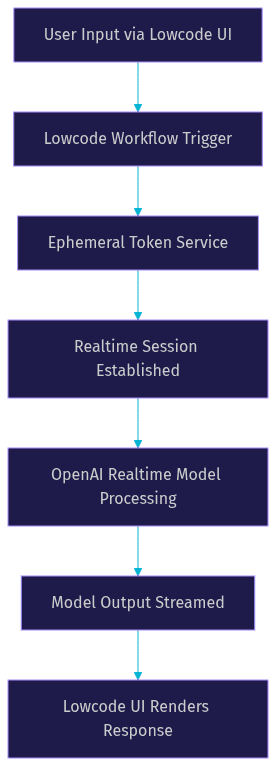
A typical integration point involves a button click or a page load event in the low-code app. This event triggers a call to your backend to fetch an ephemeral client secret. Once the low-code app receives the secret, it establishes the real-time connection.
If you want to deploy this into a production calling application, you can connect your low-code workflow to a real-time communication infrastructure like VideoSDK. VideoSDK provides an AI Voice Agent SDK that manages the WebRTC layer. Your low-code workflow acts as the brain, sending instructions to the VideoSDK Agent Worker, which then handles the audio streaming between the end user and the OpenAI Realtime model.
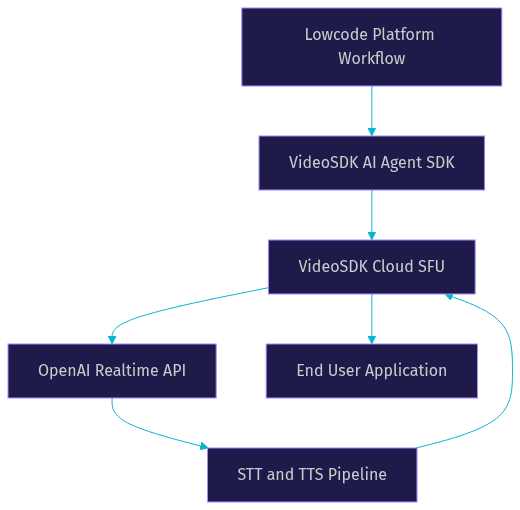
This architecture lets you build the conversation logic visually while relying on VideoSDK to handle the complexities of network-adaptive streaming and global media routing.
Step-by-Step Implementation Guide
Building a real-time AI application visually requires careful configuration. Here is how to use realtime open ai lowcode tools to build a functional voice or text agent.
1. Prepare OpenAI Credentials
Before you touch a low-code interface, you need valid OpenAI credentials. You must create an API key in your OpenAI dashboard. This key is highly sensitive and should never be placed directly into a frontend low-code application. Instead, you set up a secure server function. This function will hold your master API key and handle the token exchange. In a low-code environment like Retool or n8n, you can create a restricted backend workflow that stores this key securely in an environment variable manager.
2. Mint an Ephemeral Client Secret
Your secure backend function needs to generate an ephemeral client secret. You do this by sending a server-side request to the OpenAI endpoint responsible for realtime client secrets. You specify the model you want to use, such as a realtime model version. The endpoint returns a temporary token. You configure your low-code backend to pass this secret down to the frontend application. This secret is time-limited, which means your low-code app must request a new one if a user session lasts longer than the token's lifespan.
3. Design the Lowcode Workflow
Open your low-code platform and create a new workflow. You will need a trigger block, an API call block, and a display block. The trigger block captures the user action, like clicking a button to start a voice chat. The API call block reaches out to your secure backend to get the ephemeral client secret. Once the secret is retrieved, you use a WebSocket or WebRTC connector block to open the real-time session. You design the workflow to listen for incoming audio or text streams from the model and route them to a UI element for playback or display.
4. Connect the Realtime Session
Configuring the real-time connector requires precision. You pass the ephemeral client secret into the connector's authentication field. You then set the session parameters. This includes selecting the AI voice persona, setting the temperature for response variability, and enabling server-side turn detection. If your low-code platform supports custom WebSocket messages, you configure it to send audio input chunks directly to the session and to receive audio output chunks. For a more robust connection, you can route this through a VideoSDK room using the VideoSDK React SDK, which handles the media transport natively.
5. Test and Optimize Latency
Once the workflow is connected, you must test the round-trip time. Speak into the application and measure how long it takes for the AI to start responding. If the latency is too high, check your audio format. Sending uncompressed audio requires more bandwidth. Switch to a compressed format if your connector supports it. Ensure that built-in turn detection is active so the model does not wait for a manual signal to start generating a response.
Best Practices and Performance Tips
Building the workflow is only half the battle. Keeping it stable in production requires adherence to best practices. Network conditions change, tokens expire, and user bases grow.
First, implement network-adaptive streaming. If you are routing your low-code workflow through VideoSDK, the platform handles this automatically. VideoSDK adjusts the bitrate and resolution based on the user's real-time bandwidth. If you are building the WebRTC connection directly in your low-code platform, you need to monitor packet loss and manually adjust audio quality.
Second, handle token expiration gracefully. Ephemeral client secrets do not last forever. Your low-code workflow needs a fallback path. If the real-time session drops due to an expired token, the workflow should automatically call the backend to mint a new secret and re-establish the connection without requiring the user to click a button.
Third, use security identifiers properly. Never log the ephemeral client secret in your low-code platform's debugging console. Ensure that your backend endpoint that generates the secret is protected by authentication so only authorized users of your app can request a token.
Finally, consider scaling. Low-code platforms often run on shared infrastructure. If your AI application goes viral, the platform's backend might struggle to keep up with the WebSocket connections. Moving the real-time media layer to a dedicated RTC infrastructure like VideoSDK offloads the heavy lifting from the low-code platform, letting the visual workflow focus purely on business logic.
Real-World Use Cases
Realtime OpenAI lowcode workflows shine in scenarios where immediate interaction is critical. Here are three practical examples.
Live Customer Support Chat
A SaaS company uses a low-code platform to build a support widget. When a user opens the widget, the low-code workflow triggers a Realtime OpenAI session. The user can speak or type their issue. The AI agent accesses the company's knowledge base, provides instant verbal answers, and can escalate to a human agent by invoking a function call that the low-code platform interprets to route the conversation.
Voice-Enabled Tutoring Bot
An edtech startup builds a math tutoring application. They use a low-code platform to design the lesson interface. The core conversation is handled by a Realtime OpenAI workflow. A student reads a problem aloud. The AI agent listens, detects when the student pauses, and offers a hint or asks a guiding question. The low-code platform records the session and logs the interaction for the teacher to review later.
In-App Sales Assistant
An e-commerce brand integrates a voice assistant into their mobile app. The assistant helps users find products. The user says they are looking for running shoes. The AI agent asks about size and color preferences. The low-code workflow takes the extracted preferences, queries the product database, and displays the results on screen while the AI agent verbally describes the top options.
Common Pitfalls and Troubleshooting
Even with a visual builder, things go wrong. Here are common issues and how to fix them.
Invalid Token Errors: If your real-time session fails to connect, check the ephemeral client secret. Ensure your backend is sending the correct model ID in the token request. Make sure the low-code frontend is passing the token exactly as received, without any encoding issues.
Audio Format Mismatch: If the AI agent cannot hear the user or the audio sounds distorted, verify the audio format settings. The low-code platform's audio input block must send data in a format the Realtime API expects. Mismatched sample rates or encoding types will break the stream.
Latency Spikes: If responses are delayed, look at the network path. If your low-code platform's servers are geographically far from the OpenAI servers or the end user, latency will suffer. Routing the media through a global edge network like VideoSDK ensures the audio travels the shortest possible path.
Definitions Glossary
Realtime API: A persistent connection interface that allows continuous streaming of audio and text to and from an AI model, enabling sub-second conversational responses.
Ephemeral Client Secret: A temporary, time-limited security token generated server-side that allows a frontend application to authenticate directly with a real-time AI service without exposing the master API key.
Turn Detection: The mechanism an AI model uses to determine when a user has finished speaking, often relying on voice activity detection, so the model knows when to begin generating a response.
VideoSDK AI Voice Agent SDK: A Python-based toolkit that connects large language models, speech-to-text, and text-to-speech providers to VideoSDK rooms, enabling real-time voice AI interactions over WebRTC.
Low-Code Platform: A software development environment that provides a visual interface for dragging and dropping components to build applications and workflows, minimizing the need for manual coding.
Key Takeaways
- Low-code platforms let you build real-time AI applications visually, reducing the infrastructure code required to manage WebRTC or WebSocket connections.
- Generating an ephemeral client secret server-side is a mandatory security step to connect your low-code frontend directly to the OpenAI Realtime API.
- Built-in turn detection and proper audio format configuration are critical for achieving natural, low-latency conversational experiences.
- Routing your low-code AI workflow through VideoSDK's AI Voice Agent SDK offloads the heavy media processing to a dedicated real-time communication infrastructure.
- Always handle token expiration and network variability gracefully to maintain a stable connection in production environments.
Conclusion
Marrying Realtime OpenAI with low-code platforms gives developers a massive advantage in building interactive AI experiences. You get the cognitive power of a real-time large language model and the visual agility of a drag-and-drop workflow builder. This combination lets you prototype voice agents, customer support bots, and interactive assistants in hours instead of weeks.
When you are ready to move beyond a prototype and ship a production-ready application, consider integrating your workflow with a dedicated RTC provider. Explore the VideoSDK AI Voice Agent documentation to see how you can connect your low-code logic to a robust WebRTC infrastructure. You can also check out the VideoSDK Prebuilt UI Kit if you need a zero-code interface for your users to join the conversation. What are you building with realtime OpenAI lowcode? Drop a comment below and let me know what kind of AI agent you are working on.
Free $20 Balance for AI Voice Agents & Video Calls
FAQ