


The Gemini Vision API is Google's multimodal interface for sending images and video to Gemini models and receiving generated text, captions, bounding boxes, and structured analysis through a single generateContent endpoint. Unlike traditional vision services that only classify against fixed label sets, Gemini reasons about visual content conversationally. Developers can pair it with VideoSDK's real-time transcription and AI agent pipelines to analyze live visual and audio streams inside production apps. Start with Google AI Studio to get an API key, then follow this guide for setup, payload design, and best practices.
Google's Gemini model family was built multimodal from the ground up, meaning a single model accepts text, images, audio, and video as input and produces text (and in some modes, images) as output. The Gemini Vision API is the developer-facing surface of that capability: you send visual data to a Gemini model through Google's REST API, and it returns descriptions, answers, classifications, or structured data about what it sees.
This matters because traditional computer vision APIs, like the long-standing Google Cloud Vision AI, work from predefined taxonomies. They detect faces, read text, and assign labels from a fixed catalog. Gemini instead lets you ask open-ended questions: "What's wrong with this product photo?" or "Extract every line item from this invoice as structured data." That shift from fixed classification to visual reasoning is why so many teams are migrating vision workloads to Gemini.
By the end of this article you'll understand what the Gemini Vision API can do, how to set up access, how to structure requests and handle responses, what it costs, and where it fits alongside alternatives like OpenAI's GPT-4 Vision. You'll also see how it connects to real-time communication platforms like VideoSDK when you need live visual analysis rather than batch processing.
What Is the Gemini Vision API?
The Gemini Vision API is defined as the multimodal input capability of Google's Gemini API, where images and video frames are passed to a Gemini model alongside text prompts and the model generates natural-language or structured responses about that visual content. It works by encoding submitted media into tokens the model can process, then combining those visual tokens with your text prompt so the model reasons across both modalities in a single inference pass.
Gemini is defined as a family of multimodal models from Google, currently spanning fast, cost-efficient variants (the Flash tier) and higher-capability variants (the Pro tier). The Vision API is not a separate product: it is the same generateContent endpoint used for text-only Gemini calls, extended with image or video parts in the request payload.
VideoSDK developers encounter this pattern frequently: a VideoSDK AI voice agent processes speech through a speech-to-text, LLM, and text-to-speech pipeline, and Gemini's multimodal input extends the same idea to images. If you can describe what you want to know about an image in words, Gemini Vision can usually answer it.
Core Capabilities of Gemini Vision API
The Gemini Vision API covers four practical capability areas that replace or augment traditional computer vision pipelines.
Image-to-text conversion and captioning. Gemini generates detailed natural-language descriptions of images, from one-line alt text to paragraph-length scene analysis. You control the verbosity and style through your prompt, which makes the same model useful for accessibility tooling, catalog enrichment, and content moderation triage.
Object detection with bounding boxes. By prompting Gemini to return structured output, you can get object names paired with normalized bounding-box coordinates. This is not a purpose-trained detector like a YOLO-style model, but for ad-hoc detection tasks, it removes the need to train and host a custom model.
Image segmentation and region labeling. Gemini can divide an image into meaningful regions and label each one, useful for layout analysis of documents, screenshots, and UI captures. Combined with structured output modes, region labels come back as parseable data rather than free text.
Video frame analysis. Gemini accepts video input directly, sampling frames at a configurable rate and reasoning across them. This enables summarization of long video, event detection, and question answering over recorded content.
How to Set Up Gemini Vision API Access
Setting up Gemini Vision API access takes three steps: create a Google Cloud project, enable the Gemini API, and generate a secured API key.
Create your project and enable the API. Start in Google AI Studio or the Google Cloud console. Create a project, then enable the Gemini API (listed under Google AI services). If you plan to use Vertex AI endpoints instead, enable the Vertex AI API in the same project; both surfaces expose the same underlying models.
Obtain and secure your API key. Generate a key from Google AI Studio or the credentials page in Cloud console. Treat this key like a password: store it in an environment variable or a secret manager, never in client-side code or version control. A leaked Gemini key gives anyone direct billing access to your account.
Understand authentication and quotas. Every request carries your key in an authentication header. Free-tier quotas are generous for prototyping but tight for production; paid tiers raise rate limits and unlock higher-capability models. Check the current quota documentation before launch, since limits differ per model tier and per project.
Request Structure and Payload Design
Every Gemini Vision API call goes through the generateContent endpoint, and understanding its payload structure is the difference between a one-shot working integration and a week of debugging.
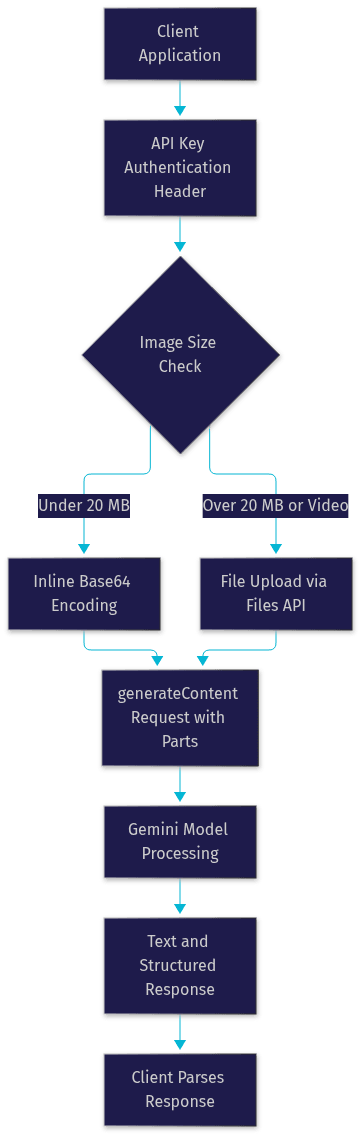
A request contains three core elements: the model name, the contents array, and optional configuration. The contents array holds parts, where each part is either a text snippet or media data. Media arrives in one of two forms: inline data, where the image bytes are base64-encoded directly into the request, or file data, where you reference a file already uploaded through the Files API.
The choice between inline and file upload comes down to size. Inline base64 works well for images under roughly 20 MB and keeps requests self-contained. Larger images, or any video, should go through the file upload path first, then be referenced by identifier in the generateContent call. Base64 encoding also inflates payload size by about a third, so inline payloads hit transport limits sooner than the raw file size suggests.
Prompt engineering for vision tasks follows a few reliable patterns. State the output format explicitly ("return a list of objects with coordinates"). Give the model a role or context ("you are analyzing product photos for an e-commerce catalog"). And when you need structured data, request a specific schema so responses parse cleanly without regex scraping.
The flow from request to response looks like this:
How to Handle Gemini Vision API Responses
Gemini Vision API responses arrive as a candidates array, where each candidate contains generated content parts. Text answers come back as plain text parts; structured outputs arrive as data matching the schema you requested.
Parsing bounding boxes requires attention to normalization. Gemini returns coordinates as normalized values between zero and one, relative to image dimensions. Multiply by your actual image width and height to get pixel coordinates. A common mistake is treating normalized values as pixels directly, which produces boxes clustered in the top-left corner.
Error handling follows standard HTTP patterns. A 400 status usually means malformed payload or unsupported media type. A 429 means you've hit a rate limit, and the correct response is exponential backoff: wait, retry, and double the wait on each failure. A 403 points to an API key problem or an API not enabled in your project. Build retry logic with jitter from day one, because rate limits are the most common production failure mode.
For multimodal responses that mix text with generated images, handle each part by its type rather than assuming a single text field. Defensive parsing here saves significant refactoring later.
Practical Use Cases for Gemini Vision API
Four use cases dominate real-world Gemini Vision adoption, and each maps to a distinct business problem.
E-commerce product tagging and visual search. A retailer sends catalog photos to Gemini with a prompt requesting product attributes: category, color, material, and style. The structured response populates search filters and recommendation metadata without manual tagging. Teams running live shopping events can combine this with VideoSDK's interactive live streaming, where hosts showcase products and a backend pipeline enriches listings in near real time.
Automated document digitization. Gemini reads scanned documents, screenshots, and PDFs, extracting tables, line items, and handwriting as structured data. Because it reasons rather than just OCRs, it handles messy layouts, multi-column invoices, and mixed print-plus-handwriting documents that break traditional OCR pipelines.
Accessibility and alt-text generation. Every untagged image on a large site is an accessibility gap. Gemini generates context-appropriate alt text at scale, and the same pipeline can power live captioning when paired with a real-time platform. VideoSDK's real-time transcription and post-call summary features follow the same architecture: media in, structured text out, delivered where users need it.
Content moderation and unsafe-image detection. Gemini flags unsafe, misleading, or policy-violating imagery and explains its reasoning in natural language, which helps human reviewers triage flagged content faster than a bare confidence score.
Performance, Pricing, and Limits
Gemini Vision API pricing follows a token-based model, where images convert to tokens based on resolution and video converts based on frames sampled.
Latency differs sharply by tier. Flash-class models return image analyses in roughly one to two seconds for typical inputs, making them viable for interactive applications. Pro-class models take longer but deliver stronger reasoning on complex visual questions. A practical pattern: route simple captioning to Flash and escalate ambiguous cases to Pro.
Cost control comes from three levers. Downscale images before sending them, since token count scales with resolution and most tasks don't need full resolution. Cap video sampling rates, because every sampled frame is billed. And cache repeated context where your platform supports it, so identical system prompts and reference images aren't re-billed on every call.
Rate-limit best practice is straightforward: implement exponential backoff with jitter, batch independent requests where the API supports it, and monitor quota consumption through Cloud console dashboards before it becomes an outage.
Gemini Vision API vs Competing Vision Services
The Gemini Vision API differs from Google Cloud Vision AI in that Gemini reasons openly about visual content while Cloud Vision AI classifies against fixed label, face, and OCR taxonomies. Use Cloud Vision AI when you need cheap, fast, deterministic labeling at massive scale. Use Gemini Vision when you need open-ended understanding, structured extraction, or conversational back-and-forth about an image.
Against OpenAI's GPT-4 Vision, the practical differences are ecosystem and pricing structure rather than raw capability, since both perform strong general visual reasoning. Gemini's strengths are native video input, tight Google Cloud integration, and competitive Flash-tier pricing for high-volume workloads. GPT-4 Vision wins when your stack already standardizes on OpenAI endpoints and tooling.
For teams building real-time applications, neither service alone covers live media transport. That's where a real-time communication platform enters the picture:

Future Roadmap and Community Resources
Google's roadmap points toward longer video context, higher-resolution image handling, and deeper structured-output support.
For implementation help, the official Gemini API documentation and Google's sample repositories on GitHub are the primary references. Google's developer community forums cover integration questions, and for teams combining vision AI with real-time communication, the VideoSDK Discord community and VideoSDK AI agents documentation cover the live-media side of the pipeline.
Definitions Glossary
Gemini Vision API: The multimodal image and video input capability of Google's Gemini API, accessed through the generateContent endpoint, where models return text and structured data describing visual content.
generateContent: The primary Gemini API endpoint that accepts a contents array of text and media parts and returns generated responses from a specified model.
Multimodal AI: A model architecture that processes multiple input types, such as text, images, audio, and video, within a single inference pass rather than through separate specialized models.
Inline data: A request payload pattern where image bytes are base64-encoded directly inside the API request, suitable for media under roughly 20 MB.
Bounding box: A normalized rectangular coordinate set returned by vision models indicating an object's location within an image, with values between zero and one relative to image dimensions.
VideoSDK Room: A real-time meeting room that participants and AI agents join to share audio, video, and data streams over WebRTC, usable as the live-media source feeding vision analysis pipelines.
Key Takeaways
- The Gemini Vision API sends images and video to Gemini models through the generateContent endpoint and returns reasoning-based text and structured output, replacing fixed-taxonomy vision services for open-ended visual tasks.
- Inline base64 payloads suit images under roughly 20 MB, while larger media and video should go through the file upload path before being referenced in requests.
- Bounding-box coordinates arrive normalized between zero and one, so multiply by image dimensions before using them as pixel values.
- Flash-tier models deliver one-to-two-second latency for interactive workloads, while Pro-tier models handle complex visual reasoning at higher cost and latency.
- For live visual analysis, pair Gemini Vision with a real-time communication platform: VideoSDK rooms deliver the media stream, and Gemini processes extracted frames for real-time overlays or agent responses.
Conclusion
The Gemini Vision API turns image and video understanding into a prompting problem rather than a model-training problem. You get captioning, detection, document extraction, and moderation from one endpoint, with pricing that scales sensibly across Flash and Pro tiers. The fastest way to evaluate it is to grab an API key from Google AI Studio and run a few real images from your own domain through it. If your use case involves live video rather than static files, explore how VideoSDK's AI agent pipeline connects real-time media streams to analysis models, and check the VideoSDK quickstart to see the transport layer in action. Sign up free at app.videosdk.live/login to test it. What are you building with the Gemini Vision API? Drop a comment, I'd love to hear which vision use case you're tackling.
Free $20 Balance for AI Voice Agents & Video Calls
FAQ