


Chat AI voice is a conversational AI assistant that speaks and listens in real time, converting your speech to text, reasoning over it with a language model, and responding with synthesized speech. VideoSDK's AI Agent SDK connects STT, LLM, and TTS providers into a real-time room so you can ship sub-second voice interactions. Start with the AI Agents introduction to see the full architecture.
The moment you speak to an AI assistant and it answers back before you finish your coffee, something has happened that would have looked like science fiction five years ago. Chat AI voice has moved from canned phone menus to genuinely conversational systems that interrupt, adapt, and respond in under a second.
For developers, this shift matters because voice is now an API surface, not a research project. You no longer need a speech lab to build a talking assistant. You need a clear understanding of the pipeline, the right provider choices, and a real-time transport layer that keeps latency low enough for natural conversation.
This article walks through what chat AI voice is, how the end-to-end pipeline works, the difference between turn-based and full-duplex interaction, the technical challenges you will hit in production, and how to choose the right stack. By the end, you will know exactly what it takes to ship a real-time voice AI experience.
What Is Chat AI Voice?
Chat AI voice is defined as a conversational AI system that interacts with users through spoken language in both directions, listening to human speech and responding with synthesized voice rather than text alone. It works by chaining three core components: a speech-to-text (STT) engine that transcribes what the user says, a language model (LLM) that interprets the transcript and generates a response, and a text-to-speech (TTS) engine that converts that response into natural-sounding audio.
Compared to text-only chat, the voice modality changes the engineering constraints completely. Text chat tolerates a two or three second delay because typing sets that expectation. Voice does not. In a phone-style conversation, a pause longer than roughly half a second starts to feel broken, because human turn-taking happens in 200 to 300 millisecond windows.
Voice also introduces problems text never faces: background noise, overlapping speech, echo, and the question of when a user has actually finished speaking. That is why chat AI voice is not just a chatbot with a speaker attached. It is a real-time media system with an LLM embedded in the middle of it.
How the End-to-End Pipeline Works
Every chat AI voice system follows the same fundamental flow, and understanding it is the foundation for every architectural decision you will make. The pipeline begins the moment a user's microphone captures audio, and ends when synthesized speech reaches their speaker.
First, the client captures raw audio from the microphone, typically in small chunks of tens of milliseconds each. These chunks stream continuously to a speech-to-text engine, which transcribes them into text in real time. Streaming STT matters here: waiting for the user to finish a full sentence before transcribing adds hundreds of milliseconds of avoidable delay.
Next, the transcript feeds into the language model. The LLM interprets intent, pulls in any relevant context or tools, and generates a response. In well-tuned systems, the LLM starts producing output while the user is still finishing their thought, so the next stage can begin immediately.
Then the text-to-speech engine converts the generated text into audio. Modern neural TTS engines produce speech that is close to indistinguishable from human recordings, and the best ones support streaming synthesis, meaning audio starts playing before the full sentence has been generated.
Finally, the audio plays back to the user over the transport layer. This is where network conditions matter. A good real-time layer uses network-adaptive streaming, adjusting bitrate and quality as bandwidth fluctuates, so a user on a weak mobile connection still gets intelligible audio instead of dropouts.
The whole loop, from mouth to ear, needs to complete in under about 500 milliseconds for the conversation to feel natural. Every stage contributes to that budget, which is why provider choice and transport architecture are not minor details.
VideoSDK's AI Agent SDK implements this exact pipeline as a managed architecture: an Agent Worker, a Python process, runs the STT, LLM, and TTS chain inside a VideoSDK room, while users connect from web, mobile, or even a phone line over the same real-time transport.
Speech-to-Text Options
The STT layer determines how accurately your assistant hears, and it is usually the first place quality is won or lost. OpenAI Whisper is a strong general-purpose option with broad language coverage and an open-source variant you can self-host. Google Speech-to-Text offers mature streaming APIs with strong multi-language support. Deepgram focuses on fast, low-latency transcription optimized for real-time conversation, which makes it a frequent choice for voice agents where every millisecond counts.
The core trade-off is accuracy versus cost and speed. Larger, more accurate models tend to cost more per minute and add latency. For a voice agent, low-latency streaming transcription usually beats slightly better accuracy on recorded audio, because a delayed response breaks the conversation even if the transcript is perfect.
Language Model Choices
The LLM is the brain of the system, and the choice depends on how you want the conversation to flow. OpenAI's GPT-4o and Google's Gemini both offer real-time multimodal variants that can process audio directly, collapsing the STT and LLM stages into one step and cutting latency significantly. Anthropic's Claude excels at reasoning quality and instruction following for text-in, text-out pipelines. Open-weight models like Llama give you the option to self-host for privacy or cost control.
Real-time versus batch processing is the key architectural decision. A batch approach waits for a complete transcript, calls the LLM, and waits for the full response. A real-time approach streams tokens as they are generated and pipes them straight into TTS. For conversational voice, the streaming approach is not optional; it is the difference between a natural reply and an awkward pause.
Text-to-Speech Engines
The TTS layer defines your assistant's personality more than any other component, because it is literally the voice your users hear. ElevenLabs leads in naturalness and expressive style, with voice cloning and fine-grained control over pacing and emotion. AWS Polly and Azure Speech are the workhorses: cheaper, extremely reliable, and covering dozens of languages with neural voices that sound solid. Open-source TTS engines let you self-host for privacy or offline scenarios.
When choosing, evaluate three dimensions: voice style (does it match your brand), speed (does it support streaming synthesis for low latency), and language support (does it cover every locale your users speak). A brilliant English voice with no Japanese support will sink a language tutoring product.
Full-Duplex vs. Turn-Based Voice Chat
Traditional voice assistants are turn-based: you speak, the system waits for silence, processes, and responds. This walkie-talkie model is simple to build but psychologically wrong. Humans do not converse in clean turns. We interrupt, backchannel with "mm-hm," and overlap constantly.
Full-duplex voice interaction means the system listens and speaks simultaneously. The assistant can detect that you have started interrupting it, stop its own playback mid-sentence, and yield the floor, exactly like a human would. It can also respond to short acknowledgments without treating them as complete turns.
The benefit is not a gimmick. Full-duplex interaction is what makes a voice assistant feel present rather than scripted. In customer support, it means users can correct the agent mid-explanation. In tutoring, it means the assistant can react to a student's confusion in real time.
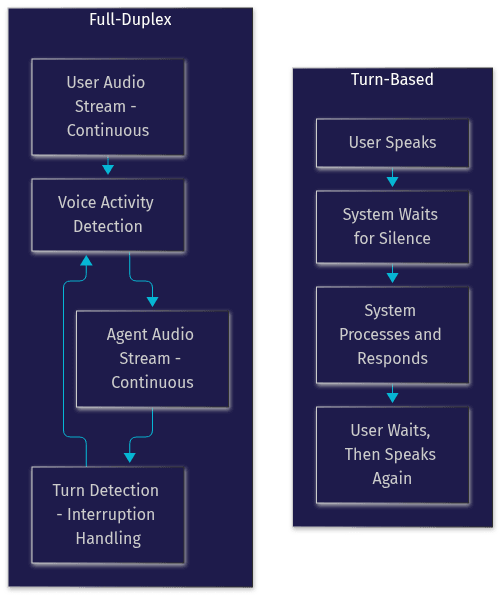
Building full-duplex requires two mechanisms working together: voice activity detection (VAD) to know when audio contains actual speech, and turn detection to decide when the user has finished a thought versus merely paused. VideoSDK's Agent SDK includes both as first-class pipeline components, along with preemptive response handling so the agent can stop and restart gracefully when interrupted.
Key Technical Challenges and Solutions
Shipping chat AI voice to production means solving problems that never appear in a demo on a fast office connection. These are the four that bite hardest.
Latency Reduction
The industry target for conversational voice is a sub-500 millisecond response, measured from the end of user speech to the start of agent speech. Hitting it requires attacking every stage: streaming STT, streaming LLM token generation, streaming TTS synthesis, and a real-time transport like WebRTC instead of HTTP polling. TTS caching also helps, storing synthesized audio for common phrases so greetings and standard acknowledgments play instantly.
Noise Suppression and Echo Cancellation
Real users call from cars, kitchens, and open-plan offices. Without noise suppression, the STT engine transcribes the TV in the background. Without echo cancellation, the agent hears its own voice through the user's speaker and starts talking to itself. Both are now built into mature real-time SDKs, including VideoSDK's, so you get them without wiring separate DSP libraries.
Endpoint Detection and Interruption Handling
Deciding when a user has finished speaking is deceptively hard. A pause might be a breath, a thought forming, or the end of a sentence. Aggressive endpoint detection cuts users off; relaxed detection makes the agent feel slow. Pair endpoint detection with interruption handling so that when a user speaks over the agent, playback stops immediately and the pipeline reprocesses with the new input.
Privacy and Data Handling
Voice conversations are intimate data. Users will ask your assistant things they would never type. Privacy-by-design means transcribing only what is needed, avoiding persistent logging of raw audio, and clearly documenting retention policies. For sensitive deployments, on-device or self-hosted processing keeps audio inside your infrastructure. VideoSDK supports self-hosted agent deployment via Docker or Kubernetes for exactly this reason, and end-to-end encryption is available for the real-time transport.
Cross-Platform Considerations
A voice product rarely lives on one platform. Browser-based voice chat needs microphone permission handling and HTTPS. Android and iOS each have their own audio session and permission models, and Unity and IoT targets add further constraints. Choosing an SDK with genuine multi-platform coverage, like VideoSDK's support for React, React Native, Flutter, Android, iOS, and Unity, avoids rebuilding the transport layer per platform.
Choosing the Right Stack for Your Project
The stack decision comes down to three axes: control, cost, and speed to market.
Cloud-hosted API chains, where you pick an STT, an LLM, and a TTS provider and orchestrate them yourself, give maximum flexibility and per-minute pay-as-you-go pricing. The cost is integration work: you own the transport layer, the turn detection, and the failure modes.
Self-hosted pipelines, with open-weight models and open-source TTS, win on privacy and marginal cost at scale, but demand serious infrastructure and ML operations expertise. They make sense for healthcare, legal, and enterprise deployments where audio must never leave your environment.
A managed agent platform like VideoSDK's occupies the middle: you choose your providers from supported plugins, and the platform handles the real-time room, the pipeline orchestration, turn detection, and observability. For most teams, this is the fastest path from prototype to production.
Finally, decide between a pre-built UI kit and custom integration. If you want a working voice chat interface today, a prebuilt kit gets you there with minimal UI work. If the voice experience is your product's core differentiator, custom integration gives you full control over every interaction detail.
Practical Use Cases
Customer support agents are the most commercially proven use case: an AI voice agent handles inbound calls, answers account questions, and transfers to a human when needed, with warm transfer preserving context.
Language tutoring is where voice AI genuinely outperforms text. A conversational AI assistant can hold spoken practice conversations, correct pronunciation, and adapt difficulty in real time, something no text chat can replicate.
Hands-free productivity is growing fast: drafting emails by voice while driving, capturing meeting notes, or querying internal systems without touching a keyboard. Voice-enabled productivity tools reduce friction for field workers and accessibility-focused users alike.
In-app gaming assistants use voice for immersion: a companion character that responds to spoken commands and comments on gameplay in real time, delivered through the same real-time transport as game audio.
Implementation Checklist
Before launching a chat AI voice feature, verify each of these items:
- Microphone permissions are requested gracefully on every platform, with a clear explanation of why voice is needed, and a working fallback when permission is denied.
- Token security is correct: authentication tokens are generated server-side, never embedded in client code, and scoped so a leaked token cannot grant broad access.
- Fallback behavior is defined for every failure mode: STT outage, LLM timeout, TTS failure, and network loss. The system should degrade to text chat rather than dead air.
- Low-bandwidth testing is done on real 3G and congested Wi-Fi networks, not just office fiber. Confirm adaptive streaming keeps audio intelligible.
- Interruption handling is tested with real humans speaking over the agent, including fast talkers and slow talkers.
- Privacy disclosures match your actual data handling: what is recorded, how long it is retained, and who can access it.
- Latency budget is measured end to end in production conditions, not just in the provider's benchmark environment.
Future Trends in Chat AI Voice
Three trends will reshape this space over the next few years.
Multimodal models that process audio and visual input together are already emerging. An assistant that can see your screen or camera feed while talking opens up use cases from technical support ("look at this error") to interactive tutoring on shared documents.
Edge-AI inference is moving voice processing onto devices, enabling fully offline assistants that never send audio to a server. For privacy-sensitive and connectivity-poor scenarios, this changes what is possible.
Adaptive voice personas will let a single assistant shift tone, pace, and vocabulary based on the user's emotional state and context, detected from speech patterns. A frustrated customer and a curious learner should not hear the same voice delivery.
Definitions Glossary
Chat AI Voice: A conversational AI system that interacts through spoken language in both directions, combining speech recognition, language modeling, and speech synthesis into a real-time loop.
Speech-to-Text (STT): The engine that converts spoken audio into text. In voice agents, streaming STT transcribes audio in real time rather than waiting for complete utterances.
Text-to-Speech (TTS): The engine that converts generated text into natural-sounding audio. Streaming TTS begins playback before the full response is synthesized, reducing perceived latency.
Full-Duplex Voice Interaction: A mode where the system listens and speaks simultaneously, allowing it to detect interruptions and yield the floor like a human conversational partner.
Agent Worker: In VideoSDK's AI Agent architecture, the Python process that runs the STT, LLM, and TTS pipeline inside a real-time room and manages the agent's session lifecycle.
Turn Detection: The mechanism that decides when a user has finished speaking versus merely pausing, which determines how quickly and naturally the agent responds.
Key Takeaways
- Chat AI voice chains streaming STT, an LLM, and streaming TTS into a real-time loop that must complete in under roughly 500 milliseconds to feel natural.
- Full-duplex interaction, where the agent listens and speaks simultaneously and handles interruptions gracefully, separates conversational products from scripted phone menus.
- Provider choice is a per-stage trade-off: low-latency streaming STT, a real-time-capable LLM, and a TTS engine whose voice, speed, and language coverage match your users.
- Production readiness means solving noise suppression, echo cancellation, endpoint detection, privacy, and cross-platform delivery, not just wiring APIs together.
- VideoSDK's AI Agent SDK provides the real-time room, pipeline orchestration, turn detection, and multi-platform transport so you can focus on the conversation, not the infrastructure.
Conclusion
Chat AI voice has crossed the threshold from impressive demo to shippable product, and the teams winning in this space are the ones that treat latency, interruption handling, and privacy as first-class engineering problems rather than afterthoughts. The pipeline is well understood, the providers are mature, and the remaining difficulty lives in the real-time layer that ties everything together.
That is exactly where VideoSDK fits. The AI Agent SDK connects your choice of STT, LLM, and TTS providers into a real-time room with built-in turn detection, noise suppression, and multi-platform support, deployable on VideoSDK's managed cloud or self-hosted. Explore the code samples, join the VideoSDK Discord community, and start building for free at app.videosdk.live/login.
What are you building with chat AI voice? Drop a comment, I would love to hear what kind of voice experience you are working on.
Free $20 Balance for AI Voice Agents & Video Calls
FAQ