


Introduction
The demand for interactive live experiences has surged in 2026, pushing developers to seek robust solutions for embedding real-time video into applications. Whether it is for live shopping, webinars, or virtual events, relying on a dedicated Live Streaming API is essential for delivering sub-second latency and high-quality broadcasts. VideoSDK’s Interactive Live Streaming (ILS) stands out as a flagship solution, enabling developers to build scalable, low-latency streaming applications with ease. While other major providers like Google Cloud and Facebook offer live streaming capabilities, VideoSDK’s developer-first approach and comprehensive SDK coverage make it uniquely suited for modern, interactive use cases.
What Is a Live Streaming API?
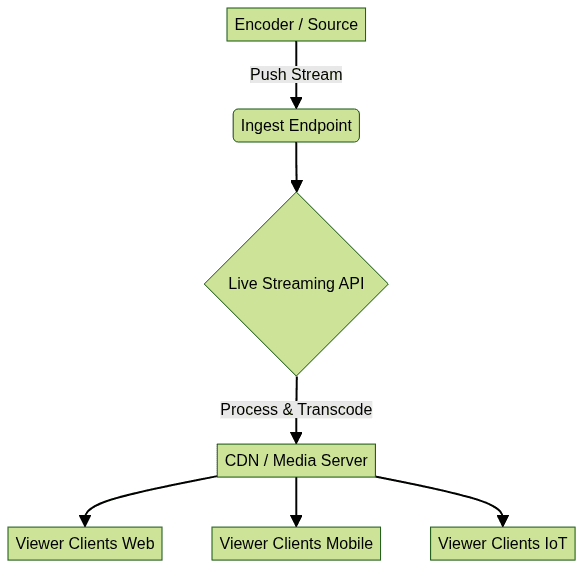
A Live Streaming API is a programmatic interface that allows developers to ingest, process, and distribute live video and audio streams to viewers across the globe. Unlike traditional HTTP Live Streaming (HLS) or Dynamic Adaptive Streaming over HTTP (DASH), which typically introduce 10 to 30 seconds of latency, a modern Live Streaming API leverages WebRTC to enable low-latency interactive streaming. This sub-second latency is crucial for scenarios where audience engagement and real-time interaction are required.
Core Components of a Live Streaming API
Rooms & Participants
At the heart of a robust Live Streaming API is a rooms-based architecture. A Room acts as a virtual container where media streams are exchanged. Participants join these rooms with specific roles, such as host, co-host, or viewer. Within this architecture, a Stream represents the continuous flow of media, while a Track is an individual audio or video source from a participant.
Tokens & Security
Security is paramount in live streaming. Meeting tokens authenticate participants and grant access to specific rooms. These tokens can be scoped with role-based access control to define permissions. Advanced Live Streaming APIs also offer End-to-End (E2E) encryption and geo-fencing to ensure media remains secure and compliant with regional data regulations.
Media Types
A versatile Live Streaming API supports various media types. Beyond standard HD and Full-HD video and audio, developers can utilize custom video tracks for screen sharing, canvas streaming, and virtual backgrounds. This flexibility allows for rich, collaborative broadcasting experiences tailored to specific application needs.
Getting Started with VideoSDK Interactive Live Streaming (ILS)
SDK Coverage
VideoSDK offers one of the broadest SDK coverages in the market. Developers can integrate Interactive Live Streaming using react video and audio calling sdk, javascript video and audio calling sdk, React Native, webrtc android (XML and Jetpack Compose), iOS (UIKit and SwiftUI), flutter webrtc, Unity, C++, IoT, and python video and audio calling sdk. This extensive support ensures that you can deliver a consistent live streaming experience across all major platforms.
Quick-Start Code Snippet
Getting started with VideoSDK ILS is straightforward. Below is a quick-start code snippet demonstrating how to join a room and switch it to live-streaming mode using the javascript video and audio calling sdk.
1import { VideoSDK } from "videosdk-live-streaming";
2
3// Initialize and join the room with a valid token
4const room = await VideoSDK.joinRoom({
5  token: "YOUR_MEETING_TOKEN",
6  roomId: "demo-room",
7  role: "host"
8});
9
10// Switch the room mode to enable Interactive Live Streaming
11await room.changeMode("liveStreaming");
In this example,
VideoSDK.joinRoom initializes the connection using your authentication token and room identifier. The changeMode function dynamically transitions the room from a standard video call into an interactive live streaming session, allowing thousands of viewers to join.Creating a Live Stream Channel
To create a live stream channel programmatically, you can use VideoSDK’s REST APIs for server-side orchestration. This allows you to provision rooms before the broadcast begins.
1curl -X POST "https://api.videosdk.live/v2/rooms" \
2  -H "Authorization: YOUR_API_KEY" \
3  -H "Content-Type: application/json" \
4  -d '{"customRoomId": "live-stream-channel"}'
Managing Live Stream Inputs & Outputs
Ingest Endpoints (RTMP_PUSH)
For broadcasting from external sources like OBS Studio or professional encoders, a Live Streaming API must support standard ingest protocols. You can create an RTMP push input endpoint to receive streams. Here is an example using a generic REST API approach for creating an RTMP input:
1curl -X POST \
2  -H "Authorization: Bearer $(gcloud auth print-access-token)" \
3  -H "Content-Type: application/json" \
4  -d '{"type":"RTMP_PUSH"}' \
5  "https://livestream.googleapis.com/v1/projects/PROJECT_NUMBER/locations/us-central1/inputs?inputId=my-input"
Output Destinations
Once the stream is ingested and processed, it needs to be distributed. VideoSDK ILS supports RTMP output, allowing you to simultaneously broadcast your live stream to platforms like YouTube and Twitch. Additionally, you can generate HLS playback URLs for broader CDN distribution. This multi-platform live streaming capability ensures maximum reach without compromising the low-latency interactive experience for your native app users.
Real-Time Interaction Features
Role Switching
One of the defining features of VideoSDK ILS is dynamic role switching. A host can promote a viewer to a speaker or co-host in real time. This is essential for interactive formats like live Q&A sessions, interviews, and live shopping where audience members need to actively participate.
Chat, Polls, Q&A
To keep the audience engaged, developers can embed a real-time chat overlay directly within the streaming interface. VideoSDK provides built-in support for in-meeting chat, polls, and Q&A, making it easy to build highly engaging live experiences without needing a separate messaging backend.
Breakout Rooms & Waiting Rooms
For large-scale virtual events or webinars, managing audience flow is critical. VideoSDK allows you to implement waiting rooms to screen participants before they join, and breakout rooms to split the audience into smaller, focused discussion groups. These features are easily controlled via API calls, giving developers granular control over the event structure.
Scaling, Monitoring, and Analytics
Scaling a live stream to thousands of concurrent viewers requires intelligent network management. VideoSDK handles this with network-adaptive streaming, automatically adjusting bitrate and resolution based on the viewer's bandwidth. Active speaker detection ensures the UI focuses on the current speaker, optimizing both layout and bandwidth.
For post-event analysis, developers can leverage server-side orchestration to fetch live stream analytics via VideoSDK REST endpoints. You can monitor participant join/leave times, track network quality, and access recording options, including both individual and composite recordings of the live stream.
Security Best Practices
When deploying a Live Streaming API, security must be a top priority. Always utilize End-to-End (E2E) encryption to protect media streams from interception. Implement token expiration to ensure that access tokens cannot be reused maliciously. For enterprise applications, configure IP allow-lists and geo-fencing to restrict access to specific regions or networks. Compliance considerations, such as GDPR and HIPAA, should also guide your architecture, especially when handling sensitive user data or broadcasting telehealth sessions.
Comparison with Other Live Streaming APIs
Choosing the right Live Streaming API depends on your specific requirements for latency, SDK support, and pricing. Below is a brief comparison of VideoSDK ILS with other major providers. VideoSDK also serves as a powerful jitsi alternative and one of the top livekit alternatives for developers seeking low-latency interactive streaming.
| Feature | VideoSDK ILS | Google Cloud Live Stream API | Facebook Live Video API | LinkedIn Live Events API |
|---|---|---|---|---|
| Latency | Sub-second (WebRTC) | 10+ seconds (HLS) | 10+ seconds (HLS) | 10+ seconds (HLS) |
| SDK Support | React, RN, Flutter, iOS, Android, etc. | REST API only | REST API / Graph API | REST API only |
| Interactivity | High (Role switching, Chat, Polls) | Low (One-way broadcast) | Moderate (Comments) | Low (One-way broadcast) |
| Pricing | Per participant / minute | Based on egress & processing | Free (but platform-locked) | Free (but platform-locked) |
Common Pitfalls & Debugging Tips
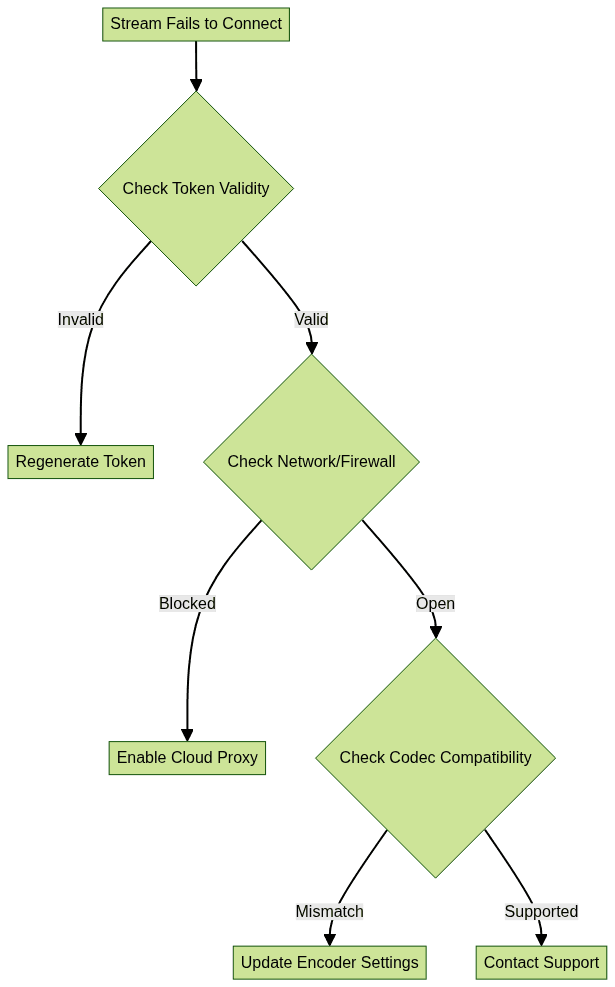
When integrating a Live Streaming API, developers often encounter network issues, token mismatches, and codec incompatibilities. Always ensure your tokens are correctly generated and have not expired. Verify that your chosen codecs (e.g., H.264, VP8) are supported across all target devices. For network issues, utilize cloud proxy configurations to bypass restrictive firewalls.
Conclusion
A dedicated Live Streaming API is the cornerstone of modern, interactive video applications. By leveraging VideoSDK’s Interactive Live Streaming, developers can bypass the complexities of building a low-latency streaming infrastructure from scratch. With comprehensive SDK coverage, robust security features, and unparalleled real-time interaction capabilities, VideoSDK empowers you to build scalable live experiences. Ready to transform your application? Explore VideoSDK’s Interactive Live Streaming today and Try it for free.
Free $20 Balance for AI Voice Agents & Video Calls
FAQ