


Robust speech recognition in noise is the capacity of an automatic speech recognition system to maintain accurate transcription when background interference degrades the input audio. VideoSDK tackles this problem through its AI Voice Agent pipeline, which pairs speech-to-text providers like Deepgram and OpenAI Whisper with built-in noise suppression on the media stream. Developers can deploy these pipelines for real-time voice applications using the VideoSDK Agent SDK and Python backend.
Picture a driver asking their car to navigate to the nearest hospital while the radio plays and three kids argue in the back seat. Or a factory worker issuing voice commands over a two-way radio with machinery roaring at 85 decibels. These are not edge cases. They are the default conditions for most voice interfaces deployed outside a quiet office.
Robust speech recognition in noise is the difference between a voice assistant that works when it matters and one that forces users to repeat themselves until they give up. For developers building telehealth platforms, in-car infotainment, teleconferencing tools, or industrial communication systems, noise robustness is not a nice-to-have. It is the feature that determines whether the product ships.
This guide breaks the topic into three parts. First, you will learn why noise breaks speech recognition and what makes the problem hard. Second, you will see proven end-to-end training strategies that jointly optimize denoising and recognition, including tri-stage training and dual-path style learning. Third, you will get a practical deployment guide covering data preparation, model selection, evaluation, and edge constraints, with a connection to how VideoSDK's real-time infrastructure handles noisy audio in production.
What Makes Speech Recognition Sensitive to Noise?
Speech recognition systems fail in noise because background interference corrupts the very acoustic features the model relies on to distinguish phonemes. When noise masks formant frequencies or fills spectral gaps that separate similar sounds, the acoustic model receives ambiguous input and produces incorrect predictions.
Acoustic vs. Linguistic Degradation
Noise affects speech recognition at two levels. Acoustically, background sounds overlap with the speech signal in the time-frequency domain, masking phonetic cues like burst onset, formant transitions, and voicing periodicity. A /p/ and a /b/ differ primarily by voice onset time, and noise that obscures that 30-millisecond gap causes the model to confuse the two.
Linguistically, acoustic errors cascade into language model errors. If the acoustic model mishears "call the hospital" as "call the hospitable," the language model may not catch the error if the surrounding context does not strongly disambiguate. In noisy conditions, the acoustic model's confidence drops, and the language model receives a probability distribution so flat that it cannot reliably correct mistakes.
Signal-to-Noise Ratio Basics
Signal-to-noise ratio (SNR) measures the power of the speech signal relative to the background noise, expressed in decibels. At 20 dB SNR, speech is clearly dominant and most ASR systems perform near their clean-speech baseline. At 0 dB SNR, speech and noise carry equal power, and word error rates can jump from 5 percent to 40 percent or higher depending on the noise type.
The relationship between SNR and WER is not linear. A drop from 20 dB to 10 dB might increase WER by 2 percentage points, while a drop from 5 dB to 0 dB might double the WER. This nonlinearity means that systems optimized for clean speech often have a cliff edge where performance collapses suddenly rather than degrading gracefully.
Traditional Mitigation Approaches
The classic approach to noise-robust ASR is a two-stage pipeline: a front-end speech enhancement module denoises the audio, then a separately trained ASR model transcribes the cleaned signal. Spectral subtraction, Wiener filtering, and more recent deep-learning denoisers all follow this pattern.
The problem is that front-end denoisers and ASR models optimize different objectives. The denoiser minimizes signal distortion, while the ASR model minimizes word error rate. A denoiser that produces perceptually clean audio might still remove acoustic cues the ASR model needs, a problem called over-suppression. This misalignment is why end-to-end joint training has become the preferred strategy for robust speech recognition in noise.
End-to-End Strategies for Robust Speech Recognition in Noise
End-to-end training eliminates the objective mismatch between denoising and recognition by optimizing both tasks within a single loss function. The result is a model that learns to preserve exactly the acoustic features it needs for accurate transcription while discarding noise that does not carry linguistic information.
Tri-Stage Training Pipeline
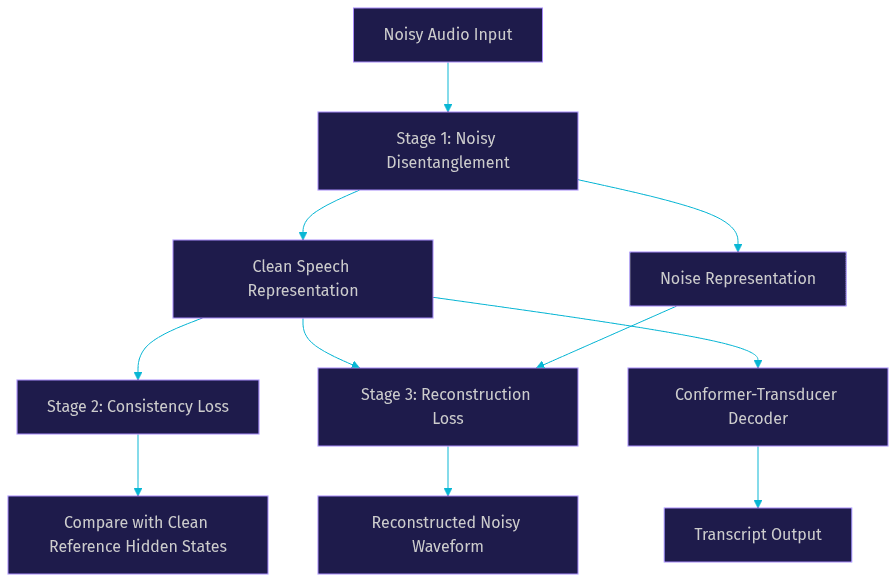
Tri-stage training, exemplified by approaches like NoisyD-CT, trains a Conformer-Transducer model through three sequential loss stages that progressively teach noise invariance. Each stage builds on the previous one, creating a curriculum that starts with disentanglement and ends with reconstruction.
Stage 1 introduces a noisy disentanglement module that separates the input into a clean speech representation and a noise representation. The module learns to factorize the noisy input so that the speech component retains linguistic content while the noise component captures everything else. This stage uses a contrastive loss that pushes clean and noisy versions of the same utterance to share identical content representations.
Stage 2 applies a clean-representation consistency loss. The model processes both the clean reference audio and the noisy version through the disentanglement module, then penalizes any difference between their intermediate representations. This forces the encoder to produce identical hidden states regardless of whether the input was clean or noisy, teaching true noise invariance rather than just noise tolerance.
Stage 3 adds a noisy reconstruction loss. The model must reconstruct the original noisy waveform from the disentangled clean and noise components. This prevents the disentanglement module from discarding information too aggressively, which would hurt generalization on unseen noise types. The reconstruction loss acts as a regularizer that keeps the factorization faithful to the physical mixing process.
Dual-Path Style Learning
Dual-path style learning, known as DPSL-ASR, takes a different architectural approach. The model maintains two parallel processing paths: one for clean speech and one for noisy speech. The clean path serves as a teacher that defines the target representation space, while the noisy path learns to map noisy input into that same space.
The key innovation is a style-transfer loss that aligns the fused features from the noisy path with the clean path's representations. Unlike simple knowledge distillation, which matches final outputs, style transfer matches intermediate feature distributions. This means the noisy path learns not just what to predict but how to represent the speech internally, capturing the structural patterns the clean path uses for recognition.
In practice, DPSL-ASR works well when you have paired clean and noisy data, which is easy to generate by mixing clean speech corpora with real-world noise samples at controlled SNR levels. The style-transfer loss is most effective when the noise types in training span a wide range, from stationary hum to non-stationary crowd noise.
Self-Supervised Pre-Training and Knowledge Distillation
Self-supervised learning (SSL) models like wav2vec 2.0, HuBERT, and WavLM have changed the landscape for noise-robust ASR. These models are pre-trained on tens of thousands of hours of unlabeled audio, learning general speech representations that capture phonetic structure without requiring transcripts. Because the pre-training data includes real-world recordings with varying noise conditions, the learned representations are naturally more robust than those from supervised models trained on clean speech alone. The original wav2vec 2.0 paper on arXiv demonstrated that self-supervised pre-training on unlabeled audio significantly narrows the gap between clean and noisy performance.
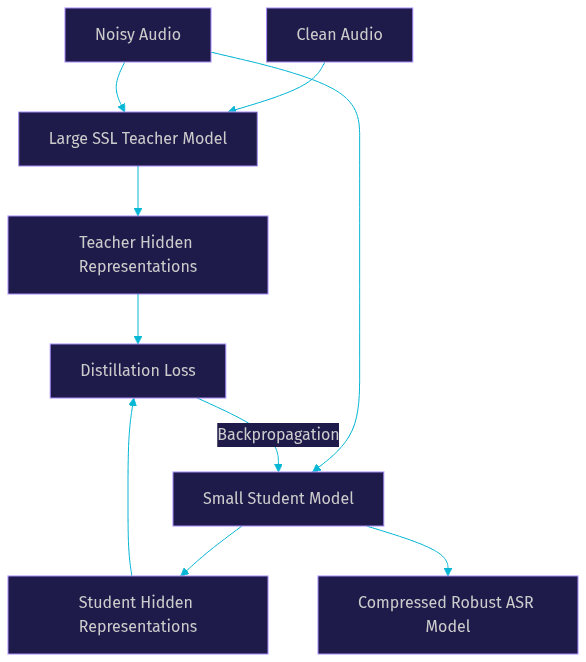
Knowledge distillation compresses this robustness into smaller models suitable for edge deployment. A large SSL teacher model, such as HuBERT trained on 960 hours of LibriSpeech, processes both clean and noisy audio. A smaller student model is then trained to match the teacher's intermediate representations on noisy input. The student learns noise-invariant features without needing the teacher's full parameter count.
According to benchmarks from the CHiME challenge, self-supervised models pre-trained on diverse audio achieve significantly lower WER on noisy test sets compared to supervised baselines trained on clean speech, with some models showing 30 to 50 percent relative WER reduction at low SNR levels.
Choosing the Right Model Architecture
Selecting the right architecture for robust speech recognition in noise depends on your deployment target, latency budget, and available training data. No single model wins across all dimensions, and the best choice often involves trading accuracy for speed or robustness for footprint.
Conformer-Transducer vs. Transformer vs. RNN
The Conformer-Transducer has become the dominant architecture for noise-robust ASR in 2026. It combines the convolutional neural network's ability to capture local patterns with the Transformer's ability to model long-range dependencies. The convolution module excels at extracting fine-grained spectral features that survive noise corruption, while the self-attention module captures the temporal context needed to disambiguate phonemes in noisy conditions.
Pure Transformer models offer strong accuracy on clean speech but can struggle with noisy input because their self-attention mechanism is sensitive to noise-induced token errors. A single misclassified frame can propagate through the attention layers and corrupt the entire sequence prediction.
RNN-based architectures, particularly LSTM and GRU models, remain relevant for edge deployment because of their smaller parameter count and streaming-friendly nature. They process audio frame by frame without the quadratic attention cost of Transformers. However, they generally underperform Conformer models on noisy benchmarks by 3 to 8 WER percentage points.
When to Prefer SSL Models
Self-supervised models like Wav2Vec 2.0, HuBERT, and WavLM shine when you have limited labeled data for your target noise domain. If you are building an in-car voice assistant and only have 50 hours of transcribed in-car audio, pre-training on 960 hours of LibriSpeech followed by fine-tuning on your 50 hours will outperform training a supervised model from scratch on the same 50 hours.
WavLM, developed by Microsoft Research, is particularly strong for noisy conditions because its pre-training objective explicitly includes denoising as an auxiliary task. This gives it an inherent advantage on benchmarks like CHiME-4 compared to wav2vec 2.0, which was pre-trained primarily on clean audio.
The trade-off is model size. WavLM Large has 316 million parameters, which is impractical for edge deployment without aggressive compression. For cloud-based inference with no strict latency requirements, SSL models are the safest default choice.
Model Size Considerations for Edge Devices
Edge deployment forces a tension between robustness and resource constraints. A 300-million-parameter model that achieves 8 percent WER on noisy speech is useless on a device with 50 MB of available model storage.
Compression techniques help bridge this gap. Quantization reduces parameter precision from 32-bit floating point to 8-bit integers, cutting model size by 4x with minimal WER increase. Structured pruning removes entire attention heads or convolution channels that contribute least to noise robustness, reducing both size and inference time. Knowledge distillation, as discussed above, transfers the robustness of a large teacher into a compact student.
The practical floor for a wake-word or short-command ASR model on edge hardware is around 5 to 15 MB. For continuous transcription on edge, 50 to 100 MB is more realistic. Anything larger typically requires cloud inference or a powerful local GPU.
Practical Implementation Guide
Building a noise-robust ASR pipeline requires careful attention to data, training workflow, evaluation, and deployment infrastructure. Each decision compounds: poor data preparation cannot be fixed by a better model, and a great model with inadequate evaluation will fail silently in production.
Data Preparation
The foundation of robust speech recognition in noise is training data that reflects real acoustic conditions. You need both clean speech and noise samples, plus a strategy for combining them.
For simulated noisy data, start with a clean speech corpus like LibriSpeech or CommonVoice and mix it with real-world noise from libraries like the MUSAN corpus or AudioSet. Mix at multiple SNR levels, typically ranging from 20 dB down to minus 5 dB, to teach the model across the full spectrum of conditions it will encounter. Use at least 20 distinct noise categories, including stationary noise (fans, engines), non-stationary noise (crowds, traffic), and impulsive noise (door slams, keyboard typing).
For real-world noisy corpora, the CHiME-4 dataset provides multi-microphone recordings of speech in real domestic environments, while the RATS dataset contains speech over highly degraded radio channels. Training on these corpora ensures your model has seen genuinely noisy recordings, not just simulated mixtures that may not capture the full complexity of real acoustic environments.
Training Workflow
The training workflow follows three phases that build robustness progressively.
Phase 1 involves pre-training a self-supervised backbone on a combination of clean and noisy audio. Use a model like HuBERT or WavLM as the starting point, either pre-trained from scratch on your data or fine-tuned from publicly available checkpoints. The goal is to give the encoder a strong speech representation that already has some noise tolerance from exposure to diverse audio during pre-training.
Phase 2 attaches the noisy disentanglement module to the SSL backbone and applies the tri-stage loss schedule. Start with the disentanglement loss alone for the first epoch, then add the consistency loss, and finally introduce the reconstruction loss. This staged approach prevents the model from trying to learn all three objectives simultaneously, which can cause training instability.
Phase 3 fine-tunes the entire model on the target domain with mixed SNR levels. If you are building an in-car assistant, this means fine-tuning on in-car noise at SNR levels measured from real driving conditions. Use a curriculum that starts with easier high-SNR examples and gradually introduces harder low-SNR examples.
Evaluation Metrics
Word Error Rate (WER) is the primary metric, but a single aggregate WER number hides critical performance patterns. Break WER down by SNR bucket: report WER at 20 dB, 10 dB, 5 dB, 0 dB, and minus 5 dB separately. This reveals whether your model degrades gracefully or has a cliff edge at a specific SNR threshold.
Real-time factor (RTF) measures inference latency relative to audio duration. An RTF of 0.5 means the model processes one second of audio in 0.5 seconds. For real-time applications like VideoSDK's AI Voice Agent pipeline, you need an RTF below 1.0 with margin for network latency. Edge deployment typically requires RTF below 0.3 to leave headroom for other on-device processing.
Deployment Checklist
Before shipping a noise-robust ASR system to production, verify the following:
Ensure your inference endpoint uses HTTPS with properly scoped authentication tokens. VideoSDK's REST API reference covers token generation and room management for cloud-based ASR pipelines. Never expose API secrets in client-side code.
Test on low-bandwidth networks. Audio quality degrades on 3G connections, and the codec compression artifacts interact with background noise in ways your training data may not capture. Run end-to-end tests on actual mobile networks, not just simulated bandwidth throttling.
Monitor for drift. Noise environments change over time as new devices, vehicles, and ambient sounds enter the real world. Set up periodic evaluation with freshly collected noise samples and schedule re-training when WER on the new samples exceeds your baseline by more than 2 percentage points.
For real-time voice applications, VideoSDK's built-in noise suppression operates on the media stream before it reaches your ASR pipeline, providing a first layer of defense against environmental noise. This is particularly valuable for teleconferencing and telehealth scenarios where participants join from unpredictable acoustic environments.
Real-World Case Studies
Three deployment scenarios illustrate how these strategies perform under production constraints.
In-Car Voice Assistant
An automotive OEM deployed a Conformer-Transducer model trained with tri-stage training for in-cabin voice commands. The training data combined 1,000 hours of clean speech mixed with cabin noise recorded across six vehicle types at speeds from 30 to 120 km/h. The tri-stage pipeline reduced WER from 18.3 percent to 12.8 percent on the in-car test set, a 30 percent relative improvement. The model ran on the vehicle's infotainment head unit with a 45 MB footprint and 120 millisecond median latency.
Low-Bandwidth Radio Communication
A defense contractor needed ASR for tactical radio channels where bandwidth is limited to 4 kHz and SNR routinely drops below 0 dB. They used dual-path style learning with a WavLM teacher model and a compact Conformer student. The style-transfer loss aligned the student's representations with the teacher's clean-speech embeddings even on heavily degraded radio audio. The final model maintained WER below 25 percent at minus 3 dB SNR while keeping inference latency under 150 milliseconds on a ruggedized Android device.
Edge-Device Wake-Word Detection
A consumer electronics company needed a wake-word model that worked in noisy kitchens and living rooms. They distilled a HuBERT teacher model into a 10 MB student network using knowledge distillation on paired clean and noisy audio. The student achieved 97.2 percent detection accuracy at 5 dB SNR, compared to 89.4 percent for the previous supervised baseline. The model ran entirely on-device with 8-bit quantization and consumed less than 50 milliwatts of power.
Best-Practice Checklist
- Diversify your noise training data across at least 20 categories, including stationary, non-stationary, and impulsive noise types.
- Use multi-task loss functions that jointly optimize denoising and recognition rather than training them separately.
- Pre-train with self-supervised learning on large unlabeled corpora before fine-tuning on your target domain.
- Evaluate WER by SNR bucket, not as a single aggregate number, to identify cliff edges in performance.
- Include real-world noisy corpora like CHiME-4 in your training set alongside simulated mixtures.
- Apply knowledge distillation to compress large SSL models for edge deployment without sacrificing noise robustness.
- Test on actual deployment hardware and networks, not just development machines with simulated conditions.
- Monitor for noise distribution drift in production and schedule re-training when WER degrades beyond your threshold.
Definitions Glossary
Word Error Rate (WER): The percentage of words incorrectly transcribed by an ASR system, calculated as the sum of substitutions, deletions, and insertions divided by the total words in the reference. WER is the standard metric for evaluating robust speech recognition in noise.
Signal-to-Noise Ratio (SNR): The ratio of speech signal power to background noise power, measured in decibels. Lower SNR values indicate more challenging noise conditions for ASR systems.
Conformer-Transducer: A neural network architecture that combines convolutional layers for local feature extraction with self-attention for long-range context modeling, paired with a transducer loss for streaming inference. It is the dominant architecture for noise-robust ASR in 2026.
Self-Supervised Learning (SSL): A training paradigm where models learn speech representations from unlabeled audio by solving pretext tasks like masked prediction or contrastive learning. SSL models like wav2vec 2.0 and HuBERT produce robust features that transfer well to noisy domains.
Knowledge Distillation: A model compression technique where a small student model learns to replicate the intermediate representations of a larger teacher model, transferring robustness without the teacher's parameter count.
Over-Suppression: A failure mode of front-end denoisers where the enhancement module removes acoustic cues that the ASR model needs for accurate transcription, paradoxically increasing WER despite producing cleaner-sounding audio.
Key Takeaways
- Robust speech recognition in noise requires end-to-end joint optimization of denoising and recognition, not a two-stage pipeline with mismatched objectives.
- Tri-stage training (disentanglement, consistency, reconstruction) progressively teaches noise invariance and prevents over-suppression in Conformer-Transducer models.
- Self-supervised pre-training on diverse audio provides a strong foundation for noise robustness, especially when labeled data for the target domain is limited.
- Knowledge distillation compresses large SSL models into edge-deployable footprints while preserving the noise-invariant representations learned during pre-training.
- VideoSDK's AI Voice Agent pipeline and built-in noise suppression provide a production-ready layer for handling noisy audio in real-time voice applications.
Conclusion
Robust speech recognition in noise is no longer a research curiosity. It is a production requirement for any voice interface deployed outside a controlled environment. The strategies in this guide, from tri-stage training to self-supervised distillation, give developers a concrete path from noisy audio to accurate transcription. The key is treating denoising and recognition as a single optimization problem rather than two separate stages.
If you are building a real-time voice application, VideoSDK's AI Voice Agent documentation covers how to integrate STT providers, handle noisy media streams, and deploy agents at scale. The Python SDK connects custom ASR pipelines directly to VideoSDK rooms. Sign up at app.videosdk.live/login to start building with free credits.
What are you building with VideoSDK? Drop a comment below. I would love to hear what kind of noise-robust ASR use case you are working on, whether it is in-car voice, telehealth, or something entirely new.
Free $20 Balance for AI Voice Agents & Video Calls
FAQ