Introduction to AI Voice Agents in Long-Term Memory for Chatbots
In the evolving landscape of artificial intelligence, AI Voice Agents have emerged as pivotal tools in enhancing user interactions with technology. These agents are not merely voice-activated assistants; they are sophisticated systems capable of understanding, processing, and responding to human speech in a natural and intuitive manner.
What is an AI Voice Agent
?
An AI
Voice Agent
is a software application designed to interact with users through voice commands. It leverages advanced technologies such as Speech-to-Text (STT), Text-to-Speech (TTS), and Large Language Models (LLMs) to process and respond to queries. These agents are integral in various applications, from customer service to personal assistants, providing seamless and efficient user experiences.Why are they important for the long-term memory for chatbots industry?
Incorporating long-term memory into chatbots enhances their ability to remember past interactions, user preferences, and contextual information, leading to more personalized and meaningful conversations. This capability is crucial in industries such as healthcare, finance, and customer support, where understanding and recalling user history can significantly improve service quality.
Core Components of a Voice Agent
- Speech-to-Text (STT): Converts spoken language into text.
- Large Language Models (LLM): Processes and understands the text input to generate appropriate responses.
- Text-to-Speech (TTS): Converts text responses back into spoken language.
What You'll Build in This Tutorial
In this tutorial, you will learn to build an AI
Voice Agent
using the VideoSDK framework. This agent will be capable of understanding and implementing long-term memory features in chatbot systems, providing users with a more interactive and intelligent experience.Architecture and Core Concepts
High-Level Architecture Overview
The architecture of an AI
Voice Agent
involves the seamless integration of various components that work together to process user input and generate responses. The process begins with capturing the user’s speech, converting it to text, processing it through a language model, and finally converting the response back to speech.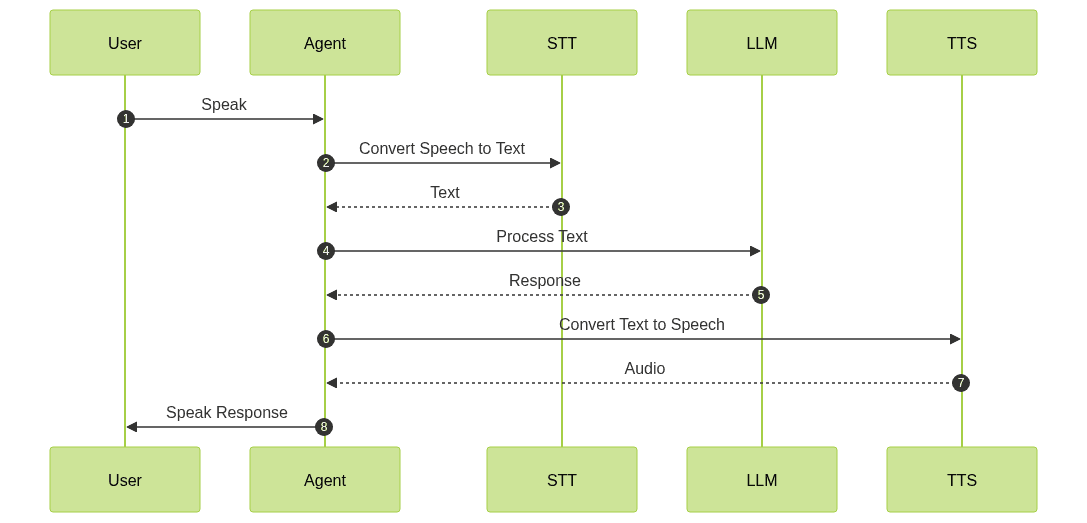
Understanding Key Concepts in the VideoSDK Framework
- Agent: The core class representing your bot, responsible for managing interactions.
Cascading Pipeline in AI voice Agents
: Manages the flow of audio processing, integrating STT, LLM, and TTS.- VAD &
Turn Detector for AI voice Agents
: These components help the agent determine when to listen and when to respond, ensuring a natural flow of conversation.
Setting Up the Development Environment
Prerequisites
Before you begin, ensure you have Python 3.11+ installed on your system. Additionally, you will need a VideoSDK account, which you can create at app.videosdk.live.
Step 1: Create a Virtual Environment
To keep your project dependencies organized, create a virtual environment:
1python -m venv venv
2source venv/bin/activate  # On Windows use `venv\Scripts\activate`
3
Step 2: Install Required Packages
Install the necessary packages using pip:
1pip install videosdk-agents videosdk-plugins
2
Step 3: Configure API Keys in a .env file
Create a
.env file in your project directory and add your VideoSDK API keys:1VIDEOSDK_API_KEY=your_api_key_here
2Building the AI Voice Agent: A Step-by-Step Guide
To build your AI Voice Agent, we will start by presenting the complete code and then break it down into manageable parts for detailed explanation.
1import asyncio, os
2from videosdk.agents import Agent, [AgentSession](https://docs.videosdk.live/ai_agents/core-components/agent-session), CascadingPipeline, JobContext, RoomOptions, WorkerJob, ConversationFlow
3from videosdk.plugins.silero import SileroVAD
4from videosdk.plugins.turn_detector import TurnDetector, pre_download_model
5from videosdk.plugins.deepgram import DeepgramSTT
6from videosdk.plugins.openai import OpenAILLM
7from videosdk.plugins.elevenlabs import ElevenLabsTTS
8from typing import AsyncIterator
9
10# Pre-downloading the Turn Detector model
11pre_download_model()
12
13agent_instructions = "You are a knowledgeable AI Voice Agent with a focus on 'long-term memory for chatbots'. Your persona is that of a 'helpful digital assistant' who aids users in understanding and implementing long-term memory features in chatbot systems. Your capabilities include explaining the concept of long-term memory in chatbots, providing examples of its applications, and guiding users through the implementation process using the VideoSDK framework. You can also suggest best practices for maintaining and updating memory data. However, you are not a software developer and should advise users to consult technical documentation or a professional for coding-specific queries. Always remind users that the information you provide is based on current best practices and may evolve with new technological advancements."
14
15class MyVoiceAgent(Agent):
16    def __init__(self):
17        super().__init__(instructions=agent_instructions)
18    async def on_enter(self): await self.session.say("Hello! How can I help?")
19    async def on_exit(self): await self.session.say("Goodbye!")
20
21async def start_session(context: JobContext):
22    # Create agent and conversation flow
23    agent = MyVoiceAgent()
24    conversation_flow = ConversationFlow(agent)
25
26    # Create pipeline
27    pipeline = CascadingPipeline(
28        stt=DeepgramSTT(model="nova-2", language="en"),
29        llm=OpenAILLM(model="gpt-4o"),
30        tts=ElevenLabsTTS(model="eleven_flash_v2_5"),
31        vad=SileroVAD(threshold=0.35),
32        turn_detector=TurnDetector(threshold=0.8)
33    )
34
35    session = AgentSession(
36        agent=agent,
37        pipeline=pipeline,
38        conversation_flow=conversation_flow
39    )
40
41    try:
42        await context.connect()
43        await session.start()
44        # Keep the session running until manually terminated
45        await asyncio.Event().wait()
46    finally:
47        # Clean up resources when done
48        await session.close()
49        await context.shutdown()
50
51def make_context() -> JobContext:
52    room_options = RoomOptions(
53    #  room_id="YOUR_MEETING_ID",  # Set to join a pre-created room; omit to auto-create
54        name="VideoSDK Cascaded Agent",
55        playground=True
56    )
57
58    return JobContext(room_options=room_options)
59
60if __name__ == "__main__":
61    job = WorkerJob(entrypoint=start_session, jobctx=make_context)
62    job.start()
63
Step 4.1: Generating a VideoSDK Meeting ID
To interact with your agent, you need a meeting ID. You can generate this using the VideoSDK API. Here’s a
curl command example:1curl -X POST "https://api.videosdk.live/v1/rooms" \
2-H "Authorization: Bearer YOUR_API_KEY" \
3-H "Content-Type: application/json" \
4-d '{"name": "My Meeting Room"}'
5Step 4.2: Creating the Custom Agent Class
The
MyVoiceAgent class is a custom implementation of the Agent class. It defines how the agent should behave when a session starts (on_enter) and ends (on_exit).1class MyVoiceAgent(Agent):
2 def __init__(self):
3 super().__init__(instructions=agent_instructions)
4 async def on_enter(self): await self.session.say("Hello! How can I help?")
5 async def on_exit(self): await self.session.say("Goodbye!")
6Step 4.3: Defining the Core Pipeline
The
CascadingPipeline is central to processing audio input and generating responses. It integrates various plugins for STT, LLM, TTS, and more.1pipeline = CascadingPipeline(
2 stt=DeepgramSTT(model="nova-2", language="en"),
3 llm=OpenAILLM(model="gpt-4o"),
4 tts=ElevenLabsTTS(model="eleven_flash_v2_5"),
5 vad=SileroVAD(threshold=0.35),
6 turn_detector=TurnDetector(threshold=0.8)
7)
8Step 4.4: Managing the Session and Startup Logic
The
start_session function initializes the agent session and manages its lifecycle. The make_context function sets up the session context, including room options.1async def start_session(context: JobContext):
2 # Create agent and conversation flow
3 agent = MyVoiceAgent()
4 conversation_flow = ConversationFlow(agent)
5
6 # Create pipeline
7 pipeline = CascadingPipeline(
8 stt=DeepgramSTT(model="nova-2", language="en"),
9 llm=OpenAILLM(model="gpt-4o"),
10 tts=ElevenLabsTTS(model="eleven_flash_v2_5"),
11 vad=SileroVAD(threshold=0.35),
12 turn_detector=TurnDetector(threshold=0.8)
13 )
14
15 session = AgentSession(
16 agent=agent,
17 pipeline=pipeline,
18 conversation_flow=conversation_flow
19 )
20
21 try:
22 await context.connect()
23 await session.start()
24 # Keep the session running until manually terminated
25 await asyncio.Event().wait()
26 finally:
27 # Clean up resources when done
28 await session.close()
29 await context.shutdown()
30
31if __name__ == "__main__":
32 job = WorkerJob(entrypoint=start_session, jobctx=make_context)
33 job.start()
34Running and Testing the Agent
Step 5.1: Running the Python Script
To start your agent, run the Python script:
1python main.py
2
Step 5.2: Interacting with the Agent in the AI Agent playground
After starting the agent, you will see a playground link in the console. Use this link to join the session and interact with your agent. You can test the agent’s responses and its ability to handle long-term memory interactions.
Advanced Features and Customizations
Extending Functionality with Custom Tools
The VideoSDK framework allows you to extend the agent’s functionality using custom tools. This feature enables you to add specific capabilities tailored to your application needs.
Exploring Other Plugins
While this tutorial uses specific plugins for STT, LLM, and TTS, the VideoSDK framework supports various other options. Explore different plugins to find the best fit for your project requirements.
Troubleshooting Common Issues
API Key and Authentication Errors
Ensure your API keys are correctly configured in the
.env file. Double-check for typos or missing keys.Audio Input/Output Problems
Verify your microphone and speaker settings. Ensure they are correctly configured and not muted.
Dependency and Version Conflicts
Use a virtual environment to manage dependencies and avoid version conflicts. Ensure all packages are up to date.
Conclusion
Summary of What You've Built
In this tutorial, you have built a fully functional AI Voice Agent capable of handling long-term memory interactions. This agent can understand and respond to user queries, providing a seamless conversational experience.
Next Steps and Further Learning
To further enhance your agent, explore additional plugins and customization options available in the VideoSDK framework. Continue learning about AI and voice technologies to stay ahead in the rapidly evolving field.
Want to level-up your learning? Subscribe now
Subscribe to our newsletter for more tech based insights
FAQ