


Triggering an action from a voice agent means moving beyond simple information retrieval to executing real-world tasks like updating a database or calling an external API. VideoSDK enables this through its AI Voice Agent pipeline, where speech is transcribed, analyzed for intent by an LLM, and mapped to function tools that perform the requested action before a spoken response is generated. Developers can orchestrate this entire flow using the VideoSDK Python Agent SDK.
Developers building voice-first applications often hit the same wall: the agent can talk, but it cannot do. A user asks a voice assistant to update a shipping address or transfer funds, and the agent merely repeats the request instead of executing it. Reliable action triggering is the bridge between a conversational interface and a functional application backend. A voice agent operates on a core loop: listen, think, act, and speak. When the act phase fails or is missing, the agent is just a chatbot with a microphone. This guide breaks down how to trigger actions from a voice agent, covering the core components, step-by-step workflow, and production considerations needed to ship a reliable voice-driven workflow automation system. You will learn how to wire real-time voice intent detection to external APIs using VideoSDK's real-time communication infrastructure.
What Does Triggering an Action Mean in a Voice Agent?
Action triggering in a voice agent is the process of translating a spoken user request into a concrete, state-changing operation on a backend system. Simple information retrieval answers questions like "What is the weather?" by fetching data. Action triggering goes further, executing tasks like "Order a large pepperoni pizza" or "Cancel my subscription" through voice-triggered API calls.
In a traditional graphical user interface, a user clicks a button to trigger an action. In a voice-first conversational flow, the user's spoken words are the button. The system must parse natural language, handle ambiguity, and map it to a deterministic API call. This is why function calling in voice assistants is so important. It provides a structured bridge between the fuzzy world of human speech and the strict world of backend APIs.
There are two primary architectures for voice agents. The first is the traditional sandwich model, where audio goes through a Speech-to-Text (STT) pipeline, the text is processed by a Large Language Model (LLM) agent, and the response is sent through a Text-to-Speech (TTS) response layer. The second is a speech-to-speech model, a multimodal voice agent architecture where a single model handles the entire pipeline. In both architectures, the action-trigger point lives between the intent decision and the response generation. Once the LLM determines the user's intent, it emits a structured signal, often called a function call, which the system uses to execute the action before generating the final spoken reply. This enables custom device actions for voice assistants without requiring physical button presses.
Core Components Required to Trigger Actions
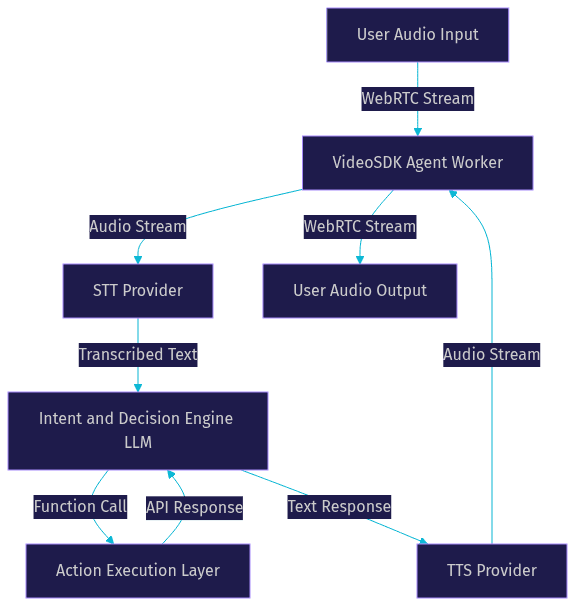
To build a system that reliably triggers actions, you need four distinct layers working in concert. Each layer handles a specific phase of the voice agent pipeline.
Speech-to-Text (STT) Layer
The STT layer converts spoken audio into text. Accurate transcription is critical because intent detection relies entirely on the quality of this text. If the STT layer mishears "transfer funds" as "transfer fans," the action trigger will fail. Developers typically choose providers like OpenAI Whisper, Deepgram, or Google Cloud STT based on their accuracy, latency, and language support. VideoSDK integrates with these providers to stream audio directly from the WebRTC room to the STT service, ensuring low-latency transcription that feeds into the intent engine.
Intent and Decision Engine
Once the user's speech is transcribed, the text passes to the intent and decision engine. This is usually an LLM like OpenAI GPT-4o or Anthropic Claude, configured with function calling in voice assistants. The LLM evaluates the text against a set of predefined tools. For example, if the user says "Transfer fifty dollars to savings," the LLM recognizes a "transfer_funds" intent and extracts the amount and destination account. It outputs a structured function call rather than a conversational text response. This engine is the brain behind real-time voice intent detection.
Developers can use frameworks like LangChain or the OpenAI Agents SDK to manage the decision engine. These frameworks help structure the conversation, maintain context, and route the user's intent to the correct function tool. VideoSDK's Python SDK integrates smoothly with these orchestration frameworks, allowing you to bring your own agent logic while relying on VideoSDK for the real-time media transport.
Action Execution Layer
The action execution layer is the bridge between the agent's decision and your application backend. When the LLM emits a function call, this layer executes the corresponding logic. This might involve calling a REST API, updating a database record, or invoking a serverless cloud function. Security is paramount here. The execution layer must use scoped tokens and least-privilege access to ensure the voice agent cannot perform unauthorized actions. VideoSDK's Agent Worker manages this execution context securely, supporting voice agent orchestration with LangChain or OpenAI Agents SDK.
Text-to-Speech (TTS) Layer
After the action completes, the agent needs to confirm the result to the user. The TTS layer converts the agent's text response back into audio. The latency of this entire round-trip heavily impacts perceived responsiveness. Providers like ElevenLabs, Cartesia, and OpenAI TTS offer low-latency streaming options that begin speaking before the full response is generated, keeping the interaction feeling natural and immediate.
Step-by-Step Workflow to Trigger an Action
Building a voice agent that triggers actions requires a clear, sequential workflow. Here is how the pipeline functions from the moment a user speaks to the moment the agent confirms the action.
Step 1: Capture Audio
The process begins when the user speaks into their device. The VideoSDK client SDK captures audio from the microphone and streams it over WebRTC to a VideoSDK room. The Agent Worker, a Python process running on VideoSDK Agent Cloud or self-hosted infrastructure, is connected to this room and receives the audio stream in real time.
Step 2: Transcribe
The Agent Worker forwards the audio stream to the configured STT provider. The STT service transcribes the audio and returns text. Turn detection mechanisms, like Voice Activity Detection (VAD), determine when the user has finished speaking, signaling the STT layer to finalize the transcription.
Step 3: Detect Intent
The transcribed text is passed to the LLM. The LLM is configured with a system prompt and a set of available function tools. It analyzes the text to determine if the user is asking a question or requesting an action. If an action is needed, the LLM selects the appropriate function tool and extracts any required parameters from the user's utterance.
Step 4: Execute Action
The Agent Worker receives the function call from the LLM and executes the corresponding Python function. This function makes an HTTP request to your backend API, performs a database update, or triggers a cloud function. The execution layer handles the response, including success confirmations or error states, and passes the result back to the LLM context.
If the external API returns an error, the execution layer must catch it and feed the error back to the LLM. The LLM can then decide whether to retry the action, ask the user for more information, or apologize and end the transaction. This closed-loop error handling is what separates a production-ready voice agent from a fragile prototype.
Step 5: Generate Reply
The LLM receives the result of the function call and generates a natural language response. If the action succeeded, the response might be "Your shipping address has been updated." If it failed, the LLM formulates an appropriate apology and suggests next steps.
Step 6: Stream Audio Back
The generated text response is sent to the TTS provider, which converts it into audio. This audio is streamed back into the VideoSDK room and played to the user. The entire flow, from audio capture to audio playback, is orchestrated by the VideoSDK Agent SDK.
Designing Reliable Action Triggers
A voice agent that triggers actions is powerful, but it can also be dangerous if it misinterprets a user. Designing reliable triggers requires careful intent engineering and robust conversational guardrails.
Use explicit intent phrases and fallback utterances. When defining function tools for the LLM, provide clear descriptions and examples of what triggers them. If you have a "cancel_order" tool, explicitly state that phrases like "cancel my order" or "stop that delivery" should trigger it. If the LLM is unsure, it should fall back to a clarifying question rather than guessing and executing the wrong action.
Implement turn detection and barge-in handling. Users often interrupt an agent while it is speaking. Your pipeline needs to detect this barge-in, stop the TTS audio immediately, and process the new command. VideoSDK's real-time pipeline supports preemption, allowing the agent to halt its current response and handle the user's new input instantly.
Add confirmation prompts for high-risk actions. If a user asks to transfer money or delete an account, the agent should not execute the action immediately. It should ask for confirmation: "Are you sure you want to transfer fifty dollars to savings?" Only when the user confirms should the function call be executed.
Finally, apply rate-limiting and idempotency to your API calls. A user might accidentally trigger the same action twice by repeating themselves. Ensure your backend APIs can handle duplicate requests without double-charging or double-updating records.
Testing and Debugging Voice-Action Workflows
Testing voice agents is harder than testing text chatbots because you have to deal with audio. You cannot just type a message and check the response. You need to simulate the entire audio pipeline.
Simulate audio inputs with recorded clips. Instead of speaking into your microphone every time, record a set of user utterances and replay them through the pipeline. This ensures consistent testing conditions. You can feed these audio files directly into the STT layer to verify transcription accuracy across different accents and speaking speeds.
Log everything. When an action fails, you need to know where it failed. Log the STT confidence score, the raw LLM output, the extracted function parameters, and the API response status code. VideoSDK provides pipeline observability features that let you inspect each stage of the agent's processing flow.
Use a dry-run mode. When testing new actions, configure your execution layer to log the API payload it would have sent without actually sending it. This lets you verify that the LLM is extracting the right parameters and formatting the function call correctly, without risking side effects on your production database.
Production Considerations
Moving a voice agent from development to production requires careful attention to latency, scaling, and security.
Latency budgeting is critical for low-latency voice interaction design. Users expect a response within 500 milliseconds. If your round-trip takes longer, the conversation feels broken. Profile each stage of your pipeline. If your STT provider takes 300 milliseconds, your LLM takes 400 milliseconds, and your TTS takes 200 milliseconds, you are already over budget. Consider streaming STT and TTS to overlap processing times, and use fast LLM providers like Cerebras or Groq for lower inference latency.
Scaling STT and TTS services requires choosing between voice-agent deployment patterns like cloud vs on-premise. Cloud providers handle scaling automatically but can become expensive at high volumes. On-premise deployment gives you control over costs and data privacy but requires you to manage infrastructure capacity. VideoSDK supports both cloud and self-hosted Agent Workers, giving you flexibility in how you scale.
Monitor and alert on failed actions. If your voice agent is responsible for processing orders, a failed API call is a business-critical event. Set up alerts for when action execution fails, and log enough context to reproduce the issue. VideoSDK's session analytics provide visibility into agent performance and failure rates.
Security is non-negotiable. Rotate your API secrets regularly. Use least-privilege tokens for your action execution layer. If your agent only needs to read user profiles and update shipping addresses, do not give it the token scope to delete accounts. VideoSDK uses token-based authentication to ensure only authorized agents can join rooms and access media streams. When your agent executes actions, it is acting on behalf of the user. You need to ensure that the agent has the correct permissions to perform the action. This might involve passing a user-specific token to the execution layer, or using OAuth to authorize the agent to access the user's account.
Real-World Example: Voice-Triggered Account Update
Imagine a user calls a customer support line powered by a VideoSDK AI Voice Agent. The user says, "Update my shipping address to 123 Main St."
The user's audio is captured by the VideoSDK client and streamed to the Agent Worker. The STT layer transcribes the audio. The LLM receives the text and recognizes an "update_address" intent. It extracts the new address "123 Main St" and emits a function call.
The Agent Worker executes the function, making an authenticated API call to the backend database to update the user's profile. The API returns a success message. The LLM receives this success status and generates the text: "Your shipping address has been updated to 123 Main St."
The TTS layer converts this text to audio, and the Agent Worker streams it back to the user. The entire process happens in under a second, providing a seamless, hands-free experience. If the user had said "Update my address to 123 Main St, wait no, 456 Elm St," the turn detection and barge-in handling would capture the correction, and the LLM would use the final value.
Definitions Glossary
Voice Agent Action Triggering: The process of converting a spoken user request into a concrete, state-changing operation on a backend system via API calls or database updates.
Function Calling: A mechanism in LLMs where the model outputs a structured JSON object containing a function name and arguments, rather than generating a text response, to trigger an external action.
Agent Worker: The Python process in VideoSDK that manages the AI agent session, orchestrating the STT, LLM, and TTS pipeline and executing function calls.
Turn Detection: The mechanism that determines when a user has finished speaking and the agent should begin processing or responding, often using Voice Activity Detection (VAD).
Barge-in: When a user interrupts the agent while it is speaking, requiring the system to stop the TTS audio and process the new input immediately.
Key Takeaways
- Triggering actions from a voice agent requires a pipeline that moves beyond information retrieval to execute state-changing operations.
- The core components are the STT layer, the intent and decision engine, the action execution layer, and the TTS layer.
- Reliable action triggers depend on explicit intent design, turn detection, and confirmation prompts for high-risk actions.
- Production deployments require strict latency budgeting, comprehensive logging, and least-privilege security tokens.
- VideoSDK's Python Agent SDK provides the orchestration layer to connect speech, intent, and action seamlessly.
Conclusion
Building a voice agent that can actually do things, not just talk about them, is the next frontier of conversational AI. By wiring STT, LLM function calling, and TTS together with a robust execution layer, you can create voice-first experiences that handle real business logic. VideoSDK gives you the real-time communication infrastructure and Python Agent SDK to build, test, and deploy these action-triggering pipelines without wrestling with raw WebRTC. Ready to build your own action-driven voice agent? Check out the VideoSDK AI Agents documentation to get started. What are you building with VideoSDK? Drop a comment below, I'd love to hear what kind of voice agent workflows you're working on.
FAQ