


How to test a voice agent involves building a golden call set, generating synthetic callers with varied personas, running automated multi-turn conversations, scoring results with an LLM-as-judge, and gating releases with regression, load, and compliance checks. VideoSDK's test harness can orchestrate this end-to-end workflow without a microphone.
Voice agents are rapidly replacing traditional interactive voice response systems in contact centers, but testing them remains a massive bottleneck for engineering teams. When you deploy an AI voice agent, you are not just shipping a chatbot with a text-to-speech layer. You are shipping a real-time, full-duplex audio application that must understand speech, reason about it, and respond naturally within sub-second latency. If you want to know how to test a voice agent effectively, you need a strategy that addresses audio quality, conversation flow, and infrastructure reliability simultaneously.
Testing voice agents is fundamentally harder than testing text-only bots. Text bots operate in a deterministic request-response cycle. Voice agents operate in a continuous stream of audio frames where interruptions, silence, and background noise constantly change the context. A slight delay in speech-to-text processing can cause the agent to talk over the user, ruining the experience and causing frustration.
This article walks you through an end-to-end voice-agent testing workflow. You will learn how to build a golden call set, generate synthetic callers with diverse personas, evaluate conversations using an LLM-as-judge, and integrate the entire pipeline into your CI/CD workflow for automated regression testing.
What Makes Testing a Voice Agent Different?
Testing a voice agent requires handling complexities that text-based LLM applications never face. The first major difference is bidirectional streaming and full-duplex audio. Unlike a chat interface where a user submits a complete message and waits for a response, a voice agent processes audio in real time. The user can speak, pause, and resume while the agent is already formulating a response. Your testing framework must simulate this streaming behavior accurately to catch timing bugs.
Non-deterministic responses add another layer of difficulty. Even with the same input, an LLM might generate slightly different responses on different runs. When you combine this with multi-turn context, where the agent must remember details from earlier in the conversation, verifying correctness becomes a statistical challenge rather than a simple string match. You cannot simply assert that the agent says a specific phrase because it might use a valid variation.
Audio-text divergence, also known as speech hallucination, is a unique voice agent failure mode. The LLM might generate a perfect text response, but the text-to-speech engine might mispronounce a word, add an awkward pause, or skip a clause entirely. Your test suite must verify the spoken audio output, not just the underlying text transcript. If the TTS engine skips a critical negation, the agent might accidentally confirm an action the user wanted to cancel.
Latency and silence handling also distinguish voice testing. If the STT engine takes too long to detect the end of a user's speech, the agent's response feels sluggish. If it triggers too early, the agent interrupts the user. Your tests must measure the exact timing of silence detection and turn-taking to ensure a natural conversation flow.
In short, voice agent testing demands a multi-layered approach that validates infrastructure, speech recognition, dialogue management, and audio synthesis in every single test run.
Core Layers of a Voice-Agent Test Stack
A robust voice-agent testing framework evaluates four distinct layers of the application stack. Isolating these layers helps pinpoint exactly where a failure occurs.
Infrastructure Layer
The infrastructure layer handles the real-time transport of audio. When testing this layer, you evaluate network latency, TURN/STUN server reliability, and audio codec selection. If your agent uses WebRTC, you need to verify that packet loss and jitter do not degrade the conversation beyond acceptable limits. VideoSDK handles this layer automatically with network-adaptive streaming, but your tests should still verify latency under load. You should simulate poor network conditions to ensure the agent degrades gracefully.
Speech-to-Text Layer
The speech-to-text (STT) layer transcribes incoming audio. The primary metric here is Word Error Rate (WER). Your test harness should feed audio files with various accents, speech rates, and background noise levels to measure STT accuracy. A voice agent cannot respond correctly if it mishears the user. You should also test the STT layer's ability to handle partial transcripts and endpointing, which is the process of detecting when a user has finished speaking.
Dialogue Layer
The dialogue layer is the brain of your voice agent. It handles intent detection, tool calls, and context retention. Testing this layer involves verifying that the agent calls the right APIs, extracts the correct parameters from user speech, and maintains context across multiple turns. This is where you test the business logic of your agent. You should verify that the agent handles out-of-scope requests gracefully and does not hallucinate tool parameters.
Speech-Synthesis Layer
The speech-synthesis (TTS) layer converts the agent's text response back into audio. Tests at this layer evaluate TTS quality, timing, and barge-in handling. Barge-in occurs when a user interrupts the agent mid-sentence. The agent must stop speaking immediately and start listening. If the TTS layer does not handle barge-in quickly, the user will hear overlapping audio. You should also test for natural intonation and correct pronunciation of domain-specific terms.
Designing a Golden Call Set
A golden call set is a curated collection of recorded or scripted conversations that represent your most critical user journeys. It serves as the baseline for regression testing. Without a golden set, you have no reliable way to know if a prompt change improved your agent or broke a working flow.
To build a golden call set, start by extracting real-world call logs from your production environment. Identify common intents, edge cases, and failure modes. For a healthcare booking agent, a golden set might include scenarios like booking an appointment, rescheduling, asking about insurance coverage, and abruptly hanging up. You should categorize these calls by difficulty and frequency.
Each scenario in your golden set should include the expected user utterances, the expected agent actions (like calling a scheduling API), and the expected conversation outcome. You must version these calls alongside your prompts and model revisions. When you update your system prompt, you run the entire golden set to ensure your changes did not break existing functionality. This versioning strategy allows you to track how agent behavior evolves over time.
For example, a golden scenario description for a flight booking agent would outline a user requesting a flight from New York to London, changing their mind about the departure date, and asking for a window seat. The test verifies that the agent successfully queries the flight database, updates the date without asking for the destination again, and passes the seat preference to the booking tool. The scenario should also include expected failure paths, such as the flight being sold out.
Building Synthetic Callers
You cannot scale voice agent testing by having human testers call your agent on the phone. You need synthetic callers that can simulate thousands of concurrent conversations. Building synthetic callers starts with persona definition. A persona dictates the caller's accent, speech rate, vocabulary, and background noise. You might define one persona as a fast-speaking user with a heavy accent calling from a noisy street, and another as a slow-speaking elderly user calling from a quiet room. This variation ensures your agent handles diverse real-world conditions.
Using LLM-simulated users is the most effective way to generate realistic utterances. Instead of hardcoding user responses, you prompt an LLM to act as the caller. The LLM receives the persona instructions and the current agent response, then generates the next spoken reply. This creates dynamic, unpredictable conversations that test the agent's reasoning capabilities. The simulator LLM can also introduce intentional complications, like changing its mind or asking clarifying questions.
Here is how the synthetic caller pipeline flows from persona definition to final evaluation:
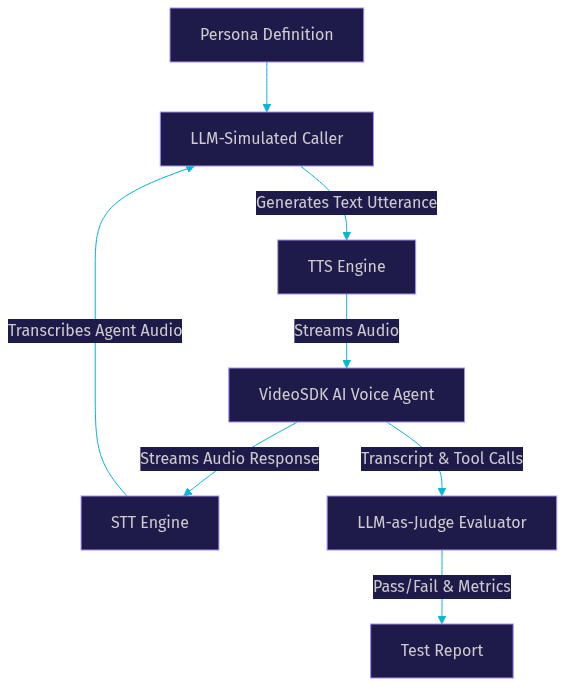
This architecture allows your test harness to run complete, natural conversations between two AI systems without any human intervention or physical microphones. The VideoSDK platform manages the real-time audio transport between the synthetic caller and the agent under test.
Automated Evaluation with LLM-as-Judge
Once your synthetic caller and voice agent complete a conversation, you need to evaluate the outcome. Traditional assertion-based testing fails here because the exact wording of the conversation will vary. Instead, you use an LLM-as-judge to evaluate the conversation transcript.
The LLM-as-judge is a separate LLM instance prompted to score the conversation based on specific metrics. These metrics include intent success (did the agent achieve the user's goal?), tool side-effects (did the agent call the right APIs with the right parameters?), latency thresholds (did the agent respond within the target time?), and compliance flags (did the agent make any unauthorized promises?). You define these metrics based on your business requirements.
The judge outputs a structured pass or fail decision along with a rationale. For example, the judge might output a structured response indicating that the agent failed because it attempted to book a flight without confirming the passenger's last name, violating a compliance rule. This structured output makes it easy to parse the results programmatically and generate dashboards.
The three-model architecture separates the caller, the agent, and the judge to ensure unbiased evaluation:
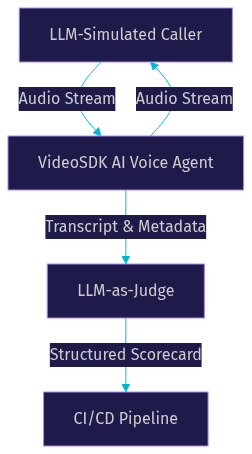
Using an LLM-as-judge allows you to evaluate subjective qualities like politeness and conversational flow, which are impossible to check with simple string matching. You can also use the judge to compare different versions of your agent, determining which one provides a better user experience.
Regression, Load, and Compliance Testing
A complete voice-agent test suite covers three types of testing: regression, load, and compliance. Each type addresses a different risk to your production environment.
Regression testing involves running your golden call set after every prompt, model, or infrastructure change. When you tweak your system prompt to make the agent friendlier, you run the golden set to ensure it did not break the booking flow. The LLM-as-judge compares the new results against the baseline, and any drop in success rate triggers a regression alert. This ensures continuous improvement without sacrificing reliability.
Load testing evaluates how your agent performs under high traffic. Contact centers experience peak volumes, and your agent must handle them without degrading latency. Your test harness should spin up hundreds or thousands of concurrent synthetic callers. You measure the end-to-end latency, STT processing time, and LLM token generation rate under this load. If you target 50,000 concurrent calls, your load test must gradually ramp up to that number while monitoring infrastructure metrics. VideoSDK's scalable infrastructure supports these high-concurrency scenarios.
Compliance testing is non-negotiable for regulated industries. If your agent handles healthcare data, it must comply with PHI regulations. Your test suite must verify that the agent never asks for sensitive information over an unencrypted channel and that it properly authenticates users before sharing data. Compliance tests also check for mandatory consent announcements at the start of the call and correct routing to human agents for emergency situations. These tests must run automatically on every deployment.
Integrating Tests into CI/CD
Manual testing cannot keep up with the pace of voice agent development. You must integrate your test harness into your CI/CD pipeline to maintain velocity.
Every pull request that modifies the agent's prompt, tool definitions, or infrastructure configuration should trigger the test harness. The pipeline spins up a temporary VideoSDK room, deploys the updated agent, and runs a subset of the golden call set. The LLM-as-judge evaluates the results and outputs a structured scorecard.
You configure deployment gates based on these metrics. If the intent success rate drops below 95 percent, or if any compliance test fails, the pipeline blocks the deployment. This ensures that only validated changes reach production. You can also run the full golden set as a nightly job to catch regressions that slip through smaller PR checks.
The pipeline should also collect metrics over time. Track your average latency, STT accuracy, and tool call success rates across hundreds of test runs. Sudden spikes in latency or drops in accuracy indicate an underlying issue with a provider or infrastructure component, even if the tests technically pass. This observability is crucial for maintaining a reliable voice agent in production.
Definitions Glossary
Golden Call Set: A curated collection of recorded or scripted conversations representing critical user journeys, used as a baseline for regression testing.
Synthetic Caller: An automated test agent that simulates human callers with specific personas, accents, and speech patterns to test voice agents at scale.
LLM-as-Judge: An evaluation method where a separate LLM instance scores a conversation based on specific metrics like intent success, compliance, and latency.
Barge-in: The event where a user interrupts a voice agent mid-sentence, requiring the agent to immediately stop speaking and start listening.
Word Error Rate (WER): A metric measuring the accuracy of a speech-to-text system by calculating the percentage of words incorrectly transcribed.
Key Takeaways
- Testing a voice agent requires validating infrastructure, STT, dialogue, and TTS layers independently and together.
- A golden call set provides a reliable baseline for regression testing across prompt and model changes.
- Synthetic callers with diverse personas enable scalable, automated multi-turn conversation testing.
- An LLM-as-judge evaluates subjective conversation quality and objective success metrics without brittle string matching.
- Integrating the test harness into CI/CD with deployment gates prevents regressions from reaching production.
Conclusion
Testing a voice agent is a multi-layered challenge that demands a structured approach to audio, dialogue, and infrastructure. By building a golden call set, generating synthetic callers, and using an LLM-as-judge, you can automate the most tedious parts of voice-agent QA. Integrating these tests into your CI/CD pipeline ensures your agent remains reliable as you iterate on prompts and models. VideoSDK's AI voice agent pipeline provides the real-time infrastructure you need to run these tests without physical microphones. You can explore the VideoSDK AI Agents documentation to start building your test harness. What are you building with VideoSDK? Drop a comment below to share your voice agent testing experiences.
Free $20 Balance for AI Voice Agents & Video Calls
FAQ