


Automatic speech recognition in Python converts spoken audio into text using libraries like OpenAI Whisper, Vosk, and Hugging Face Transformers. Python's ecosystem gives developers access to offline and cloud-based speech-to-text models, real-time transcription pipelines, and GPU-accelerated inference. For production-grade voice applications, VideoSDK's AI voice agent platform integrates ASR directly into real-time communication rooms. Start with the VideoSDK AI Agents documentation to see how Python ASR fits into a live voice pipeline.
Building a system that listens, understands, and transcribes human speech used to require a PhD in signal processing and a cluster of specialized hardware. Today, a Python developer with a laptop and the right library can spin up a speech-to-text pipeline in an afternoon. The gap between research and production has narrowed dramatically, and Python sits at the center of that shift.
This guide walks through the full landscape of automatic speech recognition in Python for 2026. You will learn how ASR works under the hood, which libraries and models are worth your time, how to choose the right one for your project, and what it takes to move from a local prototype to a production deployment.
Understanding Automatic Speech Recognition in Python
Automatic speech recognition is defined as the process of converting spoken language into written text using computational models. ASR works by capturing an audio signal, extracting acoustic features from that signal, and passing those features through models that map sound patterns to linguistic units like phonemes, words, and sentences.
A typical ASR system has three core components. The acoustic model maps audio frames to phonetic probabilities. The language model predicts which word sequences are most likely given the context. The decoder combines outputs from both models to produce the final transcription. Modern end-to-end models like Whisper blur these boundaries by training a single neural network to handle all three stages, but the conceptual division remains useful for understanding system behavior.
Python ties these pieces together because nearly every major ASR framework exposes a Python API. Whether you are loading a pretrained model from Hugging Face, calling a local Vosk instance, or orchestrating a GPU-accelerated Whisper inference server, Python is the glue language that lets you move from audio file to text output without switching ecosystems.
Why Python Is a Strong Choice for ASR
Python's dominance in machine learning and data science makes it the natural home for speech recognition work. The language offers a rich ecosystem of audio processing libraries, deep learning frameworks, and model hubs that cover every stage of the ASR pipeline.
Integration with data pipelines is straightforward. You can read audio from a file, a microphone stream, or a network socket, process it with libraries like librosa or soundfile, feed it into a neural model, and write the transcription to a database or API endpoint, all within a single Python script. The community support is unmatched. Tutorials, pre-trained models, and active discussion forums mean that when you hit a wall, someone has likely already solved it and shared the answer.
Popular Python ASR Libraries Overview
SpeechRecognition Library
The SpeechRecognition library is a wrapper that provides a unified Python interface across multiple back-ends, including Google Web Speech API, CMU Sphinx, and Whisper. It is a good starting point for developers who want to experiment with different engines without rewriting their code. The library supports both offline recognition through bundled models and cloud-based recognition through API calls. Its main limitation is that it abstracts away fine-grained control over model parameters, which matters when you need to optimize for latency or accuracy.
OpenAI Whisper
Whisper is an end-to-end transformer model trained on 680,000 hours of multilingual audio data. It handles transcription, translation, and language detection in a single forward pass. The model comes in several sizes, from Tiny to Large, allowing developers to trade accuracy for speed depending on their hardware. Whisper excels at handling noisy audio, accents, and code-switching between languages. Its main drawback is resource consumption, as the larger models require significant GPU memory for real-time inference.
Vosk API
Vosk is a lightweight offline speech recognition toolkit that runs on-device without requiring a network connection. It uses Kaldi-based acoustic models and supports dozens of languages. Vosk is ideal for edge deployment scenarios where latency, privacy, or connectivity constraints make cloud APIs impractical. The Python bindings are simple, and the models are compact enough to run on a Raspberry Pi. The trade-off is that Vosk models generally achieve lower accuracy than large transformer models on challenging audio.
Hugging Face Transformers
The Hugging Face Transformers library provides access to a wide range of ASR models through its model hub, including fine-tuned Whisper variants, Wav2Vec2, and newer models like Qwen3-ASR. Developers can load a model with a few lines of Python, run inference on audio arrays, and fine-tune models on custom datasets using the Trainer API. The hub also hosts community-contributed models for low-resource languages that commercial APIs often ignore.
Choosing a Library Checklist
When selecting a library, evaluate four factors: inference speed on your target hardware, transcription accuracy on your audio domain, licensing terms for commercial use, and hardware requirements including GPU versus CPU deployment.
Setting Up Your Python Environment
Start with Python 3.9 or later, as most modern ASR libraries have dropped support for older versions. Create a virtual environment to isolate dependencies, since ASR frameworks often have specific version requirements for PyTorch, TensorFlow, or ONNX Runtime that can conflict with other projects.
Install your core packages based on the library you chose. For Whisper, you need the Whisper package and PyTorch. For Vosk, you need the Vosk Python package and a downloaded model file. For Hugging Face, you need the Transformers library and a backend like PyTorch or TensorFlow.
GPU versus CPU considerations matter significantly. CPU inference works fine for batch processing of short audio clips with small models. Real-time transcription or large model inference requires a GPU with sufficient VRAM. If you are deploying on cloud infrastructure, an NVIDIA T4 or A10G GPU is a reasonable starting point for Whisper Medium, while Whisper Large typically needs an A100 or equivalent.
Run a sanity check by loading a short WAV file and transcribing it with your chosen library. Confirm that the output text matches expectations and that inference time is within your latency budget. This early test catches environment issues before you build more complex pipeline logic on top.
Choosing the Right ASR Model for Your Project
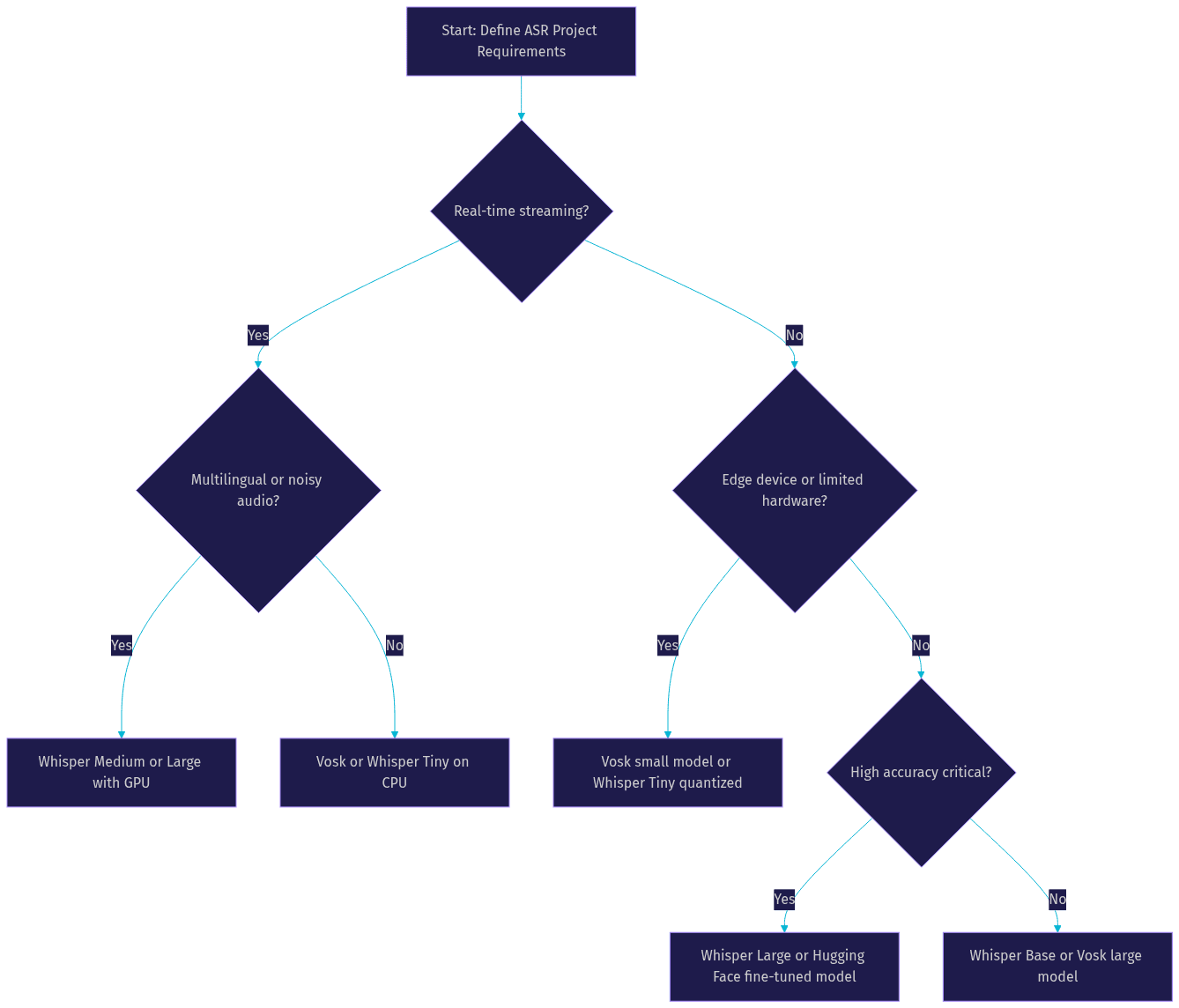
Model selection depends on three primary factors: language coverage, latency requirements, and resource budget. If your application handles a single language with clear audio, a compact model like Vosk may deliver sufficient accuracy at a fraction of the computational cost. If you need multilingual support, noisy environment robustness, or high accuracy on conversational speech, a larger transformer model like Whisper or a Hugging Face ASR variant is the better choice.
Consider your deployment target. Edge devices and mobile applications benefit from quantized models that run in under 200 milliseconds on limited hardware. Server-side batch processing can afford to use the largest available models since latency is less critical. Real-time streaming applications need a model that can process audio chunks incrementally without waiting for the full recording.
The decision flowchart below maps common project requirements to recommended model categories.
When you need deterministic control over conversation flow alongside ASR, VideoSDK's Conversational Graph provides a structured orchestration layer that pairs naturally with Python-based speech recognition pipelines.
Implementing ASR with Python: Step-by-Step Guide
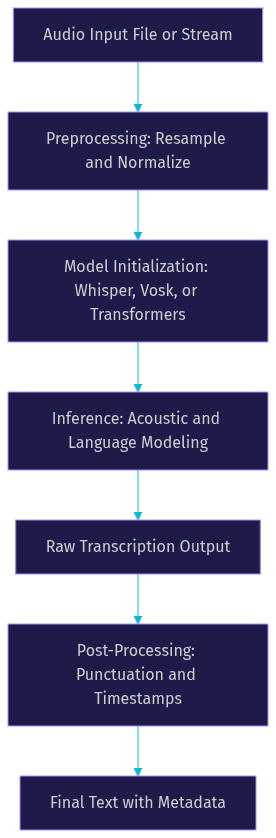
Building an ASR pipeline in Python follows a consistent sequence regardless of which library you choose. The steps below describe the process in natural language so you can adapt them to your specific framework.
Step 1: Load and Preprocess Audio
Read your audio file into a Python array using a library like soundfile or librosa. Check the sample rate of your audio and resample it to match your model's expected input, which is typically 16 kHz for most ASR models. Normalize the audio amplitude to a consistent range to help the model generalize across recordings with different volume levels. Convert stereo audio to mono by averaging channels, since ASR models are trained on single-channel input.
Step 2: Initialize the Model
Load your chosen model into memory. For Whisper, this means selecting a model size and loading the corresponding weights. For Vosk, you point the library to a downloaded model directory. For Hugging Face Transformers, you load a model and processor from the hub. This step can take several seconds for large models, so in production you should initialize the model once at application startup and reuse it across requests.
Step 3: Run Inference
Pass your preprocessed audio array to the model and capture the transcription output. For batch processing, you pass the full audio array at once. For streaming applications, you pass audio chunks incrementally and accumulate the transcription as results arrive. Pay attention to the model's maximum input length, as some models require you to split long audio files into segments.
Step 4: Post-Process the Transcription
Raw model output often lacks proper punctuation, capitalization, or formatting. Whisper handles some of this automatically, but other models may require additional processing. Apply punctuation restoration if your model does not provide it. Run language detection if your audio may contain multiple languages. Generate timestamps for each transcribed segment if your application needs word-level or sentence-level alignment.
The pipeline diagram below illustrates the full flow from audio input to final text output.
For developers building real-time voice applications, VideoSDK's Python SDK connects ASR pipelines directly to live audio streams from VideoSDK rooms, eliminating the need to build custom audio transport.
Optimizing Accuracy and Performance
Audio quality is the single biggest factor in ASR accuracy. Record at a sample rate of at least 16 kHz with a bitrate of 128 kbps or higher. Apply noise reduction before inference if your audio contains background sounds. Libraries like noisereduce and RNNoise can clean up recordings significantly before they reach the model.
Model quantization reduces memory usage and speeds up inference with minimal accuracy loss. Half-precision (FP16) inference on GPU cuts memory requirements roughly in half compared to full precision. INT8 quantization on CPU can deliver two to four times speed improvement, making it possible to run medium-sized models on hardware that would otherwise be too slow.
Batch inference processes multiple audio files in a single forward pass, which improves throughput for offline transcription workloads. Streaming inference processes audio in small chunks as it arrives, which is necessary for real-time applications but introduces additional complexity around chunk boundaries and context management.
External language models can improve accuracy by rescoring the ASR output. You take the top candidate transcriptions from the acoustic model and re-rank them using a language model that has broader context understanding. This technique is especially useful for domain-specific vocabulary that the base model may not handle well.
Deploying ASR Models in Production
Containerization is the standard approach for packaging ASR models for deployment. Build a Docker image that includes your Python environment, model weights, and application code. This ensures consistency between development and production and simplifies horizontal scaling.
For scaling, run multiple inference workers behind an async queue. Each worker loads the model into memory and processes transcription requests from the queue. Tools like vLLM and Triton Inference Server can optimize GPU utilization by batching requests across workers. Monitor inference latency, queue depth, and error rates to identify bottlenecks before they affect users.
Security considerations for audio data are critical. Audio recordings may contain sensitive personal information, so encrypt data in transit and at rest. If you use cloud-based ASR APIs, review the provider's data retention policies. For privacy-sensitive applications, on-device inference with Vosk or a quantized Whisper model eliminates the need to send audio to any external service.
Common Pitfalls and Troubleshooting
Mismatched sample rates are the most frequent cause of poor ASR results. If your audio is recorded at 44.1 kHz but your model expects 16 kHz, the model receives distorted input and produces garbage output. Always verify the sample rate before inference and resample if necessary.
Out-of-vocabulary languages cause silent failures where the model returns empty or nonsensical text. Check that your model supports the language in your audio. Whisper handles this through automatic language detection, but models like Vosk require you to load the correct language model explicitly.
GPU memory exhaustion occurs when the model and audio input exceed available VRAM. Symptoms include crashes, extremely slow inference, or fallback to CPU processing. Reduce batch size, use a smaller model variant, or apply quantization to fit within memory constraints.
Debugging silent failures requires logging at every pipeline stage. Log the audio sample rate, duration, model loading time, inference time, and raw model output before post-processing. This trail of metadata makes it possible to trace where a transcription went wrong.
Future Trends in Python-Based ASR
Real-time multimodal models are converging speech, vision, and text into unified architectures. OpenAI's Realtime API and Google's Gemini Live demonstrate that future ASR systems will not just transcribe speech but understand it in context alongside visual and textual inputs. Python developers will interact with these models through streaming APIs that handle audio, video, and text simultaneously.
On-device inference is improving rapidly as models get smaller and hardware gets faster. Apple Silicon, NVIDIA Jetson, and mobile NPUs are making it feasible to run production-quality ASR locally on phones and edge devices. This trend reduces latency, improves privacy, and eliminates dependency on network connectivity.
Integration with conversational AI pipelines is where Python ASR is heading next. VideoSDK's AI voice agent platform exemplifies this direction by connecting ASR, large language models, and text-to-speech into a single real-time pipeline. Developers can build voice agents that listen, reason, and respond in natural conversation, with Python handling the orchestration layer. The VideoSDK Agent SDK is open source and supports deployment to VideoSDK Agent Cloud or self-hosted infrastructure.
Definitions Glossary
Acoustic Model: A neural network that maps audio feature vectors to phonetic probability distributions. In Python ASR pipelines, the acoustic model is typically loaded from a pretrained checkpoint and runs inference on GPU or CPU.
Language Model: A statistical or neural model that predicts the probability of word sequences. Language models improve ASR accuracy by favoring transcriptions that form coherent sentences.
End-to-End ASR: A model architecture that directly maps audio input to text output without separate acoustic and language model components. OpenAI Whisper is a prominent example of an end-to-end ASR model available in Python.
Streaming Transcription: A mode of ASR where audio is processed in small chunks as it arrives, producing partial transcription results in real time. This is essential for live captioning and voice agent applications.
Quantization: A model optimization technique that reduces the precision of neural network weights from 32-bit floating point to 16-bit or 8-bit integers, decreasing memory usage and increasing inference speed.
Key Takeaways
- Automatic speech recognition in Python is accessible through mature libraries including OpenAI Whisper, Vosk, Hugging Face Transformers, and the SpeechRecognition wrapper, each suited to different accuracy, latency, and deployment scenarios.
- Model selection should be driven by your project's language coverage needs, latency budget, and hardware constraints, with compact models like Vosk serving edge use cases and large transformer models handling multilingual or noisy audio.
- Audio preprocessing, including resampling to 16 kHz, normalization, and noise reduction, has a larger impact on transcription accuracy than most model tuning efforts.
- Production deployment requires containerization, async worker scaling, GPU memory management, and careful attention to audio data security and privacy.
- For real-time voice applications, VideoSDK's AI voice agent platform integrates Python ASR directly into live communication rooms, connecting speech-to-text with LLM reasoning and text-to-speech in a single pipeline.
Conclusion
Automatic speech recognition in Python has evolved from a specialized research task into a practical capability that any developer can integrate. The combination of pretrained models, rich Python libraries, and accessible GPU infrastructure means the barrier to entry is lower than ever. Whether you are building an offline transcription tool, a real-time captioning service, or a conversational AI agent, the tools you need are available today.
Start by picking one library, transcribing a sample audio file, and measuring the results against your accuracy and latency requirements. From there, explore optimization techniques like quantization and streaming inference. When you are ready to build production voice applications, explore VideoSDK's AI voice agent documentation and join the VideoSDK Discord community to connect with other developers building real-time communication experiences. You can sign up for a free account at app.videosdk.live/login and start building today.
What are you building with automatic speech recognition in Python? Drop a comment below, I would love to hear what kind of speech-to-text use case you are working on.
Free $20 Balance for AI Voice Agents & Video Calls
FAQ