


An AI voice bot open source project lets you build conversational voice agents using self-hosted speech-to-text, large language model inference, and text-to-speech components without per-minute pricing or vendor lock-in. VideoSDK offers an open-source AI Agent SDK that connects these pipelines to real-time WebRTC rooms, enabling production-grade voice bot deployment with full control over your data and infrastructure. Start with the VideoSDK AI Agents documentation to see how the pieces fit together.
Introduction
Voice bots have moved from clunky IVR menus to fluid, real-time conversational agents that interrupt, pause, and respond with human-like timing. The breakthrough came when large language models met streaming speech-to-text and neural text-to-speech, collapsing the old pipeline latency from seconds to milliseconds.
But here is the catch: most commercial voice bot platforms charge per minute, lock your conversation data behind their APIs, and give you limited control over the underlying models. For developers building production voice agents, that means unpredictable costs and zero visibility into what happens to user audio.
Open source changes the equation. When you run your own AI voice bot stack, you choose the STT engine, the LLM, the TTS voice, and the turn-taking logic. You control where data lives, how long it persists, and which models process it. This guide walks through the leading open source projects, the core architecture components, and what it takes to deploy a voice bot in production.
What is an AI Voice Bot?
An AI voice bot is a software agent that conducts real-time voice conversations with human users. Unlike traditional chatbots that exchange text messages, a voice bot listens to spoken audio, transcribes it, generates a response using a language model, and speaks the response back, all within a tight latency budget that makes the interaction feel natural.
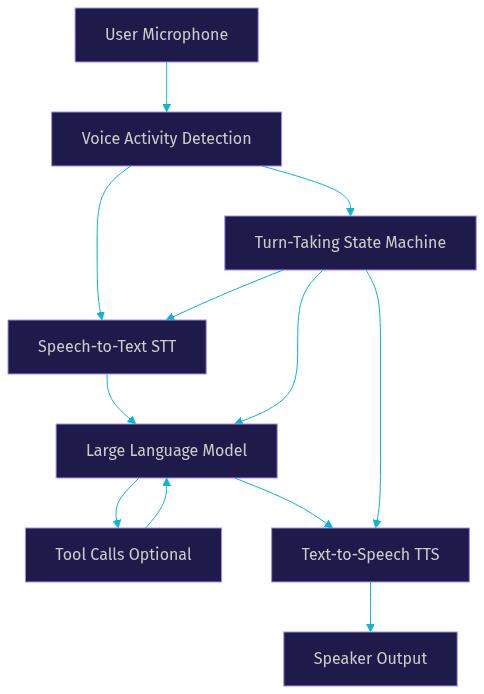
The core capabilities break down into three stages. Speech-to-text (STT) converts incoming audio into text in real time. A large language model (LLM) processes that text, maintains conversation context, and generates a response. Text-to-speech (TTS) converts the response back into audio for playback. The entire loop, from user finishing speaking to bot starting to respond, needs to complete in under one second to feel conversational.
VideoSDK provides voice bot infrastructure through its open-source AI Agent SDK, which orchestrates this real-time loop inside WebRTC rooms. The agent worker manages the STT-to-LLM-to-TTS pipeline, handles turn detection, and connects to users via web, mobile, or telephony.
Benefits of Using an Open-Source Voice Bot
Open source voice bot projects give you three things that commercial platforms cannot match: transparency, control, and cost predictability.
Transparency means you can inspect every component of the pipeline. When a voice bot hallucinates a response or mishears a user, you can trace the issue through the STT transcription, the LLM prompt, and the TTS output. With a black-box API, you are filing a support ticket.
Control extends to data residency and privacy. If your voice bot handles healthcare conversations, financial data, or EU user data under GDPR, running the entire stack on your own infrastructure keeps audio and transcripts inside your network. No third party sees, stores, or trains on your conversation data.
Cost predictability matters at scale. Commercial voice bot platforms typically charge per minute of conversation, which means your bill scales linearly with usage and can spike unpredictably. An open source stack running on your own GPU server has a fixed infrastructure cost regardless of how many minutes your bot talks.
Community support is the fourth benefit. Active open source projects accumulate contributions, bug fixes, and integration adapters faster than any single vendor can ship them. You get access to community-maintained STT adapters, TTS voice models, and deployment templates that would take weeks to build from scratch.
Leading Open-Source Projects
The open source voice bot landscape has matured significantly by 2026. Here are five projects worth knowing, each with a different architectural philosophy.
Gradbot
Gradbot is a Rust-based voice bot multiplexer designed for high-concurrency deployments. Its core innovation is the Gradium integration, a streaming orchestration layer that manages multiple simultaneous conversations on a single server with minimal memory overhead. Rust's memory safety and zero-cost abstractions make Gradbot particularly suited for production environments where resource efficiency matters. The project supports multi-language conversations out of the box, with built-in adapters for several STT and TTS engines. Gradbot's architecture separates the conversation state machine from the media processing layer, which means you can swap STT or TTS providers without touching the turn-taking logic.
Vui
Vui focuses on low-latency WebRTC streaming as its core transport. The project ships with Vui Nano, a compact neural TTS model that runs on consumer GPUs and produces natural-sounding speech with sub-200-millisecond generation latency. Where Vui stands out is barge-in handling: when a user starts speaking while the bot is still talking, Vui detects the interruption through voice activity detection, stops TTS playback immediately, and transitions to listening mode. This creates conversations that feel interactive rather than turn-based. The WebRTC pipeline also means Vui can be deployed behind a standard reverse proxy without specialized media servers.
Intervo
Intervo brings a visual workflow canvas to voice bot design. Instead of writing conversation logic in code, you drag nodes onto a graph to define conversation flows, branching conditions, and tool calls. This approach mirrors what VideoSDK's Conversational Graph offers for deterministic voice flows: the LLM handles natural language, but the graph controls what happens next. Intervo also includes a built-in RAG knowledge base, so your voice bot can answer questions from your documents without fine-tuning. Telephony integration is built in, allowing Intervo bots to receive and make phone calls through SIP trunks.
Dograh
Dograh is a drag-and-drop voice bot builder with a BYOK (bring your own key) philosophy. You provide the API keys for your chosen STT, LLM, and TTS providers, and Dograh wires them together through a visual interface. This makes it accessible to developers who want a working voice bot without diving into pipeline architecture. The tradeoff is less control over the turn-taking state machine compared to Gradbot or Vui.
Koda
Koda is a lightweight personal-assistant-focused voice bot framework. It prioritizes ease of setup over enterprise features, making it a good starting point for developers experimenting with voice agents for the first time.
Core Architecture Components
Every AI voice bot, regardless of the project you choose, shares the same fundamental architecture. Understanding these components helps you evaluate projects and plan customizations.
Speech-to-Text (STT)
The STT component converts incoming audio streams into text in real time. Streaming ASR (automatic speech recognition) is essential because batch transcription introduces latency that breaks conversational flow. Open source options include faster-whisper, an optimized inference engine for OpenAI's Whisper models that runs on local GPUs. Cloud-based options like Deepgram and Google Cloud STT offer lower latency but require sending audio to a third party. The STT engine must also provide partial transcripts so the turn-taking system can detect when a user has finished speaking, not just when they pause briefly.
Large Language Model (LLM)
The LLM generates conversational responses from the transcribed user speech. OpenAI-compatible endpoints let you swap between hosted models (GPT-4o, Claude, Gemini) and local models (Llama, Mistral) without changing your bot's code. Tool-calling capability is critical: it lets the voice bot trigger external actions like checking a database, booking an appointment, or looking up a product. VideoSDK's AI Agent SDK supports function tools and MCP integration that expose your APIs to the LLM in a structured way.
Text-to-Speech (TTS)
Neural TTS has advanced to the point where synthetic voices are nearly indistinguishable from human speech. Open source TTS engines like Coqui XTTS and Piper offer voice cloning from short audio samples, multi-voice catalogs, and multi-language support. The key metric is time-to-first-audio: how quickly the TTS engine starts producing sound after receiving the first tokens from the LLM. Streaming TTS, which generates audio incrementally as text arrives, is essential for keeping total response latency under one second.
Multiplexer and Turn-Taking
The multiplexer is the orchestrator that coordinates the three streams (STT, LLM, TTS) and decides when the bot should listen, think, or speak. It implements a state machine that tracks conversation state and handles edge cases like barge-in, silence detection, and simultaneous speech. Without a robust turn-taking system, a voice bot will either talk over users or wait too long before responding. VideoSDK's agent architecture includes built-in turn detection and voice activity detection that manages these transitions.
Choosing the Right Project
Selecting an open source voice bot project depends on your deployment target, development style, and performance requirements. The table below compares the five projects across key dimensions.
| Project | Language | Docker Support | Community Size | Voice Catalog | Best For |
|---|---|---|---|---|---|
| Gradbot | Rust | Yes | Medium | Multi-engine | High-concurrency production |
| Vui | Python | Yes | Medium | Vui Nano plus adapters | Low-latency WebRTC bots |
| Intervo | TypeScript | Yes | Growing | Cloud and local | Visual flow design, RAG |
| Dograh | Python | Yes | Small | BYOK providers | Quick prototyping |
| Koda | Python | Partial | Small | Limited | Personal assistant experiments |
| VideoSDK Agent SDK | Python | Yes | 3000+ Discord | Multi-provider | Production WebRTC and telephony |
When evaluating these projects, ask yourself five questions. First, what is your target latency budget? Sub-500-millisecond bots need Rust or optimized Python pipelines. Second, do you need telephony integration? If yes, Intervo and VideoSDK's Agent SDK have built-in SIP support. Third, will you run on CPU or GPU? Neural TTS and local LLMs require GPU resources. Fourth, how important is visual conversation design? Intervo and Dograh offer drag-and-drop builders. Fifth, do you need deterministic conversation flows? VideoSDK's Conversational Graph provides graph-based orchestration that prevents LLM hallucinations from derailing structured workflows.
Deployment Considerations
Self-Host vs Managed Cloud
Running a voice bot on your own infrastructure gives you maximum control but requires GPU resources, networking expertise, and ongoing maintenance. A self-hosted deployment means you handle Docker container orchestration, TLS certificate management, and WebRTC media routing. The upside is zero per-minute costs and full data sovereignty.
Managed cloud options like VideoSDK's Agent Cloud handle the infrastructure layer for you. You write the agent logic, deploy it, and VideoSDK manages the WebRTC rooms, media servers, and scaling. This is the pragmatic choice for teams that want to ship voice bots quickly without operating their own GPU servers.
Security and Data Residency
Voice bot security involves three layers. Transport security requires TLS for all API calls and DTLS-SRTP for WebRTC media streams. Token security means generating short-lived authentication tokens server-side and never exposing API secrets in client-side code. Data residency means choosing where audio recordings and transcripts are stored, which matters for GDPR compliance and healthcare applications under HIPAA.
VideoSDK addresses these layers with token-based authentication, E2E encryption for media streams, and geo-fencing to restrict data processing to specific regions.
Scaling and Performance
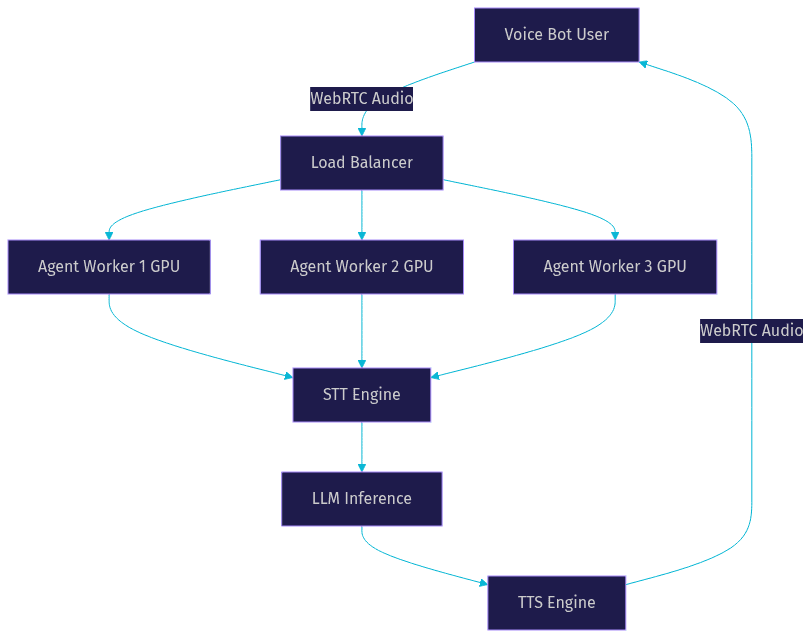
Voice bot scaling is fundamentally different from web app scaling because each conversation holds persistent state and consumes GPU resources for the duration of the call. A single NVIDIA A10G GPU can typically handle 10 to 20 concurrent voice bot sessions, depending on the STT and TTS models in use. CPU-only deployments with cloud STT and TTS can scale higher but introduce network latency.
Load balancing for voice bots requires session affinity: once a conversation starts on a specific worker process, all subsequent audio for that session must route to the same worker. VideoSDK's agent worker architecture handles this automatically through its room-based model, where each room maps to a specific agent worker process.
Extending and Customizing
Adding Custom Tools
Custom tools let your voice bot take actions beyond conversation. You expose internal APIs or functions to the LLM through a structured interface, and the LLM decides when to call them based on the conversation context. For example, a customer support bot might have tools for looking up order status, processing refunds, or scheduling callbacks. VideoSDK's Agent SDK supports function tools and MCP integration that make this exposure straightforward: you define the tool schema, implement the handler, and the agent pipeline handles the rest.
Voice Cloning and Multi-Language
Voice cloning lets you create custom TTS voices from short audio samples, which is valuable for branding and accessibility. Open source engines like Coqui XTTS and Piper support cloning with as little as six seconds of reference audio. For multi-language support, you need STT models trained on the target language, an LLM that responds in that language, and TTS voices in the appropriate language. Most open source projects provide adapter interfaces for adding new language packs without modifying the core pipeline.
Plug-in New STT and TTS Providers
The adapter pattern is the standard approach for swapping STT and TTS providers. Each provider gets a wrapper that implements a common interface: the STT adapter accepts an audio stream and returns partial and final transcripts. The TTS adapter accepts text and returns an audio stream. This separation means you can start with a cloud STT provider for fast prototyping, then switch to a self-hosted Whisper model for production without rewriting your bot logic. VideoSDK's Agent SDK uses this pattern across its supported STT and TTS providers, including Deepgram, OpenAI Whisper, ElevenLabs, and Cartesia.
Real-World Use Cases
Customer Support Hotline
A voice bot on a customer support hotline can handle tier-1 inquiries, route complex issues to human agents, and operate around the clock. The bot transcribes incoming calls, identifies intent, looks up customer information through tool calls, and either resolves the issue or transfers to a human agent. VideoSDK's telephony integration connects SIP trunk providers like Twilio and Telnyx to WebRTC rooms where the AI agent processes the call.
In-Game NPC Dialogue
Game developers use voice bots to create non-player characters that players can talk to in natural language. The voice bot runs the same STT-LLM-TTS pipeline but with a system prompt that defines the character's personality, knowledge, and speaking style. Low latency is critical here: players expect immediate responses during gameplay. The WebRTC transport layer in projects like Vui and VideoSDK's Agent SDK provides the sub-second response times that immersive dialogue requires.
Personal Productivity Assistant
A personal productivity assistant voice bot can manage calendars, set reminders, draft emails, and answer questions about your documents. The RAG capability in projects like Intervo lets the bot search through your notes and files during conversation. VideoSDK's Conversational Graph can structure these interactions so the bot follows a defined workflow for tasks like scheduling, rather than relying on the LLM to improvise.
Future Trends for Open-Source Voice Bots
Three trends are shaping the next phase of open source voice bot development.
First, real-time multimodal models like OpenAI Realtime API and Google Gemini Live are collapsing the STT-LLM-TTS pipeline into a single model that processes audio directly. This eliminates the transcription step and reduces latency to under 300 milliseconds. Open source projects are already building adapters for these models, and VideoSDK's Agent SDK supports OpenAI Realtime and Google Gemini as first-class pipeline options.
Second, edge inference on Apple Silicon and mobile NPUs is making it feasible to run voice bots entirely on-device. Projects like Whisper.cpp and MLX-based LLM inference enable voice processing without sending audio to any server. This is a privacy breakthrough for healthcare and legal applications.
Third, community-driven benchmark initiatives like Artificial Analysis Speech Arena are creating standardized comparisons of STT accuracy, TTS naturalness, and end-to-end voice bot latency. These benchmarks help developers choose components based on evidence rather than vendor marketing, and rankings update frequently as new models ship.
Definitions Glossary
Speech-to-Text (STT): The component that converts spoken audio into text in real time, enabling a voice bot to understand user input. Streaming STT provides partial transcripts that drive turn-taking decisions.
Text-to-Speech (TTS): The component that converts generated text responses into natural-sounding audio for playback to the user. Neural TTS engines like Coqui XTTS and Piper support voice cloning and multi-language output.
Turn-Taking: The state machine that coordinates when a voice bot listens, processes, and speaks. Robust turn-taking handles barge-in (user interrupting the bot), silence detection, and simultaneous speech.
Multiplexer: The orchestration layer that manages the STT, LLM, and TTS streams as a unified conversation pipeline. It routes audio between components and maintains conversation state.
Agent Worker: The Python process that runs a VideoSDK AI agent and manages its session lifecycle inside a WebRTC room, handling the full STT-to-LLM-to-TTS pipeline for each conversation.
Key Takeaways
- Open source AI voice bot projects give you full control over data residency, model selection, and cost, avoiding the per-minute pricing model of commercial platforms.
- The core architecture of any voice bot consists of three streaming components (STT, LLM, TTS) coordinated by a turn-taking state machine, and understanding this pipeline is essential for evaluating and customizing projects.
- VideoSDK's open-source AI Agent SDK provides production-grade voice bot infrastructure with WebRTC transport, telephony integration, and support for multiple STT, LLM, and TTS providers.
- Deployment choices between self-hosted GPU infrastructure and managed cloud platforms depend on your latency requirements, data sovereignty needs, and team size.
- The adapter pattern for STT and TTS providers lets you prototype with cloud services and migrate to self-hosted models without rewriting your bot logic.
Conclusion
Open source AI voice bots have reached the point where a solo developer or small team can build a production-grade conversational agent with sub-second latency, custom voices, and full data control. The projects covered here represent different philosophies: Rust for concurrency, Python for flexibility, visual builders for accessibility, and graph-based orchestration for deterministic flows. VideoSDK's open-source AI Agent SDK ties these components together with WebRTC transport, telephony integration, and a managed deployment option for teams that want to skip infrastructure management. Whether you start with Docker on a single GPU or deploy to VideoSDK's Agent Cloud, the path from prototype to production has never been shorter. Join the VideoSDK Discord community to connect with other developers building voice agents, and check out the code samples for working examples. What are you building with VideoSDK? Drop a comment below, I would love to hear what kind of voice bot use case you are working on.
Free $20 Balance for AI Voice Agents & Video Calls
FAQ