
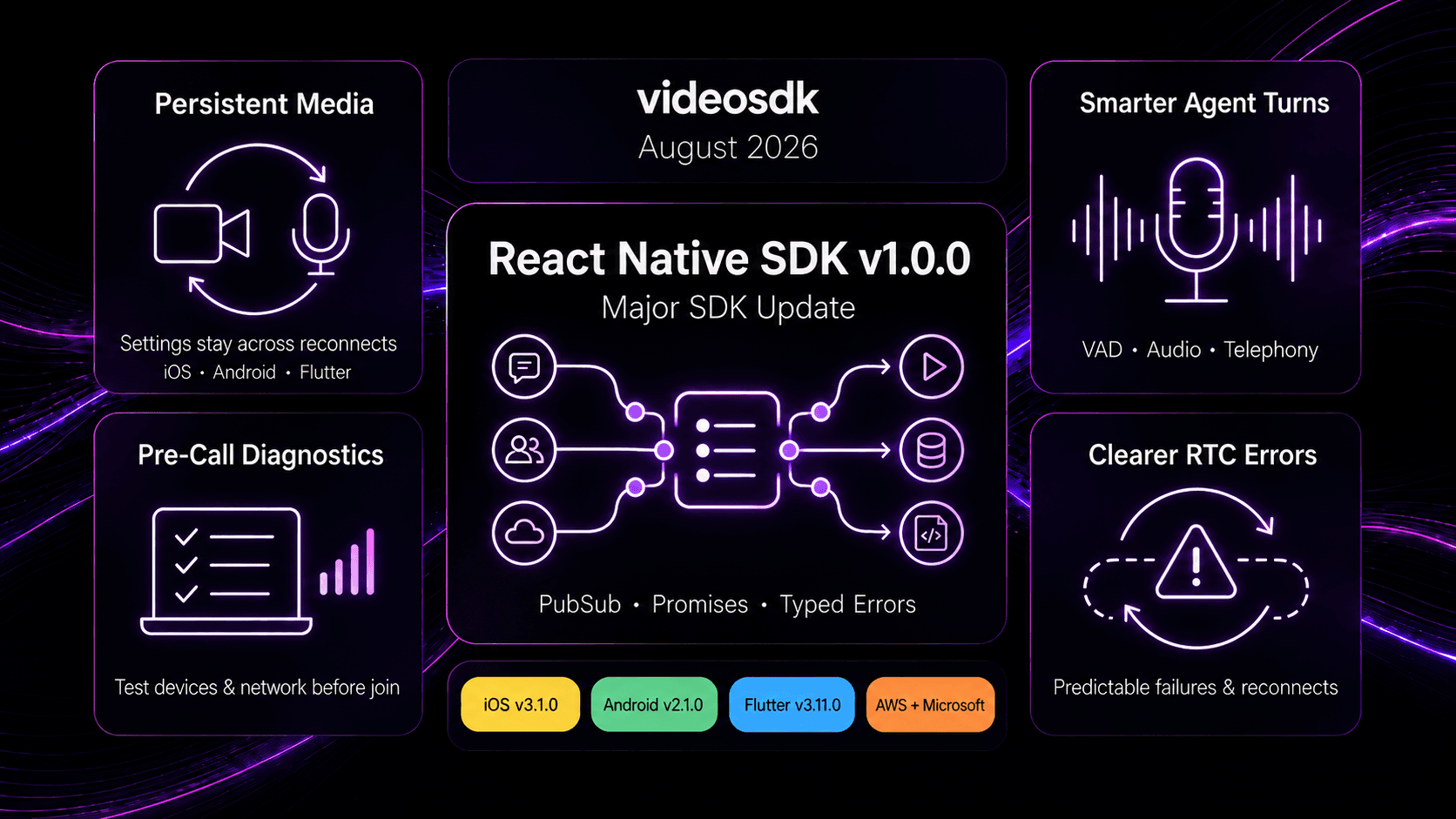


August 2026 Updates: more predictable media behavior, clearer RTC error handling, a major React Native SDK release, and better turn-taking for real-time AI voice agents.
August's releases focused on making real-time applications more predictable across media controls, reconnects, device changes, and AI voice conversations. We shipped React Native SDK v1.0.0, expanded persistent media configuration across iOS, Android, and Flutter, improved error handling across the RTC SDK stack, and added new capabilities to the VideoSDK Agents SDK.
We also improved pre-call diagnostics, Android build compatibility, Python media support, IoT resources, developer tutorials, and enterprise procurement options through Microsoft and AWS Marketplace.
React Native SDK v1.0.0: A Major SDK Update
React Native SDK v1.0.0 is one of the biggest updates this month, bringing a new PubSub experience, Promise-based SDK methods, typed errors, more predictable media controls, and stronger reconnect handling.
More Control Over PubSub
PubSub now gives applications more control when handling high-volume realtime messaging.
- Batched message delivery with onBatchReceived.
- Backpressure controls for applications that need to queue or drop messages under load.
- Message-drop visibility through onMessageDrop.
Promise-Based APIs and Typed Errors
SDK methods now return Promises, making it easier to handle successful operations and failures directly where the action is triggered.
Errors provide structured information such as name, code, and message, so applications can respond more clearly to invalid states, timeouts, or operations already in progress.
More Predictable Media Operations
Camera, microphone, and screen-share operations now provide clearer completion and failure behavior. The SDK also adds request timeouts so applications are not left waiting indefinitely when an operation cannot complete.
⚠️ Breaking Change: React Native SDK v1.0.0 moves SDK methods to Promise-based APIs and removes the external video playback APIs startVideo, stopVideo, pauseVideo, resumeVideo, and seekVideo.
Migrating to React Native SDK v1.0.0
Existing applications should update SDK calls to use await where required, handle rejected operations with try/catch, and review any usage of the removed external video playback APIs.
React Native SDK Release Notes →
Configure Media Once, Keep It Across the Meeting
One of the strongest themes across the August SDK releases is persistent media configuration. Camera and microphone preferences can now stay applied even when users toggle devices, reconnect to a meeting, or move between meeting modes.
iOS SDK v3.1.0
iOS SDK v3.1.0 now remembers custom camera and microphone settings for the lifetime of the meeting.
Settings are preserved across:
- Camera off and on.
- Microphone mute and unmute.
- Meeting mode changes.
- Automatic reconnects after network interruptions.
- Updated media configuration when the application provides new settings.
This includes video quality, camera direction, multistream preferences, bitrate settings, and noise configuration.
Android SDK v2.1.0
Android SDK v2.1.0 now keeps camera and microphone configuration isolated to each meeting and restores those settings whenever media needs to be recreated.
Media preferences are preserved across:
- Camera off and on.
- Microphone mute and unmute.
- Reconnects after network interruptions.
- Meeting mode changes.
- Custom track replacements.
Multistream preferences are also retained when the SDK falls back to VP8, helping applications preserve their intended simulcast behavior.
Flutter SDK v3.11.0
Flutter SDK v3.11.0 also keeps camera and microphone preferences applied throughout the meeting.
Settings are preserved across:
- Camera off and on.
- Microphone mute and unmute.
- Camera and microphone device changes.
- Automatic reconnects after network interruptions.
- Media recovery after a device becomes unavailable.
- Meeting mode changes.
Why this matters
Applications can configure media once and rely on those preferences throughout the meeting instead of manually restoring camera quality, device selection, multistream settings, or microphone configuration after common meeting events.
Clearer RTC Errors and Reconnect Behavior
August also brings more explicit error handling across several RTC SDKs. Invalid operations now fail clearly, while reconnect and media-state behavior is easier for applications to respond to.
JS SDK v1.1.0 & React SDK v1.1.0
JS SDK v1.1.0 and React SDK v1.1.0 introduce signalling request timeouts so unanswered operations no longer wait indefinitely.
Screen-share operations also prevent overlapping enable or disable requests, while stream events are emitted at a point where applications can safely trigger their next media action.
The releases also include reliability fixes around media publishing, device switching, and stream lifecycle behavior.
JavaScript SDK Release Notes →
React SDK Release Notes →
iOS SDK v3.1.1
iOS SDK v3.1.1 now reports errors when applications attempt meeting actions before joining or while the meeting is reconnecting.
The release also fixes an issue where microphone mute or camera-off state could be lost during a reconnect.
iOS SDK v3.2.0
iOS SDK v3.2.0 adds bounded reconnect behavior so applications receive a clear meeting exit reason when signalling cannot be restored.
Manual meeting exits are also reported separately, making it easier to distinguish a user-initiated leave from a connectivity failure.
Flutter SDK v3.12.0 & v3.12.1
Flutter SDK v3.12.0 now reports an error when meeting actions are called before join or during reconnect. It also introduces RoomState.failed for meetings that cannot be established successfully.
Flutter SDK v3.12.1 improves Android build compatibility. Apps no longer need manual setup for the previously reported compileSdkVersion issue, and the SDK is prepared for upcoming Android Gradle Plugin changes.
Smarter Agent Turn-Taking, Audio, and Telephony
The VideoSDK Agents SDK v1.0.26 and v1.0.27 releases focus on making AI voice conversations more responsive while adding more flexibility for telephony and full speech-to-speech applications.
VideoSDK Agents SDK v1.0.26: Better Turn Handling
VideoSDK Agents SDK v1.0.26 improves speech-to-text turn handling, interruption behavior, voice activity handling, and agent wake-up behavior.
Developers can also configure interrupt phrases such as "stop", "wait", or "hold on" to give users more natural control during an active conversation.
More Audio Codec Options
Voice agents can now select from Opus, PCMU, PCMA, and G.722 audio codecs through RoomOptions, making the SDK more flexible for telephony and audio-specific applications.
VideoSDK Agents SDK v1.0.27: Local VAD for Full Speech-to-Speech
VideoSDK Agents SDK v1.0.27 adds optional local Silero VAD support for full speech-to-speech pipelines, giving applications more control over user speech detection and conversational timing.
Improved Warm Transfers
Warm-transfer workflows now better support consultation calls and recordings. The primary call and consultation room can both remain available during the transfer flow, and applications can retrieve the recording information needed afterward.
Better Pre-Call Diagnostics and Developer Experience
Prebuilt SDK Example v0.3.46
Prebuilt SDK Example v0.3.46 updates SDK operations to async and await for clearer error handling and more predictable state updates.
The join flow now includes runPrecallTest, allowing applications to validate network and device readiness before a participant joins a meeting.
The release also includes:
- Improved PubSub payload handling.
- A fix for duplicate screen-share prompts after a rejected request.
- Corrected quality-selection behavior during meetings.
- More camera, microphone, and screen-share configuration options.
- A verbose option for SDK logging.
- Improved theme support across the Prebuilt meeting UI.
More Updates Across the SDK Stack
Python SDK v0.3.8
- Support for multiple video tracks.
- Custom frame metadata support.
React Native SDK v1.0.1
Improved compatibility with older React Native, Expo, Android, and Gradle environments.
IoT SDK v0.4.0
The IoT SDK updates its documentation and examples to use the latest room terminology.
Developer Resources
Alongside the SDK releases, we published tutorials, demos, implementation guides, and AI tooling resources to help developers build and test VideoSDK applications faster.
React Tutorial
Build an Online Classroom with React and VideoSDK
The classroom example combines real-time video with an online whiteboard experience and is available as a live demo, open-source project, implementation guide, and video walkthrough.
- Try the Classroom Demo →
- Explore the Classroom Demo Repository →
- Read the React Whiteboard Online Classroom Guide →
- Watch the Classroom Demo Walkthrough →
Build Video Calling on IoT Devices
For developers working with embedded devices, we have an IoT tutorial and an ESP32 implementation guide covering video calling with the VideoSDK IoT SDK.
AI Tools: MCP Server and Agent Skills
Developers using AI coding tools can connect VideoSDK documentation and development workflows through the VideoSDK MCP Server and Agent Skills.
VideoSDK Is Now Available on Microsoft and AWS Marketplace
VideoSDK is now available through both Microsoft Marketplace and AWS Marketplace, giving teams additional procurement options when adopting VideoSDK within existing cloud and enterprise workflows.
✨ Community Spotlight
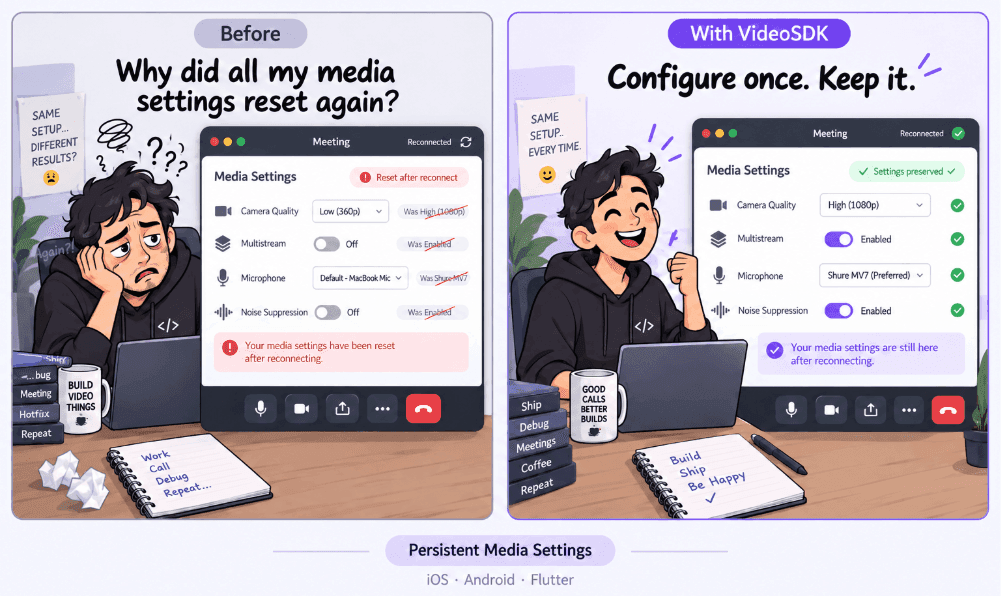
SDK Sketches
This month's SDK Sketches looks at a familiar media-state problem: configuring camera quality, multistream, and microphone settings, then expecting those choices to stay applied when media is toggled or the meeting reconnects.
Build with August's Updates
If you are upgrading this month, start by reviewing the breaking changes in React Native SDK v1.0.0, then test your media controls, reconnect flows, and device-switching experience with the latest SDK versions.
For AI voice applications, VideoSDK Agents SDK v1.0.26 and v1.0.27 add more control over conversational timing, interruptions, audio formats, VAD, and warm-transfer workflows.
And if you are improving the experience before users enter a call, the updated Prebuilt example and runPrecallTest provide a useful starting point for network and device readiness checks.
Start Building with VideoSDK
Upgrade to the latest SDKs, explore the new resources, and put August's updates to work in your application.
Dashboard Join our Discord
Happy building!
Team VideoSDK