


A digital concierge is the set of tools hotel guests use to ask for services at any hour: a guest app, messaging, an AI assistant, an in-room tablet or TV, or a lobby kiosk. Automation answers most requests. Live video covers the ones that need a person.
Many digital concierge products stop at text chat and AI. That works for Wi-Fi passwords and breakfast hours, but not for a complaint, a complex booking or a guest who can't read the screen. For concierge platforms and hotel groups, live video is the step that closes those requests without sending the guest to the front desk.
Want live video help in your hotel concierge app?
VideoSDK gives you the video layer: a waiting lobby where your front desk agent admits the guest, call recording with a transcript after the call, and delivery of recordings to your own cloud bucket. A new account comes with a $20 credit.
What is a digital concierge?
A digital concierge is an automated, always-on service layer that lets hotel guests find information, make requests and book services from their phone, a room screen or a lobby kiosk, without queuing at the desk or calling reception. It usually combines a guest app or web portal, messaging, and an AI assistant connected to the hotel's systems.
| Human concierge | Digital concierge | Virtual front desk | |
|---|---|---|---|
| What it does | Recommendations, bookings and special requests in person | Information, requests and bookings through apps, chat and AI | Check-in, check-out and front desk tasks by remote video |
| Hours | Set shifts | 24/7 | 24/7, staffed by a remote team |
| Scale | One person, one guest at a time | Many guests at once | One agent across many properties |
| Strength | Personal touch | Speed and coverage | Live help without on-site staff |
- Mobile concierge: concierge service delivered on the guest's own phone, through an app, a web link or messaging.
- Concierge app: a single app, usually branded for the hotel, that holds the concierge features.
- Digital concierge service: the whole service layer, including every channel and the staff or AI behind it.
Types of digital concierge
Guest app
A branded app or web portal for pre-arrival check-in, room service, bookings and local guides. Web apps skip the download, which raises adoption.
Messaging
SMS, WhatsApp and web chat, staffed by the team or answered by AI. Guests use apps they already have, so there's nothing to install.
AI chat and voice agents
AI assistants that answer questions and take requests in many languages, by text or voice. AI voice agents handle routine requests around the clock and hand off when a person is needed.
In-room tablet and TV
Screens in the room for service requests, room controls, menus and hotel information. They reach guests who never open the app.
Lobby kiosk
A self-service screen for check-in, key cards and questions. The hotel reception kiosk guide covers adding live video to it.
Video concierge
A live video call with a concierge or front desk agent, started from any of the channels above. It is the type most often missing from guest apps today.
What a digital concierge does across the stay
| Stage | Typical requests |
|---|---|
| Pre-arrival | Online check-in, ID upload, room upgrades, airport transfers, restaurant and spa bookings |
| In-stay | Housekeeping, extra towels, room service, maintenance issues, local tips, late checkout, room controls |
| Post-stay | Checkout, folio and invoice, lost property, review requests, rebooking offers |
In a 2025 eviivo survey of 430 travelers, 58% preferred SMS, WhatsApp or email links for quick exchanges with a property, 25% preferred to speak with a person, and only 4% wanted to download the property's own app (eviivo, November 2025). A digital concierge service that works through messaging and web links fits how most guests prefer to reach a property.
Where automated concierges fall short
- Complaints and service recovery: an angry guest wants a person, not a menu.
- Complex bookings: multi-room stays, events, group changes and anything with exceptions.
- High-value upsells: a suite or spa package is easier to sell when the guest can see it and ask questions.
- Accessibility needs: guests who are deaf or hard of hearing, or who find small screens and typing difficult.
- Language barriers: chat translation helps, but long or emotional conversations are hard to resolve in text alone.
- Less tech-comfortable guests: some guests won't type their problem into a chat box.
AI vendors report automating more than 80% of guest conversations, and up to 93% in one case study. Canary says its AI handles more than 80% (Canary), and HiJiffy reported 93% across more than 50,000 conversations at AX Hotels (HiJiffy). These are vendor figures, and the remainder still reaches staff.
Canary's October 2026 study of more than 10 million AI guest interactions found that 65% of conversations asked the concierge to do something, such as make a booking or fix a broken air conditioner, not just answer a question (Lodging Magazine, October 2026).
Guests also want a way to reach a person. In a 2025 Kinsta survey of 1,011 US adults about customer service across industries, 88.8% said companies should always offer a human option (Kinsta).
How to add live video to a digital concierge
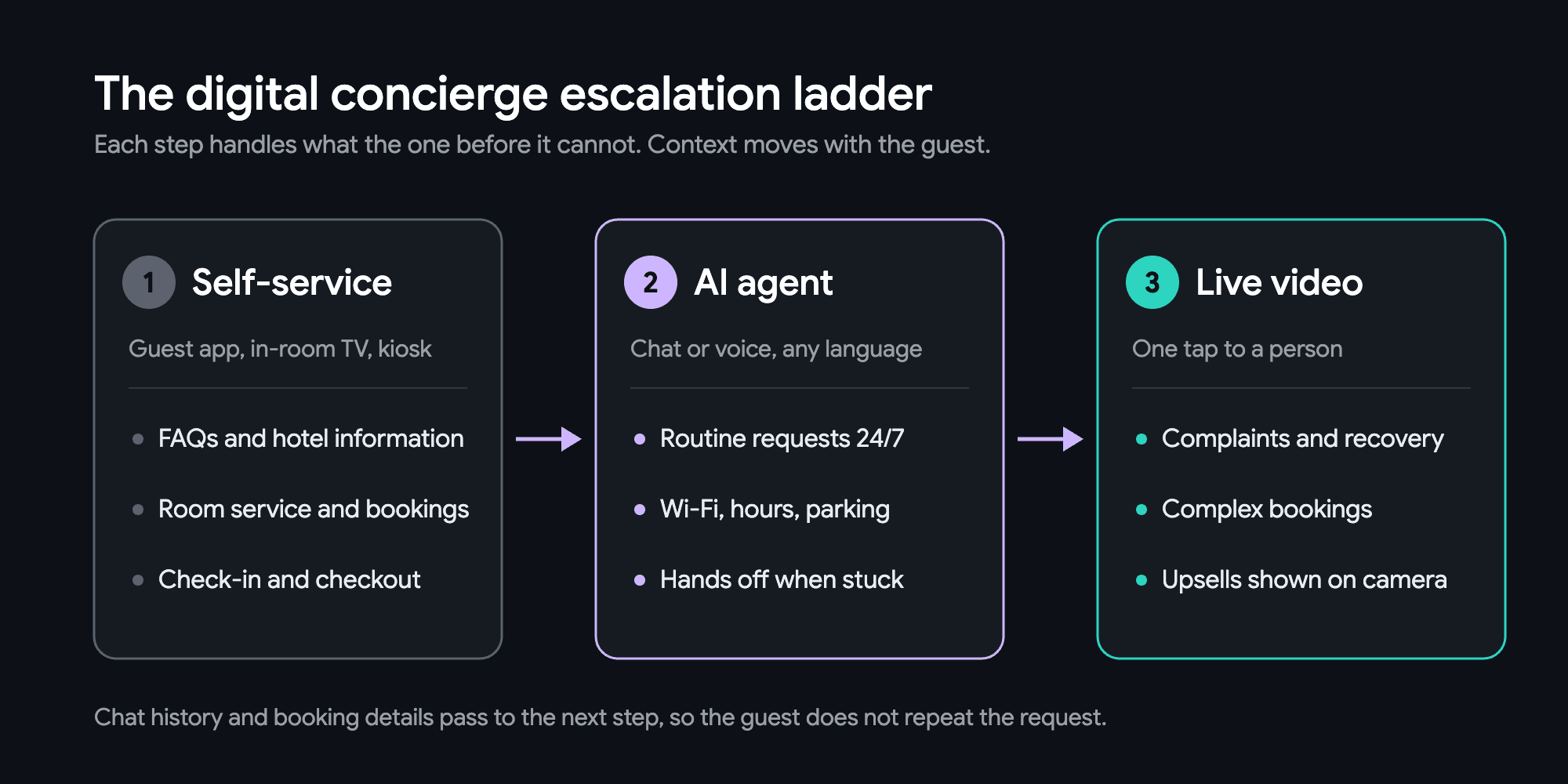
- Pick the channel. Start where guests most often ask for staff: the guest app, the in-room tablet or TV, the lobby kiosk or the web check-in page.
- Add a one-tap video button. Place it after self-service and the AI agent, so routine requests are still handled automatically.
- Pass the context into the call. Send the chat history and booking to the agent, so the guest doesn't have to repeat the request.
- Route calls to a central team. One team can answer video calls for several properties and time zones.
- Measure the result. Track the time to a live answer and how many requests close on the call.
One hotel front-desk software vendor built on VideoSDK works this way today. Lobby kiosk calls from several of its client hotels go to one remote agent, who answers check-in questions face to face and steps in when a guest is stuck.
Benefits of live video in a digital concierge
- Service recovery face to face. An unhappy guest sees a real person who can fix the problem, without leaving the app.
- Higher-value upsells. An agent can walk a guest through a suite, spa or restaurant on camera.
- One concierge team across properties and time zones. A central team can cover many hotels. On VideoSDK, one agent can watch the lobby kiosks of up to 30 hotels from a single room.
- Conversations across languages. Live translation puts translated text on screen, while the video lets both sides read tone and point at a map, menu or form.
- Service for deaf and hard-of-hearing guests. On-screen transcription and calls that a sign-language interpreter can join reach guests that phone lines miss.
- Fewer front-desk calls and queues. Requests that used to end at the desk are resolved where the guest started them.
- A better digital guest experience over time. Transcripts and summaries show what guests ask for most, which feeds the next round of automation.
Canary reports that hotels using its AI messaging grew upsell revenue by 54% on average in their first six months (vendor figure, Lodging Magazine, October 2026). Video adds the chance to show the room or service before the guest commits.
Features to look for in a video concierge
| Feature | What the guest gets | What the hotel gets |
|---|---|---|
| Cross-device and browser support | The same call from app, web, tablet, TV or kiosk | One video layer across every channel |
| HD audio and video, typically under 99ms latency | A natural, real-time conversation | Calls that feel like talking at the desk |
| Adaptive bitrate and network indicator | A call that holds up on in-room Wi-Fi | Fewer dropped calls and early warning on weak connections |
| Live language translation | Translated text on screen in their language | Guests and staff can talk across languages |
| Screen share and co-browsing | The agent walks them through a booking or form | Complex bookings finished in one call |
| Real-time chat and file sharing | Menus, confirmations and maps sent during the call | Fewer follow-up messages |
| AI voice agent with hand-off | Instant answers, and a person when needed in the same session | Staff time saved for the requests that need it |
| Transcription and summary | A written record of what was agreed | A searchable record of guest requests |
| Cloud recording and storage | A record of what was agreed, with their consent | Training material and dispute evidence |
| Webhooks | Requests passed to the right team | Call events synced with the PMS or CRM |
The usual platform basics still apply: PMS and POS integration, push notifications, analytics and brand control. Video sits on top of them, not in place of them.
Build vs buy the video layer
| Build on raw WebRTC | Use a video API (VideoSDK) | Send guests to Zoom or WhatsApp links | |
|---|---|---|---|
| Time to launch | Slowest: media servers, scaling and monitoring first | Faster: no media servers to run | Fastest, with no build at all |
| Branding | Fully your own | Fully your own | Another company's app |
| Recording and compliance | Whatever you build | Built-in recording, with SOC 2, GDPR and ISO compliance | Recordings and data sit in another company's system |
| Scale | Your team's problem | Handled by the provider | Handled, but outside your product |
| Cost model | Servers, bandwidth and an in-house team | Usage-based video minutes | Per-seat licenses or free consumer apps |
| AI agent support | Whatever you build | AI voice agents with hand-off in the same session | Not built in |
For a concierge platform, external links break the digital guest experience and lose the context of the conversation. The virtual front desk guide looks at the build vs buy choice in more depth.
Privacy, security and accessibility
- In-room cameras: keep the camera off by default, start calls only when the guest asks, and show a clear on-screen indicator while the camera is on.
- Recording: show a notice, ask for consent where the law requires it, and set how long recordings are kept. GDPR applies to EU guests' data (and UK GDPR to UK guests' data), and CCPA/CPRA to California residents' data where the business meets its thresholds.
- Compliance: choose a video provider with documented security standards. VideoSDK lists SOC 2, GDPR and ISO compliance.
- Accessibility: offer on-screen transcription for video calls and voice-first options for low-vision guests.
US travelers with disabilities spend nearly $50 billion a year on their own travel, and 74% ran into obstacles at hotels, so accessible service is a sizable market (Open Doors Organization, December 2024).
How to measure the digital guest experience
- Request deflection: the share of requests solved by self-service.
- AI containment rate: the share of conversations the AI agent closes without a person.
- Time to live answer: how long a guest waits for a person after asking.
- CSAT after a call: a one-question rating at the end of each video call.
- Upsell revenue per stay: revenue from upgrades and add-ons sold through the concierge.
- Review scores: changes in online ratings after launch, especially comments on service.
Best practices for launching a digital concierge
- Start with the top 20 guest questions and make sure self-service and the AI agent answer them well.
- Promote the concierge at booking, at check-in and with a QR code in the room.
- Staff the video queue at peak hours such as check-in, check-out and evenings.
- Review summaries every week and move common requests into self-service.
- Keep a human option visible in every channel, so guests never feel trapped in automation.
Conclusion
A digital concierge service handles routine requests through apps, chat and AI, and live video handles the moments that need a person. For concierge platforms, adding video through an SDK keeps those conversations inside your product. A good first step is to add a video button to the one channel where guests most often ask for staff, and measure how many requests it closes.
Book a hospitality solutions demo
Frequently asked questions
Is there an AI concierge?
Yes. AI chat and voice agents answer guest questions and take requests in many languages, and the better ones hand the guest to a person when the request needs it.
How much does a digital concierge cost for hotels?
Where vendors publish prices, AI concierge, messaging and guest app tools cost roughly $1 to $15 per room per month, often with a monthly minimum or a go-live fee (for example Bookboost and Innspire, checked November 2026). Video is often billed separately. VideoSDK, for example, bills by the minute, and the rate varies by resolution.
What is the difference between a digital concierge and a concierge app?
A concierge app is one channel. A digital concierge covers every channel the guest uses, so a request started in WhatsApp can finish on an in-room TV or a video call.
Can a digital concierge replace hotel staff?
No. A digital concierge service takes over routine requests so staff have time for the guests who need them, often from a central team that covers several properties.
What is a mobile concierge?
It is concierge service on the guest's own phone. Because most guests prefer messaging to downloading a hotel app, mobile concierge services increasingly run through web links and WhatsApp.