
Info: For standard live streaming with 6-7 second latency and playback support, follow this documentation.
1Help me add interactive live streaming to my Flutter app with VideoSDK.
2
31. Run `flutter create videosdk_flutter_quickstart_ils`.
4
52. Run `flutter pub add videosdk http`, then set `minSdkVersion 23` and Java 8
6
7   `compileOptions`, add the camera, mic and network permissions to
8
9   `AndroidManifest.xml`, add `NSCameraUsageDescription` and
10
11   `NSMicrophoneUsageDescription` to `ios/Runner/Info.plist`, and uncomment
12
13   `platform :ios, '12.0'` in the Podfile.
14
153. Create `lib/api_call.dart` with `createLivestream()` POSTing to
16
17   `https://api.videosdk.live/v2/rooms`, then `lib/join_screen.dart` offering
18
19   create-as-host, join-as-host and join-as-audience, and `lib/ils_screen.dart`,
20
21   `lib/ils_view.dart`, `lib/participant_grid.dart`,
22
23   `lib/livestream_controls.dart` using `VideoSDK.createRoom(..., mode: mode)` with
24
25   `Mode.SEND_AND_RECV` or `Mode.RECV_ONLY`. Listen to `roomJoined`,
26
27   `participantJoined`, `participantLeft`, `participantModeChanged`,
28
29   `streamEnabled` and `streamDisabled`, render only `SEND_AND_RECV` participants,
30
31   pin the local host on join, and expose `changeMode()`.
32
334. Ask me for a token from app.videosdk.live/api-keys and set it as `token` in
34
35   `lib/api_call.dart`.
36
375. Run `flutter run`, then join the same stream id from a second device as audience.
38
39REFERENCE
40
41https://docs.videosdk.live/flutter/guide/video-and-audio-calling-api-sdk/quick-start-flutter-ils.md
Prerequisites
Before proceeding, ensure that your development environment meets the following requirements:
- Video SDK Developer Account (Not having one, follow Video SDK Dashboard)
- Basic understanding of Flutter
- Flutter VideoSDK
- Have Flutter installed on your system.
Getting Started with the Code!
Follow the steps to create the environment necessary to add video calls into your app. Also you can find the code sample for quickstart here.
Create new Flutter app
Create a new Flutter App using the below command.
1 flutter create videosdk_flutter_quickstart_ilsInstall Video SDK
Install the VideoSDK using the below-mentioned npm command. Make sure you are in your flutter app directory before you run this command.
1 flutter pub add videosdk
2
3//run this command to add http library to perform network call to generate roomId
4 flutter pub add http
Structure of the project
Your project structure should look like this.
1  root
2  ├── android
3  ├── ios
4  ├── lib
5       ├── api_call.dart
6       ├── ils_screen.dart
7       ├── ils_view.dart
8       ├── join_screen.dart
9       ├── main.dart
10       ├── liveStream_Controls.dart
11       ├── participant_tile.dart
12       ├── participant_grid.dart
We are going to create following flutter widgets JoinScreen, ILSScreen, liveStream_Controls, ParticipantTile, ILSView for the quickstart app which will cover both Host and Audience part of the app.
App Structure
App widget will contain JoinScreen and ILSScreen screens. ILSScreen will render the ILSView which consist of views based on the participants mode. ILSView will have liveStreamControls and both view will use ParticipantTile which will be conditionally rendered based on the modes.

Configure Project
For Android
- Update the /android/app/src/main/AndroidManifest.xml for the permissions we will be using to implement the audio and video features.
1<uses-feature android:name="android.hardware.camera" />
2<uses-feature android:name="android.hardware.camera.autofocus" />
3<uses-permission android:name="android.permission.CAMERA" />
4<uses-permission android:name="android.permission.RECORD_AUDIO" />
5<uses-permission android:name="android.permission.ACCESS_NETWORK_STATE" />
6<uses-permission android:name="android.permission.CHANGE_NETWORK_STATE" />
7<uses-permission android:name="android.permission.MODIFY_AUDIO_SETTINGS" />
8<uses-permission android:name="android.permission.INTERNET"/>
Also you will need to set your build settings to Java 8 because the official WebRTC jar now uses static methods in EglBase interface. Just add this to your app-level /android/app/build.gradle.
1android {
2    //...
3    compileOptions {
4        sourceCompatibility JavaVersion.VERSION_1_8
5        targetCompatibility JavaVersion.VERSION_1_8
6    }
7}- If necessary, in the same build.gradle you will need to increase minSdkVersion of defaultConfig up to 23 (currently default Flutter generator set it to 16).
- If necessary, in the same build.gradle you will need to increase compileSdkVersion and targetSdkVersion up to 31 (currently default Flutter generator set it to 30).
For iOS
- Add the following entries which allow your app to access the camera and microphone to your /ios/Runner/Info.plist file :
1<key>NSCameraUsageDescription</key>
2<string>$(PRODUCT_NAME) Camera Usage!</string>
3<key>NSMicrophoneUsageDescription</key>
4<string>$(PRODUCT_NAME) Microphone Usage!</string>- Uncomment the following line to define a global platform for your project in /ios/Podfile :
1# platform :ios, '12.0'Step 1: Get started with api_call.dart
Before jumping to anything else, you will write a function to generate a unique liveStreamId. You will require auth token, you can generate it using either by using videosdk-rtc-api-server-examples or generate it from the Video SDK Dashboard for development.
- Use the
Token(which you have generated from Video Sdk Dashboard) in the .env file along with that also add theAPIKey for creating a room.
1import 'dart:convert';
2import 'package:http/http.dart' as http;
3
4//Auth token we will use to generate a liveStream and connect to it
5String token = "<GENERATED_TOKEN_HERE>";
6// API call to create livestream
7Future<String> createLivestream() async {
8  final Uri getlivestreamIdUrl =
9      Uri.parse('https://api.videosdk.live/v2/rooms');
10  final http.Response liveStreamIdResponse =
11      await http.post(getlivestreamIdUrl, headers: {
12    "Authorization": token,
13  });
14
15  if (liveStreamIdResponse.statusCode != 200) {
16    throw Exception(json.decode(liveStreamIdResponse.body)["error"]);
17  }
18  var liveStreamID = json.decode(liveStreamIdResponse.body)['roomId'];
19  return liveStreamID;
20}
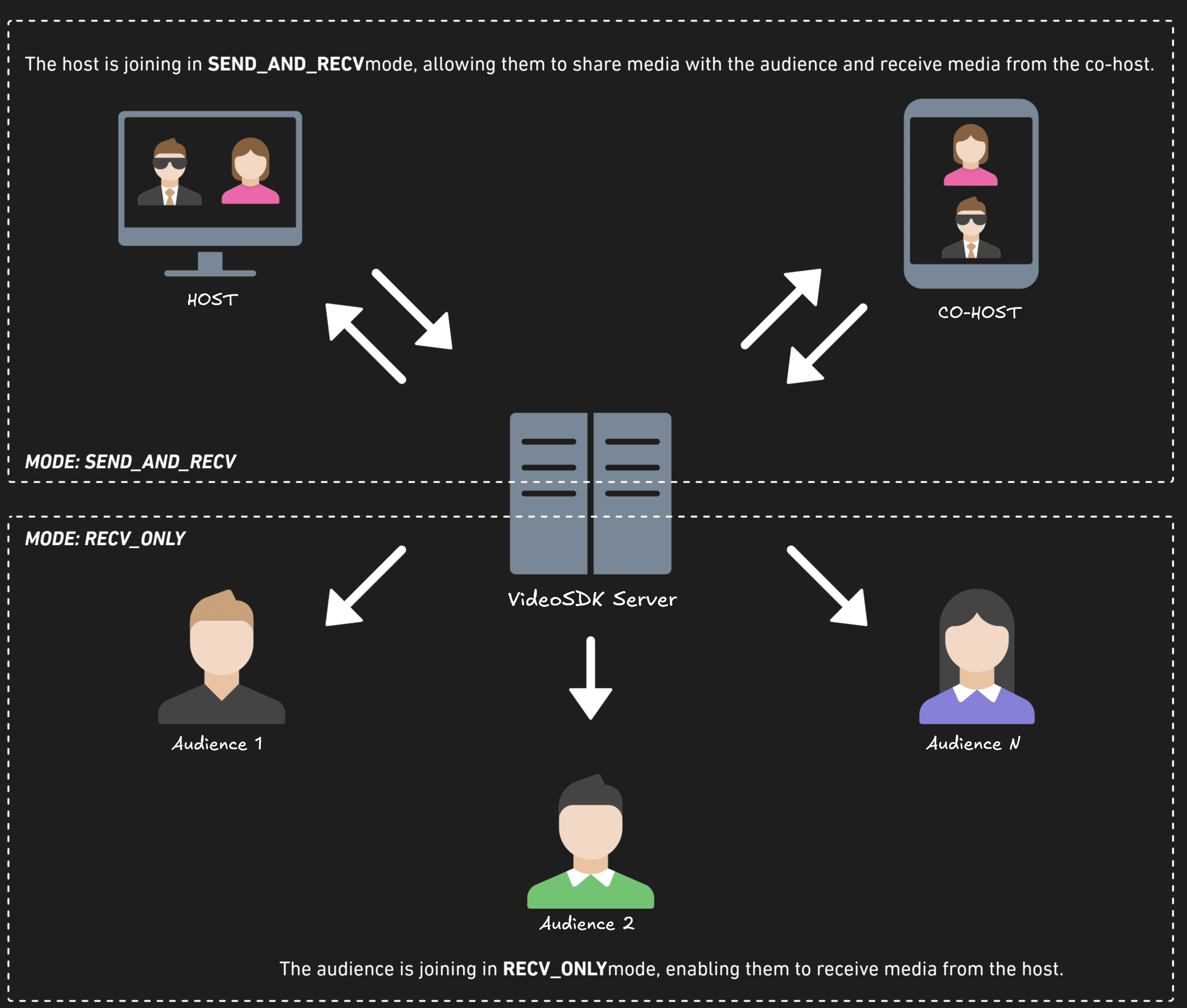
Before proceeding, let's understand the two modes of a Live Stream:
1. SENDANDRECV (For Host or Co-host):
- Designed primarily for the Host or Co-host.
- Allows sending and receiving media.
- Hosts can broadcast their audio/video and interact directly with the audience.
2. RECV_ONLY (For Audience):
- Tailored for the Audience.
- Enables receiving media shared by the Host.
- Audience members can view and listen but cannot share their own media.
Step 2: Initialize and Join the Livestream
Let's create join_screen.dart file in lib directory and create JoinScreen StatelessWidget.
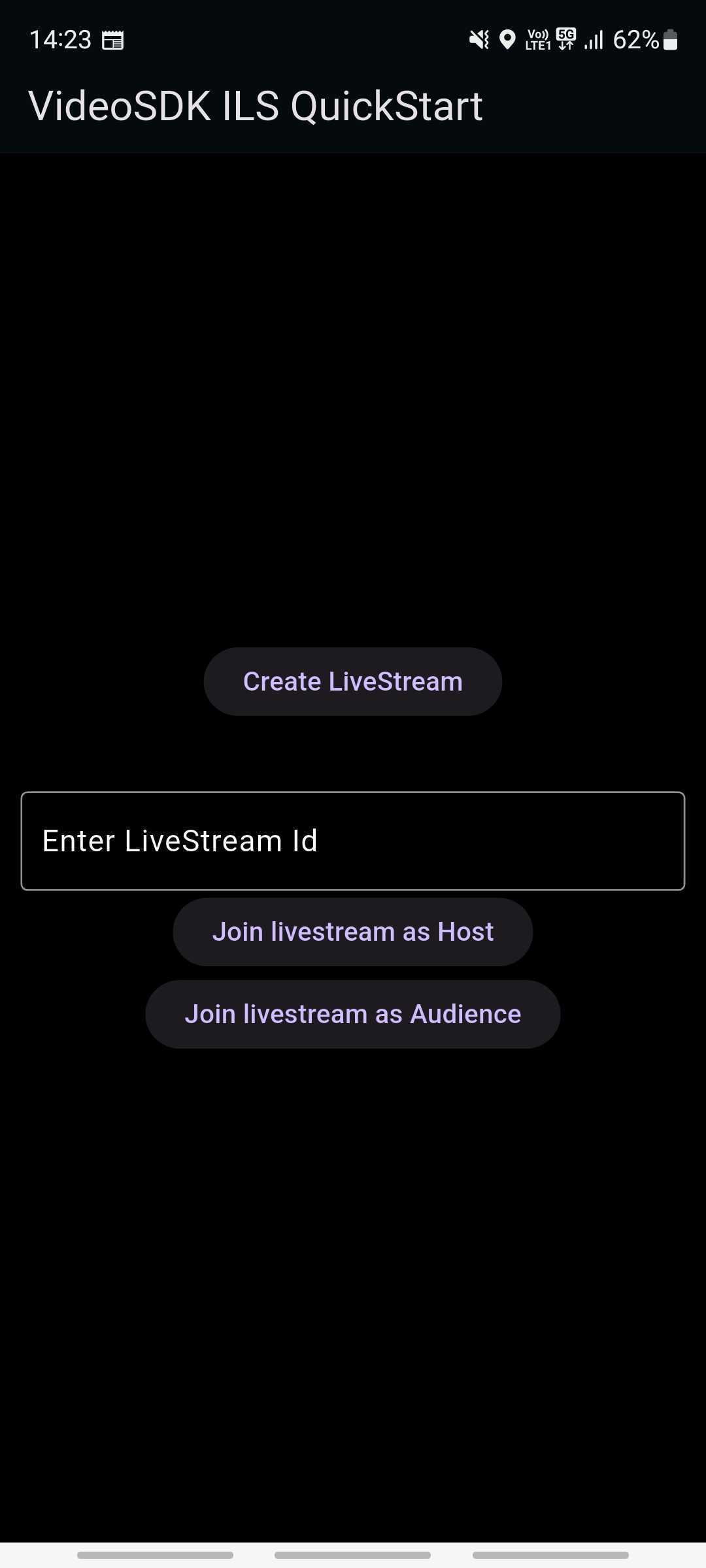
The JoinScreen will consist of:
Create livestream Button- This button will create a new livestream for Host and join it with mode CONFERENCE.livestream ID TextField- This text field will contain the livestream ID, you want to join.Join Livestream as Host Button- This button allows the user to join an existing Live Stream using the provided livestreamId with theSEND_AND_RECVmode, enabling full host privileges.Join livestream as Audience Button-Enables the user to join an existing Live Stream using the provided livestream with theRECV_ONLYmode, allowing view-only access.
1import 'package:flutter/material.dart';
2import 'package:videosdk/videosdk.dart';
3import 'api_call.dart';
4import 'ils_screen.dart';
5
6class JoinScreen extends StatelessWidget {
7  final _livestreamIdController = TextEditingController();
8
9  JoinScreen({super.key});
10
11  //Creates new livestream Id and joins it in CONFERNCE mode.
12  void onCreateButtonPressed(BuildContext context) async {
13    // call api to create livestream and navigate to ILSScreen with livestreamId,token and mode
14    await createLivestream().then((liveStreamId) {
15      if (!context.mounted) return;
16      Navigator.of(context).push(
17        MaterialPageRoute(
18          builder: (context) => ILSScreen(
19            liveStreamId: liveStreamId,
20            token: token,
21            mode: Mode.SEND_AND_RECV,
22          ),
23        ),
24      );
25    });
26  }
27
28  //Join the provided livestream with given Mode and livestreamId
29  void onJoinButtonPressed(BuildContext context, Mode mode) {
30    // check livestream  id is not null or invaild
31    // if livestream id is vaild then navigate to ILSScreen with livestreamId, token and mode
32    String liveStreamId = _livestreamIdController.text;
33    var re = RegExp("\\w{4}\\-\\w{4}\\-\\w{4}");
34    if (liveStreamId.isNotEmpty && re.hasMatch(liveStreamId)) {
35      _livestreamIdController.clear();
36      Navigator.of(context).push(
37        MaterialPageRoute(
38          builder: (context) => ILSScreen(
39            liveStreamId: liveStreamId,
40            token: token,
41            mode: mode,
42          ),
43        ),
44      );
45    } else {
46      ScaffoldMessenger.of(context).showSnackBar(const SnackBar(
47        content: Text("Please enter valid livestream id"),
48      ));
49    }
50  }
51
52  @override
53  Widget build(BuildContext context) {
54    return Scaffold(
55      backgroundColor: Colors.black,
56      appBar: AppBar(
57        title: const Text('VideoSDK ILS QuickStart'),
58      ),
59      body: Padding(
60        padding: const EdgeInsets.all(12.0),
61        child: Column(
62          mainAxisAlignment: MainAxisAlignment.center,
63          children: [
64            //Creating a new livestream
65            ElevatedButton(
66              onPressed: () => onCreateButtonPressed(context),
67              child: const Text('Create LiveStream'),
68            ),
69            const SizedBox(height: 40),
70            TextField(
71              style: const TextStyle(color: Colors.white),
72              decoration: const InputDecoration(
73                hintText: 'Enter LiveStream Id',
74                border: OutlineInputBorder(),
75                hintStyle: TextStyle(color: Colors.white),
76              ),
77              controller: _livestreamIdController,
78            ),
79            //Joining the livestream as host
80            ElevatedButton(
81              onPressed: () => onJoinButtonPressed(context, Mode.SEND_AND_RECV),
82              child: const Text('Join livestream as Host'),
83            ),
84            //Joining the livestream as Audience
85            ElevatedButton(
86              onPressed: () => onJoinButtonPressed(context, Mode.RECV_ONLY),
87              child: const Text('Join livestream as Audience'),
88            ),
89          ],
90        ),
91      ),
92    );
93  }
94}
Update the app entry to JoinScreen from the main.dart file.
1import 'package:flutter/material.dart';
2import 'join_screen.dart';
3
4void main() async {
5  // Run Flutter App
6  WidgetsFlutterBinding.ensureInitialized();
7
8  runApp(const MyApp());
9}
10
11class MyApp extends StatelessWidget {
12  const MyApp({Key? key}) : super(key: key);
13
14  @override
15  Widget build(BuildContext context) {
16    // Material App
17    return MaterialApp(
18      debugShowCheckedModeBanner: false,
19      title: 'VideoSDK Flutter ils Example',
20      theme: ThemeData.dark().copyWith(
21        appBarTheme: const AppBarTheme().copyWith(
22          color: Colors.black,
23        ),
24        primaryColor: Colors.black,
25        scaffoldBackgroundColor: Colors.black45,
26      ),
27      home: JoinScreen(),
28    );
29  }
30}
Output For JoinScreen
Step 3: Creating the ILSScreen
Let's create ils_screen.dart file and create ILSScreen StatefulWidget which will take the liveStreamId, token and mode of the participant in the constructor.
We will create a new room using the createRoom method and render the ILSView based on the passed participant mode.
1import 'package:flutter/material.dart';
2import 'package:videosdk/videosdk.dart';
3import 'ils_view.dart';
4import 'join_screen.dart';
5
6class ILSScreen extends StatefulWidget {
7  final String liveStreamId;
8  final String token;
9  final Mode mode;
10
11  const ILSScreen(
12      {super.key,
13      required this.liveStreamId,
14      required this.token,
15      required this.mode});
16
17  @override
18  State<ILSScreen> createState() => _ILSScreenState();
19}
20
21class _ILSScreenState extends State<ILSScreen> {
22  late Room _room;
23  bool isJoined = false;
24  Mode? localParticipantMode;
25
26  @override
27  void initState() {
28    // create room when widget loads
29    _room = VideoSDK.createRoom(
30      roomId: widget.liveStreamId,
31      token: widget.token,
32      displayName: "John Doe",
33      micEnabled: true,
34      camEnabled: true,
35      defaultCameraIndex:
36          1, // Index of MediaDevices will be used to set default camera
37      mode: widget.mode,
38    );
39    localParticipantMode = widget.mode;
40    // setting the event listener for join and leave events
41    setLivestreamEventListener();
42
43    // Joining room
44    _room.join();
45
46    super.initState();
47  }
48
49  // listening to room events
50  void setLivestreamEventListener() {
51    _room.on(Events.roomJoined, () {
52      if (widget.mode == Mode.SEND_AND_RECV) {
53        _room.localParticipant.pin();
54      }
55      setState(() {
56        localParticipantMode = _room.localParticipant.mode;
57        isJoined = true;
58      });
59    });
60
61    //Handling navigation when livestream is left
62    _room.on(Events.roomLeft, () {
63      Navigator.pushAndRemoveUntil(
64        context,
65        MaterialPageRoute(builder: (context) => JoinScreen()),
66        (route) => false, // Removes all previous routes
67      );
68    });
69  }
70
71  // onbackButton pressed leave the room
72  Future<bool> _onWillPop() async {
73    _room.leave();
74    return true;
75  }
76
77  @override
78  Widget build(BuildContext context) {
79    return WillPopScope(
80      onWillPop: () => _onWillPop(),
81      child: Scaffold(
82        backgroundColor: Colors.black,
83        appBar: AppBar(
84          title: const Text('VideoSDK ILS QuickStart'),
85        ),
86        //Showing the Host or Audience View based on the mode
87        body: isJoined
88            ? ILSView(room: _room, bar: false, mode: widget.mode)
89            : const Center(
90                child: Text(
91                  "Joining...",
92                  style: TextStyle(color: Colors.white),
93                ),
94              ),
95      ),
96    );
97  }
98}
Step 4: Implementing View for Host/Audience
Let's create the ILSView which will show the livestreamControls, ParticipantGrid and the ParticipantTile.
- Let us start off by creating the StatefulWidget named ParticipantTile in participanttile.dart file. It will consist the participant tile where all participant with `SENDAND_RECV` mode will get rendered.
1import 'package:flutter/material.dart';
2import 'package:videosdk/videosdk.dart';
3
4class ParticipantTile extends StatefulWidget {
5  final Participant participant;
6  final bool isLocalParticipant;
7  const ParticipantTile({
8    Key? key,
9    required this.participant,
10    this.isLocalParticipant = false,
11  }) : super(key: key);
12
13  @override
14  State<ParticipantTile> createState() => _ParticipantTileState();
15}
16
17class _ParticipantTileState extends State<ParticipantTile> {
18  Stream? videoStream;
19  Stream? audioStream;
20
21  @override
22  void initState() {
23    _initStreamListeners();
24    super.initState();
25
26    widget.participant.streams.forEach((key, Stream stream) {
27      setState(() {
28        if (stream.kind == 'video') {
29          videoStream = stream;
30        } else if (stream.kind == 'audio') {
31          audioStream = stream;
32        }
33      });
34    });
35  }
36
37  @override
38  void setState(fn) {
39    if (mounted) {
40      super.setState(fn);
41    }
42  }
43
44  @override
45  Widget build(BuildContext context) {
46    return Container(
47      decoration: BoxDecoration(
48        borderRadius: BorderRadius.circular(12),
49        color: Colors.black12,
50      ),
51      child: Stack(
52        children: [
53          videoStream != null
54              ? ClipRRect(
55                  borderRadius: BorderRadius.circular(12),
56                  child: RTCVideoView(
57                    videoStream?.renderer as RTCVideoRenderer,
58                    objectFit: RTCVideoViewObjectFit.RTCVideoViewObjectFitCover,
59                  ),
60                )
61              : Center(
62                  child: Container(
63                    padding: const EdgeInsets.all(15),
64                    decoration: const BoxDecoration(
65                      shape: BoxShape.circle,
66                      color: Colors.black12,
67                    ),
68                    child: Text(
69                      widget.participant.displayName.characters.first
70                          .toUpperCase(),
71                      style: const TextStyle(fontSize: 30),
72                    ),
73                  ),
74                ),
75        ],
76      ),
77    );
78  }
79
80  _initStreamListeners() {
81    widget.participant.on(Events.streamEnabled, (Stream _stream) {
82      setState(() {
83        if (_stream.kind == 'video') {
84          videoStream = _stream;
85        } else if (_stream.kind == 'audio') {
86          audioStream = _stream;
87        }
88      });
89    });
90
91    widget.participant.on(Events.streamDisabled, (Stream _stream) {
92      setState(() {
93        if (_stream.kind == 'video' && videoStream?.id == _stream.id) {
94          videoStream = null;
95        } else if (_stream.kind == 'audio' && audioStream?.id == _stream.id) {
96          audioStream = null;
97        }
98      });
99    });
100
101    widget.participant.on(Events.streamPaused, (Stream _stream) {
102      setState(() {
103        if (_stream.kind == 'video' && videoStream?.id == _stream.id) {
104          videoStream = null;
105        } else if (_stream.kind == 'audio' && audioStream?.id == _stream.id) {
106          audioStream = _stream;
107        }
108      });
109    });
110
111    widget.participant.on(Events.streamResumed, (Stream _stream) {
112      setState(() {
113        if (_stream.kind == 'video' && videoStream?.id == _stream.id) {
114          videoStream = _stream;
115        } else if (_stream.kind == 'audio' && audioStream?.id == _stream.id) {
116          audioStream = _stream;
117        }
118      });
119    });
120  }
121}- Along with the
participant_tile.dartfile, you should create aparticipant_grid.dartfile to manage the grid layout where each participant tile will be rendered.
1import 'package:flutter/foundation.dart';
2import 'package:flutter/material.dart';
3import 'participant_tile.dart';
4
5import 'package:videosdk/videosdk.dart';
6
7class ParticipantGrid extends StatefulWidget {
8  final Room room;
9  const ParticipantGrid({Key? key, required this.room}) : super(key: key);
10
11  @override
12  State<ParticipantGrid> createState() => _ParticipantGridState();
13}
14
15class _ParticipantGridState extends State<ParticipantGrid> {
16  late Participant localParticipant;
17  int numberofColumns = 1;
18  int numberOfMaxOnScreenParticipants = 6;
19
20  Map<String, Participant> participants = {};
21  Map<String, Participant> onScreenParticipants = {};
22
23  @override
24  void initState() {
25    localParticipant = widget.room.localParticipant;
26    participants.putIfAbsent(localParticipant.id, () => localParticipant);
27    participants.addAll(widget.room.participants);
28    updateOnScreenParticipants();
29    // Setting livestream event listeners
30    setLivestreamEventListener(widget.room);
31
32    super.initState();
33  }
34
35  @override
36  void setState(fn) {
37    if (mounted) {
38      super.setState(fn);
39    }
40  }
41
42  @override
43  Widget build(BuildContext context) {
44    return Flex(
45      direction: Axis.vertical,
46      children: [
47        for (int i = 0;
48            i < (onScreenParticipants.length / numberofColumns).ceil();
49            i++)
50          Flexible(
51            child: Flex(
52              direction: Axis.vertical,
53              children: [
54                for (int j = 0;
55                    j <
56                        onScreenParticipants.values
57                            .toList()
58                            .sublist(
59                              i * numberofColumns,
60                              (i + 1) * numberofColumns >
61                                      onScreenParticipants.length
62                                  ? onScreenParticipants.length
63                                  : (i + 1) * numberofColumns,
64                            )
65                            .length;
66                    j++)
67                  Flexible(
68                    child: Padding(
69                      padding: const EdgeInsets.all(4.0),
70                      child: ParticipantTile(
71                        key: Key(
72                          onScreenParticipants.values
73                              .toList()
74                              .sublist(
75                                i * numberofColumns,
76                                (i + 1) * numberofColumns >
77                                        onScreenParticipants.length
78                                    ? onScreenParticipants.length
79                                    : (i + 1) * numberofColumns,
80                              )
81                              .elementAt(j)
82                              .id,
83                        ),
84                        participant: onScreenParticipants.values
85                            .toList()
86                            .sublist(
87                              i * numberofColumns,
88                              (i + 1) * numberofColumns >
89                                      onScreenParticipants.length
90                                  ? onScreenParticipants.length
91                                  : (i + 1) * numberofColumns,
92                            )
93                            .elementAt(j),
94                      ),
95                    ),
96                  ),
97              ],
98            ),
99          ),
100      ],
101    );
102  }
103
104  void setLivestreamEventListener(Room livestream) {
105    // Called when participant joined livestream
106    livestream.on(Events.participantJoined, (Participant participant) {
107      final newParticipants = participants;
108      newParticipants[participant.id] = participant;
109      setState(() {
110        participants = newParticipants;
111        updateOnScreenParticipants();
112      });
113    });
114
115    // Called when participant left livestream
116    livestream.on(Events.participantLeft, (String participantId, Map<String,dynamic> reason) {
117      final newParticipants = participants;
118
119      newParticipants.remove(participantId);
120      setState(() {
121        participants = newParticipants;
122        updateOnScreenParticipants();
123      });
124    });
125
126    livestream.on(Events.participantModeChanged, (data) {
127      Map<String, Participant> _participants = {};
128      Participant _localParticipant = widget.room.localParticipant;
129      _participants.putIfAbsent(_localParticipant.id, () => _localParticipant);
130      _participants.addAll(livestream.participants);
131      // log("List Mode Change mode:: ${_participants[data['participantId']]?.mode.name}");
132
133      setState(() {
134        localParticipant = _localParticipant;
135        participants = _participants;
136        updateOnScreenParticipants();
137      });
138    });
139
140    livestream.localParticipant.on(Events.streamEnabled, (Stream stream) {
141      if (stream.kind == "share") {
142        setState(() {
143          numberOfMaxOnScreenParticipants = 2;
144          updateOnScreenParticipants();
145        });
146      }
147    });
148    livestream.localParticipant.on(Events.streamDisabled, (Stream stream) {
149      if (stream.kind == "share") {
150        setState(() {
151          numberOfMaxOnScreenParticipants = 6;
152          updateOnScreenParticipants();
153        });
154      }
155    });
156  }
157
158  updateOnScreenParticipants() {
159    Map<String, Participant> newScreenParticipants = <String, Participant>{};
160    List<Participant> conferenceParticipants = participants.values
161        .where((element) => element.mode == Mode.SEND_AND_RECV)
162        .toList();
163
164    conferenceParticipants
165        .sublist(
166      0,
167      conferenceParticipants.length > numberOfMaxOnScreenParticipants
168          ? numberOfMaxOnScreenParticipants
169          : conferenceParticipants.length,
170    )
171        .forEach((participant) {
172      newScreenParticipants.putIfAbsent(participant.id, () => participant);
173    });
174
175    if (!listEquals(
176      newScreenParticipants.keys.toList(),
177      onScreenParticipants.keys.toList(),
178    )) {
179      setState(() {
180        onScreenParticipants = newScreenParticipants;
181      });
182    }
183    if (numberofColumns !=
184        (newScreenParticipants.length > 2 ||
185                numberOfMaxOnScreenParticipants == 2
186            ? 2
187            : 1)) {
188      setState(() {
189        numberofColumns = newScreenParticipants.length > 2 ||
190                numberOfMaxOnScreenParticipants == 2
191            ? 2
192            : 1;
193      });
194    }
195  }
196}- Next let us add the StatelessWidget named LivestreamControls in the livestream_controls.dart file. This widget will accept the callback handlers for all the livestream control buttons and the current HLS state of the livestream.
1import 'package:flutter/material.dart';
2import 'package:videosdk/videosdk.dart';
3
4class LivestreamControls extends StatefulWidget {
5  final Mode mode;
6  final void Function()? onToggleMicButtonPressed;
7  final void Function()? onToggleCameraButtonPressed;
8  final void Function()? onChangeModeButtonPressed;
9
10  LivestreamControls({
11    super.key,
12    required this.mode,
13    this.onToggleMicButtonPressed,
14    this.onToggleCameraButtonPressed,
15    this.onChangeModeButtonPressed,
16  });
17
18  @override
19  State<LivestreamControls> createState() => _LivestreamControlsState();
20}
21
22class _LivestreamControlsState extends State<LivestreamControls> {
23  @override
24  Widget build(BuildContext context) {
25    return Row(
26      mainAxisAlignment: MainAxisAlignment.center,
27      children: [
28        if (widget.mode == Mode.SEND_AND_RECV) ...[
29          ElevatedButton(
30            onPressed: widget.onToggleMicButtonPressed,
31            child: const Text('Toggle Mic'),
32          ),
33          const SizedBox(width: 10),
34          ElevatedButton(
35            onPressed: widget.onToggleCameraButtonPressed,
36            child: const Text('Toggle Cam'),
37          ),
38          ElevatedButton(
39            onPressed: widget.onChangeModeButtonPressed,
40            child: const Text('Audience'),
41          ),
42        ] else if (widget.mode == Mode.RECV_ONLY) ...[
43          ElevatedButton(
44            onPressed: widget.onChangeModeButtonPressed,
45            child: const Text('Host/Speaker'),
46          ),
47        ]
48      ],
49    );
50  }
51}- Lets finally put all these widget in the StatefulWidget named ILSView in ils_view.dart file. This widget will listen to the participantJoined and participantLeft events. It will render the participants and the livestream controls like leave, toggle mic, webcam and Mode.
1import 'package:flutter/material.dart';
2import 'package:flutter/services.dart';
3import 'package:videosdk/videosdk.dart';
4import 'livestream_controls.dart';
5import 'participant_grid.dart';
6
7class ILSView extends StatefulWidget {
8  final Room room;
9  final Mode mode;
10  final bool bar;
11  const ILSView({
12    super.key,
13    required this.room,
14    required this.bar,
15    required this.mode,
16  });
17
18  @override
19  State<ILSView> createState() => _ILSViewState();
20}
21
22class _ILSViewState extends State<ILSView> {
23  var micEnabled = true;
24  var camEnabled = true;
25
26  Map<String, Participant> participants = {};
27  Mode? localMode;
28  @override
29  void initState() {
30    super.initState();
31    localMode = widget.mode;
32    //Setting up the event listeners and initializing the participants and hls state
33    setlivestreamEventListener();
34    participants.putIfAbsent(
35      widget.room.localParticipant.id,
36      () => widget.room.localParticipant,
37    );
38    //filtering the CONFERENCE participants to be shown in the grid
39    widget.room.participants.values.forEach((participant) {
40      if (participant.mode == Mode.SEND_AND_RECV) {
41        participants.putIfAbsent(participant.id, () => participant);
42      }
43    });
44  }
45
46  @override
47  Widget build(BuildContext context) {
48    return Padding(
49      padding: const EdgeInsets.all(8.0),
50      child: Column(
51        children: [
52          Row(
53            children: [
54              Expanded(
55                child: Text(
56                  widget.room.id,
57                  style: const TextStyle(
58                    color: Colors.white,
59                    fontWeight: FontWeight.bold,
60                    fontSize: 15,
61                  ),
62                ),
63              ),
64              ElevatedButton(
65                onPressed: () => {
66                  Clipboard.setData(ClipboardData(text: widget.room.id)),
67                  ScaffoldMessenger.of(context).showSnackBar(
68                    const SnackBar(content: Text("Livestream Id Copied")),
69                  ),
70                },
71                child: const Text("Copy Livestream Id"),
72              ),
73              const SizedBox(width: 10),
74              ElevatedButton(
75                onPressed: () => widget.room.leave(),
76                style: ElevatedButton.styleFrom(backgroundColor: Colors.red),
77                child: const Text("Leave"),
78              ),
79            ],
80          ),
81          Expanded(child: ParticipantGrid(room: widget.room)),
82          _buildLivestreamControls(),
83        ],
84      ),
85    );
86  }
87
88  Widget _buildLivestreamControls() {
89    if (localMode == Mode.SEND_AND_RECV) {
90      return LivestreamControls(
91        mode: Mode.SEND_AND_RECV,
92        onToggleMicButtonPressed: () {
93          micEnabled ? widget.room.muteMic() : widget.room.unmuteMic();
94          micEnabled = !micEnabled;
95        },
96        onToggleCameraButtonPressed: () {
97          camEnabled ? widget.room.disableCam() : widget.room.enableCam();
98          camEnabled = !camEnabled;
99        },
100        onChangeModeButtonPressed: () {
101          widget.room.changeMode(Mode.RECV_ONLY);
102          setState(() {
103            localMode = Mode.RECV_ONLY;
104          });
105        },
106      );
107    } else if (localMode == Mode.RECV_ONLY) {
108      return Column(
109        children: [
110          LivestreamControls(
111            mode: Mode.RECV_ONLY,
112            onToggleMicButtonPressed: () {
113              micEnabled ? widget.room.muteMic() : widget.room.unmuteMic();
114              micEnabled = !micEnabled;
115            },
116            onToggleCameraButtonPressed: () {
117              camEnabled ? widget.room.disableCam() : widget.room.enableCam();
118              camEnabled = !camEnabled;
119            },
120            onChangeModeButtonPressed: () {
121              widget.room.changeMode(Mode.SEND_AND_RECV);
122              setState(() {
123                localMode = Mode.SEND_AND_RECV;
124              });
125            },
126          ),
127        ],
128      );
129    } else {
130      // Default controls
131      return LivestreamControls(
132        mode: Mode.RECV_ONLY,
133        onToggleMicButtonPressed: () {
134          micEnabled ? widget.room.muteMic() : widget.room.unmuteMic();
135          micEnabled = !micEnabled;
136        },
137        onToggleCameraButtonPressed: () {
138          camEnabled ? widget.room.disableCam() : widget.room.enableCam();
139          camEnabled = !camEnabled;
140        },
141        onChangeModeButtonPressed: () {
142          widget.room.changeMode(Mode.RECV_ONLY);
143        },
144      );
145    }
146  }
147
148  // listening to room events for participants join, left and hls state changes
149  void setlivestreamEventListener() {
150    widget.room.on(Events.participantJoined, (Participant participant) {
151      //Adding only Conference participant to show in grid
152      if (participant.mode == Mode.SEND_AND_RECV) {
153        setState(
154          () => participants.putIfAbsent(participant.id, () => participant),
155        );
156      }
157    });
158    widget.room.on(Events.participantModeChanged, () {});
159    widget.room.on(Events.participantLeft, (String participantId, Map<String,dynamic> reason) {
160      if (participants.containsKey(participantId)) {
161        setState(() => participants.remove(participantId));
162      }
163    });
164  }
165}
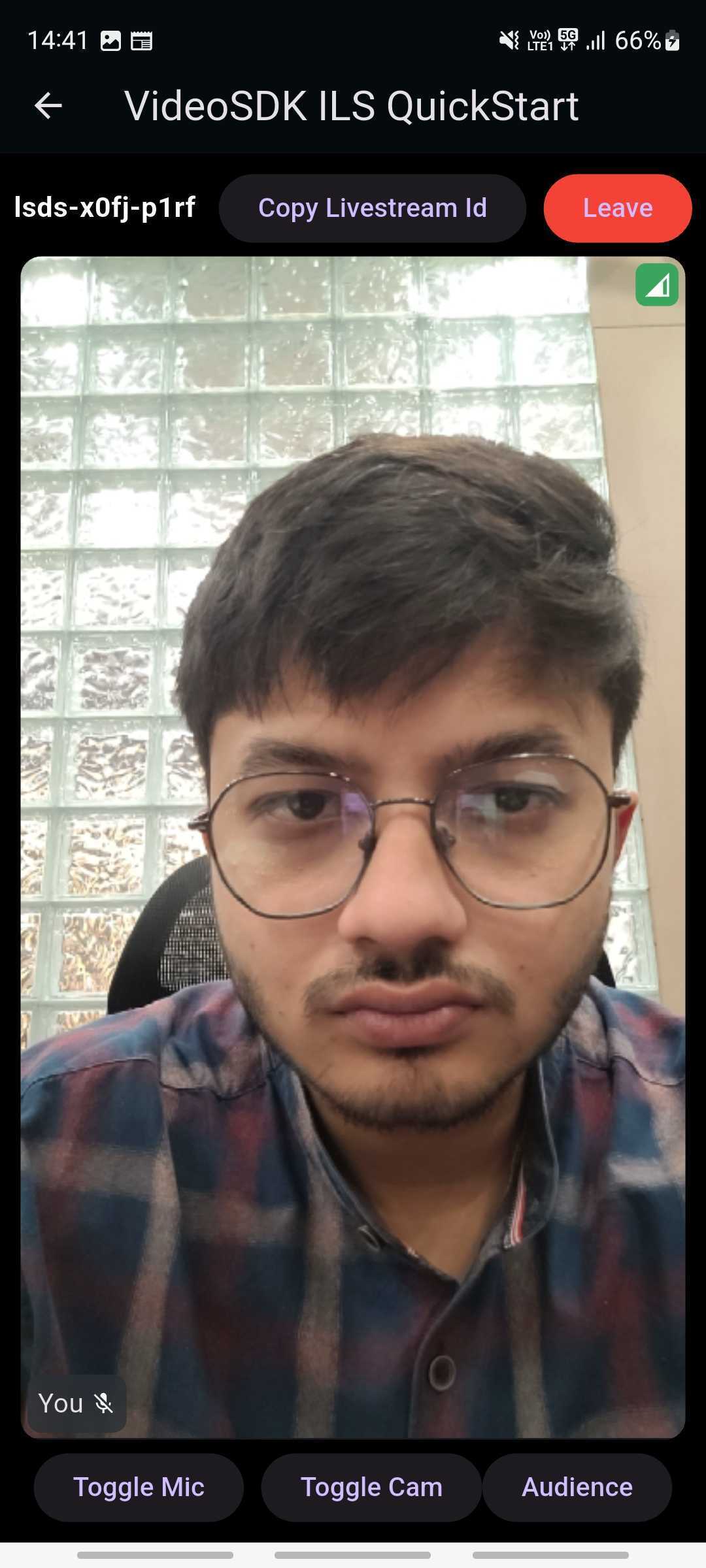
Output of Host View
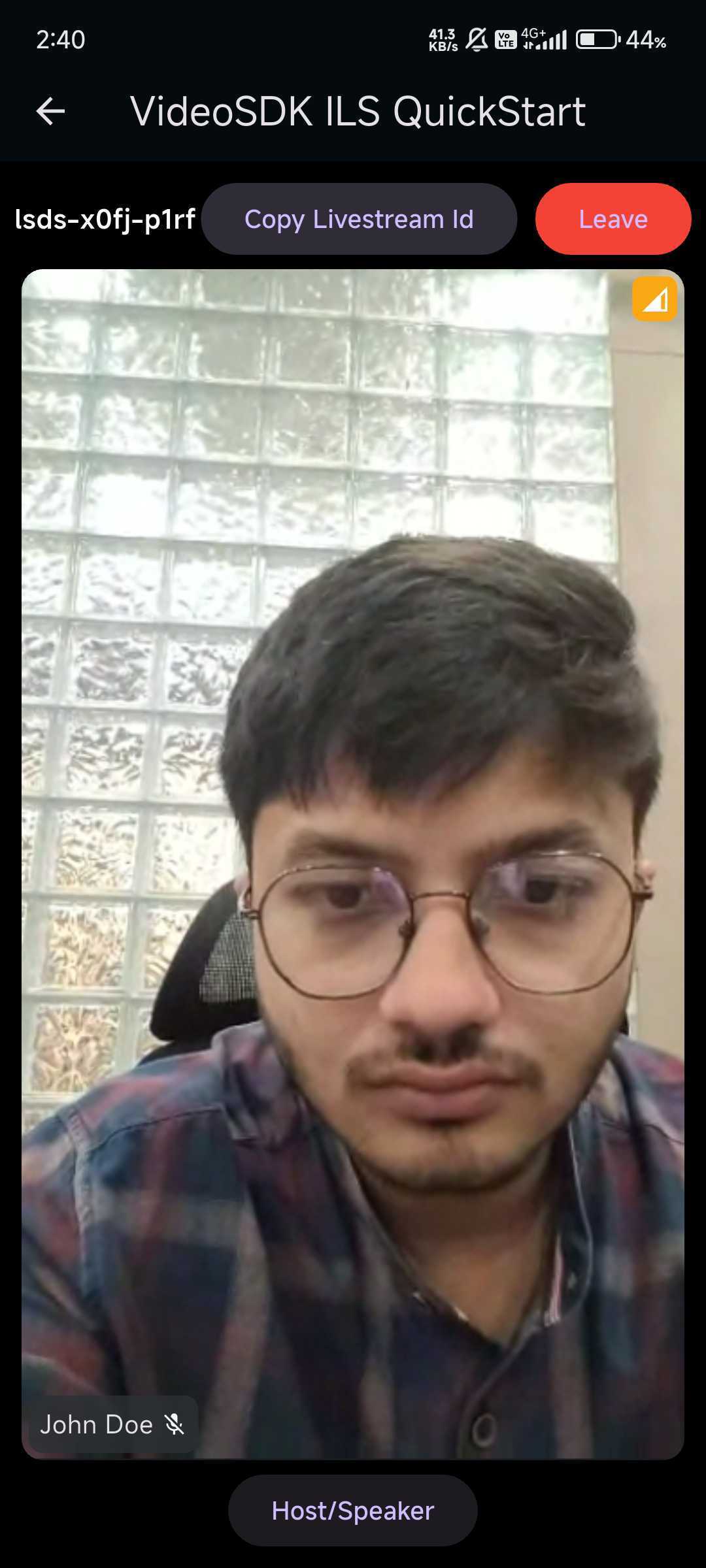
Output of Audience View
Run and Test
Now to run and test, make sure that you have added the Token in .env file and also API key.
Your app should look like this after the implementation.
Tip: You can checkout the complete quick start example here.


