


A Lambda WebSocket architecture uses Amazon API Gateway's WebSocket API to route bidirectional messages to AWS Lambda functions, with DynamoDB persisting connection IDs so any function instance can push messages back to connected clients. This serverless pattern removes the need to run and scale always-on socket servers, and it pairs naturally with pub/sub messaging for chat, gaming, and IoT workloads.
Introduction to Lambda WebSocket Architecture
Running your own WebSocket server means babysitting a fleet of machines that sit idle most of the time but must still scale instantly when traffic spikes. That is exactly the problem AWS Lambda was built to solve, and it is why the Lambda WebSocket pattern has become a default choice for serverless real-time back ends.
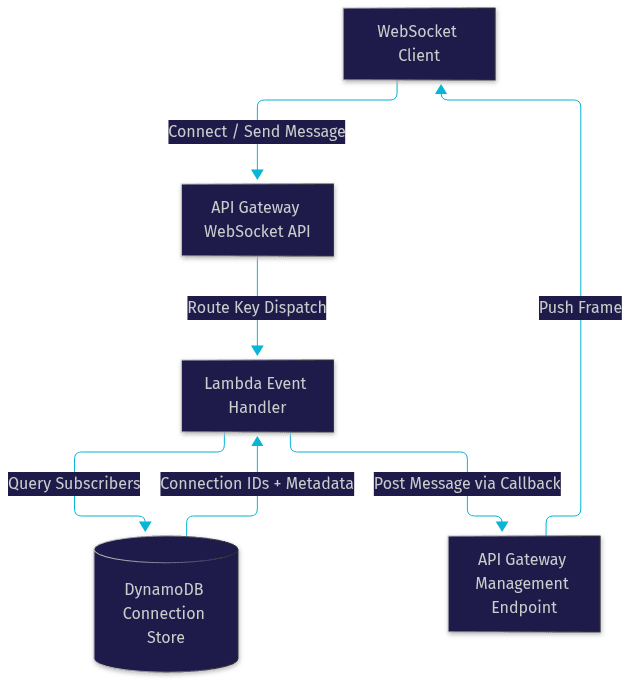
The architecture splits responsibilities across three managed services. API Gateway terminates the WebSocket connection and translates every socket event, such as a client connecting, disconnecting, or sending a message, into an invocation of a Lambda function. Lambda functions act as stateless event handlers that process those events and decide what to do next. DynamoDB serves as the connection store, persisting each active connection ID so that any Lambda invocation, on any host, can look up who is connected and push messages back through the API Gateway management endpoint.
The payoff is significant. You pay only for the milliseconds of compute actually used, connections scale to thousands of concurrent clients without capacity planning, and there is no server to patch. Typical use cases include multiplayer game state distribution, live chat and notification delivery, collaborative editing presence indicators, and IoT device telemetry where devices push readings and receive commands over a single persistent connection.
The trade-off is that stateless compute forces you to externalize connection state, handle timeouts deliberately, and design your fan-out carefully. The rest of this article walks through each of those concerns in the order you will hit them when building a production system.
Core Components of a Lambda WebSocket Solution
Every Lambda WebSocket system is assembled from the same three building blocks, and understanding the contract between them is the key to debugging problems later.
API Gateway WebSocket Routes
API Gateway WebSocket APIs expose three reserved routes plus any custom routes you define. The reserved routes are connection lifecycle events: the connect route fires when a client completes the WebSocket handshake, the disconnect route fires when the client or server closes the connection, and a default route catches any message that does not match a custom route you have registered.
Custom routes are where the real work happens. You register a route key, such as a message type name, and API Gateway inspects the first field of each incoming JSON frame to decide which route, and therefore which Lambda function, should handle it. This gives you a clean, declarative dispatch layer: a chat application might map a send message route to one function and a join room route to another, each with its own memory size and timeout settings.
Lambda Functions as Event Handlers
Each Lambda function receives an event containing the route key, the connection ID, and the message body. The connect handler typically validates the caller, extracts query parameters or headers, and writes the connection ID into DynamoDB. The disconnect handler removes that record so the connection store stays clean. Message handlers read the payload, determine the recipients, query the connection store for the relevant connection IDs, and post messages back to each client through the API Gateway callback endpoint.
Because Lambda is stateless, no function instance can rely on holding a socket in memory. Every push must go through the management endpoint, which is also why the DynamoDB connection store is non-negotiable rather than optional.
DynamoDB as a Connection Store
DynamoDB persists each connection ID alongside metadata such as the user identity, subscribed topics, and a timestamp. The connection ID becomes the primary key, and a secondary index on user or topic lets you answer the two questions every pub/sub system asks: who is connected, and who cares about this message.
Using DynamoDB rather than in-memory state or a relational database matters for two reasons. First, it delivers single-digit millisecond reads at any scale, which keeps fan-out latency low. Second, its item-level operations map cleanly onto connection lifecycle events: one write on connect, one delete on disconnect, one query per message delivery.
The request lifecycle below shows how these components interact on every message:
Designing a Scalable Pub/Sub Model
A Lambda WebSocket back end becomes a real messaging system when you add topic-based subscriptions on top of the connection store. The pattern is straightforward: when a client sends a subscribe message, the handler attaches the connection ID to a topic record in DynamoDB. When any client publishes to that topic, the publisher handler queries all subscribers and posts the message to each connection individually.
Fan-out is the part that needs deliberate design. Because every push is a separate callback request, a topic with ten thousand subscribers means ten thousand posts from a single Lambda invocation, which will exceed the function timeout. The standard fix is to shard the fan-out: the publishing function writes the message to a queue or event bus, and multiple worker invocations each deliver to a bounded slice of subscribers. This keeps latency predictable and lets delivery throughput scale horizontally with the number of workers.
Hot partitions are the classic DynamoDB pitfall here. If you model all subscribers of a popular topic under a single partition key, that partition becomes a bottleneck for both reads and writes. The remedy is to spread subscribers across multiple partition keys, for example by suffixing topic names with a shard number, and to aggregate the shards at query time. A scatter-gather read across a handful of shards is still fast enough for interactive workloads.
For cost efficiency, keep the connection store item minimal. Store only the connection ID, identity, and topic references, and resist the temptation to cache message history in the same table, since connection items are written and deleted constantly while history is append-mostly. Separating those access patterns keeps each table's provisioning predictable.
Managing Connection Health and Timeouts
API Gateway enforces two hard limits that shape every Lambda WebSocket design: a maximum connection duration of two hours, and an idle timeout of ten minutes. A connection that stays quiet for ten minutes is dropped by the service, and even a chatty connection is closed at the two-hour mark regardless of activity.
The practical consequence is that clients must treat disconnection as a normal, expected event. A well-behaved client sends a periodic heartbeat message, typically every one to five minutes, to reset the idle timer, and it reconnects with exponential backoff whenever the socket closes. On the server side, the connect handler should be idempotent so a reconnecting client that reuses stale state does not create duplicate subscription records.
Heartbeats deserve a small amount of business logic too. A common pattern is to have the heartbeat handler update a last-seen timestamp on the connection item. A scheduled Lambda function can then sweep the table periodically, deleting connections whose last-seen value is older than a threshold. This matters because the disconnect route does not always fire reliably, for example when a client's network drops abruptly, and without a sweep those ghost connections accumulate in the store and get billed as delivery failures when you try to post to them.
CloudWatch gives you the signals to monitor all of this. API Gateway emits metrics for connection counts and integration errors, Lambda exposes invocation errors and durations, and the callback endpoint returns a gone status when you post to a dead connection. Treat a rising rate of gone exceptions as your cue to tighten the sweep interval or the client heartbeat cadence.
Deploying with Infrastructure as Code
A Lambda WebSocket stack touches enough moving parts, routes, integrations, permissions, a table, and a deployment stage, that hand-configuring it in the console is a recipe for drift. Infrastructure as code keeps the whole system reproducible.
Terraform Module Overview
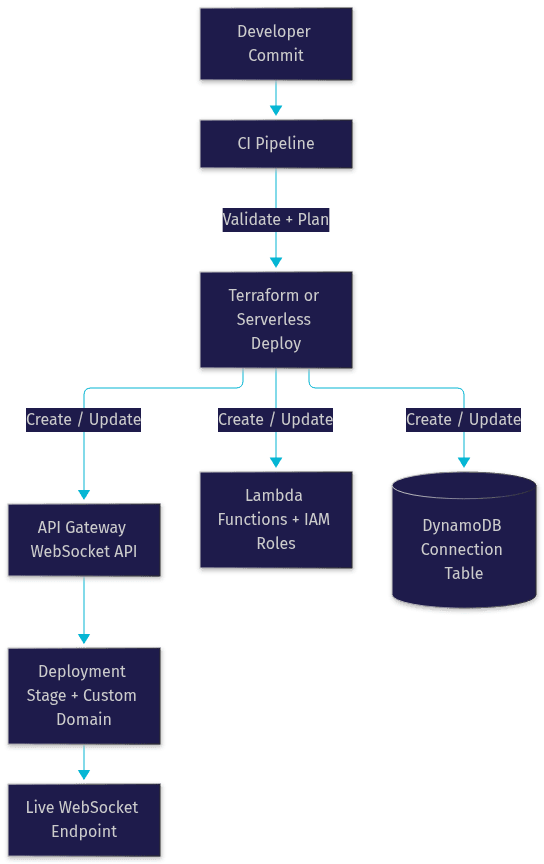
The zmunk websocket-api Terraform module packages the entire pattern into a reusable unit. You supply the route-to-function mappings, the DynamoDB table settings, and the stage configuration, and the module wires up the WebSocket API, its default and custom routes, the Lambda integrations, the IAM roles that let each function write to the connection store, and the permissions the functions need to call back through the management endpoint. Because the module owns the boilerplate, your root configuration stays focused on the parts that differ per environment, such as stage names, log retention, and custom domain mappings.
The module approach shines when you run multiple WebSocket services. Each service instantiates the module with its own routes and table, and they all inherit the same hardened defaults for timeouts, throttling, and access logging.
Serverless Framework Alternative
The Serverless Framework approaches the same problem from the application side rather than the infrastructure side. Its configuration file lets you declare Lambda functions alongside their WebSocket event triggers, and the framework generates the API Gateway resources, route mappings, and IAM permissions for you when you deploy. Developers who already manage their functions this way often find it faster to add a WebSocket event to an existing service than to introduce Terraform alongside it.
The honest comparison is this: Terraform gives you finer control over the API Gateway resources themselves, such as throttle settings and stage variables, and integrates cleanly when the rest of your platform is already Terraform-managed. Serverless Framework gives you faster iteration when the application is the center of gravity and the gateway is just plumbing. Both produce the same runtime architecture, so choose based on what already owns your deployment pipeline, not on the WebSocket feature itself.
The deployment pipeline below maps the flow from commit to a live WebSocket stage:
Security and Access Control
Security in a Lambda WebSocket system centers on one insight: the connect route is your only authentication gate, because it is the only event that fires before a client can send anything else. The recommended pattern is token-based authentication on connect. The client presents a signed token, typically a JWT, as a query parameter or header during the handshake, and the connect handler verifies the signature and claims before writing the connection record. A rejected verification returns an unauthorized response and the handshake never completes.
After the gate, everything is least-privilege IAM. Each Lambda function should hold only the permissions it actually needs: the connect and disconnect handlers get scoped write and delete access to the connection table, message handlers get query access plus permission to invoke the API Gateway management endpoint, and nothing gets broad administrative rights. Because the callback endpoint is an AWS API, IAM scoping works naturally and you can restrict a function to posting only within its own API stage.
Two additional practices close the gaps. First, validate every message payload in the handler before it touches DynamoDB, since the default route will happily deliver malformed frames to your function. Second, enable access logging on the API Gateway stage so you have an audit trail of connection and message events, which you will want the first time you investigate an abusive client.
Monitoring, Logging, and Troubleshooting
A Lambda WebSocket stack gives you three observability layers. CloudWatch Logs captures the structured output of every Lambda invocation, including route keys and connection IDs, if you log them deliberately. API Gateway contributes execution logs and metrics for connection counts, message counts, and client-to-integration errors. X-Ray traces tie the layers together, showing the full path from gateway route through Lambda to the DynamoDB and callback calls, which is invaluable when latency complaints arrive without much context.
When something breaks, work through this checklist in order:
- Gone exceptions on message delivery mean the connection ID in your store is stale. Tighten the heartbeat sweep that prunes dead connections.
- Handshake failures usually mean the connect handler rejected the token or the IAM role lacks table write access.
- Function timeout errors during fan-out mean one invocation is delivering to too many subscribers. Shard the fan-out across worker invocations.
- DynamoDB throttling on the connection table signals a hot partition. Re-shard the topic keys.
- Silent message loss with no errors often means the client sent a frame whose route key matches nothing, so it landed on the default route and was ignored.
Future Enhancements and Patterns
Once the core system is stable, three extensions are worth planning for. Reconnectable client logic, combining heartbeats, backoff, and server-side session resumption, turns the two-hour connection limit from a bug into a routine rotation. Multi-region replication of the connection store, with DynamoDB global tables, supports clients that roam across regions and improves resilience. And routing long-running or heavy work through EventBridge, so the socket handler acknowledges instantly and a downstream consumer publishes the result when ready, keeps interactive latency low even as processing complexity grows.
Definitions Glossary
Lambda WebSocket: A serverless architecture pattern in which Amazon API Gateway's WebSocket API routes real-time bidirectional messages to AWS Lambda functions, with connection state externalized to a data store.
API Gateway WebSocket Route: A mapping between an incoming socket event, such as the reserved connect and disconnect events or a custom message key, and the Lambda function that handles it.
Connection Store: A DynamoDB table that persists each active connection ID with metadata such as identity and subscribed topics, enabling any Lambda invocation to push messages back to connected clients.
Fan-out: The process of delivering one published message to many subscribers, typically sharded across multiple Lambda invocations to stay within timeout limits.
Gone Exception: The error returned when a message is posted to a connection ID that API Gateway has already closed, indicating a stale entry in the connection store.
Key Takeaways
- A Lambda WebSocket back end combines API Gateway for connection termination, Lambda for stateless event handling, and DynamoDB for connection state, removing the need to run always-on socket servers.
- The connect route is the authentication gate; verify tokens there before a client can send anything else.
- API Gateway enforces a two-hour maximum connection duration and a ten-minute idle timeout, so clients need heartbeat messages and reconnect logic as standard behavior.
- Fan-out to large audiences must be sharded across worker invocations, and DynamoDB topic keys must be spread across partitions to avoid hot spots.
- Deploy the whole stack with Terraform or the Serverless Framework so routes, permissions, and the connection table stay reproducible across environments.
Conclusion
The Lambda WebSocket pattern delivers real-time bidirectional messaging without a single server to operate, scaling from a handful of chat users to thousands of concurrent game or IoT clients while you pay only for actual invocations. The architecture rewards deliberate design in three places: the connection store, the fan-out strategy, and the timeout handling. Get those right and the rest is configuration. If you want to add real-time video, voice, or interactive streaming to the same product, explore VideoSDK's real-time communication SDKs, which handle the media layer while your Lambda back end manages signaling. Start with the Terraform module or a Serverless Framework service, deploy a stage, and connect a test client. What are you building with a Lambda WebSocket back end? Drop a comment, I would love to hear about your use case.
Free $20 Balance for AI Voice Agents & Video Calls
FAQ