


A WebRTC application is a real-time communication software platform that uses the WebRTC protocol to enable peer-to-peer audio, video, and data sharing directly between browsers and devices. It relies on a signaling layer for connection setup, STUN/TURN servers for NAT traversal, and secure media streams for low-latency transmission. Developers typically use VideoSDK to abstract these complex layers and ship production-ready video calling features faster. You can explore the VideoSDK React SDK to get started immediately.
Real-time communication has shifted from a novelty to a baseline expectation. Users now demand sub-second latency for video calls, live streams, and collaborative tools. Building a WebRTC application from scratch requires navigating signaling protocols, NAT traversal, codec management, and complex scaling strategies. Getting the foundation right determines whether your platform thrives or crumbles under load.
This guide breaks down the architecture, core components, and deployment strategies for a production-grade WebRTC application. By the end, you will understand how media flows between peers, how to scale beyond a simple two-person call, and how to secure your infrastructure. For a deeper dive into the underlying concepts, check out the VideoSDK concept and architecture guide.
What Is a WebRTC Application?
A WebRTC application is defined as a software system that leverages the open-source WebRTC project to facilitate real-time, peer-to-peer communication of audio, video, and arbitrary data across browsers and native apps without requiring proprietary plugins. A WebRTC application works by establishing a direct connection between two or more endpoints, negotiating media formats, and routing encrypted streams directly between participants.
The core capabilities of any WebRTC application include high-definition voice and video transmission, secure data exchange via the data channel API, and built-in network adaptation. Browser-native APIs power these features, allowing developers to access device cameras and microphones, establish peer connections, and handle network changes dynamically. VideoSDK provides a comprehensive abstraction over these browser APIs, allowing you to embed video calling into any application within minutes.
Core Components of a WebRTC Application
Every functional WebRTC application relies on three foundational layers to establish and maintain communication. Understanding these components is critical before writing any integration logic.
Signaling Layer
The signaling layer is the coordination mechanism that allows two peers to find each other and agree on the rules of communication. Signaling involves exchanging session control messages, network configuration data, and media capability metadata. It is important to note that signaling is not part of the WebRTC standard itself. Developers must implement it using a separate protocol.
Common choices for signaling include plain WebSockets, Socket.IO for applications needing fallback mechanisms and room management, and SIP for interoperability with traditional telephony systems. The signaling server acts as a relay, passing messages between clients until they establish a direct peer connection. Once the direct connection is established, media flows directly between peers or through a media server, bypassing the signaling server entirely.
ICE, STUN, and TURN
Peers rarely sit on public, directly addressable IP addresses. They hide behind NATs and firewalls. The Interactive Connectivity Establishment (ICE) framework solves this by gathering all possible address combinations a peer can use. STUN (Session Traversal Utilities for NAT) servers help peers discover their public IP addresses. However, symmetric NATs block even STUN-assisted connections. In these cases, TURN (Traversal Using Relays around NAT) servers act as media relays, forwarding traffic between peers when direct connection fails. A robust WebRTC application deployment requires a well-provisioned TURN server to guarantee connectivity across restrictive networks.
Media Streams and Codecs
Once peers connect, they exchange media streams containing audio and video tracks. The WebRTC application must negotiate which codecs to use. Common audio codecs include Opus, which handles variable bitrate voice efficiently. Video codecs range from the mandatory VP8 to the highly efficient H.264 and the newer AV1. Resolution choices and adaptive bitrate mechanisms ensure the stream degrades gracefully under poor network conditions. VideoSDK handles this automatically through network-adaptive streaming, adjusting resolution and bitrate in real time.
Typical Architecture Diagram
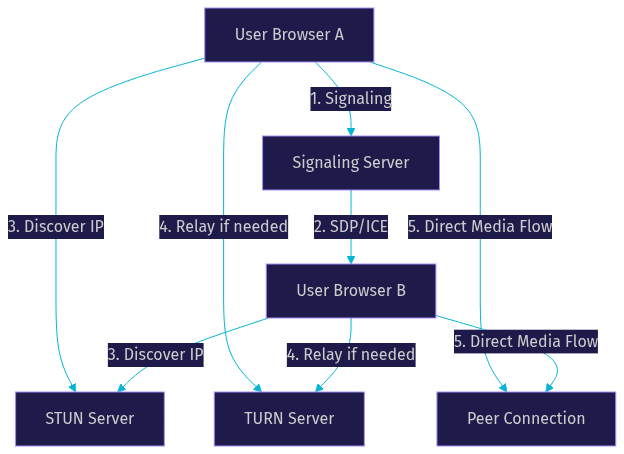
Visualizing the flow of a WebRTC application clarifies how the separate components interact. The process begins with a client requesting access to local media, moves through signaling to negotiate connection parameters, leverages STUN and TURN for network traversal, and finally establishes a direct peer connection for media flow.
This architecture represents a standard peer-to-peer flow. When scaling to multiple participants, the media flow section often routes through an SFU (Selective Forwarding Unit) instead of direct peer-to-peer meshes.
Building the Client Side
The client side of a WebRTC application handles media capture, peer connection management, and user interface rendering. This is where users interact with your platform.
Media Capture and Permissions
Before establishing any connection, the client must access the user's camera and microphone. Browsers enforce strict permission models for this. The application prompts the user for consent, and upon approval, receives media streams. You must handle permission denials gracefully, providing clear feedback if a user blocks camera access. VideoSDK simplifies this with a built-in pre-call device setup and testing interface, letting users verify their hardware before joining a session.
Peer Connection Lifecycle
The peer connection is the core object in any WebRTC application. Creating a peer connection involves initializing the object, adding local media tracks to it, and handling ICE candidate events as the browser discovers potential network routes. The connection lifecycle moves through states like new, connecting, connected, and disconnected. Handling these state transitions correctly ensures your application can recover from temporary network drops. When a participant disconnects, the application must tear down the connection cleanly to free up system resources.
UI Considerations
A functional WebRTC application needs an interface that adapts to varying participant counts and screen sizes. Common layouts include speaker view, which highlights the active speaker, and gallery view, which displays all participants in a responsive grid. You must handle participant join and leave events dynamically, re-rendering the layout without interrupting active streams. VideoSDK offers a Prebuilt UI Kit that handles these layout transitions automatically, providing a production-ready video calling interface with zero custom UI code.
Building the Server Side
The server infrastructure of a WebRTC application manages connection coordination, network traversal, and media routing at scale.
Signaling Server Options
Your signaling server choice depends on your application's complexity. A lightweight WebSocket server works well for simple, direct peer connections. Socket.IO adds automatic reconnection, room management, and broadcasting, making it suitable for multi-user applications. Open-source brokers like PeerJS offer a faster start by abstracting the signaling logic entirely. VideoSDK manages this layer entirely in the cloud, eliminating the need to deploy or maintain your own signaling infrastructure.
TURN Server Deployment
Deploying a TURN server is mandatory for production WebRTC applications. You can choose between hosted TURN services, which offer global distribution and managed capacity, or self-hosted solutions like coturn. Self-hosting gives you control but requires careful bandwidth provisioning, as all relayed media flows through your server. According to the W3C WebRTC specification, TURN servers must implement specific security mechanisms to prevent abuse. VideoSDK includes cloud proxy and TURN infrastructure by default, ensuring reliable connectivity even behind strict corporate firewalls.
Scaling Strategies
Scaling a WebRTC application beyond a handful of participants requires moving away from mesh networks. In a mesh network, every participant sends media directly to every other participant, which quickly exhausts client bandwidth and CPU. The two primary scaling architectures are SFU and MCU.
An SFU (Selective Forwarding Unit) receives media from all participants and selectively forwards the appropriate streams to each recipient. This drastically reduces client upload bandwidth, as each participant only sends one stream to the server. An MCU (Multipoint Control Unit) decodes, mixes, and re-encodes all streams into a single composite video, which saves client download bandwidth but requires massive server-side processing power. For most modern applications, SFU is the preferred architecture. VideoSDK uses a highly optimized SFU architecture to handle WebRTC scalability seamlessly.
Security and Privacy
Security is non-negotiable in a WebRTC application. All WebRTC media streams are encrypted by default using DTLS (Datagram Transport Layer Security) and SRTP (Secure Real-time Transport Protocol). However, the signaling layer is not encrypted by default, so you must secure it using HTTPS and WSS (WebSocket Secure).
Token-based authentication prevents unauthorized access to your rooms. You should generate tokens server-side using your API keys and pass them to the client, never exposing your secret keys in frontend code. VideoSDK enforces this pattern strictly. Learn more about this in the VideoSDK authentication guide. For applications handling sensitive data like telehealth consultations, end-to-end encryption (E2EE) ensures that even the media server cannot inspect the payload. GDPR considerations also require you to inform users about recording policies and provide mechanisms for data deletion.
Performance Optimization
Optimizing a WebRTC application involves balancing quality and bandwidth. Simulcast is a powerful technique where the client sends multiple versions of the same video stream at different resolutions and bitrates. The SFU then forwards the most appropriate version to each receiver based on their network conditions.
Codec selection also impacts performance. AV1 offers superior compression but requires more CPU. VP8 remains a solid, widely supported default. Handling packet loss requires enabling forward error correction and nack-based retransmission. VideoSDK abstracts these complexities with built-in noise suppression and automatic bandwidth optimization, ensuring clear audio and stable video even on unstable 3G connections.
Real-World Use Cases
WebRTC applications power critical communication across industries. Telehealth platforms use WebRTC for secure patient consultations, requiring HIPAA-compliant video sessions. Edtech platforms build online tutoring environments with interactive whiteboards and screen sharing. Multiplayer gaming lobbies use WebRTC data channels for ultra-low-latency state synchronization. Live shopping events leverage WebRTC for real-time host-to-audience interaction. VideoSDK supports all these scenarios through its flexible SDK, including interactive live streaming for sub-second audience engagement.
Future Trends in WebRTC Applications
The WebRTC landscape continues to evolve. The upcoming WebRTC 1.1 standard aims to refine existing APIs and improve interoperability. Real-time AI integration is a massive trend, with developers building voice agents that process speech and respond instantly within a WebRTC session. Low-latency streaming is pushing boundaries, moving from traditional HLS (10-30 second delay) to sub-second interactive streaming. VideoSDK is at the forefront of this shift, offering AI voice agents that connect LLMs and TTS providers directly to WebRTC rooms.
Definitions Glossary
Signaling: The process of exchanging control messages between peers to coordinate communication. VideoSDK handles this automatically via its cloud infrastructure.
STUN Server: A server that helps a WebRTC client discover its public IP address behind a NAT.
TURN Server: A server that relays media traffic between peers when direct connection fails due to restrictive firewalls.
SFU (Selective Forwarding Unit): A media server architecture that routes individual media streams to participants, enabling WebRTC scalability.
Simulcast: A technique where a client sends multiple video resolutions, allowing the server to pick the best quality for each receiver.
Key Takeaways
- A WebRTC application requires a signaling layer, STUN/TURN servers, and media stream management to function properly.
- Scaling beyond two participants demands an SFU architecture to prevent client bandwidth exhaustion.
- Security requires HTTPS, encrypted signaling, and server-side token generation to protect user data.
- Performance optimization relies on simulcast, adaptive codecs, and active packet loss handling.
- VideoSDK abstracts the entire WebRTC stack, letting developers ship secure, scalable video calling apps without managing infrastructure.
Conclusion
Building a WebRTC application from scratch involves navigating complex networking protocols, media server deployment, and intricate client-side state management. While understanding the underlying architecture is valuable, leveraging a platform like VideoSDK dramatically reduces time to market. You get built-in SFU scaling, global TURN infrastructure, network-adaptive streaming, and prebuilt UI components. Start building your WebRTC application today by signing up at app.videosdk.live/login and exploring the VideoSDK documentation. What are you building with WebRTC? Drop a comment below, I would love to hear what kind of real-time use case you are working on.
Free $20 Balance for AI Voice Agents & Video Calls
FAQ