


VoIP meaning gaming refers to the use of Voice over Internet Protocol to enable real-time voice chat between players in multiplayer games. Unlike traditional telephone VoIP, gaming VoIP prioritizes ultra-low latency (under 50 milliseconds) using lightweight codecs like Opus and transport protocols like UDP and RTP. Developers can embed similar low-latency voice communication into their own games using VideoSDK's audio calling SDKs.
Crystal-clear voice communication can be the difference between winning and losing a competitive match. When a teammate calls out an enemy position, every millisecond of delay matters. That is where VoIP comes in.
VoIP meaning gaming is the application of Voice over Internet Protocol technology specifically optimized for real-time voice chat in multiplayer environments. It is the invisible infrastructure behind every Discord call, every in-game proximity chat, and every esports team huddle.
This article breaks down what VoIP means in a gaming context, how it works at the protocol and codec level, the best tools available in 2026, and how to optimize your setup for competitive play. By the end, you will understand the full technical stack behind gaming voice chat and know which tools fit your platform and playstyle.
What Does Voip Meaning Gaming Actually Mean?
VoIP meaning gaming is defined as the use of Internet Protocol-based voice transmission to enable real-time communication between players in multiplayer game environments. It works by converting analog audio from a player's microphone into digital packets, transmitting those packets over the internet, and reconstructing the audio on the receiving player's device.
Traditional telephone VoIP services prioritize call clarity and reliability over speed. Gaming VoIP flips that priority. In a fast-paced shooter or real-time strategy game, a 200-millisecond delay makes voice communication useless for tactical callouts. Gaming VoIP systems are engineered to deliver voice packets with minimal latency, even if that means accepting slightly lower audio fidelity or occasional packet loss.
VideoSDK provides gaming-optimized voice communication through its audio calling SDK architecture, which uses the same WebRTC-based transport layer that powers modern real-time applications. Developers can embed voice rooms directly into their games without building a separate signaling infrastructure.
Core Components of Voip Meaning Gaming
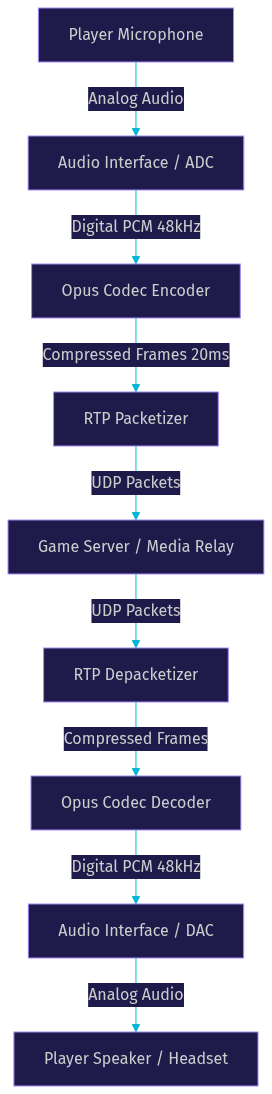
Every gaming VoIP system consists of four fundamental components working together. The microphone captures analog audio and converts it to a digital signal. The codec compresses that signal into a bandwidth-efficient format, with Opus being the dominant choice in modern gaming voice chat due to its low-latency performance across bitrates. The packetizer wraps compressed audio frames into network packets, typically using RTP over UDP for speed. The server routes those packets to other participants, either through a centralized media server or a peer-to-peer mesh.
According to the IETF Opus codec specification (RFC 6716), the Opus codec can achieve latency as low as 26 milliseconds while maintaining intelligible speech at bitrates as low as 6 kbps. This makes it ideal for gaming scenarios where bandwidth is constrained but real-time communication is critical.
How Voip Meaning Gaming Works in Multiplayer Games
Gaming VoIP follows a strict end-to-end pipeline that transforms sound into transmittable data and back again. Understanding this pipeline reveals why certain network conditions destroy voice quality and how to fix them.
The process begins when a player speaks into their microphone. The audio interface samples the analog signal at a fixed rate, typically 48,000 samples per second for Opus. The codec then compresses these samples into frames, usually 20 milliseconds each. Each frame is wrapped in an RTP header containing sequencing and timing information, then placed into a UDP packet for transmission.
UDP is preferred over TCP for gaming VoIP because it does not wait for acknowledgment of received packets. In a TCP connection, a single dropped packet would cause the entire stream to stall until retransmission succeeds. UDP simply sends the next packet, accepting minor gaps in audio rather than accumulating delay. This tradeoff is fundamental to real-time voice design.
The receiving client buffers incoming packets briefly to account for jitter (variation in packet arrival times), then decodes the compressed frames back into audio. The decoder uses sequence numbers from the RTP headers to detect and interpolate over lost packets, producing audible output with minimal gaps.
For developers building custom voice systems, VideoSDK's real-time communication platform handles this entire pipeline automatically, including adaptive jitter buffering, packet loss concealment, and automatic bitrate adjustment based on network conditions.
Latency Budget and Why It Matters
Competitive gaming demands a total round-trip voice latency under 50 milliseconds. Anything above 100 milliseconds becomes noticeable, causing players to talk over each other and miss time-sensitive callouts. The latency budget breaks down across several stages: capture and encoding (5 to 10 ms), network transit (10 to 30 ms depending on distance and routing), buffering and decoding (5 to 15 ms), and playback (2 to 5 ms).
Jitter is equally important. If packets arrive at irregular intervals, the receiving client must either expand its buffer (adding latency) or drop late packets (causing audio gaps). Modern gaming VoIP systems use adaptive jitter buffers that dynamically adjust size based on measured network conditions.
Key Benefits of VoIP for Gamers
Real-time voice communication transforms multiplayer gaming from a series of isolated actions into a coordinated team effort. The benefits extend beyond simple convenience.
Tactical coordination is the most immediate advantage. In games like Valorant, Counter-Strike 2, or Call of Duty, voice callouts about enemy positions, rotations, and ability usage happen in real time. Text chat is too slow for competitive play, and ping systems lack the nuance of spoken communication.
Proximity voice chat adds a layer of immersion that text cannot replicate. Games like PUBG, Rust, and GTA Online use spatial voice chat where volume and direction change based on in-game distance. Hearing an enemy's voice fade as they retreat around a corner creates tension and realism that static voice channels cannot match.
Social bonding keeps communities alive. Gaming voice platforms like Discord have become virtual hangout spaces where players socialize between matches, organize events, and build lasting friendships. The voice component is what transforms a server from a notification feed into a community.
Cost-effectiveness matters too. VoIP runs over existing internet connections with no per-minute charges. For developers, embedding voice directly into a game using an SDK like VideoSDK's audio calling API eliminates the need for players to install third-party clients, reducing friction and improving retention.
Common Challenges and How to Overcome Them
Gaming VoIP faces persistent challenges from network instability, toxic behavior, platform fragmentation, and security risks. Each problem has practical solutions if you know where to look.
Latency spikes occur when network conditions degrade. A player on a stable 20-millisecond connection might suddenly jump to 150 milliseconds due to ISP routing changes, congestion, or background downloads. Packet loss compounds the problem, causing choppy or garbled audio that makes communication impossible.
Voice toxicity remains a persistent issue in gaming communities. Unmoderated voice channels can expose players to harassment, hate speech, and disruptive behavior. Unlike text chat, voice content cannot be easily filtered or flagged after the fact.
Cross-platform routing introduces additional complexity. A PC player and a PlayStation player connecting to the same voice server may experience vastly different latency due to platform-specific network restrictions and NAT traversal issues.
Security and privacy concerns include IP leakage through peer-to-peer connections, unauthorized recording, and DDoS attacks targeting voice servers. Players on shared voice channels may unknowingly expose their IP addresses to malicious participants.
Mitigation Tactics for Gaming VoIP Problems
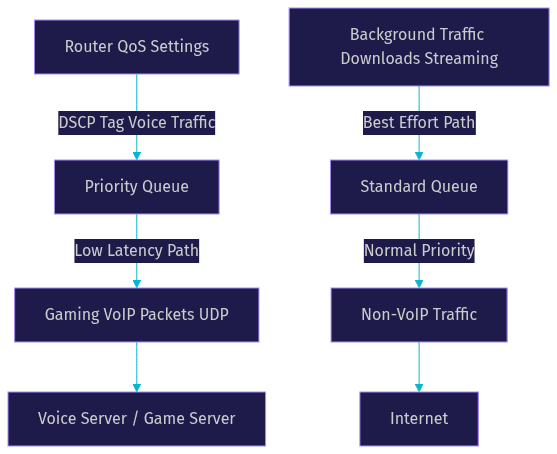
Several practical strategies address these challenges. Enabling QoS (Quality of Service) settings on your router prioritizes voice traffic over bulk data transfers, reducing latency spikes caused by background downloads or streaming. Most modern routers support DSCP tagging, which marks voice packets for priority handling.
Noise suppression has improved dramatically. AI-driven noise cancellation, like that available in VideoSDK's audio SDK, filters out keyboard clicks, fan noise, and background speech without degrading voice quality. Push-to-talk remains the simplest effective control for preventing accidental audio transmission.
For security, server-side voice mixing (used by VideoSDK and most modern voice platforms) prevents IP leakage by routing all traffic through a central media server rather than peer-to-peer. End-to-end encryption protects voice content from interception, and token-based authentication prevents unauthorized access to voice rooms.
Top VoIP Tools for Gaming in 2026
The gaming VoIP landscape in 2026 offers platforms and SDKs spanning consumer apps, self-hosted servers, and embedded developer tools. Here are the leading options evaluated on latency, platform support, security, and developer integration potential.
Discord remains the most popular gaming voice platform. It uses the Opus codec for voice encoding and offers a polished client across PC, Mac, Linux, iOS, Android, and consoles. Discord's server-based architecture provides decent latency for most users, though its centralized routing can introduce delays for players in regions far from Discord's data centers. Community features like roles, channels, and bots make it a social hub as much as a voice tool.
TeamSpeak is the choice for competitive purists. It offers ultra-low latency through self-hosted servers, giving teams full control over server location and network routing. TeamSpeak uses the Opus codec and supports up to 48kHz sample rates. Its lack of modern social features is offset by raw performance, making it a staple in esports tournaments where every millisecond counts.
Mumble is the open-source alternative with a unique advantage: positional audio. Mumble can link to supported games to make voice volume and direction reflect in-game player positions. It uses the Opus codec and supports self-hosting, but its interface and setup complexity limit mainstream adoption.
Vivox (now part of Unity) is an embedded voice SDK used in AAA titles like Fortnite, PUBG, and League of Legends. It provides in-game voice chat without requiring players to install external clients. Vivox handles cross-platform routing, matchmaking integration, and proximity chat, making it the reference standard for integrated game voice.
VideoSDK offers developers a modern alternative for embedding voice directly into games. With SDKs for React, React Native, Flutter, Android, and iOS, VideoSDK provides sub-second latency voice rooms with built-in noise suppression, recording, and role-based access control. Developers can build proximity chat, team voice channels, or spectator audio using the same SDK surface.
| Tool | Latency | Platform Support | Security | Best For | Pricing |
|---|---|---|---|---|---|
| Discord | Moderate (20-80 ms) | PC, Mac, Mobile, Console | Server-side mixing, TLS | Social gaming communities | Free, Nitro for perks |
| TeamSpeak | Low (10-30 ms) | PC, Mac, Mobile, Linux | AES encryption, self-hosted | Competitive esports teams | Self-hosted or rented servers |
| Mumble | Low (10-30 ms) | PC, Mac, Mobile, Linux | AES, self-hosted | Open-source enthusiasts | Free (self-hosted) |
| Vivox | Low (20-50 ms) | PC, Console, Mobile | Integrated with game auth | AAA game developers | Enterprise licensing |
| VideoSDK | Low (sub-300 ms) | PC, Mobile, Web, Unity | E2E encryption, token auth | Indie and mid-tier game devs | Free tier with credits |
VideoSDK stands out for developers who want Vivox-level integration without enterprise licensing costs. Its free tier includes credits sufficient for prototyping, and the SDK handles WebRTC complexity including signaling, ICE negotiation, and adaptive bitrate streaming.
Setting Up VoIP Across Platforms
Configuring gaming VoIP properly requires platform-specific attention. Each platform has unique network constraints, permission models, and hardware considerations that affect voice quality.
PC Setup
On PC, start by configuring your audio devices in your operating system's sound settings. Set your gaming headset as both the default playback and recording device. Ensure the microphone sample rate matches your VoIP client's expectation, typically 48kHz for Opus-based systems.
In your VoIP client (Discord, TeamSpeak, or your game's built-in voice), configure push-to-talk or voice activation with an appropriate threshold. Set the input sensitivity high enough to avoid transmitting background noise but low enough to capture normal speech.
On your router, enable QoS and prioritize traffic on the ports your VoIP client uses. Most gaming VoIP platforms document their port ranges. Prioritizing UDP traffic on those ports prevents background downloads or other household activity from degrading voice quality.
Use a wired Ethernet connection rather than Wi-Fi whenever possible. Wi-Fi introduces variable latency and packet loss due to interference, channel contention, and power management. A wired connection eliminates these variables.
Console Setup
Console voice chat is more constrained but simpler to configure. PlayStation and Xbox both include built-in voice chat that works with official headsets. Pair your headset through the console's Bluetooth or USB connection, then enable voice chat in the game's settings.
Console players should ensure their network connection is wired if possible. Console operating systems offer fewer QoS configuration options than PC, so network stability at the hardware level becomes more important. If you use a third-party client like Discord on Xbox, be aware that platform integration may introduce additional latency compared to native voice systems.
Mobile Setup
Mobile gaming VoIP requires attention to app permissions and data usage. Grant microphone access to your VoIP app in your device's privacy settings. On iOS, also enable background audio so voice chat continues when you switch to the game.
Mobile networks introduce higher latency and jitter than wired connections. If you are on cellular data, use a 5GHz Wi-Fi connection when available. Monitor your data usage, as voice chat typically consumes 10 to 30 MB per hour depending on codec bitrate.
For developers building mobile games, VideoSDK's React Native SDK and Flutter SDK handle mobile-specific challenges like adaptive bitrate for cellular networks and automatic reconnection when switching between Wi-Fi and cellular.
Future Trends in Gaming VoIP
Gaming voice communication is evolving beyond simple push-to-talk channels. Several emerging technologies will reshape how players communicate in virtual worlds over the next few years.
Spatial audio is becoming standard in modern game engines. Instead of all voices coming through a single channel, 3D voice positioning places each speaker in a virtual soundscape. You hear teammates to your left, enemies above, and distant gunfire behind you. The WebRTC specification maintained by the W3C now includes spatial audio capabilities, making it easier for developers to implement positional voice without custom audio processing pipelines.
AI-driven noise cancellation is replacing traditional noise gates. Machine learning models can distinguish between a player's voice and environmental noise with far greater accuracy than threshold-based filters. VideoSDK includes built-in noise suppression that adapts to each speaker's environment in real time, eliminating keyboard mechanical clicks, fan hum, and co-worker chatter without cutting off speech.
VR and AR multiplayer worlds demand voice that matches physical presence. In a VR game, voice should originate from the avatar's mouth position and attenuate with distance. This requires sub-50-millisecond latency and precise spatial rendering. Platforms like VRChat already implement this, and as VR adoption grows, the expectation for physically accurate voice will extend to all multiplayer experiences.
WebRTC-based voice layers are replacing proprietary protocols in game development. The VideoSDK platform is built on WebRTC, giving developers access to a standardized, battle-tested real-time communication stack without the overhead of maintaining custom signaling and media servers. As browser-based and cloud-streamed games grow, WebRTC-native voice becomes the default.
Definitions Glossary
VoIP (Voice over Internet Protocol): A technology that converts analog audio into digital packets and transmits them over the internet. In gaming, VoIP is optimized for low latency rather than call reliability, using UDP transport and lightweight codecs like Opus.
Opus Codec: An open, royalty-free audio codec standardized by the IETF (RFC 6716) that achieves low-latency speech encoding across a wide range of bitrates. It is the dominant codec in modern gaming voice chat due to its performance at 6 to 510 kbps.
RTP (Real-time Transport Protocol): A network protocol that wraps audio frames with sequencing and timing information for real-time transmission over UDP. RTP enables the receiving client to reorder packets, detect loss, and synchronize playback.
Jitter Buffer: A temporary storage area on the receiving client that holds incoming voice packets to smooth out variation in arrival times. Adaptive jitter buffers dynamically resize based on measured network conditions to balance latency and audio continuity.
QoS (Quality of Service): Router-level traffic management that prioritizes certain types of network traffic, such as voice packets, over others. QoS prevents background downloads and streaming from degrading real-time voice quality.
Proximity Voice Chat: A game mechanic where voice volume and spatial direction reflect the in-game distance and position of the speaking player. It requires the voice system to integrate with the game engine's spatial audio renderer.
Key Takeaways
- VoIP meaning gaming refers to internet-based voice communication optimized for ultra-low latency in multiplayer environments, typically targeting under 50 milliseconds of total round-trip delay.
- Gaming VoIP uses UDP transport and the Opus codec to prioritize speed over reliability, accepting minor packet loss rather than accumulating delay through retransmission.
- The best VoIP tool depends on your use case: Discord for social communities, TeamSpeak for competitive esports, Vivox for AAA game integration, and VideoSDK for developers building custom voice systems.
- Network optimization through QoS settings, wired connections, and proper router configuration is essential for maintaining voice quality in competitive play.
- The future of gaming VoIP points toward spatial audio, AI-driven noise suppression, and WebRTC-based voice layers that integrate seamlessly with VR and cloud-streamed game platforms.
Conclusion
Understanding VoIP meaning gaming gives you the technical foundation to choose the right voice communication tools and optimize your setup for competitive play. Whether you are a player trying to shave milliseconds off your callout latency or a developer building proximity chat into the next multiplayer hit, the principles remain the same: prioritize UDP transport, use efficient codecs like Opus, manage jitter with adaptive buffers, and secure your voice channels with server-side mixing and encryption.
For developers ready to embed voice into their games, VideoSDK's audio calling SDK provides a complete real-time voice platform with sub-second latency, built-in noise suppression, and SDKs for every major platform. Start with the free tier and explore the code samples to see how quickly you can add voice rooms to your game.
What are you building with VideoSDK? Drop a comment below and let me know what kind of gaming voice chat use case you are working on. Tag @video_sdk on Twitter and join the VideoSDK developer community on Discord to connect with other developers building real-time communication into their games.
Free $20 Balance for AI Voice Agents & Video Calls
FAQ