



VoIP lines are internet-based phone lines that carry voice calls as digital packets instead of analog signals over copper wire. They replace traditional PSTN lines with virtual numbers and SIP trunks, cutting per-line costs by 40 to 60 percent while adding features like auto-attendants, voicemail-to-email, and instant scalability. For businesses still on POTS, 2026 is the year to plan a migration before copper networks are fully sunset. VideoSDK extends this same infrastructure to developers building custom voice and telephony applications on top of WebRTC and SIP.
The copper telephone network that carried business calls for a century is being dismantled. Major carriers across North America and Europe have announced retirement timelines for legacy PSTN infrastructure, and regulators are accelerating the sunset of plain old telephone service. If your business still runs on analog lines, the question is no longer whether to move to VoIP lines, but when and how.
The economics alone make the case compelling. A traditional business line typically costs 30 to 50 dollars per month before long-distance charges, while a VoIP line with unlimited domestic calling often runs 15 to 25 dollars per user. Multiply that across a growing team, add international calling rates that are a fraction of PSTN pricing, and the savings compound quickly.
But cost is only the entry point. VoIP lines bring portability, programmability, and resilience that analog lines physically cannot match. This guide walks through what VoIP lines are, how they work technically, how to choose a provider, and how to migrate without downtime.
What Are VoIP Lines?
A VoIP line is defined as a virtual phone line that transmits voice calls over an internet connection using IP packets rather than a dedicated analog circuit. Where a traditional POTS line reserves a physical copper pair between your office and the central office for every call, a VoIP line exists as software: a phone number, a registration with a service provider, and a media path negotiated over the network.
Two concepts sit at the core of most business VoIP deployments. SIP trunking uses the Session Initiation Protocol to connect a company's PBX to the provider's network over the internet, replacing the bundles of physical trunks that used to run into a building. Virtual phone numbers, often called DID numbers for Direct Inward Dialing, let you provision local or toll-free numbers in any region without a physical presence there. A sales team in Chicago can hold London numbers; a support desk can offer callbacks from a number that matches the caller's area code.
Benefits of VoIP Lines for Business
VoIP lines deliver measurable savings, elasticity, and feature depth that analog lines cannot replicate. The differences show up in your monthly bill, your onboarding speed, and your ability to keep operating during disruptions.
Cost Savings and Pricing Models
Most providers price VoIP lines per user per month, bundling unlimited domestic calling, SMS, and a suite of features into a flat rate. International calls are billed at per-minute rates that are dramatically lower than PSTN tariffs because calls traverse the public internet for most of their route and only touch the traditional phone network at the final hop. A 20-person office moving from 20 analog lines at roughly 40 dollars each to a hosted VoIP plan at 20 dollars per user saves nearly 5,000 dollars annually before counting long-distance elimination.
Scalability and Flexibility
Adding a line on POTS meant a truck roll and a technician visit. On VoIP, adding a line means provisioning a new user in an admin portal, a process that takes minutes. Call bursting extends this elasticity to peak periods: when all primary lines are busy, overflow calls roll to additional virtual lines automatically, so a 10-line office can handle a 15-call spike without callers hearing a busy signal. Seasonal businesses find this invaluable, since lines can be added for a holiday rush and removed afterward.
Advanced Features
The feature set is where VoIP lines separate most sharply from analog. Standard business plans typically include an auto-attendant that routes callers by menu or dial-by-name, voicemail-to-email that delivers audio messages to your inbox, call forwarding rules that follow users across devices, and CRM integration that pops customer records when a call arrives. Unified communications platforms layer team messaging, video meetings, and presence indicators on top of the same line, so a colleague's availability is visible before you dial.
Reliability and Business Continuity
A common objection is that VoIP depends on power and internet, while copper lines kept working in outages. In practice, modern VoIP deployments handle this better than POTS. Cloud redundancy means your provider routes calls to any registered device, so if the office loses power, calls fail over to mobile soft-phone apps or voicemail-to-email automatically. Fiber-backed voice circuits with battery-backed on-premises equipment keep offices running through short outages, and because the phone system lives in the cloud, a physical disaster at one site does not take down the company's phone presence.
How VoIP Lines Work: Technical Overview
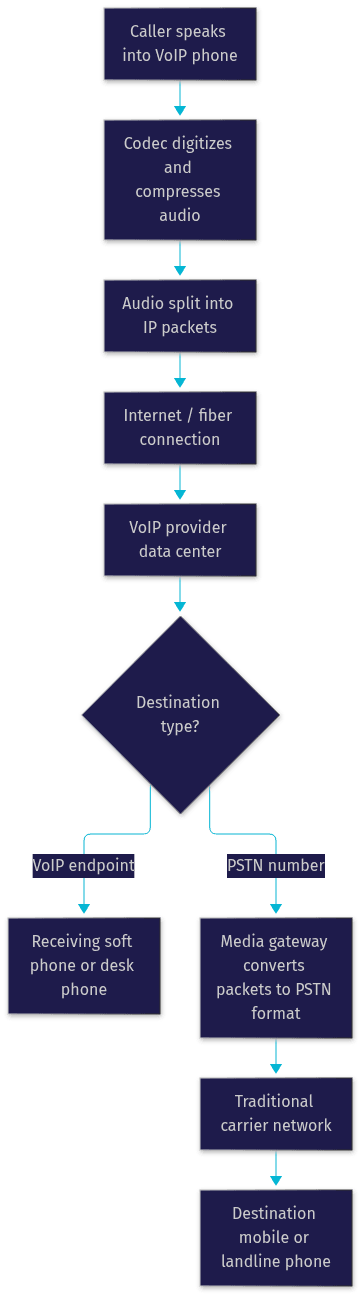
Every VoIP call follows the same fundamental pipeline: analog voice is digitized, compressed, packetized, routed across IP networks, and reassembled at the destination. Understanding this flow helps you diagnose quality issues and evaluate providers intelligently.
At the sending endpoint, a codec samples the audio stream and compresses it into a digital format. Common business codecs balance fidelity against bandwidth, with wideband codecs delivering noticeably richer audio than the narrowband standard of the PSTN era. The compressed audio is chopped into small packets, each stamped with sequencing and timing information, and sent over the internet to the provider's data center.
The provider's servers handle the hard part: translating between the IP world and the traditional phone network. If the destination is another VoIP user, the call may stay entirely on IP networks end to end. If the destination is a mobile or landline number, the provider routes the call through a gateway that converts the packets back into a format the PSTN understands and hands it off to the terminating carrier. This is why international VoIP rates are so low: the expensive legacy-network segment is minimized.
The critical dependency is your internet connection. Voice packets are small but latency-sensitive, so jitter and packet loss degrade call quality faster than raw bandwidth shortages do. A dedicated fiber circuit with quality-of-service rules that prioritize voice traffic is the gold standard; a contended consumer broadband link shared with large file transfers is the most common cause of choppy calls.
For developers, this same architecture is what powers modern programmable voice. VideoSDK's telephony and SIP integration bridges traditional SIP trunks with WebRTC rooms, so a call placed from a desk phone can join the same session as a browser-based participant, and AI voice agents built with the VideoSDK Agent SDK can answer, triage, and transfer those calls in real time.
Choosing the Right VoIP Provider
Provider selection determines your call quality, your support experience, and your total cost more than any hardware decision. Evaluate candidates against explicit criteria rather than demo-day impressions.
Key Evaluation Criteria
Start with the service level agreement. A credible provider publishes an uptime commitment of 99.9 percent or better with defined remedies for violations. Next, examine security: the provider should encrypt signaling with TLS and media with SRTP, and support multi-factor authentication on admin accounts, since a compromised phone system is a gateway to toll fraud that can cost thousands in a weekend. Review international calling rates against the countries you actually dial, because headline domestic pricing hides wide variation in per-minute international tariffs. Finally, test support responsiveness before signing: open a pre-sales ticket and measure the reply time.
Provider Models Compared
Three deployment models dominate the market. Hosted VoIP, sometimes called a cloud phone system, puts the entire PBX function in the provider's cloud; you only manage desk phones and soft-phone apps. This suits most small and mid-sized businesses. SIP trunk only keeps your existing on-premises PBX and replaces just the physical trunks with internet trunks, which appeals to companies with significant PBX investment. Hybrid deployments split traffic, keeping some on-premises capacity while moving most users to the cloud.
| Model | Best for | Trade-off |
|---|---|---|
| Hosted VoIP | SMBs wanting zero infrastructure management | Less granular PBX control |
| SIP trunk only | Companies with modern on-premises PBX | You maintain the PBX and its security |
| Hybrid | Multi-site enterprises in phased migration | Highest complexity |
Quick Evaluation Checklist
- Published SLA with uptime remedies
- TLS and SRTP encryption, MFA support
- Transparent international rates for your dialing profile
- Number porting guarantees in writing
- E911 compliance capabilities
- Responsive pre-sales support
Migration Path: From POTS to VoIP Lines
A disciplined migration moves a business from analog lines to VoIP with little or no customer-facing downtime. The sequence below reflects how successful cutovers are typically run.
Step 1: Audit Current Lines and Network Readiness
Inventory every analog line, its number, its purpose, and any equipment attached to it, including fax machines, alarms, elevators, and payment terminals that often hide on forgotten lines. In parallel, assess your network: confirm bandwidth headroom for voice, verify that routers can prioritize voice traffic, and identify whether your internet circuit is fiber-backed. Devices like elevator phones and fire-alarm lines sometimes require special handling or dedicated wireless backup paths, so flag them early.
Step 2: Select a Provider and Plan Number Porting
Choose your provider using the criteria above, then initiate number porting. Porting timelines vary by carrier and region, and the porting date anchors your cutover schedule. Never cancel existing service before the port completes, because cancelled numbers can be lost permanently. Get the porting commitment in writing.
Step 3: Configure SIP Trunks and Users
Work with the provider to configure your SIP trunks or hosted users, set up the auto-attendant and call routing rules, and assign direct numbers to users who need them. Configure call bursting and failover rules at this stage so overflow behavior is defined before go-live, not discovered during it.
Step 4: Test Before Cutover
Run parallel operation for at least a week if possible. Place test calls to and from every number, verify voicemail-to-email delivery, test call forwarding to mobile devices, and confirm that fax and alarm lines work over the new path. Validate E911 behavior by confirming that emergency services receive the correct registered address for each site, including details like suite numbers, since inaccurate E911 location data is a compliance failure and a safety risk.
Step 5: Cutover and Monitor
Execute the port on the scheduled date, ideally during low-call-volume hours. Keep the old service active through the port window. Monitor call quality and routing for the first two weeks, and keep a rollback plan documented even though you are unlikely to need it.
The most common migration mistakes are skipping the line audit and discovering an alarm line after the copper is gone, and underestimating internal network readiness. Both are avoidable with the sequence above.
Real-World Use Cases
VoIP lines prove their value across very different organizational shapes.
A five-person professional office. A small accounting firm replaces four analog lines with a hosted VoIP plan. The auto-attendant routes callers to the right accountant by name, voicemail-to-email ensures no message sits unheard overnight, and the monthly telecom bill drops by more than half. When a partner works from home, calls to her direct number ring the soft-phone app on her laptop.
A multi-site enterprise using call bursting. A logistics company with six warehouses runs SIP trunks into a cloud phone system. During peak season, call volume at the main site triples. Call bursting absorbs the overflow across pooled virtual lines, so customers never hear a busy signal, and the company only pays for burst capacity during the months it is needed.
A fully remote workforce. A 30-person software company has no office at all. Every employee uses a soft-phone app on laptop and mobile, with a single main company number and direct DIDs for client-facing roles. New hires get a working business line on day one, with no hardware shipped and no site visit scheduled.
For teams building their own communication products rather than buying a phone system, the same building blocks are available programmatically. VideoSDK's audio calling SDKs and REST APIs let you provision rooms, manage participants, and control recording and transcription server-side, while the Python SDK connects custom AI pipelines directly to live voice streams.
Definitions Glossary
VoIP line: A virtual phone line that carries voice calls as IP packets over the internet instead of over a dedicated analog circuit, provisioned and managed through software.
SIP trunking: A method of connecting a business PBX to a carrier network over the internet using the Session Initiation Protocol, replacing physical phone trunks.
DID (Direct Inward Dialing): A virtual phone number that routes calls directly to a specific user or extension, provisionable in any region without a physical presence.
PSTN: The Public Switched Telephone Network, the traditional global circuit-switched phone system that VoIP calls reach through media gateways when dialing landlines or mobiles.
Call bursting: A VoIP feature that automatically rolls overflow calls to additional virtual lines when primary lines are busy, preventing busy signals during spikes.
Key Takeaways
- VoIP lines replace physical copper circuits with software-defined virtual numbers and SIP trunks, typically cutting line costs by 40 to 60 percent while adding features analog lines cannot support. -- Scalability is near-instant: lines are provisioned in admin portals in minutes, and call bursting absorbs volume spikes without busy signals.
- Reliability in modern VoIP comes from cloud redundancy and failover to mobile apps, which in practice outperforms copper during outages and site disasters.
- A disciplined migration, audit, port, configure, test, cutover, protects against lost numbers, forgotten alarm lines, and E911 compliance gaps.
- Developers building custom voice products can achieve the same capabilities programmatically with VideoSDK's audio calling SDKs, SIP telephony integration, and AI agent tooling.
Conclusion
VoIP lines are no longer an upgrade decision, they are the default architecture for business voice as the PSTN sunset accelerates through 2026. The strategic value sits in three places: lower and more predictable cost, elasticity that matches your headcount and call volume, and a feature set, from auto-attendants to voicemail-to-email to CRM integration, that turns a phone line into a business system.
If you are still on POTS, start with the line audit this week, because the forgotten alarm line and the unported number are the two risks that bite hardest. If you are evaluating providers, run the checklist above and demand the SLA and security posture in writing. And if you are building your own voice product, explore how VideoSDK's telephony and real-time communication platform can power it, with a free tier available at app.videosdk.live.
What are you building with voice? Drop a comment, I would love to hear whether you are migrating an office or building the next generation of voice applications on top of VoIP lines.
Free $20 Balance for AI Voice Agents & Video Calls
FAQ