


VoIP chat is real-time voice communication delivered over IP networks, combining live voice with chat-style features like presence, history, and multi-device sync. Unlike plain VoIP calling, it wraps voice in a messaging experience, and unlike text chat, it carries actual audio streams. Developers typically build it with an SDK such as VideoSDK, which handles signaling, media routing, encryption, and NAT traversal so you ship in weeks, not years.
Voice has quietly become the default interface for remote work, customer support, and social apps. A support agent who can talk a customer through a setup screen resolves the issue in half the time of a text thread. A distributed engineering team that can drop into a quick voice room avoids the scheduling tax of formal calls. This shift is why voip chat has become one of the most searched topics among developers building communication features in 2026.
The economics help too. Legacy phone systems charge per minute, per line, and per feature. Internet-based voice rides on infrastructure you already pay for, scales with usage, and works on every device a user owns.
This guide covers what VoIP chat actually is, the technologies underneath it, how to build and secure a VoIP chat application, how to choose an SDK, and how to scale and price it for teams and enterprises.
What Is VoIP Chat?
VoIP chat is defined as real-time voice messaging transmitted over IP networks, presented inside a chat-like interface with presence indicators, session history, and multi-device continuity. It works by capturing audio on a client device, compressing it with a codec, sending it as packetized media to a peer or media server, and reconstructing it on the receiving end, typically with sub-300ms latency.
The distinction matters. A plain VoIP call is a voice session between two endpoints, full stop. A text chat app exchanges messages with no audio at all. VoIP chat sits in the middle: it is a voice-first experience with the affordances of messaging. Think of a walkie-talkie-style team channel, a voice room in a social app, or a support widget where the customer taps a button and starts talking.
For developers, this hybrid nature is the whole challenge. You need the low-latency media pipeline of a calling system and the state management of a messaging system, which is why most teams reach for an SDK rather than building both from scratch.
Core Technologies Behind VoIP Chat
Four technologies do the heavy lifting in any VoIP chat system. SIP (Session Initiation Protocol) handles signaling: it sets up, modifies, and tears down sessions, and it is the lingua franca for connecting to traditional phone networks. RTP (Real-time Transport Protocol) carries the actual audio packets once a session is established. WebRTC provides a browser-native implementation of all of this, enabling voice directly in web apps with no plugins. Codecs compress the audio: Opus is the modern default, adapting bitrate to network conditions, while G.711 remains common for PSTN interop. A well-architected VoIP chat stack uses all four in combination, and mature SDKs abstract them behind a clean API surface.
How VoIP Chat Differs From Traditional Telephony
Traditional telephony runs on dedicated circuit-switched infrastructure with per-minute billing and hardware-bound lines. VoIP chat runs on packet-switched internet infrastructure, which changes the economics completely. There is no per-minute charge for the data itself, devices are software-defined so a user can be reachable on laptop, phone, and tablet simultaneously, and features like recording, transcription, and transfer are software capabilities rather than paid add-ons. The trade-off is that you now own the reliability problem: network jitter, packet loss, and NAT traversal are your concerns, not the phone company's. That is the core reason SDKs exist.
Building a VoIP Chat Application: End-to-End Overview
Every production VoIP chat application follows the same fundamental architecture, whether it serves two users or two thousand. Understanding this flow before choosing tools will save you from the most expensive architectural mistakes.
The journey starts at the client app, which captures audio and connects to a signaling server. The signaling server authenticates the user, negotiates session parameters, and coordinates who talks to whom. Once signaling completes, media flows through a media server, typically an SFU (Selective Forwarding Unit) that receives one stream per participant and forwards only the necessary streams to others, keeping bandwidth costs linear rather than exponential. For phone-network reach, an optional PSTN or SIP gateway bridges the session to traditional numbers.
Two infrastructure problems bite every team here. First, NAT traversal: most devices sit behind firewalls that block direct peer connections, so you need STUN and TURN servers to punch through or relay. Second, authentication: you must never trust a client directly. Production systems generate short-lived tokens server-side using your API credentials, then pass those tokens to the client SDK to authorize room access. VideoSDK's authentication and token guide covers this pattern in detail, and it is the single most commonly skipped step in DIY tutorials.
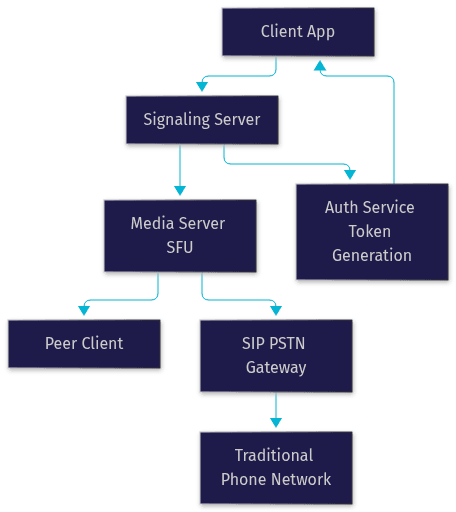
When you evaluate SDKs, map each vendor's offering onto this diagram. If a vendor handles signaling, media, TURN, and token auth as one integrated surface, your integration surface shrinks dramatically. If you are assembling open-source components, you are signing up to operate every box in that diagram yourself.
Choosing the Right VoIP Chat SDK
The SDK market splits into three families, and the right choice depends on your team's constraints.
Managed communication platforms like VideoSDK, Twilio Voice, and Agora Voice own the entire infrastructure layer. You integrate a client SDK, generate tokens from your backend, and the platform handles media routing, NAT traversal, and scaling. VideoSDK's differentiators are its unusually broad platform coverage (React, JavaScript, React Native, Android, iOS, Flutter, Unity, and more), a Prebuilt UI Kit that lets you embed a working calling interface with zero custom UI code, and built-in collaborative features like chat, polls, and recording included in the SDK rather than billed as add-ons. Twilio Voice brings deep telephony heritage and strong PSTN reach. Agora Voice offers solid global media infrastructure.
Open-source stacks like PJSIP and Linphone give you full control and no per-minute platform fees, but you operate the servers, handle scaling, and build every feature yourself. They suit teams with dedicated infrastructure engineers and strict data-residency requirements.
In practice, teams shipping product features choose managed platforms; teams building communication as their core product sometimes choose open source. Most application teams are better served by the first family.
Key Evaluation Criteria
Score every candidate against six dimensions. Latency: look for sub-300ms mouth-to-ear figures, and test on poor networks, not office Wi-Fi. Codec support: Opus is table stakes; G.711 matters if you interop with phone systems. Encryption: DTLS-SRTP for media and TLS for signaling should be defaults, not options. Scalability: ask what happens at 10, 100, and 1,000 concurrent participants per room. Pricing: understand per-minute versus per-user models and where free tiers cap out. Documentation quality: read the actual quickstart end to end before committing, because you will live in those docs for months.
Implementing Secure VoIP Chat
Security in VoIP chat is layered, and skipping any layer creates a real vulnerability. Voice conversations carry sensitive content, from customer payment details to internal strategy discussions, so treat security as an architecture requirement rather than a checkbox.
Start with transport security. Signaling traffic must run over TLS so that session metadata, participant lists, and tokens are never readable on the wire. Media streams must use SRTP, which encrypts the audio packets themselves, so even an attacker who intercepts RTP traffic hears noise. In WebRTC-based systems, DTLS-SRTP is mandatory by specification, which is one quiet advantage of WebRTC-based SDKs over older SIP stacks.
Then add access control. Token-based authentication, where your server generates short-lived credentials scoped to a specific room and role, prevents both unauthorized joins and credential replay. For regulated industries, look at end-to-end encryption, where media is encrypted on the client and never decrypted in transit through the media server. Also consider waiting rooms and role-based access control for participant management, both of which VideoSDK supports natively.
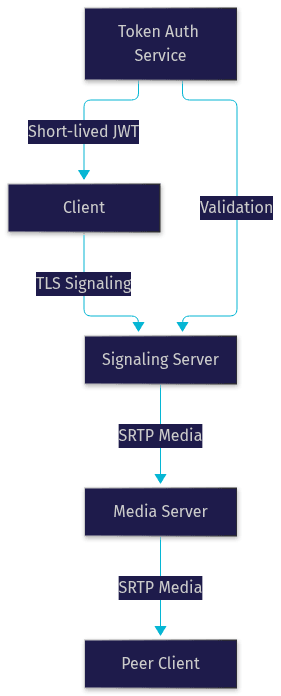
A practical security checklist: enforce TLS on all signaling, require SRTP on all media, generate tokens server-side with short expiry, scope tokens to specific rooms and roles, never ship API secrets in client bundles, enable waiting rooms for external participants, and log participant joins for audit trails. For healthcare or finance use cases, verify your SDK vendor's compliance documentation before signing anything.
Enhancing the User Experience
The difference between a VoIP chat app people use daily and one they abandon is rarely the audio quality. It is the experience around the audio.
UI matters first. Participants need clear visual state: who is speaking, who is muted, and how to join with one tap. Push notifications are essential for re-engagement, since voice sessions are spontaneous and users are not staring at your app. Background audio support keeps sessions alive when the app is minimized, which is non-negotiable for mobile. On the network side, adaptive bitrate is the feature that saves poor connections: the SDK detects bandwidth drops and automatically reduces audio quality slightly rather than letting the session degrade into choppy, unusable audio. VideoSDK's network-adaptive streaming does exactly this, adjusting bitrate and resolution in real time. Finally, handle reconnection gracefully: when a user's train goes through a tunnel, the app should rejoin the session automatically rather than dumping them back to a lobby.
Common Pitfalls and How to Avoid Them
Four issues account for most production incidents. Token expiry mid-session causes mysterious disconnects; use tokens with sensible lifetimes and refresh them before expiry. NAT and ICE failures show up as one-way audio or failed joins; always configure TURN fallback, not just STUN. Audio echo usually means a client is capturing speaker output; enforce echo cancellation on the SDK side and test on real hardware. Battery drain on mobile comes from holding the audio session hot unnecessarily; suspend the session when the app is backgrounded and no active conversation exists. Each of these is a known, solved problem if your SDK exposes the right controls, which is another argument for mature platforms over hand-rolled stacks.
Scaling VoIP Chat for Teams and Enterprises
Scaling VoIP chat is less about raw participant counts and more about organizational features. A ten-person startup needs reliable two-way voice. A five-hundred-person company needs structure.
Multi-party conferencing is the baseline: the SFU architecture described earlier scales to dozens of simultaneous speakers without bandwidth explosion. Breakout rooms let large meetings split into focused discussions, a pattern that became standard in remote-work culture. Recording, both composite and per-participant, serves compliance, training, and absent teammates. Real-time and post-call transcription turn voice sessions into searchable archives, which is increasingly an expectation rather than a premium feature. Session analytics give operations teams visibility into quality, participation, and drop-off.
For enterprises, the integration layer matters most. SIP and telephony integration bridges your VoIP chat rooms to existing Cloud PBX systems and SIP trunks, so employees on desk phones and customers on mobile numbers join the same conversation. VideoSDK supports inbound and outbound SIP flows with providers like Twilio, Vonage, and Telnyx, including DTMF events and call transfer, which covers most contact-center scenarios. The REST API then lets your backend orchestrate rooms, recordings, and analytics programmatically.
Pricing Models and Cost Optimization
VoIP chat pricing falls into three models. Per-minute pricing charges for connected participant minutes, which suits sporadic usage but punishes always-on voice rooms. Per-user or per-host pricing charges a flat rate for active participants, which suits teams with heavy daily usage. Free tiers and credits let you prototype at zero cost; VideoSDK offers a free tier with starting credits, so you can build and test a complete VoIP chat experience before paying anything.
To keep costs down, favor SFU architectures that avoid transcoding, since transcoding multiplies server CPU cost. Reuse media server sessions across features rather than spinning up separate infrastructure for chat, calls, and streaming. Set sensible session timeouts so idle rooms do not bill forever. And model your real usage pattern before committing: a support app with short frequent sessions and a social app with long ambient rooms have completely different cost curves under the same pricing model.
Future Trends in VoIP Chat
Three trends are reshaping VoIP chat in 2026. AI-enhanced transcription is moving from post-call to real-time, making every voice conversation searchable and accessible. Real-time translation is collapsing language barriers in support and global-team scenarios, with speech-to-text, LLM, and text-to-speech pipelines running live inside the session. And conversational AI agents are joining voice rooms as first-class participants: VideoSDK's AI voice agent SDK lets a Python-based agent listen, respond, and transfer calls inside the same rooms your human participants use. The line between "talking to a person" and "talking to a system" is dissolving, and VoIP chat is where it happens first.
Definitions Glossary
VoIP chat: Real-time voice communication over IP networks presented in a chat-style interface with presence, history, and multi-device sync. VideoSDK delivers this through its audio calling SDK built on the same rooms-based architecture as its video products.
SIP (Session Initiation Protocol): The signaling protocol that sets up, modifies, and ends communication sessions, and the standard bridge between IP-based systems and traditional phone networks.
SRTP (Secure Real-time Transport Protocol): The encrypted version of RTP that protects audio media packets on the wire, standard in WebRTC-based systems via DTLS-SRTP.
SFU (Selective Forwarding Unit): A media server that receives one stream per participant and forwards only necessary streams onward, keeping bandwidth costs linear as rooms grow.
Meeting Token: A short-lived, server-generated credential that authenticates and authorizes a participant's access to a specific VideoSDK room with a specific role.
NAT traversal: The set of techniques (STUN, TURN, ICE) that allow devices behind firewalls to establish direct media connections across the internet.
Key Takeaways
- VoIP chat combines low-latency voice with messaging-style features, requiring both a media pipeline and session state management that SDKs like VideoSDK abstract away.
- The core architecture is client SDK, signaling server, media server (SFU), and optional SIP/PSTN gateway, with server-side token authentication as a non-negotiable security layer.
- Security means TLS for signaling, SRTP for media, short-lived scoped tokens, and, for regulated use cases, end-to-end encryption.
- User experience is won through push notifications, background audio, network-adaptive streaming, and graceful reconnection, not raw audio quality alone.
- Enterprise scale requires breakout rooms, recording, transcription, analytics, and SIP integration with existing PBX and telephony infrastructure.
- Start on a free tier, model your real usage pattern, and avoid transcoding-heavy architectures to keep costs predictable.
Conclusion
VoIP chat in 2026 is a solved problem if you pick the right foundation. The architecture is well understood, the security patterns are established, and platforms like VideoSDK handle the hardest infrastructure layers, from NAT traversal to adaptive streaming to SIP interop, across ten-plus platforms with a Prebuilt UI Kit for zero-code embedding. Explore the VideoSDK quickstart, grab the free tier at app.videosdk.live/login, and join the VideoSDK Discord community to compare notes with other builders. What are you building with VoIP chat? Drop a comment, I'd love to hear what kind of voice experience you're working on.
Free $20 Balance for AI Voice Agents & Video Calls
FAQ