



Jitter in VoIP is the variation in packet arrival time between voice packets, caused by network congestion, routing changes, or queuing delays. Acceptable jitter for clear voice calls is under 30 milliseconds, while anything above 150 milliseconds produces choppy, robotic audio. You mitigate jitter with adaptive jitter buffers, QoS prioritization, wired connections, and continuous RTP monitoring using RTCP reports and tools like Wireshark and iPerf3. VideoSDK handles jitter mitigation at the media layer through network-adaptive streaming and built-in noise suppression for real-time communication apps.
When a voice call starts breaking up, most people blame their internet connection. But the real culprit is usually jitter, the unpredictable variation in how long packets take to travel across the network. For developers building real-time communication systems, understanding jitter and VoIP performance is non-negotiable. A network can have excellent bandwidth and low average latency, yet still deliver terrible call quality if jitter is high.
This guide breaks down what jitter is, how it differs from latency and packet loss, what levels are acceptable, and how to measure and mitigate it in production deployments. Whether you are building a VoIP application with WebRTC, managing SIP trunks for an enterprise, or evaluating real-time communication SDKs like VideoSDK, the concepts here apply directly to your call quality.
What Is Jitter and How It Differs From Latency and Packet Loss?
Jitter is defined as the variation in inter-arrival time between consecutive packets in a media stream. If packet one arrives 20 milliseconds after it was sent, packet two arrives 35 milliseconds later, and packet three arrives 18 milliseconds later, the jitter is the statistical deviation of those arrival intervals. The packets are not lost and they are not uniformly delayed. They arrive at irregular intervals, which disrupts the continuous playback that voice codecs require.
Latency, by contrast, is the consistent one-way delay between a packet being sent and arriving. A network with 100 milliseconds of latency but near-zero jitter produces clear audio because the receiver can buffer and play packets at a steady rate. A network with 50 milliseconds of latency but 60 milliseconds of jitter produces garbled audio because the playout scheduler cannot predict when the next packet will arrive.
Packet loss is a third distinct problem. Packets simply never arrive, usually due to network congestion causing buffer overflows at routers or switches. Loss creates audible gaps in the audio stream. Jitter creates timing irregularities. Both degrade the Mean Opinion Score (MOS), but they require different mitigation strategies.
In VoIP systems, audio is typically transported using the Real-time Transport Protocol (RTP), which carries the encoded voice payload, and the RTP Control Protocol (RTCP), which carries quality feedback including the inter-arrival jitter value. RTCP reports allow the sender to observe jitter as experienced by the receiver, making it the primary signaling-layer mechanism for jitter measurement in standards-based VoIP.
Acceptable Jitter Levels for VoIP
Jitter thresholds for VoIP are well established in telecom engineering. The table below summarizes the quality tiers based on one-way jitter measurements.
| Jitter Range | Quality Level | Audible Impact |
|---|---|---|
| Under 20 ms | Excellent | No perceptible degradation |
| 20 to 40 ms | Good | Minimal impact, jitter buffer absorbs variation |
| 40 to 80 ms | Degraded | Occasional choppy audio, buffer may overflow |
| 80 to 150 ms | Poor | Frequent audio artifacts, robotic voice |
| Over 150 ms | Unacceptable | Severe breakup, conversation becomes difficult |
These thresholds assume a properly configured jitter buffer on the receiving end. One-way jitter is the metric that matters most for VoIP because voice is a one-way media stream. Round-trip jitter measurements, while useful for general network diagnostics, do not directly reflect the listener's experience because the return path jitter affects the other participant's audio, not yours.
For enterprise SIP trunk deployments, carriers often specify a maximum jitter commitment of 30 milliseconds one-way in their SLAs. For WebRTC-based applications using VideoSDK, the media stack handles jitter buffering automatically, but developers should still monitor RTCP-derived jitter metrics to catch network issues before users complain.
How Jitter Impacts Call Quality
Jitter degrades call quality by disrupting the continuous playout schedule that voice decoders depend on. When packets arrive at irregular intervals, the decoder either waits for late packets, producing silence gaps, or discards them entirely, producing audio dropouts. The audible symptoms of jitter include choppy audio where words sound cut off, robotic or metallic voice quality where the decoder interpolates missing frames, and in severe cases, complete loss of syllables.
The impact on MOS is significant. A call with under 20 milliseconds of jitter typically scores 4.3 to 4.5 on the MOS scale, which is near toll quality. At 80 milliseconds of jitter, MOS drops to around 3.2, which users perceive as noticeably degraded. Above 150 milliseconds, MOS falls below 2.5, and most users rate the call as unacceptable.
This is why jitter buffers exist. The buffer intentionally delays playout by a small amount to absorb arrival time variations, trading a fixed latency increase for smoother audio. Without a jitter buffer, even moderate jitter renders VoIP unusable. The challenge is that the buffer itself introduces latency, so the engineering tradeoff is always between buffer depth and conversational responsiveness.
The Role of the Jitter Buffer
A jitter buffer is a temporary packet queue on the receiving side that reorders incoming RTP packets and releases them to the decoder at fixed intervals. By holding packets briefly, the buffer compensates for the fact that some packets arrive early and others arrive late. The decoder then receives a steady, predictable stream regardless of what the network did in transit.
Static jitter buffers use a fixed depth, typically 30 to 60 milliseconds. They are simple to implement and predictable in their latency cost, but they cannot adapt to changing network conditions. If jitter suddenly spikes beyond the fixed depth, the buffer overflows and packets are discarded. If jitter drops, the buffer still imposes the same latency penalty.
Adaptive jitter buffers, which are used in modern WebRTC stacks and VideoSDK's media layer, dynamically adjust their depth based on observed network conditions. When jitter increases, the buffer grows to absorb the variation. When jitter decreases, the buffer shrinks to minimize latency. This adaptivity is critical for mobile networks and Wi-Fi, where jitter fluctuates constantly.
The tradeoff is unavoidable. A deeper buffer handles more jitter but adds latency, which hurts conversational flow. A shallower buffer keeps latency low but risks overflow and packet loss during jitter spikes. When a jitter buffer overflows, late packets are discarded, which is functionally equivalent to packet loss from the decoder's perspective.
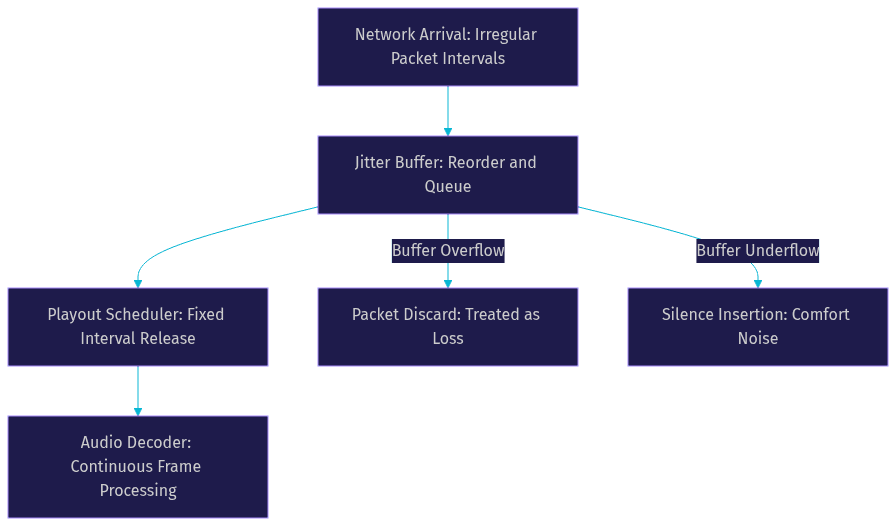
The diagram above shows the flow from irregular network arrival through the jitter buffer to the playout scheduler and decoder. Overflow and underflow paths represent the two failure modes that produce audible artifacts.
Common Causes of VoIP Jitter
Jitter does not have a single root cause. It emerges from multiple layers of the network stack, and identifying the specific source in your deployment requires systematic measurement. Here are the most common causes.
Network Congestion and Queuing Delay
When a router or switch interface receives more traffic than it can transmit, packets enter a queue. The time spent waiting in that queue varies based on instantaneous load, producing jitter. A link running at 90 percent utilization will show significantly more jitter than one at 40 percent because queues fill and drain unpredictably. This is the most common cause of jitter in enterprise networks.
Wi-Fi Contention and Retransmissions
Wireless networks are inherently prone to jitter due to medium access contention. When multiple devices compete for airtime, the access point schedules transmissions in variable order. Retransmissions caused by interference or signal degradation add further delay variation. A Wi-Fi network with 15 connected devices will produce more jitter than a wired Ethernet link under identical load conditions.
Variable Routing Paths
Equal-cost multi-path routing (ECMP) and load-balancing algorithms distribute packets across multiple paths. If those paths have different latency characteristics, consecutive packets in a single RTP stream may take different routes and arrive out of order with varying delays. This is a well-known source of jitter in cloud-hosted VoIP deployments where traffic traverses multiple provider backbones.
ISP Throttling and Bandwidth Saturation
Some ISPs apply traffic shaping policies that introduce variable delay, particularly on unencrypted UDP traffic or traffic that resembles peer-to-peer protocols. Additionally, if the upstream bandwidth is saturated by non-voice traffic, VoIP packets compete for limited capacity and experience queuing jitter at the ISP edge.
Misconfigured QoS or Missing Traffic Prioritization
Without proper Quality of Service configuration, VoIP packets are treated the same as bulk data transfers. A large file download can fill the egress queue, forcing voice packets to wait. DSCP marking (typically EF, or Expedited Forwarding, for voice) tells routers to prioritize VoIP traffic. Missing or incorrect DSCP markings are a frequent cause of avoidable jitter.
Session Border Controller Processing Delays
SBCs perform deep packet inspection, transcoding, and security functions. Under high load, an SBC may introduce variable processing delay that manifests as jitter on the egress side. If the SBC's internal jitter buffer is undersized or its CPU is saturated, the problem compounds. Monitoring SBC jitter buffer statistics is essential for carrier-grade deployments.
Measuring Jitter in Real-World Deployments
You cannot mitigate what you cannot measure. Several tools and protocols provide jitter visibility at different layers of the stack.
iPerf3 is a network testing tool that can measure jitter directly by sending UDP packets at fixed intervals and computing the variation in arrival times. It is useful for baseline network capacity testing before deploying VoIP, but it does not measure actual RTP stream jitter.
Wireshark provides RTP stream analysis that calculates jitter from captured packet timestamps. By applying the RTP analysis filter to a packet capture, you can view a jitter graph showing the variation over the duration of the call. This is the most precise method for diagnosing jitter on a specific call segment.
RTCP reports are the standards-based mechanism for jitter measurement in live VoIP systems. Every RTCP receiver report includes an inter-arrival jitter field, calculated as the running average of the difference between packet spacing at the receiver and the spacing at the sender. This value is expressed in timestamp units and can be converted to milliseconds. SIP-based monitoring platforms and SBC management interfaces typically expose RTCP jitter values in their dashboards.
SNMP counters on routers and switches can provide indirect jitter indicators through interface queue depth and drop statistics, though they do not measure jitter directly.
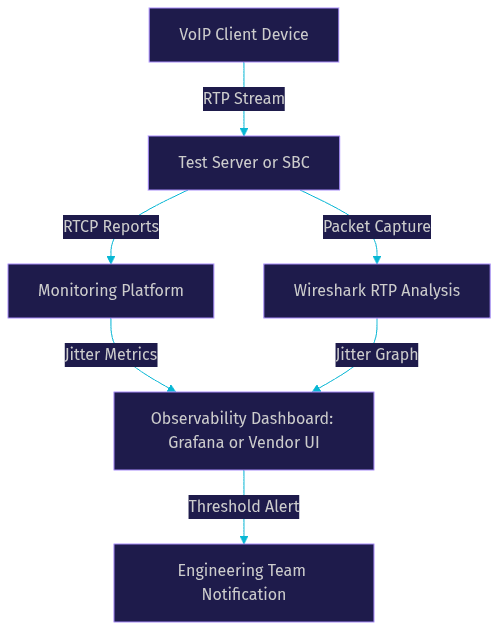
The diagram above illustrates a monitoring architecture where RTP traffic flows through a server or SBC that generates both packet captures for Wireshark analysis and RTCP reports for a monitoring platform. Both data streams feed into a unified observability dashboard.
Strategies to Reduce Jitter
Mitigating jitter requires a combination of network engineering, endpoint configuration, and architectural choices. The following strategies address the most common causes.
Prioritize VoIP with QoS and DSCP Marking
Apply DSCP Expedited Forwarding markings to RTP traffic at the edge switch or router, and ensure every hop in the path honors those markings. Configure traffic shaping on egress interfaces to prevent bursts from filling queues ahead of voice packets. Use this strategy in any enterprise network where VoIP shares bandwidth with data traffic.
Separate Voice Traffic onto Dedicated VLANs
Create a voice VLAN that carries only RTP traffic, isolated from data VLANs at Layer 2. This prevents broadcast traffic and data bursts from interfering with voice packets. Use this in enterprise campus networks where multiple device types share physical infrastructure.
Upgrade to Wired Ethernet or 5 GHz Wi-Fi
Wired Ethernet eliminates the contention and retransmission jitter inherent in Wi-Fi. If Wi-Fi is unavoidable, use the 5 GHz band with fewer connected clients and strong signal strength to minimize retransmissions. Use this strategy for desk phones, softphone workstations, and any endpoint where call quality is critical.
Optimize Routing for Voice Flows
Pin RTP flows to a single path rather than distributing them across ECMP routes. Many modern routers support flow-based hashing that keeps a single RTP stream on one path, but verify this behavior in your configuration. Avoid per-packet load balancing for voice traffic, as it guarantees out-of-order delivery and jitter.
Adjust Jitter Buffer Settings
If your endpoint or SBC allows jitter buffer configuration, choose adaptive buffers over static ones for variable networks like Wi-Fi and mobile. For stable wired networks with known jitter characteristics, a static buffer set to the observed jitter plus a small margin can reduce latency. VideoSDK's media stack uses adaptive jitter buffering by default, which is the right choice for consumer-facing applications where network conditions are unpredictable.
Deploy SBCs with Built-in Jitter Mitigation
Enterprise SBCs from vendors like Oracle, Ribbon, and Sangoma include sophisticated jitter buffer algorithms and transcoding capabilities that normalize jitter between network segments. Place SBCs at network boundaries where jitter characteristics change, such as between a corporate LAN and a SIP trunk.
Use Cloud-Based Media Relays Close to Users
For WebRTC applications, deploying media relay servers geographically close to users reduces the number of hops and the likelihood of encountering congested transit links. VideoSDK's cloud infrastructure routes media through regional servers optimized for low-latency real-time communication, which reduces both jitter and latency for end users. Learn more about VideoSDK's architecture.
Monitoring Jitter Over Time
Point-in-time jitter measurements are useful for diagnosis, but chronic jitter problems require continuous monitoring. Integrate jitter metrics into your observability stack using Prometheus to scrape RTCP-derived jitter values from your media servers or SBCs, and visualize trends in Grafana dashboards.
Set alert thresholds at 40 milliseconds for warning and 80 milliseconds for critical, based on the quality tiers established earlier. Correlate jitter spikes with network events such as routing changes, bandwidth saturation, or SBC failovers. For VideoSDK users, the REST API provides session analytics that include quality metrics, which can be pulled into external monitoring systems for long-term trend analysis.
Vendor dashboards from SBC manufacturers and SIP trunk providers also offer jitter visibility, but they often lack the customization needed for deep correlation analysis. A unified observability approach that combines network-layer metrics, RTCP reports, and application-layer quality scores gives you the most complete picture.
Quick Reference Cheat Sheet
- Excellent jitter: Under 20 ms one-way
- Acceptable jitter: Under 40 ms one-way
- Unacceptable jitter: Over 150 ms one-way
- Key measurement tools: Wireshark RTP analysis, iPerf3 UDP tests, RTCP receiver reports
- Primary mitigation tactics: QoS with DSCP EF marking, voice VLANs, wired Ethernet, adaptive jitter buffers, pinned routing paths
- SBC role: Normalizes jitter at network boundaries with built-in adaptive buffers
- WebRTC approach: Adaptive jitter buffering in the media stack, cloud relays near users
- Monitoring thresholds: Alert at 40 ms warning, 80 ms critical
- MOS impact: 4.3+ at under 20 ms jitter, below 2.5 at over 150 ms jitter
Definitions Glossary
Jitter: The variation in inter-arrival time between consecutive packets in a media stream, measured in milliseconds. In VoIP, jitter disrupts continuous audio playback and degrades call quality.
Jitter Buffer: A packet queue on the receiving endpoint that temporarily holds incoming RTP packets and releases them to the decoder at fixed intervals to compensate for arrival time variation.
RTP (Real-time Transport Protocol): The IETF standard protocol for delivering audio and video over IP networks, carrying the encoded media payload with sequence numbers and timestamps.
RTCP (RTP Control Protocol): The companion protocol to RTP that provides quality feedback including inter-arrival jitter, packet loss, and round-trip time measurements.
MOS (Mean Opinion Score): A subjective quality rating from 1 to 5 used in telephony to evaluate voice quality, where 4.0 or higher is considered good quality.
DSCP (Differentiated Services Code Point): A field in the IP header that classifies packets for QoS treatment, with Expedited Forwarding (EF) typically used for VoIP traffic.
SBC (Session Border Controller): A network element that manages, secures, and normalizes VoIP traffic at network boundaries, including jitter buffering and transcoding functions.
Key Takeaways
- Jitter is the variation in packet arrival time, not the delay itself, and it is the primary cause of choppy and robotic audio in VoIP calls.
- Acceptable jitter for clear voice is under 30 milliseconds one-way, with quality degrading noticeably above 40 milliseconds and becoming unacceptable above 150 milliseconds.
- Adaptive jitter buffers are the standard mitigation in modern WebRTC stacks and VideoSDK's media layer, dynamically trading latency for smoothness based on real-time network conditions.
- Network-level mitigation requires QoS with DSCP marking, voice VLANs, wired Ethernet where possible, and pinned routing paths to avoid ECMP-induced out-of-order delivery.
- Continuous monitoring using RTCP reports, Wireshark RTP analysis, and observability platforms like Grafana is essential for catching chronic jitter before users report call quality problems.
Conclusion
Managing jitter and VoIP quality is an ongoing engineering practice, not a one-time configuration. The combination of proper QoS, adaptive jitter buffers, wired connectivity, and continuous monitoring covers the vast majority of real-world jitter problems. For developers building real-time communication applications, choosing a platform that handles jitter mitigation at the media layer, like VideoSDK's video and audio calling SDK, eliminates much of the low-level network engineering work while still giving you visibility into quality metrics through session analytics.
Start by measuring your current jitter baseline, then apply the mitigation strategies that match your network architecture. If you are building a VoIP or video calling application, sign up for a free VideoSDK account and explore how the platform handles adaptive streaming and jitter buffering out of the box.
What are you building with real-time communication? Drop a comment below, I would love to hear about your VoIP deployment and any jitter challenges you are working through.
Free $20 Balance for AI Voice Agents & Video Calls
FAQ