


Introduction to Free AI Text to Speech Generators
A free AI text to speech generator is a software tool or service that converts written text into spoken audio using artificial intelligence, typically without any cost to the user. These platforms leverage advanced machine learning models to deliver high-quality, realistic speech output. In 2025, the demand for text to speech (TTS) technology has skyrocketed, driven by the proliferation of digital content, accessibility requirements, and the global expansion of multilingual communication. From enhancing the accessibility of websites to powering dynamic voiceovers in videos, free AI TTS generators are now vital tools for developers, content creators, and businesses.
The evolution of free AI text to speech generators has been rapid. Early TTS systems produced robotic, monotone voices, but modern AI-powered platforms now offer natural-sounding, emotionally expressive speech in numerous languages. This shift is fueled by neural networks and deep learning, making it easier than ever to integrate high-quality, customizable voice synthesis into any digital project.
How Does a Free AI Text to Speech Generator Work?
At its core, a free AI text to speech generator transforms input text into lifelike speech using neural networks, especially transformer models. The process begins with natural language processing (NLP) to analyze and segment the input, followed by neural TTS (text to speech) models that map text to phonemes and audio features. These models generate a waveform that is rendered as an audio file, often in MP3 or WAV format.
For developers interested in adding real-time voice features to their applications, integrating a Voice SDK can streamline the process, enabling seamless audio experiences alongside TTS capabilities.
Here’s a high-level workflow from input text to MP3 output:
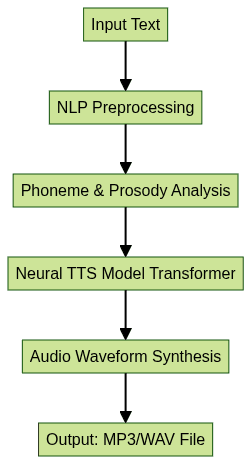
This process ensures that the speech output is both intelligible and natural-sounding. Transformer models, such as Tacotron 2 and FastSpeech, are especially popular due to their superior performance in capturing inflection, emotion, and context. Some advanced TTS platforms even support voice cloning and emotional tone modulation, further enhancing realism.
Key Technologies Behind Free AI Text to Speech
Modern free AI text to speech generators rely on several key technologies:
- Natural Language Processing (NLP): Parses and interprets text for accurate pronunciation and prosody.
- Neural TTS: Uses deep learning models (often transformers) to generate high-fidelity speech.
- Voice Cloning: Allows creation of a synthetic voice based on a few samples, enabling custom or celebrity voices.
- Emotional Tone Detection: Modulates speech to convey emotion, making output more engaging and less monotonous.
If you're building interactive applications that require more than just TTS, such as live audio rooms or collaborative spaces, leveraging a Voice SDK can provide advanced audio features and real-time communication capabilities.
These advancements have made TTS tools indispensable for developers seeking to add voice features to their applications without compromising on quality or flexibility.
Top Features to Look For in a Free AI Text to Speech Generator
When evaluating a free AI text to speech generator, developers should consider a range of technical and practical features:
- Realistic & Natural-Sounding Voices: Modern platforms leverage neural TTS and large voice datasets to produce speech indistinguishable from human voices.
- Multilingual Support: The best generators offer dozens of languages and accents, crucial for global and accessibility-focused applications.
- Emotional Tone & Inflection: Advanced TTS engines can modulate speech for emotion, tone, and context, critical for storytelling or e-learning.
- Downloadable Formats (MP3, WAV): Instant access to audio files for integration into podcasts, videos, and presentations.
- Privacy and Data Retention: Some platforms prioritize privacy, offering no data retention and anonymous use, which is vital for sensitive content.
- No Sign-Up/Instant Use: Frictionless access increases developer productivity by removing account creation barriers.
- Browser Extensions & APIs: Easy integration via browser plugins or API endpoints, supporting automation and workflow customization.
For those looking to add video communication alongside TTS, a Video Calling API can be integrated to enable seamless video and audio conferencing within your application.
These features can significantly impact the usability, flexibility, and security of your TTS implementation, especially when dealing with commercial or privacy-sensitive projects.
Comparing the Best Free AI Text to Speech Generators
To help you choose the right free AI text to speech generator, here’s a comparison of leading platforms in 2025:
| Platform | Languages | Voice Types | Character Limit | Privacy | Sign-up Needed | API | Commercial Use |
|---|---|---|---|---|---|---|---|
| OpenAI FM | 30+ | Neural, Emotional, Celebrity | 5,000/mo (free) | No data retention | No | Yes | Yes (license required) |
| Beepbooply | 15 | Neural, Standard | Unlimited* | Minimal logs | No | Yes | No |
| The AI Voice Generator | 40+ | Neural, Voice Cloning | 2,500/day (free) | Full privacy | Yes | Yes | Yes |
| AI Speaker | 25 | Realistic, Multilingual | 10,000/mo (free) | Anonymous | No | Yes | No |
| AIDocMaker | 10 | Standard, WAV only | 1,000/day | Retained logs | Yes | No | No |
| AI Voice Generator | 12 | Neural, Standard | 3,000/mo | No retention | No | Yes | Yes |
(*Unlimited tier may be subject to fair use policy.)
If your project involves live broadcasts or interactive sessions, consider integrating a Live Streaming API SDK to enable real-time streaming features alongside your TTS solution.
Pros and Cons of Leading Platforms
- OpenAI FM
- Pros: Advanced voices, privacy-first, strong API, commercial license
- Cons: Free tier is limited by character count
- Beepbooply
- Pros: Unlimited free use, quick API
- Cons: Fewer voices, minimal emotional range
- The AI Voice Generator
- Pros: Voice cloning, strong privacy, wide language support
- Cons: Requires sign-up
- AI Speaker
- Pros: Multilingual, anonymous use
- Cons: No commercial use allowed
- AIDocMaker
- Pros: Simple interface
- Cons: Standard voices, logs retained, no API
- AI Voice Generator
- Pros: Neural voices, no sign-up, commercial use permitted
- Cons: Limited languages
For developers building telephony or call-based features, exploring a phone call api can help you add robust audio calling capabilities to your app.
Practical Use Cases for Free AI Text to Speech Generators
Free AI text to speech generators have broad applicability across the tech ecosystem:
- Content Creation: Automate narration for podcasts, YouTube videos, or explainer videos. E-learning platforms use TTS for interactive lessons and dynamic quizzes.
- Accessibility: Power screen readers and assistive technologies, making digital content accessible for users with visual impairments or reading difficulties.
- Business Applications: Enhance IVR (Interactive Voice Response) systems, create dynamic presentations, and automate marketing voiceovers.
- Creative Projects: Generate voiceovers for audiobooks, bring fictional characters to life, or experiment with celebrity voice AI for entertainment or parody content.
If you want to quickly add video calling functionality to your website or app, you can embed video calling sdk solutions for a seamless, ready-to-use experience.
The flexibility and ease of integration of modern TTS platforms have opened up creative and commercial opportunities previously limited by cost or technical complexity.
Implementation: Using a Free AI Text to Speech Generator
Getting started with a free AI text to speech generator is straightforward. Here’s how you can implement TTS via both web interface and API:
Step-by-Step (Web Interface):
- Choose your TTS platform (e.g., OpenAI FM or Beepbooply).
- Paste or type your text into the input box.
- Select language, voice, and emotional tone if available.
- Click "Generate" to process the text.
- Download the MP3 or WAV file for use in your project.
For developers working with JavaScript, a javascript video and audio calling sdk can be integrated to add advanced communication features alongside TTS in your web applications.
API Implementation Example (Python):
1import requests
2
3API_URL = "https://api.openai.fm/v1/tts"
4API_KEY = "YOUR_API_KEY"
5
6payload = {
7    "text": "Welcome to the future of AI voice synthesis!",
8    "voice": "en-US-EmilyNeural",
9    "format": "mp3"
10}
11headers = {
12    "Authorization": f"Bearer {API_KEY}",
13    "Content-Type": "application/json"
14}
15
16response = requests.post(API_URL, json=payload, headers=headers)
17if response.status_code == 200:
18    with open("output.mp3", "wb") as f:
19        f.write(response.content)
20else:
21    print(f"Error: {response.status_code} - {response.text}")
This snippet demonstrates a typical POST request to a TTS API, returning an MP3 file for quick integration into your application.
Tips for Maximizing Quality & Naturalness
- Use precise punctuation to guide inflection and pauses.
- Break long passages into smaller chunks for better prosody.
- Test multiple voices and emotional settings to find the most natural fit for your project.
For projects that require real-time voice communication, integrating a Voice SDK can further enhance your application's audio capabilities, allowing for seamless live audio interactions.
Privacy, Security & Limitations
While free AI text to speech generators are powerful, it’s crucial to consider privacy and technical limitations:
- Data Retention: Some platforms retain logs of submitted text; privacy-first platforms offer no retention or anonymous use.
- Character Limits: Most free tiers restrict usage per month or day.
- Voice Quality: Standard (non-neural) voices may sound robotic compared to premium neural options.
- Commercial Licensing: Not all free platforms allow commercial use; always verify terms before deploying in products.
Choosing the right platform means balancing technical needs with privacy and licensing requirements. If your application needs secure and scalable audio features, a Voice SDK can help you meet both privacy and performance standards.
Future Trends in Free AI Text to Speech Technology
In 2025, free AI text to speech generators are advancing rapidly:
- Emotional AI: Enhanced emotion and tone control for more expressive speech.
- Real-Time Voice Generation: Instant, low-latency TTS for live applications.
- Expanding Languages: Broader multilingual support, including underrepresented dialects and accents.
These trends will further democratize access to high-quality voice technology for developers worldwide.
Conclusion: Choosing the Best Free AI Text to Speech Generator
Free AI text to speech generators are game-changers for developers and content creators in 2025. By understanding the technical foundations, key features, and practical use cases, you can select the best tool for your project's needs. Experiment with different platforms, prioritize privacy and quality, and unlock new creative possibilities with AI-powered voice synthesis.
Ready to experience the future of voice technology? Try it for free and see how AI text to speech can transform your next project!
Free $20 Balance for AI Voice Agents & Video Calls
FAQ