


Speech recognition AI is automatic speech recognition (ASR) powered by machine-learning models that convert spoken audio into text. Modern systems support real-time streaming transcription, speaker diarization, and language identification, and can run either in the cloud or on-device. Developers can integrate speech recognition AI into apps through cloud speech APIs or open-source models, and platforms like VideoSDK add real-time transcription directly inside live video and audio calls.
A modern streaming ASR system can transcribe speech with end-to-end latency under 300 milliseconds, fast enough that captions appear almost as words are spoken. That number matters because it crosses the threshold where transcription stops feeling like a background report and starts feeling like a live conversation partner. Adoption reflects this: voice interfaces, live captioning, and AI voice agents have moved from novelty features to expected functionality across telehealth, education, and customer support products.
For developers, speech recognition AI has become a strategic building block rather than a niche specialty. The hard part is no longer whether the technology works, it is choosing the right model, deployment pattern, and accuracy strategy for your specific app. This guide covers the technology basics, how to choose between cloud and on-device models, deployment patterns for batch and streaming workloads, and practical techniques for improving transcription accuracy in production.
What Is Speech Recognition AI?
Speech recognition AI is defined as automatic speech recognition powered by machine-learning models that convert spoken audio into machine-readable text. It works by processing raw audio through neural networks that map acoustic signals to linguistic tokens, producing text output either after the fact (batch) or continuously as speech arrives (streaming).
The field has evolved dramatically. Early systems from the 1980s and 1990s relied on rule-based phonetic models and hidden Markov models, achieving word error rates above 40 percent on general speech. The deep-learning era, accelerated by architectures like DeepSpeech and later transformer-based models, pushed error rates on clean conversational audio below 10 percent for major languages. Today's flagship models, including OpenAI Whisper and Google's Chirp family, approach or exceed human-level accuracy on many benchmarks.
Modern speech recognition AI goes beyond simple transcription. Key capabilities include automatic language identification (detecting which language is being spoken), speaker diarization (labeling who spoke when), punctuation and formatting restoration, and real-time streaming recognition with sub-second latency. These capabilities turn raw transcription into structured, searchable, and actionable data.
Core Technologies Behind Speech Recognition AI
Every speech recognition AI system, whether a cloud API or an on-device model, is built from the same fundamental processing chain. Understanding that chain helps you debug accuracy problems and reason about latency budgets.
Acoustic Modeling and Neural Networks
Acoustic modeling is the component that maps audio signals to phonetic or subword units. Modern systems use convolutional front-ends for feature extraction followed by transformer or conformer encoder layers that learn acoustic patterns across time. These models are trained on hundreds of thousands of hours of speech, which is why they generalize across accents, speaking styles, and background noise far better than earlier statistical approaches.
Language Modeling and Tokenization
Language modeling adds linguistic context to the acoustic output. Instead of transcribing pure sounds, the system predicts the most likely sequence of words given both the audio and the statistical structure of the language. Tokenization, the process of splitting text into subword units, lets a single model handle multiple languages and vocabularies without separate dictionaries. End-to-end architectures combine the acoustic and language components into a single neural network trained jointly, which simplifies the pipeline and improves accuracy on conversational speech.
The ASR Processing Pipeline
The diagram below shows the canonical flow from raw audio to final text:
In streaming systems, this pipeline runs continuously on small chunks of audio (typically 100 to 300 milliseconds), with partial hypotheses refined as more context arrives.
Choosing the Right Speech Recognition AI Model
Model selection is the highest-leverage decision you will make, because it determines your accuracy ceiling, latency profile, cost structure, and privacy posture simultaneously.
Cloud APIs vs. On-Device Models
Cloud speech APIs, including Google Cloud Speech-to-Text, Microsoft Azure Speech, and OpenAI's transcription APIs, offer the highest accuracy, broad language coverage, and zero infrastructure management. The trade-offs are per-minute pricing, network latency, and the fact that audio leaves your infrastructure. On-device models, such as compressed variants of Whisper or purpose-built edge ASR models, run entirely on the user's hardware: no per-call cost, no network dependency, and stronger privacy. The trade-off is a lower accuracy ceiling on hard audio and larger app bundles.
Open-Source vs. Proprietary Options
Open-source models like OpenAI Whisper and Qwen3-ASR give you full control, free usage, and the ability to fine-tune on your domain data. Proprietary services win on managed scaling, streaming support, and enterprise SLAs. A common production pattern is starting with an open-source model for prototyping, then moving to a managed service (or self-hosting at scale) once requirements solidify.
Model Comparison Table
[LINKABLE ASSET — comparison table]
| Dimension | OpenAI Whisper (self-hosted) | Google Cloud STT (Chirp) | On-device edge ASR |
|---|---|---|---|
| Latency | Batch-oriented; streaming requires wrappers | Low, streaming-optimized | Lowest, no network hop |
| Accuracy on clean audio | Excellent | Excellent | Good |
| Language coverage | 90+ languages | 100+ languages | Usually 1 to 10 languages |
| Cost model | Infrastructure cost only | Per-minute pricing | Free after deployment |
| Data privacy | Audio stays on your servers | Audio processed in cloud | Audio never leaves device |
| Best for | Batch transcription, research, fine-tuning | Production apps needing scale and SLAs | Offline apps, privacy-critical use cases |
The most important row for most teams is latency: if your app needs live captions or a voice agent that responds conversationally, a batch-oriented model is the wrong tool regardless of its accuracy.
Deployment Patterns for Speech Recognition AI
How you deploy speech recognition AI matters as much as which model you pick. Three patterns cover nearly all production use cases.
Batch Transcription
Batch transcription processes complete audio files after recording finishes. It suits podcast production, voicemail analysis, meeting archives, and media indexing. Because the entire file is available, batch systems can use larger, more accurate models and revisit earlier audio when later context clarifies ambiguous speech. Latency is measured in minutes, not milliseconds, so accuracy is the only optimization target.
Streaming Transcription
Streaming transcription processes audio continuously as it arrives from a microphone or live call. This is the pattern behind live captions, voice assistants, and real-time transcription inside video calls. The system emits partial hypotheses that get revised as context accumulates, and the engineering challenge is keeping end-to-end latency inside your interaction budget, typically under 500 milliseconds for conversational UX. VideoSDK provides real-time transcription as a built-in capability of its video calling SDK, so developers can add live captions to calls without wiring a separate ASR pipeline.
Hybrid Edge-Cloud Deployment
For latency-critical apps that also need maximum accuracy, a hybrid pattern runs a small on-device model for immediate feedback while sending audio to a cloud model for the authoritative transcript. The diagram below shows this architecture with automatic fallback:
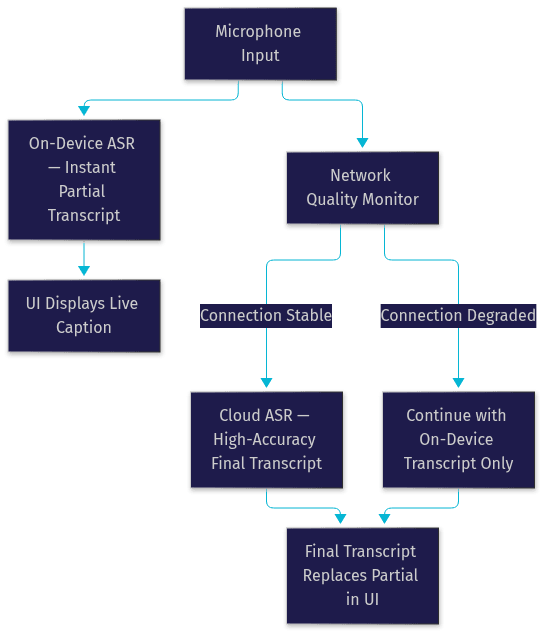
This pattern is common in telehealth and field-service apps where connectivity is unreliable but transcription quality is contractually important.
Improving Accuracy with Speech Recognition AI
Accuracy problems in production are rarely the model's fault alone. They usually come from audio conditions, vocabulary mismatches, and configuration defaults.
Model Adaptation and Custom Vocabularies
Every domain has words the base model rarely saw in training: drug names in telehealth, product SKUs in retail, legal citations in law firms. Custom vocabulary and model adaptation features, offered by most cloud speech APIs and achievable through fine-tuning with open-source models, bias recognition toward your domain terms. Even a few hundred example utterances covering your key terms can produce measurable error-rate reductions.
Audio Preprocessing and Noise Suppression
Garbage in, garbage out applies forcefully to ASR. Applying noise suppression, automatic gain control, and voice activity detection before the recognizer dramatically improves results on real-world audio. VideoSDK includes built-in noise suppression in its SDKs, which is one reason its real-time transcription output stays clean even on laptop microphones.
Diarization and Language Identification
On multi-speaker audio, speaker diarization turns a wall of text into a structured conversation, attributing each sentence to a speaker. Automatic language identification lets a single pipeline serve multilingual users without asking them to pick a language, which matters for global products.
Practical Tips for Collecting Adaptation Data
- Record real users, not team members reading scripts, because real speech includes disfluencies and accents.
- Capture audio on the actual devices your users have, including cheap laptop mics and phone speakers.
- Include the noise environments where the product runs: cars, clinics, open offices.
- Transcribe a sample manually to establish a baseline error rate before and after adaptation.
- Keep at least 20 percent of your data as a held-out test set so improvements are measurable, not anecdotal.
Common Pitfalls and How to Avoid Them
Most speech recognition AI failures in production trace back to a handful of predictable mistakes. Run this checklist before launch:
- Default language settings: Do not assume the user's locale matches their spoken language. Enable automatic language identification or let users choose, otherwise multilingual users get garbled transcripts.
- Ignoring latency budgets: A model that takes two seconds to return results is fine for batch and unusable for a voice agent. Define your latency budget first, then pick the deployment pattern that fits it.
- Mishandling privacy: Sending patient audio or customer calls to a third-party cloud without consent flows and data-processing agreements is a compliance failure, not just a technical one. For regulated data, prefer on-device processing or a provider with healthcare-grade agreements.
- Skipping permission handling: Microphone access denied at the OS level is the single most common integration bug. Handle the denied state gracefully with a clear recovery path.
- Testing only on clean audio: Demo recordings hide problems that real microphones and real rooms expose. Test on the worst audio your users will produce, not the best.
Real-World Use Cases of Speech Recognition AI
Telehealth dictation. A telemedicine platform embeds real-time transcription into video consultations so physicians receive an auto-generated clinical note. The doctor edits rather than types, cutting documentation time per appointment significantly.
Live captioning for webinars. An edtech company adds live captions to its interactive live streaming classes. Non-native speakers and hearing-impaired students follow along in real time, and the transcript doubles as searchable study material after the session.
Voice-controlled IoT devices. A smart-home manufacturer runs a compact ASR model entirely on-device so voice commands work without internet. Users get instant response times and the privacy guarantee that no audio leaves the speaker.
Future Trends in Speech Recognition AI
Three trends will reshape speech recognition AI over the next few years.
First, multimodal models that process audio and video together are already emerging. Seeing a speaker's lip movement improves recognition in noisy environments, and unified multimodal models will make speech recognition one input channel among several rather than a standalone system.
Second, on-device large language models are shrinking fast enough to bring near-cloud accuracy to edge hardware. Zero-network-latency voice agents running entirely on a phone or IoT device are becoming practical, which changes the calculus for privacy-sensitive and offline-first products.
Third, privacy-preserving speech standards, including on-device processing guarantees and federated learning techniques that improve models without centralizing user audio, are maturing from research topics into product requirements, especially under tightening global data regulations.
Definitions Glossary
Automatic Speech Recognition (ASR): The technology that converts spoken audio into text using machine-learning models. It is the engine behind transcription features in apps built with platforms like VideoSDK.
Streaming Speech Recognition: A transcription mode that processes audio continuously as it arrives, emitting partial results with sub-second latency. It powers live captions and voice agents.
Speaker Diarization: The task of labeling which speaker uttered each segment of a transcript. It turns multi-participant call recordings into structured, per-speaker conversations.
Language Identification: Automatic detection of which language is being spoken, allowing a single ASR pipeline to serve multilingual users without manual language selection.
Voice Activity Detection (VAD): A preprocessing step that detects when speech is present in audio, used to gate recognition, reduce cost, and prevent the model from transcribing background noise.
Key Takeaways
- Choose your deployment pattern before your model: batch for archives, streaming for live UX, hybrid edge-cloud when both latency and accuracy are non-negotiable.
- Cloud speech APIs win on accuracy and scale; on-device models win on cost, privacy, and offline reliability; open-source models win on control and fine-tuning.
- Most accuracy problems are audio problems: invest in noise suppression, custom vocabularies, and real-device test data before blaming the model.
- Real-time transcription is available as a built-in capability in VideoSDK's video and audio calling SDKs, removing the need to wire a separate ASR pipeline for live calls.
- Speech recognition AI is now a strategic capability: it unlocks searchable archives, accessible live experiences, and conversational AI agents across virtually every product category.
Conclusion
Speech recognition AI has crossed the threshold from impressive demo to dependable infrastructure, but the outcome still depends on two decisions: picking the model whose accuracy, latency, and privacy profile matches your use case, and deploying it in a pattern that respects your interaction budget. Get those right, and transcription becomes a feature users rely on without thinking about it.
A good next step is to test both paths: run an open-source model like Whisper on a sample of your real audio, and trial a managed cloud speech API on the same data to compare error rates and latency side by side. If you are building live video or voice experiences, explore VideoSDK's real-time transcription and its free tier to see live captions running inside an actual call in minutes.
What are you building with speech recognition AI? Drop a comment, I'd love to hear what kind of transcription or voice-agent use case you're working on.
Free $20 Balance for AI Voice Agents & Video Calls
FAQ