


Django SocketIO is a bridge library that connects Django to the Socket.IO protocol, letting you add real-time, bi-directional features like chat and live notifications without writing raw WebSocket plumbing. It sits on top of Django Channels and Engine.IO, giving you automatic transport fallback, room-based broadcasting, and a familiar class-based consumer API. This guide walks through the full journey from installation to production deployment, and shows where VideoSDK's real-time SDKs fit when you need production-grade video and audio calling on top of your Django stack.
Picture a customer support dashboard where an agent needs to see new tickets the instant they arrive, or a live auction site where every bid must reach all bidders in under a second. Polling the server every few seconds feels sluggish, hammers your database, and still delivers stale data. What these products need is a persistent, bi-directional channel between browser and server.
That is exactly the gap Django SocketIO fills. Django was built around the request-response cycle, which makes real-time push awkward out of the box. Django SocketIO brings the Socket.IO protocol, the most widely deployed real-time client library in the JavaScript ecosystem, into your Django project by layering it on Django Channels and Engine.IO. By the end of this article you will understand the architecture, the setup path, the scaling story, and the pitfalls that bite teams in production.
What Is Django SocketIO?
Django SocketIO is defined as an integration layer that lets a Django application speak the Socket.IO protocol, so that any browser or mobile client running the standard Socket.IO JavaScript library can connect, send events, and receive pushed messages in real time. It works by riding on top of Django Channels, Django's official toolkit for handling asynchronous protocols, and Engine.IO, the transport negotiation layer beneath Socket.IO that decides between WebSocket and long-polling.
The library exposes three key pieces. First, a class-based consumer API: you write handler classes with lifecycle methods for connections, disconnections, and named events, much like writing Django class-based views. Second, routing: the library registers its endpoints within the ASGI application so Socket.IO handshake requests reach your consumers instead of ordinary views. Third, transport fallback: if a corporate firewall or flaky mobile network blocks WebSockets, Engine.IO transparently downgrades to long-polling so the session survives.
Here is how the pieces fit together:
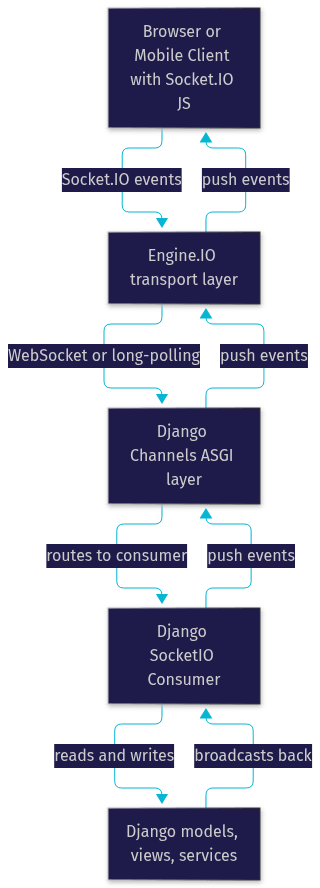
The important mental model: your Django business logic stays synchronous and familiar, while the real-time transport layer handles the asynchronous plumbing for you.
When to Choose Django SocketIO Over Alternatives
Django SocketIO shines in three situations: you already have Socket.IO clients (common if your frontend team uses the ubiquitous JavaScript library), you need automatic long-polling fallback for restrictive networks, and you want room-based broadcasting without building it yourself. Plain Django Channels is the better choice when you control both ends and want a leaner, WebSocket-only stack with no protocol overhead. Libraries like django-channels-layers or gevent-based approaches suit teams already committed to those ecosystems.
Core Benefits
- Protocol compatibility: any standard Socket.IO client, browser or mobile, connects without custom glue code.
- Built-in room management: join, leave, and broadcast-to-room semantics come free, which covers most chat and notification patterns.
- Simple class-based consumer: developers familiar with Django views pick up the consumer pattern quickly, with lifecycle methods mirroring what they already know.
- Automatic transport negotiation: Engine.IO picks WebSocket when available and falls back to long-polling when it is not, with reconnection handled client-side.
Setting the Stage: Prerequisites
Before installing anything, confirm your environment meets the baseline. You need Python 3.10 or newer and Django 4.x or 5.x, since the library depends on modern ASGI support. You also need an ASGI server to run the application in development and production; Uvicorn and Daphne are the two most common choices. Redis is optional but strongly recommended once you run multiple worker processes, because it serves as the shared channel layer that lets events cross process boundaries.
You do not need deep WebSocket knowledge to follow this guide. Understanding what a connection is, what an event name means, and how rooms group connections is enough. The library abstracts the handshake, heartbeats, and framing details behind Engine.IO.
Installing Django SocketIO
Installation follows the standard Django pattern. First, install the package and its companion Channels dependency from the Python Package Index using your usual dependency tool, and pin the versions in your requirements file so upgrades are deliberate rather than accidental. Next, add the library and Channels to your project's installed applications list in settings, which registers the ASGI machinery Django needs. Finally, include the library's URL routes in your root URL configuration so handshake requests have a place to land.
Two compatibility checks matter here. Confirm the Socket.IO protocol version your frontend client uses matches what the server library supports; a v5 client talking to a v6-only server will fail handshakes in confusing ways. Also verify your Django Channels version is current, since the consumer API evolves alongside it.
After installation, restart your development server with the ASGI entry point rather than the traditional WSGI one, and confirm the Socket.IO endpoint responds to handshake requests. That single check catches most misconfigurations early.
Configuring the ASGI Application
Django SocketIO integrates with the ASGI stack by registering itself during application startup. In most setups you barely touch your ASGI entry point file: the library provides a ready-made application object that wraps the standard Django ASGI handler and appends its own protocol routing. If you already have custom ASGI middleware or additional protocol routes, you compose them in the same routing structure, with the Socket.IO routes sitting alongside your existing WebSocket consumers.
The request flow looks like this:
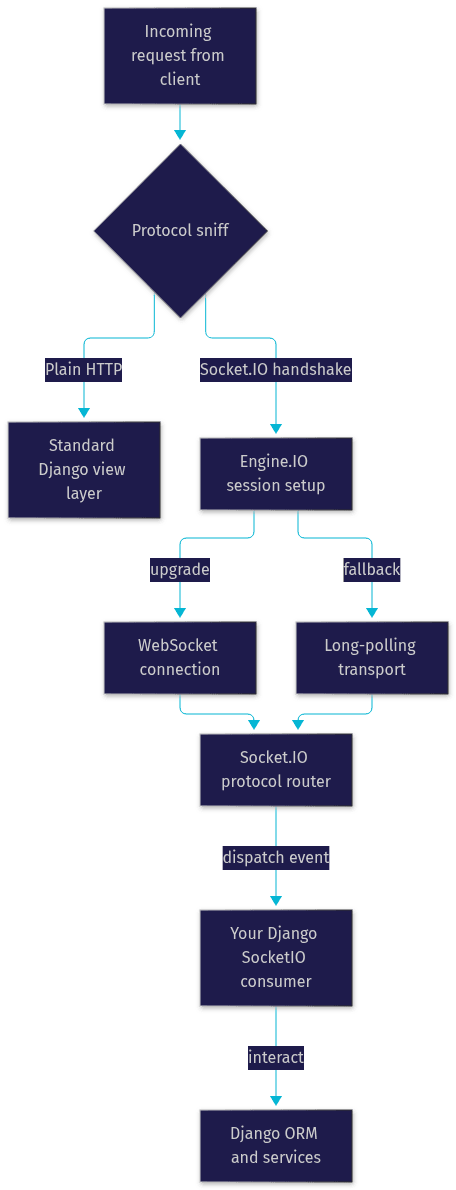
The reason you rarely modify the ASGI file directly is that the library's routing is declared where your consumers live, not in a central configuration. You point the router at your consumer classes, and the ASGI wrapper discovers them at startup. This keeps real-time code colocated with the features it powers.
One production note: if you run behind Nginx or another reverse proxy, ensure the proxy forwards upgrade headers so WebSocket handshakes survive the hop. This is the single most common deployment blocker.
Defining a SocketIO Consumer
A consumer is a class that inherits from the library's base consumer and defines methods for the events you care about. The lifecycle mirrors what you would expect from Django views: a connection method fires when a client completes the handshake, a disconnection method fires when the session ends, and one handler method fires per named event the client emits. Method names map to event names, so an event called chat message routes to the corresponding handler on your class.
Arguments arrive as parsed values, not raw frames. When a client emits an event with a payload, your handler receives the payload fields as keyword arguments, already deserialized. Acknowledgements work in reverse: if the client expects confirmation, your handler can return a value, and the library packages it as the acknowledgement response, closing the loop without extra wiring.
Consumers can also reach back into Django. Inside a handler you can query the ORM, call services, enforce permissions, and then broadcast results to rooms. The pattern that works best in practice: keep handlers thin, delegate business logic to service functions your regular Django views also use, and let the consumer focus on connection state and event routing.
Handling Connections and Disconnections
When a client connects, your connection method runs first. This is where authentication happens: you can validate a session cookie, a token passed as a connection parameter, or a signed ticket issued by a Django view. Rejecting the connection is as simple as raising the appropriate exception or returning a denial, which causes the handshake to fail cleanly rather than leaving a half-open session.
On disconnect, your cleanup method fires whether the client left politely or the network dropped. Use it to remove the user from room registries, mark presence as offline, and release any resources. Because disconnects are guaranteed to fire eventually, you can treat this method as your destructor.
Working With Events and Rooms
Event naming is your API contract with the frontend. Keep names short, lowercase, and verb-first, and document them alongside your REST endpoints so both teams agree on the vocabulary. Rooms are string-labeled groups of connections: a user joins a room, and any broadcast to that room reaches every member. For a chat feature, the room ID is typically the conversation ID, which gives you per-conversation isolation for free. Namespaces extend this by splitting one server into multiple logical endpoints, useful when a single project serves chat and notifications with separate consumer classes.
Integrating the Front-End
On the JavaScript side, the developer loads the standard Socket.IO client library, creates a connection pointing at your Django server's Socket.IO endpoint, and registers listeners for the event names your consumers emit. Sending data is an emit call with an event name and a payload, optionally with a callback that receives the server's acknowledgement.
The same client library works across browsers, React and Vue applications, and React Native or Flutter mobile apps via their respective bridges, which is a genuine advantage over hand-rolled WebSocket code where you own reconnection, heartbeat, and fallback logic yourself. The client handles reconnection with exponential backoff automatically, so a flaky train Wi-Fi connection recovers without user intervention.
A practical pattern for Django front-ends: authenticate over a normal Django view first, establish the session, then open the Socket.IO connection so the consumer can validate the existing session rather than doing token exchange over the real-time channel.
Scaling and Production Considerations
A single development process handles hundreds of connections comfortably. Production is different: you will run multiple worker processes, and events must cross process boundaries. That is the job of the channel layer. Configure Redis as your channel layer and every worker process shares the same event bus, so a broadcast from process one reaches clients connected to process four. Without a shared layer, broadcasts silently reach only the clients on the emitting process, which is a maddening bug to diagnose.
Your production checklist:
- Run behind a reverse proxy with WebSocket upgrade headers forwarded.
- Configure Redis (or another shared channel layer) before scaling past one process.
- Tune Engine.IO ping intervals so dead connections are detected quickly without churning healthy ones.
- Keep long-polling fallback enabled for corporate-firehole and restricted-network users.
- Set sensible timeouts so abandoned connections are reaped.
- Monitor connection counts and channel layer latency as first-class metrics.
For a deeper comparison of real-time transport options, including when a managed SDK beats self-hosted infrastructure, see the VideoSDK real-time communication docs.
Testing and Debugging
Test consumers like you test views: instantiate the consumer, invoke the lifecycle and event methods directly with representative payloads, and assert on the broadcasts they trigger. Django's asynchronous test support lets you run these tests inside an event loop, and the library's test utilities provide a fake connection object so you can simulate connect, emit, and disconnect sequences without a live server.
For end-to-end confidence, run a real ASGI server in your test harness and connect a Socket.IO client to exercise the full handshake, transport negotiation, and event round-trip. Enable the library's logger during development; its debug output shows every connection, room join, and event dispatch, which turns mysterious silence into an obvious missing handler or rejected handshake.
Common Pitfalls and How to Avoid Them
Four issues account for most lost hours. Version mismatch: a Socket.IO v5 client against a v6 server fails handshakes; pin both ends and verify protocol versions in one place. Missing channel layer: multi-process deployments without Redis produce partial broadcasts; configure the layer before your second worker exists. Authentication expiry: tokens validated only at connect time leave long-lived sessions unvalidated; re-validate on sensitive events. CORS and proxy misconfiguration: development works, production fails because the reverse proxy strips upgrade headers; test the production path early, not the night before launch.
Real-World Example: Live Chat Feature
Consider a telehealth startup building a Django-based patient portal that needs a live chat between patients and care coordinators. The team models conversations as ordinary Django models, with a REST API for history and a Socket.IO consumer for live traffic. When a patient opens a conversation, the frontend connects and joins the room named after the conversation ID. The consumer validates the patient's session, confirms they are a participant in that conversation, and admits them to the room.
Messages flow as named events with a payload of text and metadata. The handler persists the message through the same service function the REST API uses, then broadcasts the saved message to the room, so every connected participant renders it instantly. Disconnection handlers update presence, showing coordinators which patients are currently online. The UI treats Socket.IO events as one input alongside REST responses, keeping a single source of truth in the Django models.
When the team later adds video consultations, they reach for a dedicated real-time SDK rather than extending raw WebRTC themselves. VideoSDK's video calling SDKs handle the media layer, rooms, and adaptive streaming, while their Django backend keeps orchestrating sessions through REST APIs. For teams that want a working call interface immediately, the Prebuilt UI Kit embeds a full video call experience with minimal integration effort.
Definitions Glossary
Django SocketIO: An integration layer that connects Django applications to the Socket.IO protocol, built on Django Channels and Engine.IO, enabling real-time bi-directional communication with standard Socket.IO clients.
Django Channels: Django's official project for handling asynchronous protocols, providing the ASGI foundation that real-time consumers, including Socket.IO consumers, run on.
Engine.IO: The transport negotiation layer beneath Socket.IO that establishes the connection, chooses between WebSocket and long-polling, and manages heartbeats and reconnection.
Consumer: A class-based handler in the ASGI world, analogous to a Django view, with lifecycle methods for connections, disconnections, and named events.
Room: A string-labeled group of Socket.IO connections; broadcasting to a room delivers an event to every client that joined it, which powers chat and notification isolation.
Channel Layer: The messaging system (commonly Redis-backed) that lets multiple worker processes exchange events, so broadcasts reach clients connected to any process.
Key Takeaways
- Django SocketIO bridges Django and the Socket.IO protocol by layering on Django Channels and Engine.IO, giving you real-time push with automatic transport fallback.
- The class-based consumer pattern mirrors Django views, with lifecycle methods for connect, disconnect, and named events, keeping the learning curve gentle for Django developers.
- Rooms provide free broadcast isolation, which covers most chat, notification, and presence use cases without custom bookkeeping.
- Scaling past one process requires a shared channel layer such as Redis; without it, broadcasts silently miss clients on other workers.
- When your real-time needs grow into video and audio calling, a dedicated SDK like VideoSDK handles the media layer while Django stays your orchestration backend.
Conclusion
Django SocketIO gives your Django project a pragmatic path to real-time features: protocol compatibility with the world's most common real-time client, room-based broadcasting, and transport fallback, all wrapped in a consumer API that feels native to Django. Set up the ASGI stack carefully, configure a shared channel layer before you scale, and test the production proxy path early. When your roadmap extends from chat and notifications into live video, explore VideoSDK's documentation and grab a free tier at app.videosdk.live to prototype calling features fast. What are you building with Django SocketIO? Drop a comment, I'd love to hear what kind of real-time use case you're working on.
Conclusion
Integrating Django with Socket.IO provides a powerful way to build real-time web applications. By following the step-by-step guide, you can set up a robust system that handles real-time data updates and live interactions seamlessly. This combination is ideal for applications like chat systems, live notifications, and collaborative tools. Leveraging Django Channels and Socket.IO together not only enhances user experience but also keeps your application scalable and efficient.
Free $20 Balance for AI Voice Agents & Video Calls
FAQ