



CallKeep is a library that bridges app-level VoIP logic with the native call UI on iOS and Android, wrapping Apple's CallKit and Google's ConnectionService. It enables developers to display the native phone interface for incoming and outgoing calls, handle background audio, and manage call lifecycle events like answer, end, and hold. You can integrate CallKeep with real-time communication SDKs like VideoSDK to deliver a seamless, native telephony experience across platforms.
Delivering a native call experience in a VoIP app is harder than it looks. Users expect the incoming call screen to look exactly like the standard phone interface, complete with the system-level answer and reject buttons. They expect the call to survive background app termination and continue playing audio when the screen is locked. Building this from scratch for both iOS and Android is a massive undertaking.
That is where callkeep comes in. Instead of reinventing the wheel, developers use callkeep to bridge their app-level VoIP logic with the native call UI on both platforms. This library wraps Apple's CallKit and Google's ConnectionService, providing a unified interface for handling incoming call events, managing call lifecycle actions, and displaying the native call screen. Whether you are building a React Native callkeep integration or working with Flutter callkeep, the goal is the same: make your VoIP app feel like the built-in phone app.
In this deep dive, we will explore what callkeep is, how it works under the hood, and how you can set it up alongside a real-time communication SDK like VideoSDK to deliver a seamless native call experience.
What Is CallKeep?
CallKeep is defined as a bridge between app-level VoIP logic and the native call UI on iOS and Android. It works by wrapping platform-specific telephony APIs into a single, unified interface that JavaScript or Dart code can interact with. On iOS, it interfaces with CallKit. On Android, it interfaces with ConnectionService.
When a VoIP app receives an incoming call, it instructs callkeep to display the native call UI. The library then communicates with the underlying OS telephony service to render the incoming call screen. When the user taps answer or end, the OS sends a callback to callkeep, which forwards the event back to the app's VoIP stack. This allows developers to focus on the media layer and signaling while relying on callkeep for the native UI and call lifecycle management.
Core Native Components Behind CallKeep
To understand callkeep, you need to understand the native components it wraps. On iOS, the core component is CallKit. CallKit is Apple's framework for integrating VoIP calls into the native phone experience. It provides the incoming call UI, the call history in the Recents tab, and system-level call handling. CallKit works in tandem with PushKit, which delivers VoIP push notifications to wake the app even when it is terminated.
On Android, the core component is ConnectionService. This is Google's equivalent of CallKit, allowing third-party VoIP apps to integrate with the system's telephony stack. ConnectionService provides the native call UI, manages audio routing, and handles call lifecycle events. CallKeep abstracts the differences between CallKit and ConnectionService, exposing a consistent API for handling VoIP call handling across both platforms.
When Should You Use CallKeep?
You should use callkeep when your app needs to provide a system-level calling experience. This includes scenarios like locked-screen answering, where the user needs to interact with an incoming call without unlocking their device. It is also essential for background call handling, ensuring the VoIP stack remains active even when the app is backgrounded.
Multi-device continuity is another strong use case. CallKeep integrates with the OS telephony layer, allowing calls to be routed through system-level audio devices like Bluetooth headsets or car audio systems. Finally, there are regulatory considerations. In many regions, emergency services require VoIP apps to use the native call UI to ensure consistent behavior and access to emergency numbers. If your app needs to meet these regulatory standards, callkeep is a necessary integration.
Setting Up CallKeep
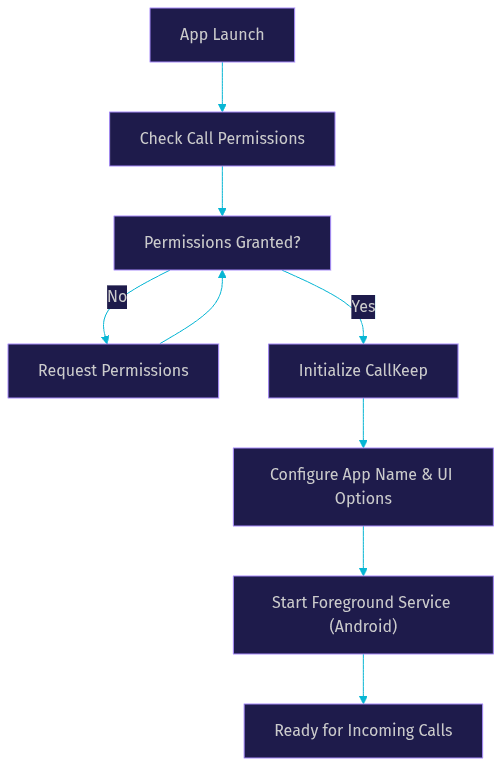
Setting up callkeep involves configuring permissions, defining app metadata, and ensuring the foreground service is correctly declared for Android.
Permissions Strategy
Requesting call permissions without showing duplicate dialogs is a common challenge. On Android, you need to request the foreground service and phone state permissions. On iOS, you need to configure the VoIP background mode capability. The key is to request these permissions at app launch or during a non-intrusive onboarding step, rather than waiting until a call is incoming. CallKeep handles the permission flow, but your app must manage the timing of the request to avoid confusing the user.
Configuration Options
CallKeep configuration involves defining how your app appears in the native call UI. You need to specify the app name, which is displayed on the incoming call screen. For Android, you configure the foreground service channel name and description. You can also define additional permissions and customize alert titles for incoming calls. These options map directly to platform requirements, ensuring the native UI displays your branding correctly while adhering to OS guidelines.
Foreground Service on Android 11+
On Android 11 and later, background audio playback for VoIP calls requires a foreground service. Without it, the OS may terminate your app's audio process when it goes to the background. You must declare the foreground service with the phone type in your app manifest. This tells the OS that your app is actively managing a call and should not be killed. CallKeep manages the lifecycle of this service, but the manifest declaration is a manual setup step.
Handling Call Events
Handling call events is the core of callkeep event handling. The library acts as a two-way bridge between the native UI and your VoIP stack.
Incoming Call Event
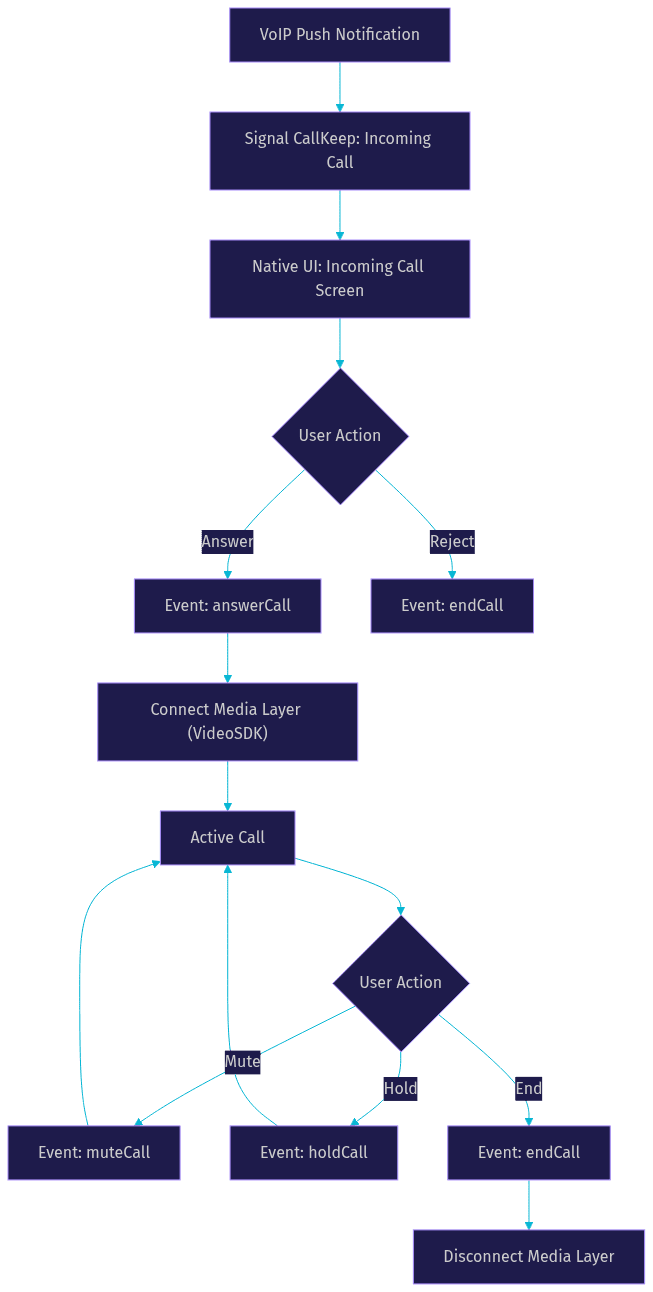
When a VoIP push notification arrives via PushKit or FCM notifications, your app signals callkeep to display an incoming call. You pass a unique call UUID, the caller's name, and the caller's number. CallKeep then triggers the native incoming call UI. When the user answers, callkeep fires an answer call event. Your app must listen for this event and immediately connect the media layer, such as a VideoSDK room.
Answer, End, Mute/Unmute, Hold
Each action has a specific effect. The answer call event means the user accepted the call. The end call event means the user rejected or hung up. The mute and unmute events toggle the microphone state. The hold call event places the call on hold, which should pause media transmission. Your VoIP stack must respond to these events in real-time to keep the native UI state synchronized with the media state.
Custom Events and Extensibility
CallKeep is extensible. Developers can extend the event model for features like call transfer or video toggle. While the native UI has a fixed set of buttons, you can use callkeep to manage the underlying call state and trigger custom UI within your app for advanced features.
Integrating CallKeep with a VoIP SDK
Integrating callkeep with a VoIP SDK follows a standard pattern. The VoIP engine, such as VideoSDK, creates a call UUID when a session is initiated. This UUID is passed to callkeep to display the native UI. CallKeep then listens for UI callbacks, like answer or end, and forwards them to the VoIP SDK to control the media layer.
For example, when building a React Native callkeep integration with VideoSDK React Native SDK, the flow is straightforward. The app receives a push notification, creates a VideoSDK room token, and tells callkeep to show the incoming call screen. When the user answers, the answer call event fires, and the app joins the VideoSDK room. This separation of concerns allows callkeep to handle the native UI while VideoSDK handles the real-time audio and video streams. You can also explore VideoSDK SIP integration for bridging traditional telephony with your WebRTC rooms.
Platform-Specific Considerations
While callkeep abstracts much of the platform differences, some limitations remain.
iOS Restrictions
CallKit has specific limitations. It is not supported on iPad, meaning VoIP apps on iPad cannot use the native call UI. Additionally, CallKit requires PushKit for background execution. Without a VoIP push notification, the app cannot wake from a terminated state to display an incoming call. Apple also enforces strict rules on VoIP push usage, requiring the push to immediately report a call to CallKit or face termination.
Android 11+ Background Audio
On Android 11 and later, the foreground-service requirement is strict. If your app does not properly declare and start the foreground service, the OS will cut audio when the app is backgrounded. Battery optimization settings can also interfere, so guiding users to disable battery optimization for your app is a common practice.
China Market Note
CallKit is unavailable in China due to regulatory restrictions. If your app targets the Chinese market, you cannot rely on CallKit for the native call UI. Instead, you must fall back to standard FCM notifications or local notifications to alert the user of an incoming call. This requires building a custom in-app call UI as a fallback when callkeep is not available.
Best Practices & Common Pitfalls
To get the most out of callkeep, follow these best practices. Request permissions early in the onboarding flow to avoid interrupting the user during an actual call. Avoid initializing CallKeep on the UI thread, as this can cause jank or delays in displaying the call screen. Always test on real devices, as simulators often do not accurately reflect telephony behavior.
Handle app termination gracefully. If the app is killed while a call is active, ensure it can recover the call state on relaunch. Respect user privacy by only requesting the minimum necessary permissions. A common pitfall is failing to synchronize the native UI state with the VoIP stack, leading to situations where the native UI shows an active call but the media layer has disconnected. Always listen for callkeep events and update your media state accordingly.
Monitoring & Debugging CallKeep
Debugging callkeep issues requires platform-specific tools. On iOS, use the Xcode console to monitor CallKit logs. Look for errors related to PushKit token registration or CallKit provider configuration. On Android, use Android Logcat to filter for ConnectionService logs. Common error messages often relate to foreground service permissions or missing manifest declarations.
Enable verbose logs in your callkeep configuration during development to trace the event flow. If an incoming call event is not firing, verify that your VoIP push notification is being delivered and that the callkeep event listener is registered before the push arrives. The VideoSDK GitHub repository and community forums are valuable resources for troubleshooting specific integration issues.
Alternatives & Complementary Tools
There are several callkeep alternatives and complementary tools. The react-native-callkeep package is a popular open-source library for React Native apps. The LiveKit React Native CallKeep package is another option tailored for LiveKit users. For Flutter, the flutter_callkeep package provides similar functionality.
In some cases, a custom UI might be preferable. If your app requires a highly branded call screen with features not supported by the native UI, building a custom in-app call interface gives you full control. However, you lose the system-level integration, such as locked-screen answering and Bluetooth routing. Weigh the trade-offs between native integration and custom branding before deciding.
Definitions Glossary
CallKeep: A library that bridges app-level VoIP logic with the native call UI on iOS and Android, wrapping CallKit and ConnectionService.
CallKit: Apple's framework for integrating VoIP calls into the native iPhone phone experience, providing the incoming call UI and system-level call handling.
ConnectionService: Google's Android framework that allows third-party VoIP apps to integrate with the system's telephony stack and display the native call UI.
PushKit: An iOS framework that delivers VoIP push notifications to wake an app from a terminated state, essential for background call handling with CallKit.
Foreground Service: An Android service that keeps an app running in the foreground, required for maintaining audio playback during background VoIP calls on Android 11+.
Key Takeaways
- CallKeep bridges VoIP app logic with native iOS and Android call UIs by wrapping CallKit and ConnectionService.
- Proper setup involves managing permissions, configuring app metadata, and declaring a foreground service for Android 11+ background audio.
- CallKeep event handling requires synchronizing native UI actions like answer, end, and hold with your VoIP media stack.
- Integrating CallKeep with a real-time communication SDK like VideoSDK provides a seamless native telephony experience.
- CallKit is unavailable in China, requiring a fallback to standard notifications and a custom in-app call UI.
Conclusion
CallKeep is an essential tool for developers building VoIP apps that need to feel like the native phone experience. By wrapping CallKit and ConnectionService, it simplifies the complex task of displaying system-level call UIs and handling background call events. When paired with a robust real-time communication SDK like VideoSDK, you can deliver high-quality audio and video calls with the native interface users expect. Start integrating callkeep with your VoIP stack today and explore the VideoSDK documentation to build your next calling app. What are you building with VideoSDK? Drop a comment below.
Free $20 Balance for AI Voice Agents & Video Calls
FAQ