


SIP phones behind a single NAT router fail because SIP embeds private IP addresses inside its signaling and media descriptions, which NAT rewrites incorrectly. STUN lets each phone discover its public address, dedicated port forwarding prevents collisions between devices, and TURN relays traffic when direct paths are impossible. ICE orchestrates all of these automatically, and VideoSDK's SIP gateway handles the entire traversal problem for you when bridging phones into WebRTC rooms.
Your first IP phone works perfectly. Calls connect, audio flows both ways, and life is good. Then you plug in the second desk phone, and everything breaks: registrations fail, calls ring but deliver one-way audio, or the phones unregister randomly throughout the day. If this sounds familiar, you are dealing with one of the oldest and most stubborn problems in VoIP engineering: getting multiple SIP devices to work behind a single NAT device.
The root cause is that SIP, the Session Initiation Protocol, was designed in a pre-NAT era. It carries IP addresses inside its message payloads, not just in packet headers, so when your router performs address translation, the addresses inside the SIP messages no longer match reality. Multiply that by several phones sharing one public IP, and you get port collisions, ambiguous routing, and media streams that never find their destination.
This guide walks through the full diagnostic and fix path: understanding what SIP needs, seeing exactly how NAT corrupts it, then applying STUN, port forwarding, TURN relays, and ICE in the right order. By the end, you will know how to get every phone on your network registering and delivering two-way audio reliably.
What SIP Needs: Accurate Addressing
SIP is a text-based signaling protocol that sets up, modifies, and tears down voice and video sessions. Every SIP phone registers with a registrar server, then sends INVITE messages to establish calls. The critical detail is that SIP messages carry addressing information in two places: the Contact header, which tells the registrar where to send future requests for that phone, and the SDP body, the Session Description Protocol payload that describes where the actual media should flow.
The SDP body contains a connection line, often written as the c= line, which specifies the IP address and port where the phone expects to receive RTP audio streams. When a phone sits on a private network, it honestly reports its private address, something like 192.168.1.50, in both the Contact header and the SDP connection line.
That honesty is the problem. The remote endpoint on the public internet cannot route packets to 192.168.1.50, because that address only exists inside your LAN. The registrar stores the unreachable Contact address, so incoming calls never reach the phone. The SDP connection line points the media stream at a dead end, so even when signaling succeeds, audio fails in one direction. This is the classic VoIP one-way audio symptom, and it is almost always an addressing mismatch rather than a codec or firewall issue.
For a call to work end to end, both the signaling addresses and the media addresses must be publicly routable, and they must uniquely identify each phone. With one phone, a lucky NAT behavior can sometimes paper over the mismatch. With multiple phones, luck runs out.
How NAT Alters SIP Traffic
Network Address Translation rewrites packet headers so multiple private devices can share one public IP. The trouble is that NAT comes in several flavors, and each interacts with SIP differently. A full cone NAT maps one internal address and port to one external port, and accepts inbound packets from any source to that mapping. A restricted cone NAT accepts inbound traffic only from destinations the internal device has already contacted. A symmetric NAT, the most hostile type, assigns a different external port for every destination the phone talks to, which breaks address discovery entirely.
When a SIP phone behind a full cone NAT sends its registration, the NAT creates a mapping and rewrites the packet header. But the Contact header inside the message still says 192.168.1.50. Some routers and session border controllers apply SIP-aware Application Layer Gateway logic to rewrite the payload too, but consumer routers frequently do this badly, or not at all, especially when several phones are involved.
With multiple phones sharing one NAT, a second failure mode appears: port collision. If two phones both send SIP traffic from internal port 5060, the NAT must map them to two different external ports, or the registrar cannot tell them apart. If the router's ALG rewrites both registrations to the same external port, one phone's registration overwrites the other's, which explains the maddening symptom of phones that unregister themselves minutes apart.
The diagram below shows how a SIP INVITE travels from a private phone through NAT to a registrar, and where the private addresses leak through:
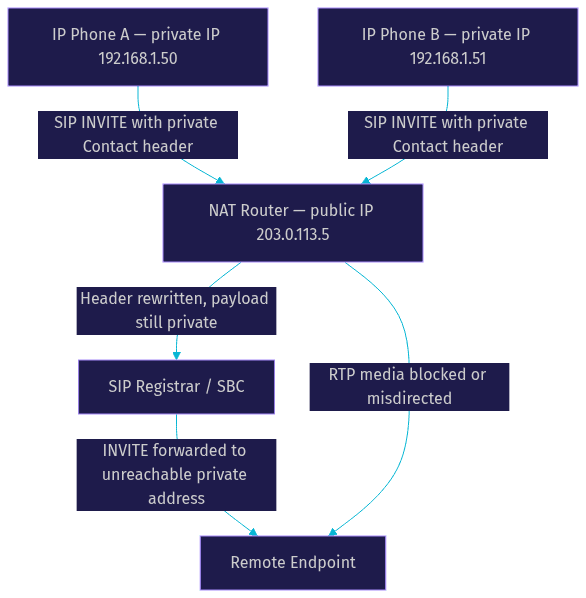
The takeaway: NAT breaks SIP in two layers, the signaling layer where Contact addresses become unreachable, and the media layer where RTP ports are unmapped or ambiguous. Each fix in this guide targets one or both of those layers.
STUN: Discovering Your Public IP
STUN, Session Traversal Utilities for NAT, is the first tool to reach for. A STUN server is a simple public service that echoes back the source address and port it observes on any packet it receives. When a SIP phone sends a STUN binding request to a public STUN server, the response tells the phone what its public IP and mapped port look like from the outside. The phone can then embed that discovered address into its SIP Contact header and SDP connection line instead of its private one.
The sequence works like this: the phone queries the STUN server, receives its public mapping, rewrites its SIP registration and SDP to use the discovered address, and registers with the registrar. Incoming calls now route to a reachable public address, and media flows to the mapped RTP port.
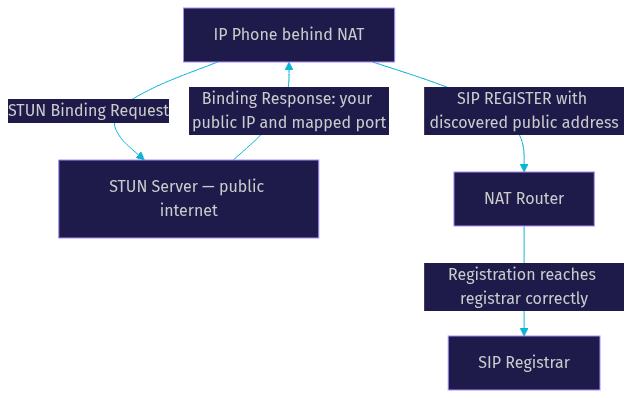
STUN works well behind full cone and restricted cone NAT, where the mapping is stable and reusable. It costs almost nothing in latency, since the discovery happens once at registration time, and public STUN servers are widely available.
But STUN has two serious limitations for multi-phone deployments. First, behind symmetric NAT, the external port differs per destination, so the address the STUN server reports is not the address the registrar sees. The phone embeds a mapping that only works for talking to the STUN server itself, and calls still fail. Second, STUN only solves addressing, not inbound reachability. If the NAT has no mapping for incoming RTP on the discovered port, media still fails. Multiple phones amplify both problems, because each phone's mapping must remain unique and stable, and consumer NATs often recycle mappings aggressively. This is why SIP keepalive mechanisms, periodic OPTIONS or re-registrations that keep NAT mappings from expiring, matter so much in practice.
Port Forwarding: Manual Workaround
Port forwarding is the brute-force fix: you statically map external ports on your router to specific internal phones. For SIP signaling, you forward a unique external UDP port to each phone's internal port 5060, for example external 5060 to phone A and external 5061 to phone B. For media, you forward a dedicated RTP port range to each phone, typically a block of UDP ports per device to cover all possible audio streams.
The reason each phone needs its own external port range is simple: the NAT cannot dynamically create two mappings that both point to the same internal port on different phones. Static forwarding removes the ambiguity entirely, and it also keeps mappings alive permanently, which eliminates the expiry-driven unregistration problem.
A practical router configuration checklist looks like this:
- Assign each phone a static internal IP, via DHCP reservation, so forwarding rules never point at the wrong device.
- Forward one unique external UDP signaling port per phone to that phone's SIP port.
- Forward a non-overlapping RTP port range per phone, sized for the maximum concurrent calls that phone will handle.
- Disable the router's SIP ALG, which frequently corrupts multi-phone registrations by rewriting payloads incorrectly.
- Configure each phone to use its assigned external port in its SIP settings, so the Contact header matches the forwarding rule.
- Enable SIP keepalives on a shorter interval than the NAT mapping timeout, often 30 seconds or less.
Port forwarding works, but it does not scale. Every new phone means manual router changes, and it fails completely when the NAT type is symmetric or when the router is outside your control, such as in hotels, branch offices, or carrier-grade NAT environments. That is when you need a relay.
TURN Relays: When STUN Isn't Enough
TURN, Traversal Using Relays around NAT, abandons the direct path entirely. Instead of trying to discover a usable public address, the phone sends all its signaling and media to a TURN server, and the TURN server relays that traffic to the remote endpoint. Because the phone only ever initiates outbound connections to the TURN server, NAT traversal is guaranteed regardless of NAT type, even symmetric NAT and carrier-grade NAT.
The trade-offs are real. Every media packet now travels phone to TURN server to endpoint, which adds latency proportional to the relay's geographic distance from both parties. Bandwidth costs double on the relay, since it receives and re-sends every stream. And the TURN server becomes a single point of failure and a capacity bottleneck, so production deployments need authentication, allocation quotas, and monitoring.
In SIP environments, TURN is typically integrated through a session border controller or an enterprise SIP trunk that handles relay logic centrally, so individual phones do not need native TURN support. This is also where managed platforms shine: VideoSDK's SIP integration includes TURN infrastructure as part of its WebRTC media path, so SIP endpoints bridged into VideoSDK rooms get relay fallback automatically without you operating a TURN server. For teams building their own, the open-source ecosystem and VideoSDK's telephony documentation describe how the gateway handles traversal on both the SIP and WebRTC sides.
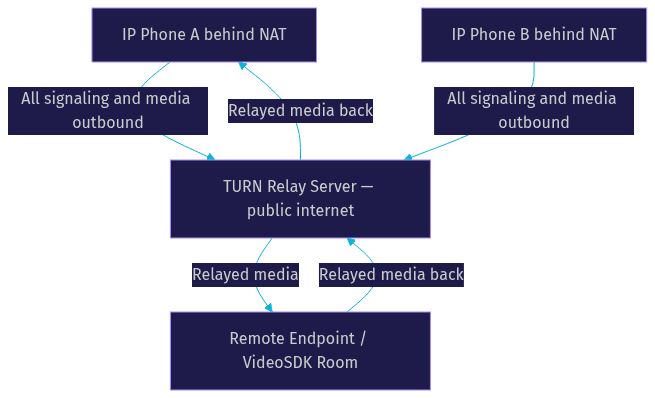
The rule of thumb practitioners use: STUN first, because it is free and fast; TURN as fallback, because it always works but always costs. The question is how to make that fallback decision automatically per call, which is exactly what ICE was built to do.
ICE Orchestration: Combining STUN and TURN
ICE, Interactive Connectivity Establishment, is the coordination layer that makes STUN and TURN work together without human intervention. When a call is set up, each endpoint gathers a list of candidate addresses: its local private address, server-reflexive addresses discovered via STUN, and relayed addresses allocated on a TURN server. The endpoints exchange this candidate list inside their signaling, then run connectivity checks, testing which candidate pairs can actually carry a packet end to end.
ICE then prioritizes the results. Direct local connections win, STUN-discovered paths come next, and TURN relays are the last resort. If a direct path fails mid-call, ICE can switch to the next best candidate, which is why modern WebRTC calls survive network changes that would kill a manually configured SIP deployment.
For multiple phones behind one NAT, ICE resolves the port collision problem elegantly. Each phone gathers its own candidate set, and the connectivity checks verify uniqueness per device rather than relying on static router rules. If two phones would collide on a mapping, the checks fail for that pair and ICE falls back to a relay for the affected phone only.
This is precisely the architecture VideoSDK uses on its SIP-to-WebRTC bridge. When a SIP phone dials into a VideoSDK room, the gateway performs full ICE candidate gathering on the WebRTC side, pairing STUN and TURN automatically, while the SIP side terminates at the gateway where traversal is handled centrally. You can read more about the underlying room architecture in the VideoSDK concepts documentation.
Practical Troubleshooting Checklist
When a multi-phone SIP deployment misbehaves, work through this sequence in order, because each step depends on the one before it:
- Verify your NAT type first, using an online STUN discovery tool or your router's admin interface. If it reports symmetric NAT, skip straight to TURN or a managed gateway, because STUN and port forwarding will not work reliably.
- Confirm STUN server reachability from each phone's network. A phone that cannot reach its STUN server silently falls back to private addresses, which produces intermittent one-way audio.
- Check port forwarding rules per device: unique external signaling port, non-overlapping RTP ranges, static internal IPs, and the router's SIP ALG disabled.
- Enable TURN fallback in your SIP client, SBC, or gateway configuration, and confirm relay allocations succeed under load.
- Read the ICE candidate logs if your platform exposes them. The selected candidate type, host, server-reflexive, or relayed, tells you exactly which traversal mechanism carried the call and where to look next.
- Test with two-way audio calls, not just registration status. A phone can register successfully and still fail media, because signaling and media traverse NAT independently.
Most one-way audio cases resolve at the STUN or port forwarding stage. Most random unregistration cases resolve at the keepalive or ALG stage. Symmetric NAT cases always end at TURN.
VideoSDK SIP Integration Tips
If you would rather not operate STUN servers, TURN relays, and per-phone forwarding rules, VideoSDK's SIP gateway abstracts the entire NAT problem. The gateway terminates SIP on the public side, so phones register against a reachable public address with no payload rewriting issues, and it bridges calls into VideoSDK rooms over WebRTC with automatic STUN and TURN candidate selection built in.
That means you can link desk phones, PBX trunks from providers like Twilio or Telnyx, and browser or mobile participants into the same room without touching a single router. The VideoSDK telephony guide covers inbound and outbound call flows, and the code samples library includes working SIP integration examples you can adapt to your deployment.
Definitions Glossary
SIP (Session Initiation Protocol): The signaling protocol that sets up, modifies, and ends voice and video sessions, carrying addressing information in message payloads such as the Contact header.
NAT (Network Address Translation): The router function that rewrites packet addresses so multiple private devices share one public IP, often corrupting the addresses embedded inside SIP messages.
STUN (Session Traversal Utilities for NAT): A protocol that lets a device discover its public IP and mapped port by asking a public server what source address it observes, effective behind cone NAT but not symmetric NAT.
TURN (Traversal Using Relays around NAT): A relay protocol where a device sends all traffic to a public server that forwards it onward, guaranteeing traversal at the cost of added latency and bandwidth.
ICE (Interactive Connectivity Establishment): A framework that gathers local, STUN, and TURN address candidates, tests them pairwise, and automatically selects the best working path, falling back to relays when direct paths fail.
SDP (Session Description Protocol): The payload inside SIP signaling that describes media streams, including the connection line specifying the IP address and port where RTP audio should be delivered.
Key Takeaways
- SIP breaks behind NAT because it embeds private IP addresses in its Contact header and SDP connection line, which NAT rewrites only at the packet-header level.
- Multiple phones behind one NAT add port collisions and registration overwrites, causing random unregistration and one-way audio that a single-phone setup never exposed.
- STUN solves addressing for cone NAT but fails behind symmetric NAT, where per-destination port mappings make discovered addresses useless.
- Port forwarding gives each phone a unique external signaling port and RTP range, but it is manual, fragile, and impossible when you do not control the router.
- TURN relays always work regardless of NAT type, at the cost of latency and bandwidth, and ICE automates the STUN-first, TURN-fallback decision per call.
- VideoSDK's SIP gateway handles traversal on both the SIP and WebRTC sides, letting phones join VideoSDK rooms with no manual NAT configuration.
Conclusion
Solving SIP networking challenges with multiple phones behind NAT comes down to a decision flow: try STUN for address discovery, apply per-phone port forwarding when you control the router, fall back to TURN relays when NAT is symmetric or unmanageable, and let ICE orchestrate all of it automatically. Every step in that chain targets the same two failure layers, unreachable signaling addresses and unmapped media ports.
If you want the shortest path to a working deployment, try VideoSDK's SIP integration and bridge your phones into WebRTC rooms without touching a router, or set up your own TURN server for full control. Sign up free at app.videosdk.live/login and join the VideoSDK Discord community to compare notes with other developers.
What NAT setup is tripping up your SIP deployment? Drop a comment with your router type and symptoms, whether it is registration drops, one-way audio, or port collisions, and I will help you map it to the right fix.
Free $20 Balance for AI Voice Agents & Video Calls
FAQ