


SIP connectivity is the ability of a VoIP system to reliably send and receive SIP signaling and media between endpoints. VideoSDK ensures robust SIP connectivity through supported UDP, TCP, and TLS transports, firewall-friendly configuration, and detailed diagnostics. Follow this guide to test, secure, and troubleshoot your SIP links in 2026.
When a SIP trunk fails, nobody calls the network engineer to say so. They call to complain that customers cannot reach the sales line, that a telehealth consultation dropped mid-consultation, or that an outbound AI phone agent silently stopped dialing. SIP connectivity problems are invisible until they are expensive.
The stakes are real: every dropped or one-way call is lost revenue, degraded customer trust, or a compliance headache in regulated industries like healthcare and finance. The good news is that most SIP connectivity failures trace back to a small set of causes, and you can diagnose nearly all of them without writing a single line of code.
This guide covers how SIP connectivity works, how to test it with standard network tools, the most common failure modes and their fixes, how to secure your signaling, and how VideoSDK's SIP integration bridges traditional telephony into modern WebRTC rooms.
What is SIP Connectivity?
SIP connectivity is defined as the reliable exchange of Session Initiation Protocol (SIP) signaling, and the media sessions it negotiates, between two or more voice endpoints. SIP itself is a text-based signaling protocol standardized by the IETF. It does not carry voice. Instead, it sets up, modifies, and tears down calls, negotiating codecs, transport addresses, and session parameters, while the actual audio flows separately over RTP.
SIP works by exchanging structured request and response messages between endpoints. A calling party sends an INVITE request toward the callee's SIP server, the parties negotiate session details, and the call is established. Along the way, registration messages, keepalive OPTIONS pings, and acknowledgment responses keep the session state consistent. If any hop in that chain, whether a firewall, a NAT device, or a misconfigured DNS record, interferes with the signaling, the call never completes or fails partway through.
VideoSDK's SIP integration supports both UDP and TLS transports, allowing seamless connection to on-premise PBX systems and cloud SIP trunk providers alike. According to IETF RFC 7118, SIP can also be carried over WebSocket, a transport that browser-based clients depend on and that modern WebRTC-to-SIP gateways leverage to bridge web users into traditional phone networks.
The most common transport configuration uses UDP on port 5060 for signaling, with TCP and TLS variants on ports 5060 and 5061 offering reliability and encryption respectively. Choosing the right transport, and making sure every device in the path agrees on it, is the foundation of dependable SIP connectivity.
Why Reliable SIP Connectivity Matters
Unreliable SIP connectivity translates directly into business damage. A contact center whose inbound trunk intermittently fails registration loses calls it never knows about, because failed signaling means the phone simply never rings. Latency-sensitive applications, such as AI voice agents handling outbound calls, suffer even more: a signaling delay of a few hundred milliseconds compounds with media latency and makes real-time conversation feel broken.
There are regulatory dimensions too. Healthcare and financial services organizations often have contractual or legal obligations around call recording, retention, and reachability. A SIP path that silently drops calls can put those obligations at risk. Security is equally critical: unencrypted SIP signaling on UDP port 5060 is readable by anyone who can observe the traffic, exposing call metadata, credentials, and dialog state.
Finally, reliability compounds. A single flaky trunk is an annoyance. A flaky trunk feeding an automated outbound calling system is an outage generator. Investing in proper testing, monitoring, and security upfront is dramatically cheaper than incident response after customers notice.
Testing SIP Connectivity Without Code
You do not need to write an application to validate a SIP path. A small set of standard diagnostic tools covers the vast majority of connectivity checks, and each works at the network or protocol level rather than requiring development effort.
The core tools worth knowing are:
- sipsak, a command-line SIP Swiss army knife that can send OPTIONS pings, register requests, and simple INVITEs to a target SIP server and report the responses it receives.
- sngrep, a console-based SIP flow viewer that captures SIP messages passing through an interface and displays them as readable call flows, so you can see the full dialog in sequence.
- Wireshark, the classic packet analyzer, which can filter for SIP and RTP traffic, decode individual messages, and confirm whether signaling and media are actually flowing in both directions.
A basic SIP connectivity test follows a simple pattern. You send a SIP OPTIONS request, which is essentially a polite "are you alive" ping, from your side of the network toward the remote SIP server or trunk endpoint. The remote server responds with a status code. A 200 OK response means the server received your request, understood it, and is willing to communicate, which confirms that routing, firewall rules, and transport selection are all functioning at least one direction. A timeout instead means the request never arrived or the response could not return, pointing to a firewall, NAT, or addressing problem.
The next step is verifying bidirectional flow with a packet capture. Run a capture on the interface facing the SIP peer while a test call or registration attempt is in progress, then inspect the captured traffic. You should see your outbound requests and the peer's inbound responses in roughly equal measure. If you see outbound requests with no responses, your packets are leaving but the replies are being blocked or misrouted, a classic asymmetric routing or NAT issue.
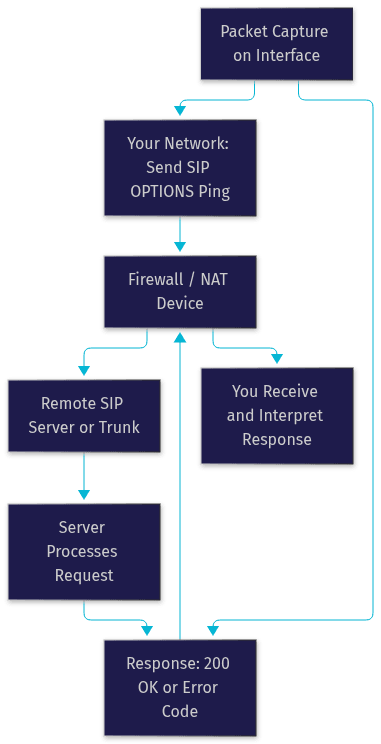
Interpreting the results is straightforward once you know the vocabulary. A 200 OK confirms reachability. A 401 or 407 response means the server is reachable but wants authentication, which is actually a healthy sign. A 403 means authentication or permissions failed. A 408 timeout or no response at all means the connectivity layer itself is broken, and that is where firewall and NAT checks come in.
Verifying UDP Port Reachability
Most SIP signaling runs over UDP on port 5060, and UDP is connectionless, which makes reachability problems tricky to detect. A standard port check that completes a TCP handshake will not tell you whether UDP packets are flowing. Instead, use a SIP OPTIONS ping as described above, or a UDP-specific reachability test, and confirm the response arrives on the same port pair your system expects.
Firewall configuration is the usual culprit. Both the host firewall on your SIP server and any perimeter firewall must allow UDP port 5060 in both directions, and any stateful inspection rules must treat return traffic as part of the same flow. NAT adds a second layer of complexity: the IP addresses and ports embedded inside SIP messages must match the translated addresses the outside world sees, otherwise the remote peer tries to send responses to an unreachable private address.
Checking TLS Handshake Success
When your trunk uses SIP over TLS, typically on port 5061, the connectivity check changes shape. Before any SIP message is exchanged, the two endpoints must complete a TLS handshake: negotiate a protocol version, agree on a cipher suite, and validate certificates. If the handshake fails, no SIP traffic flows at all, and the failure is usually one of three things.
First, certificate validation: if the remote server presents a certificate that is expired, self-signed without being trusted, or issued for a different hostname, the handshake aborts. Second, protocol or cipher mismatch: if one side requires TLS 1.2 or higher and the other only offers older versions, negotiation fails. Third, port or firewall issues on 5061, which mirror the UDP checks above. A packet capture during the handshake attempt will show exactly which stage failed, and the TLS alert message usually names the reason.
Common Issues and Troubleshooting
Most SIP connectivity failures fall into a handful of well-understood categories. Here are the five you will encounter most often, with symptoms and fixes.
Firewall or SIP ALG Interference
Symptoms: Registration succeeds intermittently, calls connect but have no audio, or INVITEs time out despite the server being reachable. Cause: Many consumer and branch-office routers ship with a SIP Application Layer Gateway (ALG) enabled by default. The ALG rewrites SIP headers to "help" with NAT, but frequently corrupts them, breaking dialog state. Fix: Disable SIP ALG on the router entirely, and rely on proper firewall rules plus your SIP system's own NAT handling. This single change resolves a surprising share of mystery SIP failures.
NAT Traversal Problems
Symptoms: One-way audio, calls that ring but drop when answered, or registrations that expire unexpectedly. Cause: SIP embeds IP addresses and ports inside its message bodies, and NAT translation changes the outer packet addresses without updating the inner ones, so media flows toward unreachable private addresses. Fix: Enable STUN so endpoints learn their public address, and deploy a TURN relay for clients behind strict NATs where direct media flow is impossible. Ensure keepalive traffic keeps NAT bindings alive between calls, since expired bindings cause silent failure on the next call attempt.
Mismatched Transport Protocol
Symptoms: One side sees no traffic at all while the other insists it is sending. Cause: One endpoint is sending UDP while the peer listens on TCP, or both use the same transport but different ports. Fix: Confirm the transport and port configuration on both sides match exactly, including any TLS port such as 5061. A packet capture on the receiving side quickly confirms whether packets are arriving on the expected port and protocol.
Codec Incompatibility
Symptoms: Calls connect, signaling completes cleanly, but audio is silent or garbled. Cause: The two endpoints found no common codec, or negotiated one that a middlebox strips. Fix: Review the codec list offered in the session negotiation and ensure at least one widely supported codec, such as G.711, is enabled on both sides. This is a session negotiation problem rather than a connectivity problem, but it masquerades as one.
DNS and SRV Record Misconfiguration
Symptoms: Intermittent failures where some calls route and others do not, or failures only when the primary server is busy. Cause: SIP systems commonly use DNS SRV records to locate the correct server and port for a domain, and NAPTR records to select the transport. Missing or malformed records send traffic to the wrong destination. Fix: Verify the SRV and NAPTR records for your SIP domain resolve correctly, and that they point to servers that are actually listening on the advertised transport and port.
Ensuring Secure SIP Connectivity
Security for SIP connectivity starts with encryption and ends with monitoring. The first and most impactful step is enabling TLS on your SIP trunks. TLS-encrypted signaling protects registration credentials, call metadata, and dialog state from anyone observing the network path. Pair it with SRTP for encrypted media, and the entire call, signaling and audio, is protected end to end.
Cipher selection matters once TLS is on. Configure your SIP endpoints to require modern TLS versions with strong cipher suites, and disable outdated protocol versions and weak ciphers. Most modern SIP platforms and trunk providers support TLS 1.2 and above, so there is rarely a reason to accept anything weaker.
Network-level controls add a second layer. IP whitelisting restricts which addresses may even attempt to reach your SIP endpoints, cutting off the vast majority of automated scanning and toll-fraud attempts. Geo-fencing goes further by restricting access to regions where you legitimately operate, which is especially valuable for organizations with a fixed geographic footprint. VideoSDK supports both IP whitelisting and geo-fencing as first-class features of its telephony layer.
Authentication hygiene completes the picture. Use strong digest authentication credentials for SIP registrations, rotate them like any other privileged secret, and avoid reusing credentials across trunks. Finally, monitor your signaling rates: a sudden spike in registration attempts or INVITE floods from unfamiliar addresses is the signature of a DDoS or toll-fraud attempt in progress, and early detection is the difference between an alert and an incident.
VideoSDK SIP Integration Overview
VideoSDK bridges traditional SIP telephony into modern WebRTC rooms, letting desk phones, PBX systems, and PSTN callers participate in the same sessions as browser and mobile app users. The integration is built around two components: an Inbound Gateway that accepts calls arriving from your SIP trunk provider and routes them into VideoSDK rooms, and an Outbound Gateway that places calls from VideoSDK sessions out through your SIP trunk to the PSTN. A routing rules engine controls how calls are matched, directed, and handed off, including routing inbound calls to AI voice agents.
The integration supports the transports your existing telephony stack already speaks, including UDP, TCP, and TLS, along with standard digest authentication for trunk registration. That means you can connect an on-premise PBX, a cloud trunk from providers like Twilio, Vonage, Telnyx, or Plivo, or a private SIP network, without re-architecting either side.
A common deployment pattern pairs a cloud-hosted VideoSDK deployment with an on-premise PBX. The PBX continues to serve internal desk phones and existing PSTN lines. A SIP trunk connects the PBX to VideoSDK's gateway, and from that point any VideoSDK room participant, whether a web app user, a mobile user, or a Python-based AI voice agent, can converse with PSTN callers. This is the architecture behind AI phone agents, hybrid contact centers, and telehealth systems that need to reach patients on ordinary phone lines.
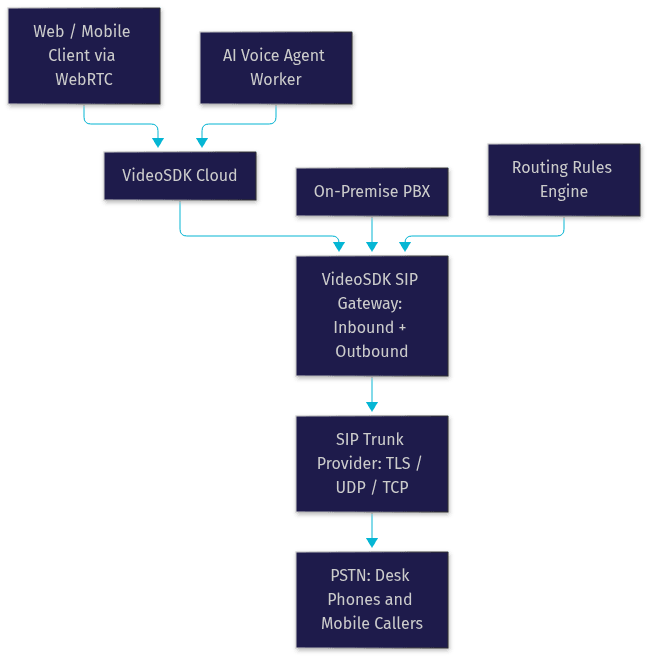
Because the gateway handles the protocol translation between WebRTC and SIP, your application code never touches SIP directly. You manage rooms, participants, and recordings through the same VideoSDK REST APIs you already use for real-time communication, and the telephony layer behaves like any other participant source. For a deeper walkthrough of gateway setup and routing rules, see the VideoSDK SIP integration documentation.
Best Practices Checklist
- Disable SIP ALG on every router and firewall in the signaling path.
- Allow SIP signaling ports (5060 for UDP/TCP, 5061 for TLS) in both directions on all firewalls.
- Enable TLS on all SIP trunks and require modern protocol versions with strong cipher suites.
- Use STUN and TURN to handle NAT traversal, and keep keepalive traffic flowing to preserve NAT bindings.
- Whitelist known trunk and peer IP addresses, and apply geo-fencing where your operations are regionally bounded.
- Verify DNS SRV and NAPTR records for your SIP domain after any DNS change.
- Run a SIP OPTIONS health check on a schedule and alert on timeout or unexpected response codes.
- Capture and review a sample call flow with a diagnostic tool after any network or trunk configuration change.
- Rotate SIP digest authentication credentials on a regular schedule.
Definitions Glossary
SIP (Session Initiation Protocol): The signaling protocol that establishes, modifies, and terminates VoIP calls. SIP negotiates who is calling whom and with what parameters, while the actual audio flows separately over RTP.
NAT Traversal: Techniques such as STUN and TURN that allow SIP signaling and media to cross network address translation devices. Without them, embedded private IP addresses cause one-way audio and failed calls.
TLS (Transport Layer Security): The encryption protocol used to protect SIP signaling, typically on port 5061. TLS prevents observers from reading registration credentials and call metadata.
SIP ALG (Application Layer Gateway): A router feature intended to assist SIP through NAT, which frequently corrupts SIP headers instead. Disabling it is a standard first troubleshooting step.
VideoSDK SIP Gateway: The VideoSDK component that translates WebRTC media and signaling to SIP, connecting browser and mobile room participants to SIP trunks, PBX systems, and the PSTN.
Key Takeaways
- Reliable SIP connectivity hinges on matching transports, correct firewall rules, working NAT traversal, and successful TLS negotiation across every hop in the path.
- Standard diagnostic tools let you validate bidirectional SIP signaling with an OPTIONS ping and a packet capture, without writing any code.
- The five most common failure modes are SIP ALG interference, NAT traversal, transport mismatch, codec incompatibility, and DNS record errors, and each has a distinct symptom signature.
- VideoSDK provides a turnkey SIP gateway supporting UDP, TCP, and TLS, bridging on-premise PBX systems and cloud trunks into WebRTC rooms.
- A security-first approach combining TLS, IP whitelisting, geo-fencing, and credential rotation, plus scheduled health checks, prevents most outages before customers notice them.
Conclusion
SIP connectivity is the invisible foundation of every VoIP deployment, and it fails in predictable, diagnosable ways. Test your paths with OPTIONS pings and packet captures, secure them with TLS and network controls, and troubleshoot against the five common failure modes covered here. When you are ready to bridge traditional telephony into modern applications, VideoSDK's SIP integration handles the WebRTC-to-SIP translation for you, from the documentation home onward. What are you building with SIP connectivity? Drop a comment, I'd love to hear whether you're connecting a PBX, a contact center, or an AI phone agent.
Free $20 Balance for AI Voice Agents & Video Calls
FAQ