


RTMP streaming services receive your live video feed from an encoder and distribute it to viewers or platforms like YouTube, Twitch, and Facebook. RTMP remains the dominant ingest protocol in 2026 because nearly every encoder and platform supports it. Choose a service based on ingest reliability, RTMPS encryption, global ingest points, and pricing, and pair it with a low-latency delivery layer such as WebRTC or HLS when viewers need real-time interaction. VideoSDK's interactive live streaming covers the low-latency delivery side of that workflow.
Introduction
Live video now accounts for a massive share of global internet traffic, and every one of those streams starts with an ingest step. Despite being more than two decades old, RTMP (Real-Time Messaging Protocol) is still the protocol most encoders, platforms, and streaming services speak fluently. Developers building live streaming products keep searching for RTMP streaming services because the protocol solves a hard problem: getting a stable, persistent media stream from a camera or encoder into a cloud distribution system.
The catch is that RTMP is an ingest workhorse, not a modern playback technology. Latency, security, and multi-platform delivery all depend on the service you build around it. This guide explains how RTMP works, what to look for in a provider, how to set up and secure a stream, and where alternatives like SRT and WebRTC fit in 2026.
Understanding RTMP Streaming Services
What is RTMP?
RTMP is defined as a TCP-based protocol originally developed by Macromedia (later Adobe) for delivering audio, video, and data between a Flash player and a server. Today, its primary role has shifted almost entirely to ingest: an encoder pushes a live stream to an RTMP server, which then transcodes and repackages the media for delivery protocols viewers actually use, such as HLS, DASH, or WebRTC.
RTMP works by maintaining a persistent TCP connection and splitting media into message chunks, which keeps packet ordering intact and makes the connection resilient for upstream delivery. It supports H.264 video and AAC audio, which is why it remains the universal compatibility layer between encoders and streaming platforms.
Core Components of an RTMP Service
An RTMP streaming service has three layers. The RTMP client is the encoder side: software like OBS, hardware encoders, or your own application that captures media and pushes it upstream. The RTMP server is the receiving layer, responsible for accepting the connection, authenticating the stream key, and processing the incoming media. The protocol layer defines how the two communicate, including chunking, handshaking, and control messages.
Most modern services are cloud-based, meaning the RTMP server sits behind a global ingest network with automatic failover between ingest points. On-premise RTMP server deployments still exist for organizations with strict data residency or network requirements, but they trade convenience for operational burden.
How RTMP Works in a Live Stream
Ingest Workflow
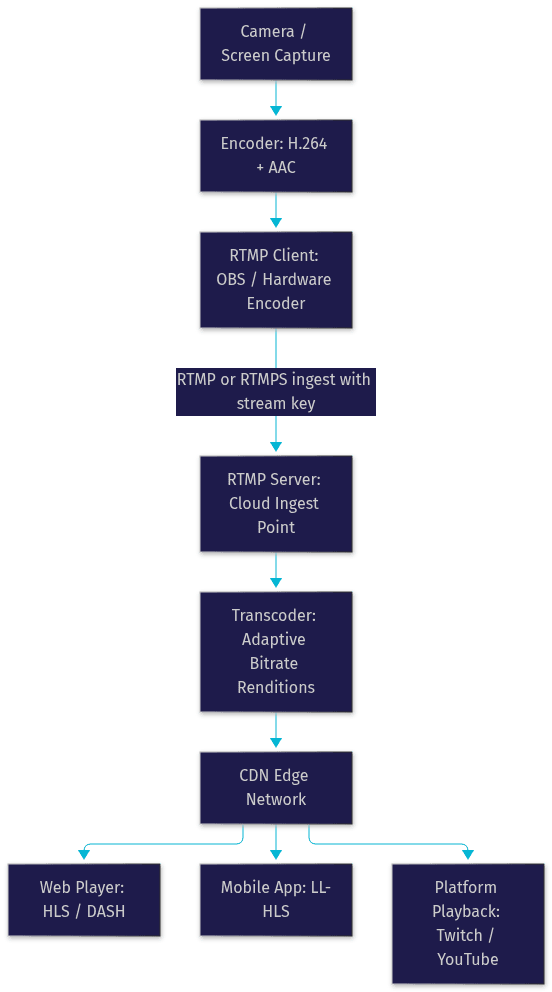
A live stream follows a predictable path. Capture starts at the camera or screen, where raw audio and video are fed into an encoder. The encoder compresses the media, typically into H.264 video and AAC audio, and hands it to the RTMP client, which opens a persistent connection to the RTMP server using a stream URL and a stream key for authentication.
Once the RTMP server accepts the ingest, it transcodes the stream into multiple renditions for adaptive bitrate streaming and repackages them into delivery formats. A CDN then distributes those renditions to edge nodes close to each viewer. Playback endpoints, whether a custom web player, a mobile app, or a platform like Twitch, pull the appropriate rendition from the nearest edge. The VideoSDK interactive live streaming guide describes how the delivery side handles viewer interaction once ingest is complete.
Data-Flow Diagram
The diagram below shows the full path from encoder to viewer, including the transcoding step where RTMP hands off to delivery protocols:
Key Benefits of Using RTMP Streaming Services
Low Latency and Reliability
RTMP's persistent connection and ordered chunk delivery make upstream ingest remarkably stable. Because the protocol maintains a continuous TCP session, the server receives packets in sequence, which simplifies reassembly and reduces ingest-side corruption. For the ingest leg itself, RTMP adds only a small delay, typically in the range of one to three seconds, which is why it remains the standard for getting media into a cloud pipeline.
Reliability also comes from the ecosystem. RTMP health monitoring is a mature discipline: services expose connection state, dropped-frame counts, and bitrate graphs, so you can detect encoder or network problems before viewers do. Error-resilient behavior on unstable networks, combined with automatic reconnect in most encoders, keeps long broadcasts alive.
Broad Platform Support
The strongest argument for RTMP in 2026 is compatibility. YouTube Live, Twitch, Facebook Live, LinkedIn Live, and virtually every custom streaming platform accept RTMP ingest. Every major software encoder (OBS Studio, vMix, Wirecast) and most hardware encoders ship with RTMP output as a first-class feature.
That means one encoder configuration can reach any destination. For developers building multi-destination streaming products, RTMP is the common denominator: your service can relay a single ingest to any number of RTMP endpoints without per-platform integration work. No competing ingest protocol comes close to this level of support.
Choosing the Right RTMP Streaming Service
Evaluation Criteria
Evaluate RTMP streaming services against six dimensions. First, feature set: transcoding quality, adaptive bitrate support, recording, and REST APIs for programmatic control. Second, scalability: whether the service can absorb sudden audience spikes without manual capacity planning. Third, security: RTMPS (RTMP over TLS) support, token-based playback authentication, and stream key management tools.
Fourth, pricing models: some services charge by bandwidth, others by viewer minutes or encoded minutes, and a few offer flat monthly tiers; model your expected usage against each before committing. Fifth, global ingest points: the closer an ingest server is to your encoder, the fewer dropped frames you will see. Sixth, analytics: real-time concurrent viewer counts, geographic distribution, and playback error rates are essential for operating a serious stream. Streaming analytics also feed directly into your monitoring and alerting strategy.
Top Providers Overview
Several services lead the RTMP ingest market in 2026. Dacast offers strong enterprise features with Akamai-based delivery and secure streaming. Wowza provides both a cloud service and an engine you can self-host, appealing to teams that want flexibility. Vimeo's streaming product targets professional broadcasters with a polished workflow. Red5 Pro focuses on low-latency and WebRTC-capable deployments alongside RTMP. StreamYard serves the browser-based, multi-guest segment. IBM Video Cloud (formerly Ustream) remains a choice for large-scale corporate events. For teams that need interactive, sub-second delivery rather than one-way broadcast, pairing an RTMP ingest layer with a real-time SDK such as VideoSDK's live streaming capabilities is a common hybrid pattern.
Setting Up an RTMP Stream: Step-by-Step Guidance
Preparing Your Encoder
Start with your source and encoder settings. Set your camera or capture device to a resolution and frame rate your bandwidth can sustain; 1080p at 30 or 60 frames per second is the common ceiling for most broadcasts. Configure the video bitrate based on resolution, generally in the range of 4,500 to 6,000 kilobits per second for 1080p, and choose a keyframe interval of two seconds, which aligns with the segmentation requirements of HLS delivery downstream.
For audio, use AAC at 128 kilobits per second and a 48 kHz sample rate, which matches what nearly every RTMP server expects. Set your encoder's output to constant bitrate rather than variable, since RTMP ingest behaves more predictably with a steady upstream rate. Before going live, confirm your upload bandwidth is at least double your combined audio and video bitrate to leave headroom for network fluctuation.
Configuring the Service
In your streaming service dashboard, create a live stream entry and copy two values: the stream URL (the RTMP or RTMPS ingest address) and the stream key (the authentication token that identifies your stream). In your encoder, paste both into the output settings. If your service supports RTMPS, use the encrypted ingest URL so your media and credentials travel over TLS rather than plain TCP.
Some services also let you restrict ingest by IP whitelisting, so only your encoder's network can connect, and set a maximum bitrate ceiling to prevent accidental misconfiguration. If your service exposes a REST API, you can automate stream creation and key rotation, which matters for applications that generate streams programmatically. The VideoSDK REST API reference shows this pattern applied to real-time rooms.
Testing and Troubleshooting
Always run a private test stream before your event. Verify that the encoder connects successfully, then check the service's health dashboard for ingest bitrate stability and dropped-frame counts. Watch the playback end to end and measure the delay between a spoken word at the source and its appearance in the player.
Common problems have common fixes. Dropped frames usually indicate insufficient upload bandwidth; lower your bitrate or switch to a wired connection. Connection rejection usually means an invalid or expired stream key. Stuttering playback with a healthy ingest graph points to a transcoding or delivery issue rather than your encoder. Keep an eye on RTMP health monitoring dashboards during the live event, and have a fallback bitrate profile ready to switch to if your network degrades mid-broadcast.
Advanced Use Cases
Multi-Streaming to Multiple Platforms
Multi-destination streaming means sending one broadcast to YouTube, Twitch, and Facebook simultaneously. There are two approaches. The first is relaying: your RTMP server or a cloud relay service receives one ingest and re-publishes it to multiple RTMP endpoints. The second is using a multi-streaming service that handles the fan-out natively, often with per-platform overlays and chat aggregation.
Relaying from a single server is more efficient than pushing multiple full-bitrate streams from your encoder, since your upload link only carries one copy. When evaluating multi-streaming services, check whether they transcode per destination, because platforms have different bitrate and resolution requirements.
Secure RTMPS and Encryption
RTMPS wraps the RTMP session in TLS encryption, protecting both your media and your stream key from interception on the network path between encoder and server. Enable it wherever your service supports it, and treat plain RTMP as acceptable only on fully trusted private networks.
Layer additional controls on top. Token-based playback authentication prevents unauthorized viewers from accessing your CDN URLs. IP whitelisting on the ingest side restricts connections to known encoder addresses. For firewall-constrained corporate networks, confirm which ports your service uses for ingest, since some networks block non-standard ports and you may need to coordinate with your network team before an event.
Common Pitfalls and Best Practices
Bandwidth Management
The most common RTMP failure is upstream bandwidth exhaustion. Best practice is to encode at a bitrate your upload link can sustain with headroom, enable adaptive bitrate renditions on the server side so viewers on weak connections still get smooth playback, and monitor your encoder's bitrate graph continuously during broadcasts.
Have a fallback strategy: a lower-resolution, lower-bitrate encoder profile you can switch to within seconds if your network degrades. Teams running frequent broadcasts should also monitor ingest server health, not just the encoder, because a distant or overloaded ingest point produces the same symptoms as a local network problem.
Token Security
Stream keys are credentials, and leaked keys mean anyone can broadcast to your channel. Never expose stream keys in client-side code, shared documents, or screenshots. Rotate keys regularly, especially after team members change or after any suspected exposure, and revoke keys immediately after an event ends.
Use IP whitelisting so a stolen key is useless from an unknown network. For applications that generate streams programmatically, issue short-lived keys per session rather than reusing a permanent one. These practices cost minutes and prevent the far more expensive aftermath of a hijacked broadcast.
Future of RTMP and Emerging Alternatives
RTMP's future is ingest-only. Adobe ended active development long ago, and the protocol's codec ceiling (effectively H.264 and AAC) limits it as a delivery format. But nothing has displaced it as the universal ingest standard, and nothing is likely to soon.
The alternatives each solve a different problem. SRT offers better error recovery and encryption over unreliable networks, making it strong for remote contribution links where the source connection itself is shaky. WebRTC delivers true sub-second latency, which is essential when viewers need to interact, vote, or join the conversation, as explored in VideoSDK's interactive live streaming documentation. Low-latency HLS closes the gap for one-to-many delivery, bringing broadcast-style streams down to a few seconds of delay.
The winning architecture in 2026 is hybrid: RTMP or SRT for ingest and contribution, WebRTC for interactive scenarios, and LL-HLS for large-scale one-to-many distribution. Choose per leg of the pipeline, not per protocol loyalty.
Definitions Glossary
RTMP (Real-Time Messaging Protocol): A TCP-based protocol used to push live audio and video from an encoder to a streaming server. In modern workflows it serves almost exclusively as an ingest protocol.
RTMPS: RTMP wrapped in TLS encryption, protecting media and credentials in transit between the encoder and the ingest server.
Stream key: An authentication token paired with a stream URL that identifies and authorizes an RTMP ingest session. It should be treated as a secret credential.
Adaptive bitrate streaming: A technique where the server produces multiple quality renditions of a stream so each viewer's player can switch quality based on their real-time network conditions.
Multi-destination streaming: Relaying a single ingest to multiple RTMP endpoints simultaneously, such as YouTube, Twitch, and Facebook, usually via a cloud relay service.
Interactive Live Streaming (ILS): A low-latency streaming mode where audience members can be promoted to active participants, enabled in VideoSDK by switching a room's mode at runtime.
Key Takeaways
- RTMP remains the universal ingest protocol in 2026 because virtually every encoder and platform, from OBS to YouTube and Twitch, accepts it.
- Evaluate RTMP streaming services on ingest reliability, RTMPS support, global ingest points, pricing model, and streaming analytics before committing.
- Secure your workflow with RTMPS encryption, stream key rotation, IP whitelisting, and token-based playback authentication.
- Multi-destination streaming is best done via a cloud relay that fans one ingest out to many RTMP endpoints, saving upstream bandwidth.
- The strongest 2026 architecture is hybrid: RTMP or SRT for ingest, WebRTC for interactive sub-second delivery, and LL-HLS for large-scale broadcast, a combination VideoSDK supports natively.
Conclusion
RTMP streaming services remain the backbone of live video ingestion because the protocol's ubiquity, reliability, and tooling maturity are unmatched. When choosing a provider, weigh ingest point proximity, RTMPS security, adaptive bitrate quality, analytics depth, and a pricing model that fits your actual usage. Then secure the pipeline: encrypted ingest, rotated keys, and monitored bandwidth. For the delivery side, where latency and interactivity matter, explore VideoSDK's interactive live streaming and its REST APIs, or try the free tier at app.videosdk.live. What are you building with RTMP ingest? Drop a comment, I'd love to hear what kind of streaming workflow you're working on.
Top 10 RTMP Streaming Services Compared
Many companies provide rtmp server hosting and associated services. Here's a comparison of some popular options. Note that features and pricing are subject to change, so always check with the provider directly.
Criteria for Comparison
When evaluating rtmp streaming services, consider factors such as pricing, features (e.g., transcoding, recording, analytics), scalability, reliability, CDN integration, and ease of use. Look for solutions providing scalable streaming solutions and robust video analytics.
Service 1: Wowza Streaming Engine
Wowza Streaming Engine is a powerful and flexible platform supporting various streaming protocols, including RTMP. It offers extensive customization options and is suitable for demanding streaming workflows. You can deploy it as cloud-based streaming or on-premise streaming.
- Pros: Highly customizable, supports multiple protocols, robust features.
- Cons: Can be complex to set up, higher cost compared to some alternatives.
Service 2: Red5 Media Server
Red5 is an open-source media server that supports RTMP streaming. It's a cost-effective option for developers who want to build custom streaming applications. It's a popular solution when considering rtmp streaming solutions
- Pros: Open-source, free to use, flexible.
- Cons: Requires technical expertise to set up and maintain, less feature-rich than commercial solutions.
Service 3: Nginx with RTMP Module
Nginx, a popular web server, can be extended with an RTMP module to provide streaming capabilities. This is a good option for those already familiar with Nginx and looking for a lightweight solution.
- Pros: Free, lightweight, integrates with existing Nginx infrastructure.
- Cons: Requires technical expertise to configure, limited features compared to dedicated streaming servers.
Service 4: Dacast
Dacast is a comprehensive live video streaming services platform that includes RTMP ingest. It offers features like transcoding, CDN integration, and monetization options.
- Pros: All-in-one platform, easy to use, includes CDN and monetization features.
- Cons: Can be more expensive than self-hosted solutions.
Service 5: IBM Cloud Video (Ustream)
IBM Cloud Video, formerly Ustream, offers a robust platform for live and on-demand video streaming solutions, including RTMP ingest and delivery. It provides a range of features for enterprise-level streaming.
- Pros: Enterprise-grade platform, scalable, includes analytics and security features.
- Cons: Higher cost, geared towards larger organizations.
Service 6: Twitch
While primarily known as a gaming platform, Twitch allows RTMP ingest from various encoders. It provides a built-in audience and monetization options for streamers.
- Pros: Large built-in audience, monetization options, easy to use.
- Cons: Primarily focused on gaming content, limited control over branding.
Service 7: YouTube Live
YouTube Live is a free platform for live streaming, supporting RTMP ingest. It offers broad reach and integration with the YouTube ecosystem.
- Pros: Free, wide reach, integrates with YouTube.
- Cons: Limited customization options, subject to YouTube's terms of service.
Service 8: Restream.io
Restream.io allows you to simultaneously stream to multiple platforms using RTMP. It's a useful tool for expanding your reach and engaging with audiences on different services.
- Pros: Multi-platform streaming, easy to use, centralized control.
- Cons: Adds a layer of complexity, potential for increased latency.
Service 9: Nimble Streamer
Nimble Streamer is a lightweight and versatile streaming server that supports RTMP and other protocols. It's known for its performance and efficiency.
- Pros: Lightweight, high performance, supports multiple protocols.
- Cons: Requires technical knowledge to configure, may require additional modules for certain features.
Service 10: Ant Media Server
Ant Media Server is a platform that supports RTMP along with other protocols, focusing on ultra-low latency and real-time communication features.
- Pros: Focuses on low-latency streaming, supports WebRTC, includes real-time communication features.
- Cons: Targeted at specific use cases, may not be suitable for all streaming scenarios.
Setting Up Your RTMP Streaming Workflow
Setting up an rtmp streaming setup involves several steps. Here's a breakdown of the process.
Choosing the Right Encoder
An encoder converts your video and audio into a format suitable for streaming. Popular encoders include OBS Studio, Wirecast, and vMix. The choice depends on your needs and budget.
python
1# Example configuration for OBS Studio
2# (This is a conceptual representation - actual configuration is done via the OBS interface)
3
4settings = {
5    "stream_type": "rtmp_custom",
6    "rtmp_server": "rtmp://your_rtmp_server/live",
7    "stream_key": "your_stream_key",
8    "video_bitrate": "2500k",
9    "audio_bitrate": "128k",
10    "resolution": "1280x720"
11}
Configuring Your RTMP Server
The RTMP server receives the stream from your encoder and distributes it to viewers. You'll need to configure the server with the correct settings, including the stream key.
text
1# Example RTMP Server URL
2rtmp://your_rtmp_server/live/your_stream_key
Testing Your Stream
Before going live, always test your stream. Use an RTMP player or a platform like YouTube Live to verify that the stream is working correctly.
Monitoring Your Stream
During your live stream, monitor the stream health, including bitrate, frame rate, and latency. This helps ensure a smooth viewing experience for your audience.
Advanced RTMP Streaming Techniques
To optimize your RTMP streaming, consider these advanced techniques.
Low-Latency Streaming
Achieving low latency streaming with RTMP requires careful configuration of your encoder and server. Minimize buffering and optimize network settings to reduce delay.
Multi-bitrate Streaming
Multi-bitrate streaming allows viewers to watch your stream at different quality levels based on their internet connection. This improves accessibility and reduces buffering.
Stream Security and Encryption
Protect your stream from unauthorized access by using encryption. RTMP supports RTMPS, which encrypts the stream using SSL/TLS.
Integrating with CDNs
Content Delivery Networks (CDNs) distribute your stream across multiple servers, improving scalability and reducing latency for viewers around the world. Services like Akamai and Cloudflare offer CDN solutions for RTMP streaming.
RTMP Streaming: Future Trends and Considerations
The streaming landscape is constantly evolving. Here's a look at the future of RTMP and its role in the industry.
The Rise of WebRTC
WebRTC is a real-time communication protocol that offers ultra-low latency and is increasingly used for interactive streaming applications. WebRTC is growing quickly, it is essential to review its advantages when comparing rtmp vs hls streaming.
Choosing Between RTMP and Other Protocols
While RTMP remains a viable option for ingest, newer protocols like HLS and DASH are more commonly used for delivery. Consider your specific needs and target audience when choosing a protocol. Most services include HTML5 live streaming options.
The Importance of Scalability and Reliability
Whether you're using RTMP or another protocol, scalable streaming solutions and reliability are crucial. Ensure your infrastructure can handle the expected traffic and that you have redundancy in place to prevent outages.
Future of RTMP in the Streaming Landscape
RTMP is likely to remain relevant for ingest and contribution, but its use for direct playback will continue to decline. The protocol may evolve to support new features and adapt to changing industry needs. It's more important than ever to consider how to choose rtmp streaming service that meets your requirements.
Conclusion: Choosing the Right RTMP Streaming Service for Your Needs
Choosing the right RTMP streaming service depends on your specific requirements, budget, and technical expertise. Consider factors such as scalability, reliability, features, and ease of use. Evaluate different rtmp streaming platform providers to find one that aligns with your needs. A clear understanding of the options, as well as setup, techniques and future considerations discussed in this article will help you move forward with your project.
Free $20 Balance for AI Voice Agents & Video Calls
FAQ