



A fitness API is a web service that gives your application programmatic access to exercise databases, workout plans, activity tracking data, and health metrics. Choosing the right fitness API in 2026 means comparing data coverage, authentication models, rate limits, and pricing across providers like ExerciseDB, Hyperhuman, and Google Health. This fitness API guide walks you through every decision point, from your first integration to a full provider migration, and shows how VideoSDK adds live video and real-time coaching on top of any fitness data source you pick.
Building a fitness application in 2026 almost always means standing on the shoulders of third-party data. Nobody hand-curates a database of 1,300 exercises, their muscle-group mappings, and instructional videos while also shipping a consumer app. You integrate a fitness API instead, and you move fast because of it.
The problem is that "fitness API" covers a wide surface. Some providers give you structured exercise data. Others give you wearable-derived health metrics, AI-generated workout plans, or streaming workout video. Each has its own authentication scheme, response shapes, rate limits, and pricing model. Picking wrong means a painful migration later, and migrations are where fitness app projects usually bleed time.
This guide is written for developers and technical founders who need one consolidated reference. By the end, you will know how the major providers compare, how to design an integration layer that survives a provider switch, and how to keep the whole thing fast, secure, and compliant.
What Is a Fitness API and How Does It Work?
A fitness API is defined as a RESTful web service that exposes exercise, workout, and health-related data over HTTP, typically returning JSON responses that your backend or frontend consumes. It works by exposing a set of endpoints, each representing a resource such as an exercise, a body part, a workout plan, or a user's daily activity summary, and each accepting requests authenticated with either an API key or an OAuth 2.0 token.
Most fitness APIs follow familiar REST conventions. You send a request to a resource URL, optionally with query parameters for filtering and pagination, and you receive a structured JSON payload back. Media-heavy providers also return URLs pointing to exercise demonstration images or videos hosted on their CDNs, which you embed in your UI rather than download and re-host.
The authentication model is the first big fork in the road. Simple exercise databases typically use API keys, a static credential you attach to every request. Health-data platforms like Fitbit or Google Health use OAuth 2.0, because they act on behalf of an end user and need per-user consent. The two models have very different operational implications, and the sequence diagram below shows why.
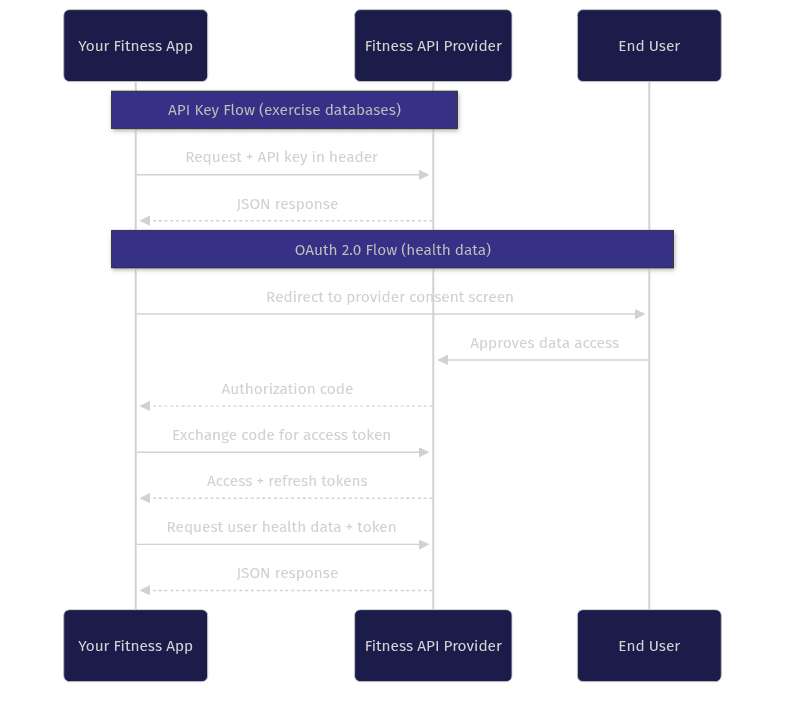
API keys are stateless and fast to integrate, but they grant blanket access, so they must never ship inside a public client. OAuth 2.0 adds a consent and token-exchange handshake, but it gives you per-user, revocable, scoped access, which is non-negotiable when personal health data is involved.
Popular Fitness API Providers Compared
The fitness API market splits into three tiers: exercise data providers, AI workout generators, and health-data aggregators. Knowing which tier you need is the single highest-leverage decision in this guide, because it determines your authentication model, your compliance burden, and your integration complexity.
ExerciseDB is the most widely used exercise database API. It offers a large catalog of exercises searchable by name, body part, equipment, and target muscle, with multiple image assets per exercise. It is the default choice for apps that need a reliable, structured exercise library, and it has a free tier suitable for development.
Hyperhuman focuses on AI-generated workout content and media, including exercise videos and programmable workout templates. It suits teams building adaptive training experiences rather than static catalogs.
Fitbit Web API and Google Health Connect sit in the health-data tier. They expose per-user activity, heart rate, sleep, and step data through OAuth 2.0, and they come with strict compliance requirements because the data is personal health information.
FitnessSyncer acts as an aggregation layer, normalizing data from multiple wearables and health platforms into one API surface, which reduces your integration count at the cost of an intermediary.
| Provider | Tier | Standout Strength | Auth Model | Best For |
|---|---|---|---|---|
| ExerciseDB | Exercise data | Deep, searchable exercise catalog with media | API key | Apps needing a structured exercise library |
| Hyperhuman | AI workout content | AI-generated workouts and video media | API key | Adaptive, media-rich training apps |
| Fitbit Web API | Health data | Wearable activity, sleep, and heart-rate data | OAuth 2.0 | Apps built around Fitbit users |
| Google Health Connect | Health data | Device-agnostic Android health data hub | OAuth 2.0 | Android apps aggregating multiple trackers |
| FitnessSyncer | Aggregator | Normalizes many wearable sources into one API | API key | Apps avoiding per-provider integrations |
[LINKABLE ASSET — provider comparison table]
The most important row depends on your product. If you are building a workout builder or a coaching app, start in the exercise-data tier. If your product is analytics-driven and lives on wearable data, you are in the OAuth tier and should budget for consent flows and compliance work from day one.
How to Map Fitness API Endpoints Across Providers
Endpoint mapping is the discipline of translating your application's generic data needs into each provider's specific resource URLs and parameters. It matters because fitness providers name the same concepts differently: one provider's "target muscle" is another's "primary muscle group," and one uses path-style URLs while another uses query parameters for the same filter.
The core pattern is to define your own internal vocabulary first, then translate. Your app should never request a provider URL directly from its UI components. Instead, define canonical operations like "search exercises by muscle group," "fetch exercise media," or "estimate calories burned," and implement each operation once per provider behind a thin translation layer.
Two design styles dominate. Path-style providers encode the resource in the URL segments, so a body-part filter becomes part of the address itself. Query-parameter providers keep a single search endpoint and express filters as key-value pairs appended to the request. Neither is better, but mixing them without an abstraction layer means your UI code becomes permanently coupled to one provider's conventions.
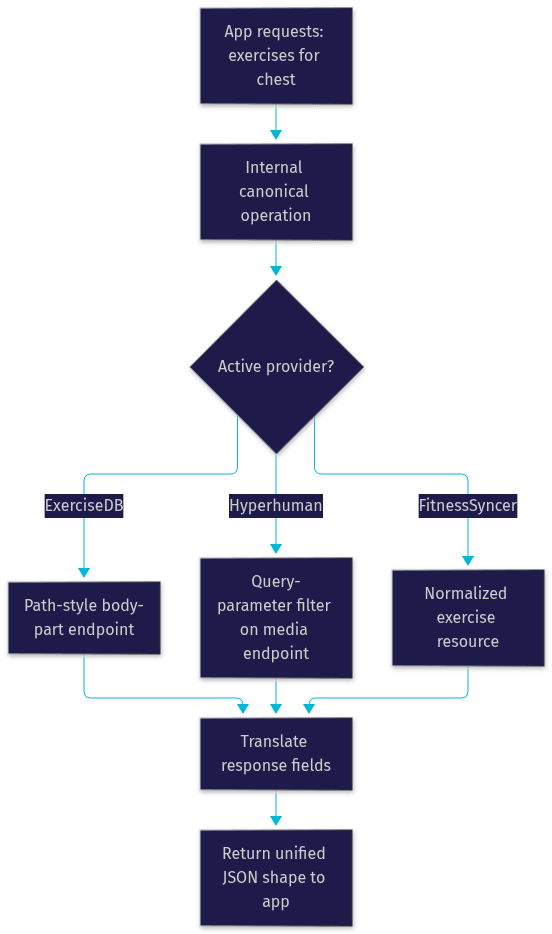
Field-name translation is the other half of mapping. One provider returns a media array, another returns separate image and video fields, and a third nests media inside an assets object. Your translation layer should normalize all of these into one internal shape so that a provider switch never touches your UI components. This is also where calorie estimation lives: some providers expose a dedicated calorie endpoint, while others return metabolic-equivalent metadata that your backend converts. Treat calorie numbers as estimates and label them as such in your UI, since real-world accuracy varies significantly by individual.
How to Migrate From One Fitness API to Another
Migration is where fitness API projects lose weeks, and almost always because teams skipped the abstraction step above. If your UI calls provider endpoints directly, a migration from ExerciseDB to Hyperhuman becomes a rewrite. If your UI calls canonical operations, it becomes a translation-layer swap.
The migration process, in order:
- Audit current usage. Log every provider endpoint your app actually calls for two weeks. Most teams discover they use a fraction of the API surface they integrated.
- Build the new translation layer in parallel. Implement the same canonical operations against the new provider while the old one still serves traffic.
- Diff the data. Run both providers side by side on identical queries and compare results. Field-name changes are the visible problem, but coverage gaps are the dangerous one: the new provider may simply not have certain exercises or media your users depend on.
- Test in a sandbox. Every major provider offers a development tier or sandbox keys. Never validate a migration against production credentials.
- Cut over gradually. Route a small percentage of traffic to the new provider, watch error rates and response shapes, then ramp up. Keep the old layer warm for a fast rollback.
The most common migration failure is silent data drift: the new provider returns valid JSON, your integration layer accepts it, but the semantic meaning of a field has shifted. A "difficulty" score on a 1-to-5 scale is not the same as one on a 1-to-10 scale, and nothing will crash, but your users will notice. Automated comparison of side-by-side responses during step three is the only reliable defense.
Performance and Rate-Limit Management
Fitness data is unusually cache-friendly. An exercise's name, instructions, and media rarely change, which means most of your traffic should never reach the provider at all. A well-designed integration caches exercise catalog responses aggressively, often for days, and only bypasses the cache for genuinely dynamic data like a user's live activity stream.
Rate limits are the second constraint. Providers typically enforce limits per API key per time window, and exceeding them returns throttling errors rather than data. Three practices keep you inside the limits: batch related queries into fewer requests where the provider supports it, cache everything static, and implement exponential backoff so that a throttled request retries later instead of failing visibly to the user.
Monitoring closes the loop. Track your usage against each provider's published limits, and alert well before you hit the ceiling, not after. Most provider dashboards expose current usage metrics, and treating those metrics as production telemetry rather than a billing page is the difference between a smooth scale-up and a Friday-night outage.
Security and Compliance Considerations
Fitness and health data sits under some of the strictest privacy regimes in software. If your app touches wearable-derived health metrics from users in the EU or California, GDPR and CCPA apply, and both frameworks treat health data as a sensitive category requiring explicit consent, purpose limitation, and deletion rights.
Practically, this means four things. Obtain explicit, granular user consent before pulling any health data, and record that consent. Store OAuth tokens and API keys server-side in a secrets manager, never in client bundles or public repositories. Scope OAuth access to the minimum data categories your product actually uses. And implement a working data-deletion path, because a user asking you to erase their data is a legal request, not a support ticket.
Exercise catalog data carries far lighter obligations since it is not personal data, which is one more reason the exercise-data tier is a gentler starting point for new teams.
Documentation and Tooling
Good tooling turns a fitness API integration from guesswork into an inspectable system. Start with the provider's OpenAPI or Swagger specification if one is published: it gives you a machine-readable contract for every endpoint, parameter, and response shape, and it lets SDK generators produce a typed client for your language automatically instead of hand-writing request logic.
Postman or similar request-collection tools are the second staple. Build a collection covering every canonical operation against every provider, so that migration testing and sandbox validation become repeatable button-clicks rather than ad-hoc requests. Embedding architecture diagrams, including Mermaid flowcharts like the ones in this guide, directly into your internal API documentation keeps the translation layer's design decisions visible to every developer who touches the codebase.
Real-World Use Cases
Personalized workout generation. A coaching app combines an exercise database API for the movement catalog with an AI workout generator, then filters exercises by the user's available equipment and target muscle groups to build weekly plans.
Calorie and activity dashboards. A wellness app pulls wearable data through an OAuth health API, merges it with a calorie estimation endpoint, and renders daily energy-balance trends.
Live video coaching. A personal-training platform layers real-time video on top of its data layer, using VideoSDK's video calling API so trainers and clients can see each other, share screens to review form, and record sessions. VideoSDK's Prebuilt UI Kit lets a team ship this interface without building custom video UI, and its interactive live streaming mode supports one-to-many classes where members can be promoted to ask questions in real time.
Definitions Glossary
Fitness API: A RESTful web service exposing exercise, workout, or health data as JSON over HTTP, consumed by fitness applications instead of building the data layer from scratch.
OAuth 2.0: An authorization framework where a user grants an application scoped, revocable access to their data through a consent screen and token exchange, standard for wearable and health-data APIs.
Endpoint mapping: The practice of translating an application's canonical data operations into each provider's specific URLs, parameters, and response shapes behind an abstraction layer.
Rate limit: A provider-enforced cap on the number of API requests allowed per key or token within a time window, exceeded requests are throttled or rejected.
API migration: The structured process of switching an application from one fitness API provider to another, ideally isolated to a translation layer so the UI is untouched.
Key Takeaways
- Choose your fitness API tier first: exercise databases, AI workout content, or OAuth-based health data, because the tier determines your auth model and compliance burden.
- Build a translation layer with canonical operations so your UI never calls provider endpoints directly; this is what makes a future migration a swap instead of a rewrite.
- Cache static exercise data aggressively, implement backoff for throttling, and monitor usage metrics against provider rate limits as production telemetry.
- Health data triggers GDPR and CCPA obligations: explicit consent, server-side token storage, minimal scopes, and a working deletion path.
- For live coaching features, pair any fitness data API with VideoSDK's real-time video calling or its Prebuilt UI Kit to add trainer-to-client video without custom video engineering.
Conclusion
This fitness API guide covered the full integration lifecycle: picking the right provider tier, designing an endpoint mapping layer that survives provider changes, migrating safely through sandbox testing and gradual cutover, and keeping performance, security, and compliance under control. The next step is practical: pick one provider from the comparison table, define your canonical operations, and build the translation layer before writing any UI code. If live video coaching is part of your roadmap, explore VideoSDK's documentation and start free at app.videosdk.live. What are you building with a fitness API? Drop a comment, I'd love to hear what kind of fitness use case you're working on.
Free $20 Balance for AI Voice Agents & Video Calls
FAQ