


Introduction: The Power of Integrating LLM with Voice Assistant
Voice assistants are transforming the way users interact with software, devices, and services. From smart home automation to on-the-go productivity, voice-driven interfaces are now a cornerstone of modern application design. Integrating LLM with voice assistant technology unlocks next-generation conversational AI, delivering more natural, context-aware, and intelligent user experiences. By combining the prowess of large language models (LLMs) with robust voice assistant architectures, developers can create applications that understand user intent, retrieve relevant information, and respond in real time. In this guide, we explore the technologies, architectures, and practical steps for integrating LLM with voice assistant, leveraging tools like Whisper, LangChain, Qdrant, and more to build smarter systems in 2025.
Understanding the Core Concepts
What is a Large Language Model (LLM)?
A large language model (LLM) is an advanced AI system trained on massive text datasets to understand, generate, and manipulate human language. LLMs such as GPT-4, Llama 2, and open-source alternatives are capable of answering questions, generating code, summarizing documents, and engaging in multi-turn conversations. Integrating LLM with voice assistant enables fluid, context-aware dialog and empowers voice interfaces with deep knowledge and reasoning.
What is a Voice Assistant?
A voice assistant is a software agent that interprets spoken commands, processes intent, and responds via synthesized speech or actions. Examples include Alexa, Siri, Google Assistant, and open source solutions like Mycroft. Typical voice assistant architecture involves speech recognition, natural language understanding, dialog management, and text-to-speech. Integrating LLM with voice assistant augments these systems with richer language understanding and generative capabilities. For developers looking to add real-time voice capabilities, integrating a Voice SDK can streamline the process and enhance the assistant's responsiveness.
Key Technologies for Integrating LLM with Voice Assistant
Speech Recognition: Converting Voice to Text
Speech recognition is the first step in integrating LLM with voice assistant. It converts spoken language into text that can be processed by the LLM. OpenAI Whisper is a popular open source model for robust, multilingual speech-to-text. For example, using Whisper in Python:
1import whisper
2model = whisper.load_model("base")
3result = model.transcribe("audio.wav")
4print(result["text"])
5
For applications that require handling phone-based interactions, leveraging a phone call api can facilitate seamless integration of telephony features with your voice assistant.
Text-to-Speech: Generating Natural Responses
Text-to-speech (TTS) converts the LLM's textual response back into spoken audio. Libraries like
pyttsx3 offer offline TTS, while Bark provides high-fidelity, neural TTS. Example with pyttsx3:1import pyttsx3
2engine = pyttsx3.init()
3engine.say("Integrating LLM with voice assistant is the future of AI.")
4engine.runAndWait()
5If you're building cross-platform communication tools, consider using a python video and audio calling sdk to add both video and audio calling capabilities alongside your voice assistant features.
Orchestrating with LangChain
LangChain is a framework for building applications with LLMs and connecting them to external tools, APIs, and workflows. With LangChain, you can create conversational chains that manage context, retrieval, and generation. Example workflow:
1from langchain.llms import OpenAI
2from langchain.chains import ConversationChain
3llm = OpenAI()
4conversation = ConversationChain(llm=llm)
5response = conversation.predict(input="How do I integrate LLM with a voice assistant?")
6print(response)
7
For developers who want to quickly add video calling to their applications, an embed video calling sdk can be a powerful addition, enabling seamless integration with minimal setup.
Storing and Retrieving Knowledge: Vector Databases (Qdrant) and RAG
Retrieval-Augmented Generation (RAG) combines LLMs with vector databases like Qdrant to fetch relevant context or knowledge from large document stores. This boosts accuracy and allows dynamic, context-rich responses. Integrating a Voice SDK with your voice assistant can further enhance real-time communication and collaboration features.
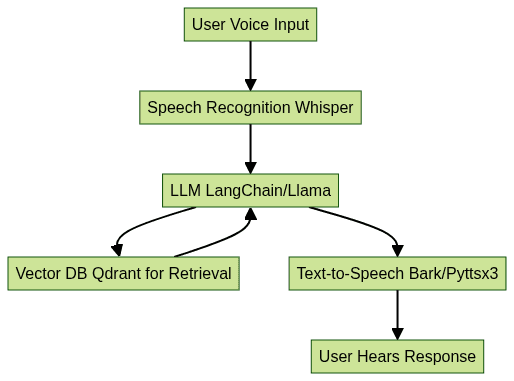
Step-by-Step Guide: Integrating LLM with Voice Assistant
1. Setting Up Your Environment
To start integrating LLM with voice assistant, set up a Python 3.9+ environment and install required dependencies:
1python3 -m venv va-llm-env
2source va-llm-env/bin/activate
3pip install openai-whisper pyttsx3 langchain llama-cpp-python qdrant-client
4
Ensure you have access to required model checkpoints (e.g., Whisper, Llama) and API keys for cloud LLMs if using them. For robust audio and video conferencing capabilities, integrating a Video Calling API can help you build scalable, interactive applications.
2. Implementing Speech Recognition
Capture microphone audio and transcribe with Whisper:
1import whisper
2import sounddevice as sd
3import numpy as np
4import scipy.io.wavfile as wav
5
6# Record audio
7fs = 16000
8seconds = 5
9recording = sd.rec(int(seconds * fs), samplerate=fs, channels=1)
10sd.wait()
11wav.write('input.wav', fs, recording)
12
13# Transcribe
14model = whisper.load_model("base")
15result = model.transcribe("input.wav")
16print(result["text"])
17
For live audio communication, integrating a Voice SDK can provide real-time streaming and enhance the overall user experience.
3. Connecting to LLM
Use LangChain or llama-cpp-python to send recognized text to the LLM for response generation. Example with llama-cpp-python:
1from llama_cpp import Llama
2llm = Llama(model_path="./llama-2-7b-chat.ggmlv3.q4_0.bin")
3user_input = "How does integrating LLM with voice assistant work?"
4response = llm(user_input)
5print(response["choices"][0]["text"])
6
Or with LangChain:
1from langchain.llms import OpenAI
2llm = OpenAI(openai_api_key="YOUR_API_KEY")
3response = llm("Explain integrating LLM with voice assistant.")
4print(response)
5
If your application requires live broadcasting or interactive sessions, integrating a Live Streaming API SDK can expand your assistant's capabilities to new audiences.
4. Enabling Text-to-Speech
Convert the LLM response back to speech:
1import pyttsx3
2engine = pyttsx3.init()
3engine.say(response)
4engine.runAndWait()
5
5. Orchestrating the Conversation Loop
Tie everything together in a conversation loop. Pseudocode:
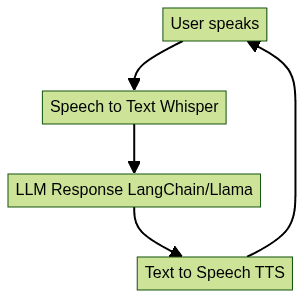
For developers seeking to build interactive audio rooms or collaborative spaces, a Voice SDK can be easily integrated into your workflow.
6. Enhancing with Retrieval-Augmented Generation (RAG)
Integrate Qdrant to provide external knowledge context for the LLM. Use LangChain’s retriever interface to query Qdrant and supplement LLM responses, especially in domain-specific applications.
Best Practices & Challenges in Integrating LLM with Voice Assistant
Privacy, Security, and Local Deployment
When integrating LLM with voice assistant, privacy and security are paramount. Local LLM deployment and on-device speech recognition (e.g., Whisper, Llama-cpp) prevent sensitive data from leaving the user’s device. Encrypt data in transit, limit logging, and follow responsible AI practices. Open source voice assistants allow full control over user data and compliance with privacy requirements.
Optimizing for Latency and Real-Time Response
Real-time voice AI demands low-latency processing. Optimize by choosing smaller, quantized models for LLM and speech recognition, leveraging GPU acceleration, and minimizing round-trips to external APIs. Caching frequent responses and pre-loading models into memory can further reduce delay, delivering a seamless user experience.
User Experience and Personalization
Personalize the assistant by tracking conversation history, customizing voice, and adapting responses to user preferences. Focus on clear feedback, context retention, and multi-turn dialog for a truly conversational experience.
Real-World Applications and Use Cases
Integrating LLM with voice assistant powers a new generation of intelligent applications:
- Customer Support: Automate complex support queries, provide natural troubleshooting, and resolve issues 24/7 with context-aware dialog.
- Smart Home: Control IoT devices, manage routines, and provide dynamic information in the home environment.
- AR/VR: Enable hands-free, conversational interfaces in immersive environments for navigation, training, and collaboration.
- Mobile Apps: Embed voice-driven features like scheduling, content search, and contextual recommendations on smartphones and wearables.
In each use-case, integrating LLM with voice assistant elevates user engagement and system intelligence. To explore these features risk-free, you can Try it for free and start building your own intelligent voice applications.
Future Trends: Multimodal Voice Assistants and Beyond
In 2025 and beyond, integrating LLM with voice assistant will expand into multimodal systems that process not only speech but also images, video, and sensor data. Advances in multimodal LLMs, federated learning for privacy, and on-device AI acceleration will empower even richer, safer, and more adaptive voice-driven experiences across domains.
Conclusion: Building Smarter Voice Assistants with LLM Integration
Integrating LLM with voice assistant is the foundation of next-generation conversational AI. By combining speech recognition, LLMs, RAG, and intelligent orchestration, developers can build responsive, secure, and context-aware voice systems for every platform in 2025.
FAQ