


Introduction to Integrating LLM in a Voice Application
In 2025, the demand to integrate LLM in a voice application is reshaping how humans interact with computers. A voice application leverages speech recognition and text-to-speech (TTS) to allow users to communicate with software using natural language. When paired with a Large Language Model (LLM) like Llama, GPT, or Gemini, such systems become highly conversational, context-aware, and intelligent.
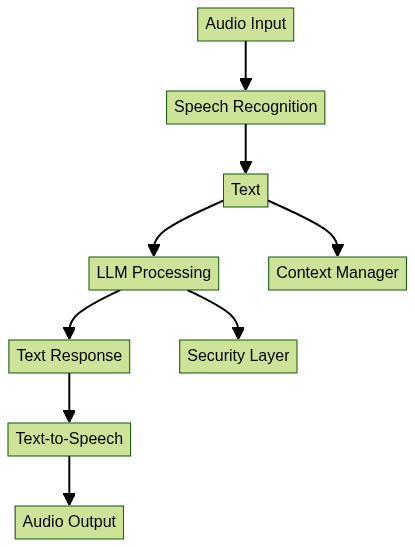
The importance of integrating LLMs into voice applications cannot be overstated. From accessibility solutions for individuals with disabilities, to hands-free productivity tools and immersive entertainment platforms, the impact is vast. Let’s explore the technical architecture of a modern LLM-powered voice application:

Why Integrate LLM in a Voice Application?
Integrating LLM in a voice application unlocks several key benefits:
- Accessibility: Voice-driven interfaces empower users with visual or motor impairments by providing alternative methods of interaction.
- Natural Interaction: LLMs provide context-aware, fluid, and human-like responses, making conversations with machines more intuitive.
- Productivity and Entertainment: From virtual assistants automating tasks to interactive storytelling and education, LLMs elevate user experiences.
Use Cases:
- Accessibility: Reading content aloud, controlling smart devices via voice, or enabling hands-free computing.
- Productivity: Virtual meeting assistants, code generation helpers, voice-based note-taking.
- Entertainment: Interactive games, storytelling, conversational companions.
With real-time processing and evolving APIs, integrating LLMs in voice applications is now more feasible and impactful than ever. For example, leveraging an Audio API can simplify the process of adding real-time audio streaming and voice features to your application.
Core Components for Voice-Language Integration
A robust voice-LLM application consists of several interdependent components, and choosing the right APIs and SDKs is crucial. If your application requires telephony integration, consider using a phone call api to enable seamless voice communications over the phone.
Speech Recognition
- Whisper (OpenAI): Open-source, accurate, supports many languages.
- Google Speech-to-Text: Cloud-based, highly scalable.
Text-to-Speech (TTS)
- ElevenLabs: Realistic, neural TTS via API.
- pyttsx3: Offline, Python-based.
- gTTS: Google’s TTS API.
Large Language Models (LLMs)
- Llama (Meta), GPT (OpenAI), Gemini (Google): Each offers API access for generating conversational responses.
Backend & Frontend
- Backend: Python (FastAPI, Flask), Node.js, or cloud functions for orchestration. If you’re building in Python, you can accelerate development with a python video and audio calling sdk that supports both audio and video features.
- Frontend: Web (React.js, Streamlit), mobile, or desktop interfaces. For React-based projects, a react video and audio calling sdk provides a quick start for integrating real-time communication.
Component Interaction Diagram:
Step-by-Step Guide: How to Integrate LLM in a Voice Application
1. Setting up the Environment
Begin by preparing your development environment. For Python-based solutions, install the following core libraries:
1pip install openai-whisper transformers elevenlabs gtts pyttsx3 streamlit sounddevice
2
For web frontends, consider installing React.js and Vocode for streamlined audio handling. If you prefer using JavaScript, you can leverage a javascript video and audio calling sdk for easy integration of audio and video features:
1npm install react vocode
2
2. Capturing and Processing Voice Input
To capture audio, use the
sounddevice library in Python, or the Web Audio API in a browser environment. Here’s a basic example in Python:1import sounddevice as sd
2import numpy as np
3import wavio
4
5fs = 16000 # Sample rate
6seconds = 5 # Duration
7print("Speak now...")
8recording = sd.rec(int(seconds * fs), samplerate=fs, channels=1, dtype=np.int16)
9sd.wait()
10wavio.write("input.wav", recording, fs, sampwidth=2)
11Or, for a React.js frontend using browser APIs:
1const startRecording = async () => {
2  const stream = await navigator.mediaDevices.getUserMedia({ audio: true });
3  // Process stream with MediaRecorder or Vocode
4};
5
If you want to quickly add video calling capabilities to your web app, consider using an embed video calling sdk for a seamless integration experience.
3. Speech-to-Text Conversion
Use Whisper or Google STT to transcribe audio. Whisper is open-source and easy to use:
1import whisper
2model = whisper.load_model("base")
3result = model.transcribe("input.wav")
4print("Transcribed text:", result["text"])
5
For Google STT:
1from google.cloud import speech_v1p1beta1 as speech
2client = speech.SpeechClient()
3with open("input.wav", "rb") as audio_file:
4    content = audio_file.read()
5    audio = speech.RecognitionAudio(content=content)
6    config = speech.RecognitionConfig(
7        encoding=speech.RecognitionConfig.AudioEncoding.LINEAR16,
8        sample_rate_hertz=16000,
9        language_code="en-US",
10    )
11    response = client.recognize(config=config, audio=audio)
12    for result in response.results:
13        print("Transcript: {}".format(result.alternatives[0].transcript))
14
4. Sending Transcribed Text to LLM
Once you have transcribed text, send it to an LLM via API. Here’s an example using OpenAI’s GPT or Meta’s Llama with prompt engineering:
1import openai
2openai.api_key = "YOUR_API_KEY"
3
4prompt = f"Act as a helpful assistant. User said: {result['text']}"
5response = openai.ChatCompletion.create(
6    model="gpt-3.5-turbo",
7    messages=[{"role": "user", "content": prompt}]
8)
9llm_reply = response["choices"][0]["message"]["content"]
10print("LLM Response:", llm_reply)
11
For Llama (using Hugging Face Transformers):
1from transformers import pipeline
2llama = pipeline('text-generation', model='meta-llama/Llama-2-7b-chat-hf')
3llm_reply = llama(result["text"])[0]["generated_text"]
4
5. Receiving and Processing LLM Response
Parse the LLM’s output and maintain conversational context (e.g., using a context window or storing chat history):
1conversation = []  # Maintain history
2conversation.append({"user": result["text"], "llm": llm_reply})
3
You can enhance this with vector-based retrieval (RAG) for context-aware answers. For applications that require robust real-time audio features, integrating an Audio API can help manage and process audio streams efficiently.
6. Text-to-Speech: Voice Output
Convert the LLM’s text response to speech using ElevenLabs, gTTS, or pyttsx3. Example with gTTS:
1from gtts import gTTS
2import os
3speech = gTTS(text=llm_reply, lang='en')
4speech.save("response.mp3")
5os.system("start response.mp3")  # Use 'afplay' on Mac or 'mpg123' on Linux
6
Or with pyttsx3 (offline):
1import pyttsx3
2engine = pyttsx3.init()
3engine.say(llm_reply)
4engine.runAndWait()
5
ElevenLabs API example:
1from elevenlabs import generate, play, set_api_key
2set_api_key("ELEVENLABS_API_KEY")
3voice = generate(text=llm_reply, voice="Rachel")
4play(voice)
5
7. Building a Simple UI (React.js or Streamlit)
For a quick web UI with Streamlit:
1import streamlit as st
2st.title("Voice LLM Assistant")
3st.write("\n".join([f"User: {c['user']}\nAI: {c['llm']}" for c in conversation]))
4
Or a basic React.js chat history component:
1function ChatHistory({ conversation }) {
2  return (
3    <div>
4      {conversation.map((item, idx) => (
5        <div key={idx}>
6          <b>User:</b> {item.user}<br />
7          <b>AI:</b> {item.llm}
8        </div>
9      ))}
10    </div>
11  );
12}
13
For advanced audio features in your frontend, you can utilize the Audio API to enable real-time audio streaming and interactive voice experiences.
Accessibility Tips:
- Use ARIA roles and keyboard navigation.
- Offer both text and audio outputs.
- Ensure color contrast and font size adjustability.
Advanced Features and Best Practices
Wake Word Detection
Enable always-on listening without manual triggers. Use open-source libraries like
Porcupine or custom models for wake word spotting.Retrieval-Augmented Generation (RAG)
Combine LLMs with vector-based retrieval for factual, context-aware responses. Use tools like LangChain or Vocode for chaining retrieval and LLM steps.
Security, Privacy, and API Key Management
- Store API keys securely (environment variables, secrets managers).
- Encrypt sensitive data in transit and at rest.
- Implement user authentication and access controls.
- Avoid exposing backend endpoints directly to the public internet.
Scaling and Deployment
- Use cloud platforms like Vercel, Render, or AWS Lambda for scalable deployment.
- Containerize with Docker for portability.
- Monitor latency and optimize for real-time audio processing.
Common Pitfalls and Troubleshooting
- Latency: Use efficient models, local inference where possible, and cache results.
- Speech Recognition Errors: Enhance accuracy with noise reduction and user confirmation steps.
- LLM Guardrails: Implement prompt filtering, response moderation, and user intent detection to avoid unsafe outputs.
Conclusion: The Future of Voice Applications with LLMs
Integrating LLM in a voice application unlocks new paradigms in accessibility, user experience, and productivity. As models and APIs advance in 2025, expect even more natural, secure, and context-rich voice interfaces across devices. The fusion of LLMs, robust audio processing, and thoughtful UX will define the next generation of conversational AI. If you’re ready to build your own solution, Try it for free and start experimenting with these powerful tools today.
External Resources and Further Reading
- OpenAI Whisper: Open-source speech recognition
- ElevenLabs: Neural text-to-speech platform
- LangChain: Framework for retrieval-augmented generation
- Streamlit: Python web app framework
- Vocode: Voice and LLM integration toolkit
FAQ