


A google voice agent is an AI-powered system that automates inbound and outbound calls through Google Voice, typically using browser automation to bridge the lack of a native call control API. It combines real-time speech recognition, an LLM for conversation logic, and text-to-speech to handle calls autonomously. For production-grade voice agents without browser automation hacks, developers use platforms like VideoSDK's AI Voice Agent SDK with built-in SIP and telephony integration.
Businesses want a voice agent on Google Voice to automate customer interactions, screen calls, and handle outbound outreach without hiring human agents. Google Voice is ubiquitous and free for personal use, making it an attractive starting point for AI-powered phone answering. However, building a google voice agent presents unique challenges. Google Voice lacks a public API for real-time call control and media streaming. Developers must rely on browser automation to simulate user interactions, which introduces fragility and latency. This guide breaks down the architecture, implementation steps, and best practices for building a reliable voice agent on Google Voice, while also highlighting how purpose-built RTC and AI agent platforms like VideoSDK can eliminate these bottlenecks.
What Is a Google Voice Agent?
A google voice agent is defined as an automated voice bot that answers, routes, or initiates phone calls specifically through the Google Voice web or mobile interface. Unlike generic voice bots that connect directly to SIP trunks or PSTN gateways via APIs like Twilio or Vonage, a google voice agent operates within the constraints of Google Voice's consumer or workspace environment. It works by controlling the Google Voice web UI programmatically, capturing audio from the call, sending it through a speech-to-text engine, processing the text with an LLM, and playing back the generated speech. VideoSDK provides a more robust path for developers who need reliable voice agents through its AI Voice Agent SDK, which handles media streaming and agent orchestration natively without UI automation.
Core Components
Building a google voice agent requires five core components. First, a browser automation engine like Playwright or Selenium to control the Google Voice web interface. Second, a real-time speech-to-text (STT) service to transcribe caller audio. Third, a large language model (LLM) to generate conversational responses. Fourth, a text-to-speech (TTS) engine to synthesize the agent's voice. Fifth, call state detection logic to monitor the DOM for ringing, connected, and disconnected states. These components must be tightly orchestrated to maintain low latency and natural conversation flow.
Architecture Overview
The architecture of a google voice agent relies on bridging a consumer web application with an AI pipeline. The end-to-end flow begins when a user initiates a call. The automation engine detects the incoming call in the Google Voice web UI and clicks the answer button. Audio from the caller is captured from the browser tab and routed to a virtual audio cable. This audio stream is sent to the STT service. The transcribed text is passed to the LLM, which generates a response based on the conversation context. The response is sent to the TTS provider, and the resulting audio is played back into the Google Voice call via the virtual audio cable. Finally, call metadata and transcripts are pushed to a CRM via REST API.
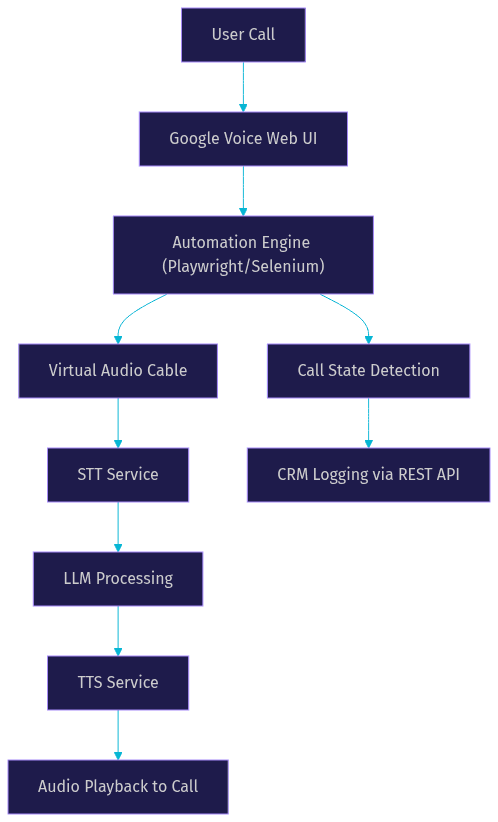
This architecture works for prototypes but introduces multiple points of failure. The DOM can change, audio routing can desync, and latency can stack up quickly across the STT, LLM, and TTS chain. Production systems often replace the browser automation layer with a direct WebRTC or SIP integration.
Setting Up the Environment
Setting up the environment for a google voice agent requires careful configuration of both hardware and software layers. You need a dedicated machine or cloud instance running Chrome. Install a virtual audio cable driver to route audio between the browser and your AI pipeline without hardware microphones. Next, set up your automation framework. Playwright is generally preferred over Selenium for its modern API and reliability with complex web apps like Google Voice. Configure a persistent browser profile so your Google Voice session stays authenticated. You must handle token security carefully. Never hardcode credentials. Use environment variables or a secrets manager to store Google account credentials and API keys for your STT, LLM, and TTS providers. Ensure your automation script can handle two-factor authentication prompts if they occur during the initial login. Once the browser is authenticated and the virtual audio cable is routing correctly, you can begin orchestrating the call flow.
Choosing the Right Speech Services
Selecting the right STT and TTS providers is critical for a natural-sounding google voice agent. For STT, Google Cloud Speech-to-Text offers low latency and high accuracy, especially with the Chirp model. OpenAI Whisper provides excellent accuracy but can introduce latency if not hosted on edge infrastructure. Deepgram is another strong contender, known for its speed. For TTS, ElevenLabs leads in natural voice quality. OpenAI TTS and Google Cloud TTS are also viable, offering lower latency but slightly less expressive voices. Evaluate providers based on three criteria: latency (target under 300ms for round-trip), accuracy (word error rate), and pricing. VideoSDK's AI Agent SDK supports multiple STT and TTS providers natively, allowing you to swap engines without rewriting your pipeline.
Managing Call States Safely
Managing call states is the most fragile part of building a google voice agent. Because you are interacting with a DOM rather than an API, you must rely on UI cues. The automation engine must detect when a call is ringing, when it connects, and when it ends. Implement a minimum ring time before answering to avoid picking up spam calls instantly. Monitor the DOM for the call status indicator. Avoid premature speech. Wait for the call state to definitively change to connected before sending your welcome message. If the agent speaks while the call is still connecting, the audio will be lost. Use explicit waits and polling intervals to check for UI elements that confirm the call is active. VideoSDK's Telephony and SIP integration handles these states natively, removing the need for DOM scraping.
Handling Voicemail and Fallbacks
Voicemail detection is essential for outbound google voice agents. If your agent calls a number and hits voicemail, speaking into the voicemail recording is a waste of resources and can appear unprofessional. Detect voicemail by analyzing the audio stream for the typical voicemail beep or by using a classifier on the initial audio response. If voicemail is detected, route the call to a fallback flow. This might involve leaving a pre-recorded message or simply hanging up. If the call fails to connect entirely, log the attempt and schedule a retry.
Designing Conversational Flows
Designing conversational flows for a google voice agent requires applying best practices from platforms like Dialogflow. Start with a clear, concise welcome message that identifies the agent and its purpose. Implement robust turn-taking. The agent must know when the user has finished speaking. Use voice activity detection (VAD) to identify pauses and end-of-speech markers. Handle errors gracefully. If the STT engine returns garbage or the LLM fails, have a fallback response like "I didn't catch that, could you repeat it?" Design a closing flow that confirms any actions taken, such as booking an appointment, and ends the call politely. For example, a booking flow should collect the caller's name, requested service, and preferred time, then read back the confirmation before hanging up. VideoSDK's Conversational Graph allows you to build these deterministic flows, ensuring the LLM follows business rules rather than improvising.
Conversation Metrics to Track
Tracking metrics is vital for optimizing your google voice agent. Monitor the misroute rate, which measures how often the agent transfers a call incorrectly. Track first-call resolution to see if the agent solves the user's problem without human escalation. Measure average handling time to ensure calls are not dragging on. Log user churn, indicated by callers hanging up early. Push these metrics to your CRM alongside the call transcript for post-call analysis.
Integrating with Business Systems
A google voice agent is only useful if it integrates with your business systems. After a call ends, push the transcript and metadata to your CRM using REST APIs. If the agent booked an appointment, use a webhook to create a calendar event. Post-call analytics should be sent to a data warehouse for long-term tracking. Because the google voice agent runs on automation, these integrations must be handled by your backend script once the call state returns to idle. VideoSDK provides comprehensive REST APIs for session analytics, recording control, and participant management, making backend orchestration straightforward.
Compliance and Legal Considerations
Compliance is non-negotiable for any voice agent. If your google voice agent makes outbound calls, it must comply with the Telephone Consumer Protection Act (TCPA) and Do-Not-Call registries. Always disclose at the beginning of the call that the user is speaking to an AI agent. If the call is recorded, provide a recording notice. Ensure that any data captured during the call, including transcripts and audio recordings, is stored securely and encrypted at rest. Google Voice's consumer terms of service also restrict automated calling, so review the current terms before deploying a production agent. Using a dedicated RTC platform like VideoSDK with built-in security features, such as E2E encryption and geo-fencing, helps maintain compliance.
Production-Ready Tips
Taking a google voice agent from prototype to production requires addressing scalability and reliability. Browser automation is inherently brittle. UI changes in Google Voice can break your automation scripts overnight. Implement robust monitoring that alerts you if DOM elements are missing. Use TURN and STUN servers if you are routing media through WebRTC components. Scale your automation engine by running multiple browser instances on separate virtual machines, each tied to a unique Google Voice account. Implement error recovery logic that can restart the browser if it crashes. For a truly production-ready voice agent without these hacks, consider VideoSDK's Video Calling API and AI Agent Cloud, which provide managed infrastructure for real-time audio and AI processing.
Future Trends for Voice Agents on Google Voice
The landscape for voice agents is shifting rapidly. Emerging real-time LLM APIs, like OpenAI Realtime and Google Gemini Live, are reducing latency to sub-second levels. Multimodal extensions will allow agents to process visual inputs alongside audio. The biggest potential shift for google voice agent developers would be the release of a native Google Voice API for call control and media streaming, which would eliminate the need for browser automation entirely. Until then, platforms that bridge WebRTC, SIP, and AI pipelines will dominate the production space.
Definitions Glossary
Google Voice Agent: An AI-powered voice bot that automates phone calls through the Google Voice interface using browser automation and AI pipelines.
Browser Automation: The practice of controlling a web browser programmatically to simulate user interactions, used here to control Google Voice.
STT (Speech-to-Text): The technology that converts spoken audio into text, enabling the LLM to understand the caller's input.
TTS (Text-to-Speech): The technology that synthesizes human-like speech from text generated by the LLM.
Conversational Graph: A deterministic, graph-based orchestration layer that controls conversation flow, ensuring business rules are followed over LLM improvisation.
Key Takeaways
- A google voice agent relies on browser automation to bridge the lack of a native call control API.
- Core components include STT, LLM, TTS, and robust call state detection logic.
- Managing call states and voicemail detection via DOM cues is fragile and requires careful handling.
- Compliance with TCPA, Do-Not-Call rules, and recording disclosures is mandatory.
- For production reliability, developers should consider purpose-built RTC and AI agent platforms like VideoSDK.
Conclusion
Building a google voice agent is a complex but rewarding project that pushes the boundaries of browser automation and AI integration. While hacking Google Voice via the DOM works for prototypes, production deployments demand robust infrastructure. If you want to build scalable, low-latency voice agents without the fragility of UI automation, explore VideoSDK's AI Agent documentation. What are you building with voice AI? Drop a comment or join the VideoSDK Discord community to share your use case.
Free $20 Balance for AI Voice Agents & Video Calls
FAQ