


A livestream chat in Next.js combines real-time messaging protocols (WebSockets, Server-Sent Events, or WebRTC data channels) with React's component model to deliver sub-second message delivery during live broadcasts. VideoSDK's Interactive Live Streaming (ILS) provides a built-in low-latency transport layer that integrates directly with Next.js applications, handling participant roles, chat overlays, and audience scaling. The right architecture depends on your concurrency targets, moderation needs, and whether you want managed infrastructure or a self-hosted real-time server.
Introduction
Livestreaming has evolved from a one-way broadcast model into an interactive experience where chat drives engagement, community, and revenue. Whether you are building a live shopping platform, a webinar tool, or a gaming broadcast app, the chat component is what keeps viewers coming back. A livestream without chat is just a video player. A livestream with a fast, reliable chat feels like an event.
Building a livestream chat with Next.js in 2026 means navigating real-time transport protocols, authentication flows, state management, and scaling strategies. Next.js gives you server-side rendering, API routes, and edge functions out of the box, which makes it a strong foundation for chat-enabled streaming applications. But the real-time layer requires careful architectural decisions that go beyond standard React patterns.
This article walks through everything you need to know about building a livestream chat in Next.js, from transport protocol selection to production deployment. We will cover WebSockets versus Server-Sent Events, when to leverage VideoSDK's Interactive Live Streaming for built-in chat and media sync, how to structure your authentication, and how to scale to thousands of concurrent viewers without losing message integrity.
Understanding the Core Requirements for Livestream Chat Nextjs
User Experience Expectations
Viewers expect chat to feel instantaneous. Research from the W3C WebRTC working group and real-world streaming platforms consistently shows that anything above 500 milliseconds of perceived latency breaks the conversational flow of a livestream chat. If a viewer sends a message and does not see it appear within that window, they assume the chat is broken.
Beyond speed, viewers expect color-coded usernames so they can visually distinguish participants in a fast-moving conversation. They expect moderators to be visible and authoritative. They expect the chat to persist so that if they refresh the page or reconnect after a network drop, previous messages are still visible. And they expect emoji reactions, pinned messages, and slow-mode indicators to be part of the experience.
For the streamer or host, the requirements extend further. Hosts need the ability to pin messages, highlight questions, ban disruptive users, and export chat logs after the stream ends. These product-level requirements directly shape your architecture decisions.
Technical Foundations
The underlying transport for a livestream chat in Next.js typically falls into three categories: WebSockets, Server-Sent Events (SSE), and WebRTC data channels. Each has distinct tradeoffs.
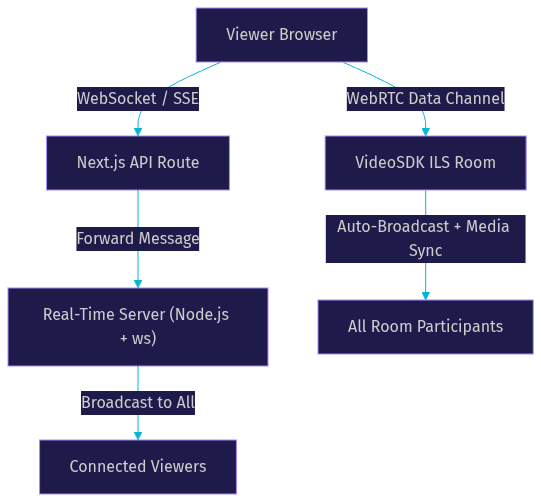
WebSockets provide bidirectional, persistent connections that work well for chat because both the client and server can push messages at any time. SSE is simpler and works over standard HTTP, but it is unidirectional (server to client only), which means you need a separate POST endpoint for sending messages. WebRTC data channels offer the lowest latency but are more complex to set up because they require signaling and ICE negotiation.
Next.js supports all three approaches. API routes can handle WebSocket upgrades when deployed on custom servers, while edge functions work well for SSE streams. For WebRTC-based chat, VideoSDK's Interactive Live Streaming provides a managed data channel layer that eliminates the need to handle signaling yourself.
Choosing the Right Real-Time Transport
WebSockets vs Server-Sent Events
WebSockets are the most common choice for livestream chat in Next.js applications. They provide a single persistent connection that carries messages in both directions, which means a viewer can send and receive chat messages over the same channel without additional HTTP requests. The WebSocket protocol, standardized in RFC 6455, has universal browser support and works reliably across network conditions.
SSE is simpler to implement because it uses standard HTTP connections and does not require a protocol upgrade. The server pushes messages to the client as a stream of text events, and the client receives them through a standard EventSource API. However, SSE is one-way only. To send a chat message, the client must make a separate POST request to your Next.js API route. This adds a round trip for every outgoing message, which can increase perceived latency in fast-moving chats.
For small to medium audiences (under 500 concurrent viewers), both approaches work well. For larger audiences, WebSockets generally scale better because they avoid the HTTP overhead of repeated POST requests for outgoing messages.
When to Use LiveKit Data Channels or VideoSDK ILS
When your livestream already includes video or audio, using the same real-time connection for chat simplifies your architecture significantly. VideoSDK's Interactive Live Streaming mode provides data channels that run alongside media streams, meaning chat messages travel through the same infrastructure as the video feed.
This approach has a distinct advantage: chat messages are automatically synchronized with the media stream. If a viewer joins mid-stream, the VideoSDK room can replay recent chat context alongside the video buffer. The VideoSDK REST APIs also let you manage room state, participant roles, and session metadata from your Next.js server without maintaining a separate chat backend.
LiveKit offers a similar SFU-based data channel approach. The choice between VideoSDK ILS and LiveKit often comes down to SDK coverage and feature needs. VideoSDK supports React, React Native, Flutter, Android, iOS, and JavaScript with consistent APIs across platforms, while LiveKit focuses primarily on WebRTC-based client SDKs.
Architecture Overview for a Livestream Chat in Next.js
High-Level Component Diagram
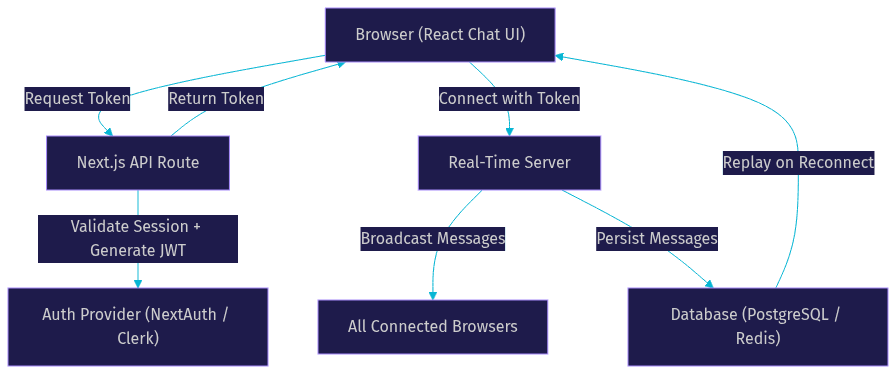
A production-grade livestream chat in Next.js involves four primary components working together. The browser runs your React chat UI and maintains the real-time connection. Next.js API routes handle token generation, authentication, and message persistence. The real-time server (whether a self-hosted WebSocket server, VideoSDK ILS, or a managed service like Stream) handles message broadcasting. A database stores chat history for replay and moderation review.
The flow works as follows. When a viewer loads the stream page, the Next.js frontend requests an authentication token from an API route. That route validates the user's session (or issues a guest token) and returns a JWT or short-lived token. The frontend uses that token to connect to the real-time server. Once connected, incoming chat messages are pushed to the client and rendered in real time. Outgoing messages go through the same connection and are broadcast to all connected viewers.
If you are using VideoSDK ILS, the token generation step uses your VideoSDK API key and secret to create a meeting token server-side. The frontend then joins the VideoSDK room with that token, and chat messages flow through the room's pub/sub messaging system. You can learn more about this flow in the VideoSDK authentication guide.
Server-Side vs Client-Side Rendering Decisions
One of the most common questions developers face when building a livestream chat in Next.js is whether to use Server Components or Client Components for the chat UI. The answer is almost always: use Client Components for the chat interface.
Chat is inherently interactive and stateful. Messages arrive in real time, the scroll position changes constantly, and users type and send messages. None of this works well with Server Components, which are designed for static or infrequently changing content. Rendering chat on the server would mean every new message triggers a server round trip, which defeats the purpose of real-time communication.
That said, you can use Server Components for the surrounding page content. The stream video player container, the stream metadata (title, host name, viewer count), and the page layout can all render server-side for SEO and initial load performance. The chat component itself mounts as a Client Component within that server-rendered shell. This hybrid approach gives you the SEO benefits of server rendering while keeping the chat experience fully interactive.
Implementing Authentication and Permissions
Authentication for a livestream chat in Next.js typically involves three tiers of users: guests, authenticated viewers, and moderators. Each tier has different permissions that must be enforced both on the client and the server.
Guests are viewers who join without signing in. Many livestream platforms allow guest viewing to reduce friction, but guests may have restricted chat capabilities. For example, guests might only be able to read messages but not post, or they might be rate-limited more aggressively than signed-in users. You can implement guest access by issuing short-lived anonymous tokens from your Next.js API route without requiring a full authentication flow.
Authenticated viewers go through a standard sign-in flow. NextAuth.js and Clerk are the two most popular authentication libraries in the Next.js ecosystem. Both integrate cleanly with Next.js API routes and support JWT-based session management. When an authenticated viewer connects to the chat, their token includes their user ID and role, which the real-time server uses to enforce permissions.
Moderators have elevated permissions: they can delete messages, ban users, pin messages, and toggle slow mode. These permissions should be enforced server-side, never client-side only. A client-side permission check is a suggestion, not a security boundary. The real-time server must validate every moderation action against the user's token claims before executing it.
If you are using VideoSDK ILS, role-based access control is built into the room architecture. You define roles (host, co-host, viewer, moderator) when generating the meeting token, and the VideoSDK room enforces those roles automatically. This eliminates the need to build a custom permission system for chat moderation.
Building the Chat UI Without Code Snippets
UI Patterns and Libraries
The chat UI for a livestream needs to handle high message volumes, smooth scrolling, and visual clarity. Several UI patterns and libraries work well within the Next.js ecosystem.
For styling, Tailwind CSS is the most common choice in Next.js projects. It gives you utility-first styling that works naturally with Client Components and does not require a separate CSS pipeline. The shadcn/ui component library, built on top of Tailwind and Radix UI, provides accessible primitives like scroll areas, dialogs (for moderation actions), and dropdown menus that you can compose into a chat interface.
Message bubbles should be compact in a livestream chat. Unlike a messaging app where each message gets generous spacing, livestream chat messages need to be dense because dozens can arrive per second. A typical pattern is a single line per message with the username color-coded, followed by the message text. Long messages wrap to a second line but rarely more.
Color assignment for usernames is a small detail that significantly improves readability. A common approach is to hash the user ID and map it to a predefined palette of high-contrast colors. This ensures the same user always gets the same color, which helps viewers track conversations in fast-moving chats.
Auto-scroll behavior is critical. The chat container should automatically scroll to the bottom when new messages arrive, but only if the viewer is already at the bottom. If a viewer has scrolled up to read older messages, auto-scroll should pause. A "jump to latest" button appears when new messages arrive while the viewer is scrolled up. This pattern is standard across YouTube Live, Twitch, and other major platforms.
Managing State and Real-Time Updates
State management for a livestream chat in Next.js needs to handle three things: the message list, the connection status, and the current user's permissions. React Context works for smaller chats, but Zustand is a better fit for high-frequency updates because it prevents unnecessary re-renders across the component tree.
The message store should be a sliding window, not an ever-growing array. Keeping the last 200 to 500 messages in memory is sufficient for most livestream chats. Older messages can be fetched from the database on demand if the viewer scrolls to the top. This prevents memory issues on low-end devices during long streams.
Incoming real-time events should be batched when message volume is high. If 50 messages arrive in a single second, rendering each one individually causes layout thrashing. Batching updates into a single render cycle (using a short interval or requestAnimationFrame) keeps the UI smooth even during peak chat activity.
Connection status needs to be visible to the viewer. A small indicator showing "Connected," "Reconnecting," or "Disconnected" builds trust and helps viewers understand why chat might temporarily stop. When the connection drops, the client should attempt reconnection with exponential backoff and display a non-intrusive banner.
Scaling and Performance Considerations for Livestream Chat Nextjs
Horizontal Scaling of the Real-Time Server
A single WebSocket server handles roughly 10,000 concurrent connections on standard hardware. For livestreams with larger audiences, you need horizontal scaling, which introduces two challenges: message broadcasting across server instances and connection routing.
When a viewer sends a chat message to Server A, that message needs to reach viewers connected to Servers B, C, and D. The standard solution is a pub/sub layer using Redis. Each server instance subscribes to a Redis channel for the stream, publishes incoming messages to that channel, and broadcasts received messages to its local connections. This pattern is well-documented and works reliably at scale.
Sticky sessions (also called session affinity) ensure a viewer's WebSocket connection stays on the same server instance for the duration of the stream. Most load balancers support sticky sessions, but they can complicate failover. An alternative is to design your reconnection logic to be robust enough that switching servers mid-stream is transparent to the viewer.
Managed services like VideoSDK ILS, Stream Chat, and LiveKit handle this scaling for you. VideoSDK's ILS architecture uses an SFU (Selective Forwarding Unit) that automatically distributes media and data across regions. If your livestream audience spans multiple continents, VideoSDK's geo-distributed infrastructure routes each viewer to the nearest edge node, reducing chat latency without any custom infrastructure work. You can explore VideoSDK code samples to see how this works in practice.
Rate Limiting and Slow-Chat Mode
Spam protection is essential for livestream chat. Without rate limiting, a single user (or bot) can flood the chat and ruin the experience for everyone else. There are two primary approaches: per-user rate limiting and global slow mode.
Per-user rate limiting caps how many messages a single user can send within a time window. A common setting is 5 messages per 30 seconds for regular viewers and 1 message per 5 seconds for guests. The real-time server enforces this by tracking message timestamps per user ID and dropping messages that exceed the threshold.
Slow-chat mode is a moderator-controlled setting that applies a global minimum interval between messages from the same user. Twitch popularized this with its slow mode feature, which lets moderators set a delay (such as 10 seconds) between messages from any single user. This is particularly useful during high-volume moments like product launches or Q&A sessions.
Both approaches should be enforced server-side. Client-side rate limiting is easily bypassed by modifying the client or sending raw WebSocket frames.
Persisting Chat History
Chat persistence serves three purposes: replay on reconnect, moderation review, and post-stream analytics. The storage choice depends on your scale and query patterns.
PostgreSQL works well for chat history if you need structured queries (such as "show all messages from user X in stream Y"). Store each message as a row with columns for stream ID, user ID, message text, timestamp, and moderation status. Index on stream ID and timestamp for efficient replay queries.
Redis is better for short-term message caching. Storing the last 200 messages per stream in a Redis list allows instant replay on reconnect without hitting the database. Set a TTL (time-to-live) on each list so old messages expire automatically after the stream ends.
For very high-volume chats, a NoSQL store like MongoDB or DynamoDB can handle higher write throughput than PostgreSQL. The tradeoff is more complex query patterns for moderation and analytics.
If you are using VideoSDK ILS, the platform provides built-in recording and session analytics through the REST API, which can supplement your custom chat persistence layer.
Deployment Best Practices
Deploying a livestream chat in Next.js requires careful consideration of where each component runs. Next.js applications are commonly deployed on Vercel, which supports edge functions for API routes and automatic CDN distribution for static assets. However, Vercel's serverless functions have execution time limits that conflict with long-lived WebSocket connections.
For WebSocket-based chat, you have two options. First, deploy the Next.js frontend on Vercel and run a separate WebSocket server on a platform that supports persistent connections, such as Railway, Fly.io, or a dedicated VPS. The frontend connects to the WebSocket server directly, bypassing Vercel's serverless layer. Second, use SSE for the server-to-client direction (which works on Vercel edge functions) and POST requests for client-to-server messages.
If you are using VideoSDK ILS or a managed chat service, the real-time connection goes directly to the provider's infrastructure. Your Next.js API routes only handle token generation and webhooks, both of which work perfectly on Vercel's serverless platform. This is the simplest deployment model and eliminates the need to manage your own real-time server.
Environment variables for API keys, database credentials, and authentication secrets should never be committed to your repository. Use Vercel's environment variable management or your deployment platform's equivalent. Separate development and production secrets, and rotate production keys regularly.
CDN caching applies to static assets like your chat UI JavaScript bundle, CSS, and images. Configure cache headers so that static assets are cached aggressively at the edge while API routes remain uncached. This reduces load on your origin server and speeds up initial page load for viewers joining mid-stream.
Common Pitfalls and How to Avoid Them
Token expiration mid-stream. Authentication tokens have a finite lifespan. If a token expires during a livestream, the viewer's chat connection drops unexpectedly. Always set token TTLs longer than your expected stream duration, and implement a token refresh mechanism that renews the connection before expiration. VideoSDK meeting tokens can be configured with custom expiry times to match your stream schedule.
Duplicate messages on reconnect. When a viewer reconnects after a network drop, the client may re-send the last message that was in flight. The real-time server should deduplicate messages using a combination of user ID and a client-generated message ID. If the server has already seen that message ID within the last few seconds, it drops the duplicate.
Lost messages during server restarts. If your real-time server restarts (due to a deploy or crash), all connected viewers lose their chat connection. The reconnection flow should fetch recent messages from the database or Redis cache so the viewer sees a continuous chat history rather than a gap. VideoSDK ILS handles this automatically through its room reconnection mechanism.
SEO impact of client-only chat. Search engines cannot index content that only exists in a Client Component after hydration. If chat messages contain valuable keywords (such as product names in a live shopping stream), consider server-rendering a static summary of the stream metadata and pinned messages. The full chat history remains client-only, but the page still has indexable content for search engines.
Ignoring mobile performance. Livestream chats on mobile devices face constrained CPU and memory. A chat that renders smoothly on desktop can judder on a mid-range Android phone. Test with Chrome DevTools' CPU throttling enabled, and batch message renders to avoid layout thrashing on low-end devices.
Definitions Glossary
WebSocket: A persistent, bidirectional communication protocol that runs over a single TCP connection, standardized in RFC 6455. Ideal for real-time chat because both client and server can push messages at any time.
Server-Sent Events (SSE): A unidirectional HTTP-based protocol where the server pushes text events to the client over a long-lived connection. Simpler than WebSockets but cannot carry client-to-server messages.
Interactive Live Streaming (ILS): VideoSDK's low-latency streaming mode where viewers can be promoted to active speakers. Supports real-time chat through pub/sub messaging alongside media streams, with sub-second latency.
SFU (Selective Forwarding Unit): A media server architecture that receives media and data from participants and selectively forwards them to other participants. Used by VideoSDK and LiveKit for scalable real-time communication.
Slow-Chat Mode: A moderation feature that enforces a minimum time interval between messages from the same user, reducing spam during high-volume livestreams.
Meeting Token: A JWT generated server-side using VideoSDK API credentials that authenticates a participant's access to a VideoSDK room and encodes their role and permissions.
Key Takeaways
- A livestream chat in Next.js requires choosing between WebSockets, SSE, and WebRTC data channels based on your latency, scalability, and bidirectional communication needs.
- VideoSDK's Interactive Live Streaming provides built-in chat, role-based access control, and geo-distributed scaling, eliminating the need for a separate real-time server when your app already includes live video.
- Client Components are mandatory for the chat UI, but Server Components can wrap the surrounding page for SEO and initial load performance.
- Authentication and permissions must be enforced server-side, with token TTLs that exceed your expected stream duration to prevent mid-stream disconnections.
- Horizontal scaling requires a pub/sub layer (typically Redis) for cross-server message broadcasting, or a managed service like VideoSDK that handles this automatically.
- Rate limiting and slow-chat mode are essential moderation tools that must be enforced on the server, never on the client alone.
Conclusion
Building a livestream chat in Next.js is a multi-layered challenge that spans transport protocol selection, authentication, UI engineering, and production scaling. The right architecture depends on your audience size, moderation requirements, and whether your livestream already includes video or audio. For applications that need both live media and chat, VideoSDK's Interactive Live Streaming consolidates the real-time layer into a single SDK with built-in roles, pub/sub messaging, and global edge infrastructure. For chat-only applications, a WebSocket server with Redis pub/sub and PostgreSQL persistence remains a proven, cost-effective approach.
Start by prototyping with the VideoSDK Prebuilt UI Kit to validate your livestream chat experience in minutes, then migrate to the custom SDK as your requirements grow. You can sign up for a free account at app.videosdk.live/login and explore the code samples to see real implementation patterns.
What are you building with VideoSDK? Drop a comment below. I would love to hear what kind of livestream chat use case you are working on, whether it is live shopping, webinars, gaming, or something entirely new. You can also join the VideoSDK Discord community to connect with other developers building real-time applications.
Free $20 Balance for AI Voice Agents & Video Calls
FAQ