



An API for video streaming is a set of programmatic endpoints and SDKs that handle video upload, transcoding, storage, playback delivery, and analytics without requiring you to build media infrastructure from scratch. VideoSDK provides a real-time communication platform that extends traditional streaming with sub-second latency video calling, interactive live streaming, and built-in recording. To get started, explore the VideoSDK quickstart guide and integrate streaming capabilities in minutes.
Video is now the dominant format on the internet, accounting for the majority of global network traffic. Developers building applications today need a reliable API for video streaming to handle everything from user-generated content uploads to live event broadcasting. Building this infrastructure yourself means managing media servers, encoding pipelines, content delivery networks, and playback compatibility across devices. That is months of engineering work before you ship a single feature.
A well-designed video streaming API abstracts all of that complexity into a set of REST endpoints and SDKs. You upload a video, the API transcodes it into multiple resolutions, stores it on a global CDN, and returns a playback URL that works on any device. For live streaming, the API handles ingest, low-latency delivery, and viewer interaction. VideoSDK extends this further by offering real-time video calling, interactive live streaming, and audio calling SDKs that let you embed communication directly into your application with sub-300ms latency.
By the end of this guide, you will understand what a video streaming API does, how to evaluate one, and how to integrate it into your application using proven best practices.
What Is an API for Video Streaming?
An API for video streaming is defined as a programmatic interface that allows developers to upload, process, store, and deliver video content over the internet without managing underlying media infrastructure. It works by accepting video files or live streams through ingestion endpoints, processing them through transcoding pipelines that create multiple quality renditions, and distributing the output through a content delivery network to end users on any device.
Unlike generic video hosting platforms that provide a web UI for managing videos, a streaming API gives you full programmatic control. You automate uploads, configure transcoding profiles, generate signed playback URLs, and pull analytics data through REST calls. This makes it possible to build custom video workflows that fit your application rather than adapting your application to a hosted platform's constraints.
VideoSDK provides video streaming capabilities through its video calling API and SDKs, which support real-time communication, recording, and interactive live streaming across more than ten platforms including React, Flutter, Android, iOS, and Python.
Core Capabilities of a Video Streaming API
A production-grade video streaming API handles six core capabilities that together form the complete video lifecycle from upload to playback.
Video Upload and Ingestion
The upload process begins when a client sends a video file to the API's ingestion endpoint. Most APIs support common formats including MP4, MOV, WebM, and AVI, with file size limits ranging from a few gigabytes on standard plans to unlimited on enterprise tiers. For large files, the API typically offers resumable uploads that split the file into chunks, allowing the transfer to recover from network interruptions without starting over. Some APIs also support direct-to-cloud uploads where the client uploads straight to object storage, bypassing the API server to reduce latency and bandwidth costs.
Transcoding and Adaptive Bitrate (ABR)
After ingestion, the API transcodes the source video into multiple renditions at different resolutions and bitrates. A 1080p source might be transcoded into 720p, 480p, and 360p versions. This process, called adaptive bitrate streaming, allows the player to switch between renditions dynamically based on the viewer's available bandwidth. If a viewer on a mobile connection experiences bandwidth drops, the player seamlessly downshifts to a lower resolution to prevent buffering. The API manages all of this automatically through its transcoding pipeline, and you configure the output profiles through API parameters.
Playback and Streaming Protocols
Video streaming APIs deliver content using established protocols. HTTP Live Streaming (HLS) is the most widely supported, working across browsers, iOS, Android, and smart TVs. MPEG-DASH offers similar functionality with more flexibility in encoding and DRM. For real-time communication where latency matters most, WebRTC provides sub-second delivery. VideoSDK uses WebRTC as its transport layer for video calling and interactive live streaming, achieving latency under 300 milliseconds. Traditional HLS streams typically introduce 10 to 30 seconds of delay, which is acceptable for on-demand content but problematic for interactive experiences.
Live Streaming Support
Live streaming APIs handle real-time ingest from broadcasting software or mobile devices, process the live feed through a transcoding pipeline, and distribute it to viewers. Low-latency live streaming reduces the gap between broadcast and playback to under five seconds, while real-time streaming using WebRTC brings it under one second. VideoSDK's interactive live streaming mode goes further by allowing viewers to be promoted to active speakers mid-stream, enabling use cases like live shopping, webinars, and virtual events where audience participation is essential. The SDK handles role switching, real-time chat overlays, and audience polling without additional infrastructure.
Analytics and Metadata
A streaming API provides viewership metrics through analytics endpoints. You can track concurrent viewers, watch time, geographic distribution, playback quality, and engagement drop-off points. This data helps you understand how viewers interact with your content and where optimization is needed. Some APIs offer real-time analytics for live streams, letting you monitor concurrent viewer counts and bitrate health during a broadcast. VideoSDK provides session analytics through its REST API, allowing you to pull post-call data and automate reporting workflows.
Security and Access Control
Security in video streaming APIs covers three layers. First, token authentication ensures only authorized clients can upload or access content. Second, signed URLs restrict playback to specific domains, IP ranges, or time windows. Third, Digital Rights Management (DRM) systems like Widevine, FairPlay, and PlayReady encrypt content at the player level to prevent unauthorized downloads. VideoSDK uses token-based authentication where tokens are generated server-side using your API key and secret, then passed to the SDK on the client. This prevents credential exposure while maintaining granular access control through room-level permissions and role-based access.
Choosing the Right Video Streaming API
Selecting a video streaming API requires evaluating five dimensions: scalability, latency, pricing, SDK support, and global CDN coverage. Each dimension matters differently depending on your use case.
Scalability determines how many concurrent viewers and streams the API can handle. If you are building a platform that might spike to tens of thousands of viewers during a live event, you need an API that scales automatically without manual capacity planning. Latency matters most for interactive use cases. On-demand playback tolerates 10 to 30 seconds of HLS delay, but live shopping, gaming, and real-time communication demand sub-second delivery. Pricing models vary widely: some APIs charge per minute of video streamed, others charge per gigabyte of bandwidth, and some combine both. SDK support determines how quickly you can integrate. An API with SDKs for your target platforms saves weeks of custom integration work compared to one that offers only REST endpoints.
Global CDN coverage ensures viewers in different regions experience similar playback quality. An API with edge servers in North America, Europe, Asia, and South America will deliver lower latency and fewer buffering events than one with limited regional presence.
The decision flow below visualizes how to evaluate these factors based on your specific requirements.
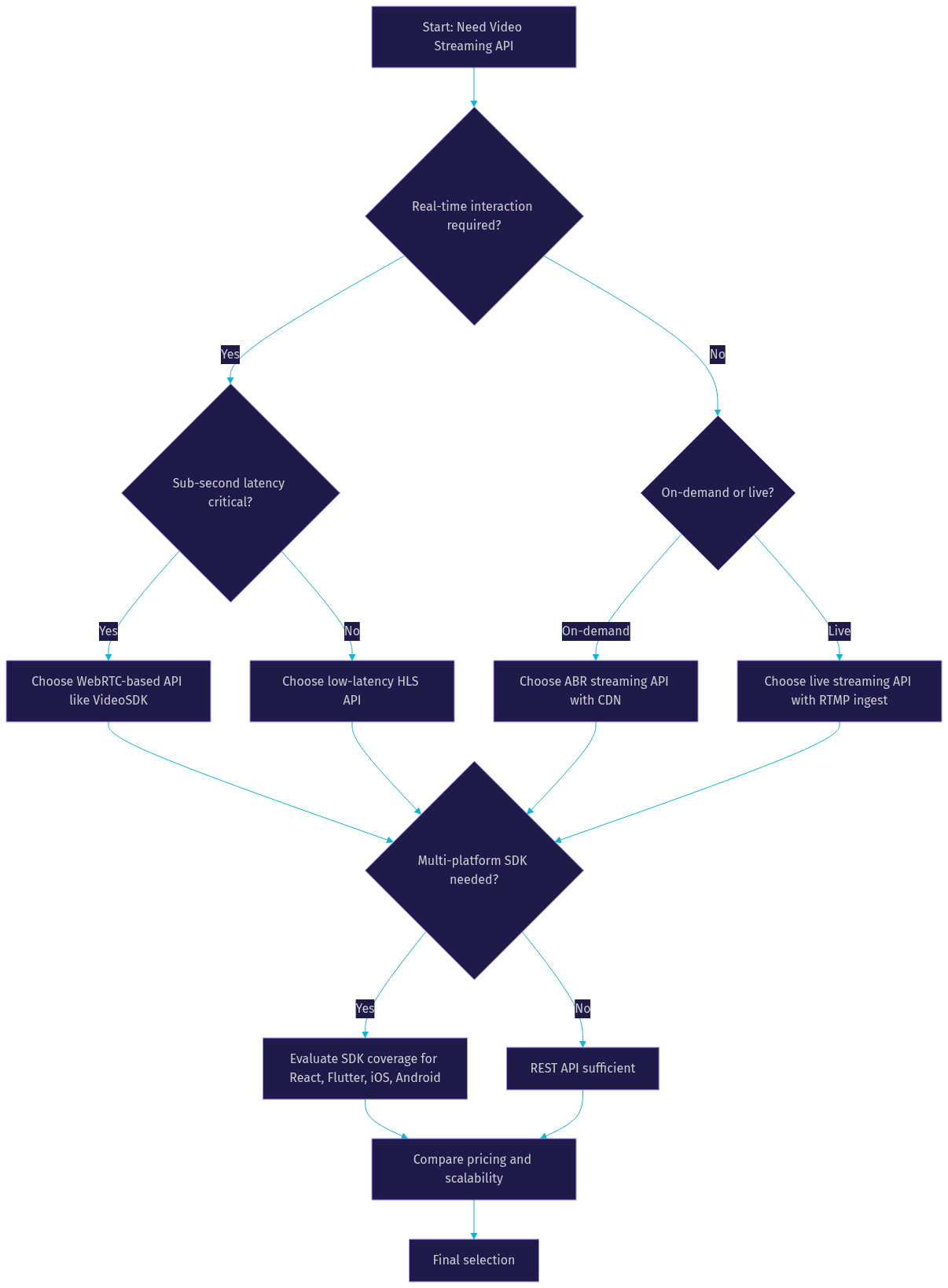
VideoSDK stands out for developers who need real-time or interactive streaming because it combines WebRTC-based delivery with SDKs across more than ten platforms, including Unity and IoT. For purely on-demand video delivery, a traditional video hosting API with HLS output and CDN distribution may be sufficient.
Integrating a Video Streaming API into Your Application
Integration follows a three-layer architecture: a server-side layer for authentication and configuration, a client-side layer for upload and playback, and an error handling layer for resilience.
Server-Side Setup
Your server acts as the trust boundary for the streaming API. You store your API credentials as environment variables on the server, never in client-side code. When a client needs to upload or play a video, your server generates a short-lived token using the API key and secret, then returns that token to the client. This pattern prevents credential exposure and lets you revoke access instantly by invalidating tokens.
For VideoSDK specifically, you generate a meeting token server-side using your API key and secret. The token encodes permissions, room ID, and expiry time. Your frontend SDK uses this token to join a room and begin streaming. The same pattern applies whether you are building a video calling app, a live streaming platform, or an audio room.
You also configure webhooks on the server to receive event notifications from the streaming API. These webhooks fire when a video finishes transcoding, when a live stream starts or stops, or when recording is available for download. Your server processes these events to update your application state and trigger downstream workflows.
Client-Side Integration
On the client side, you use the streaming API's SDK or make direct REST calls to upload and play video. When using an SDK, initialization involves passing the token generated by your server to the SDK's configuration method. The SDK then exposes methods for uploading files, starting live broadcasts, and embedding players.
For playback, the SDK handles protocol negotiation, buffer management, and adaptive bitrate switching automatically. You provide a container element and a video ID or stream URL, and the SDK renders the player. For live streaming, the SDK manages the camera and microphone capture, encoding, and transmission to the ingest endpoint.
VideoSDK's React SDK, for example, provides hooks that return meeting state, participant lists, and media streams. You use these hooks to render custom UIs or rely on the Prebuilt UI Kit for a zero-code video calling interface that drops in as a single component.
Handling Errors and Rate Limits
Every streaming API imposes rate limits to protect its infrastructure. When your client exceeds the limit, the API returns a rate limit error with headers indicating when to retry. Your client should implement exponential backoff: wait a short interval before the first retry, then double the interval on each subsequent failure, up to a maximum number of attempts.
Network errors require similar resilience. Uploads should use resumable protocols so a dropped connection does not restart the entire transfer. Playback should handle buffer underruns by downshifting to a lower bitrate rather than stalling completely. Your monitoring layer should track error rates, retry counts, and average latency so you can identify patterns before they become user-facing problems.
The diagram below illustrates the request-response lifecycle for a typical upload, transcode, and playback workflow.
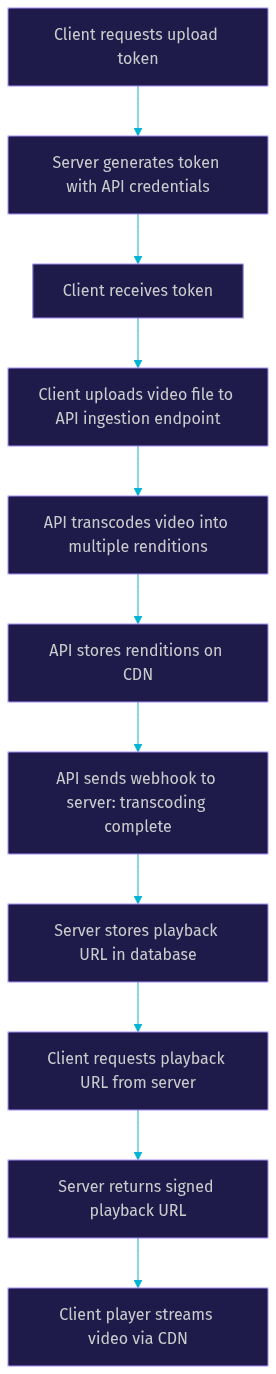
This lifecycle shows how the server, client, and API interact at each stage. The server never handles video bytes directly, keeping bandwidth costs low and security tight.
Best Practices for Performance and Cost Optimization
Optimizing a video streaming integration requires attention to both performance and cost. These four practices deliver the most impact.
Use adaptive bitrate streaming wisely. ABR improves viewer experience by matching video quality to available bandwidth, but each additional rendition increases transcoding time and storage costs. Start with three renditions (1080p, 720p, 480p) and add more only if your analytics show viewers frequently hitting the lowest tier. For live streams, keep the rendition count lower to reduce encoding latency.
Leverage CDN caching aggressively. CDN edge servers cache video segments close to viewers, reducing origin load and improving playback start time. Configure cache headers so popular content stays at the edge longer. For live streams, ensure your CDN supports just-in-time segment caching to handle viewer spikes without overwhelming the origin.
Clean up unused assets regularly. Transcoding generates multiple files per video, and these accumulate quickly. Implement a lifecycle policy that deletes renditions for videos with zero views over a defined period. This reduces storage costs significantly, especially for platforms with high user-generated content volume.
Monitor usage with analytics dashboards. Track bandwidth consumption, concurrent viewer peaks, and transcoding minutes. Set alerts for unusual spikes that might indicate abuse or a viral event. VideoSDK provides session analytics through its REST API, letting you pull usage data programmatically and build custom dashboards.
Real-World Use Cases
Video streaming APIs power applications across industries. Here are four common scenarios.
E-learning platforms use streaming APIs to deliver course videos with adaptive bitrate, ensuring students on slow connections can still watch lectures. Live tutoring sessions use real-time video calling APIs like VideoSDK to enable interactive one-on-one or group classes with screen sharing and recording. The video calling SDK handles participant management, media routing, and recording without custom infrastructure.
Social media video sharing platforms rely on upload APIs that accept user-generated content, transcode it into web-friendly formats, and distribute it through a CDN. Short-form video features need fast transcoding and instant playback start to keep users engaged.
Live events and webinars demand low-latency streaming with audience interaction. VideoSDK's interactive live streaming mode supports host and viewer roles, real-time chat, polls, and Q&A. Viewers can be promoted to speakers mid-event, enabling panel discussions and audience participation without switching tools.
Mobile gaming video clips require efficient upload from devices with limited bandwidth and battery. The API handles compression, format conversion, and CDN distribution so clips load quickly when shared. Recording APIs capture gameplay sessions and make them available for playback or download immediately after the session ends.
Future Trends in Video Streaming APIs
Three trends are shaping the next generation of video streaming APIs.
Serverless transcoding is replacing dedicated encoding instances. APIs spin up transcoding workers on demand, process the video, and shut down the workers when done. This eliminates idle compute costs and scales to handle sudden spikes in upload volume without capacity planning.
AI-enhanced analytics are moving beyond view counts. Modern APIs use machine learning to detect scene boundaries, generate automatic thumbnails, identify objects and faces, and produce chapter markers. Some APIs offer real-time transcription and content moderation during live streams, flagging inappropriate content before it reaches viewers. VideoSDK supports real-time transcription and post-call summaries as built-in features.
Edge computing is bringing processing closer to viewers. Instead of routing all traffic through centralized media servers, APIs distribute encoding and packaging to edge nodes in CDN points of presence. This reduces latency for live streaming and lowers bandwidth costs for the origin. VideoSDK's geo-fencing and cloud proxy features already leverage distributed infrastructure to optimize delivery based on viewer location.
Definitions Glossary
Adaptive Bitrate Streaming (ABR): A streaming technique where the player dynamically switches between video renditions of different resolutions and bitrates based on the viewer's available bandwidth. VideoSDK supports network-adaptive streaming that automatically adjusts bitrate and resolution in real time.
Transcoding: The process of converting a source video into multiple formats, resolutions, and bitrates to ensure compatibility across devices and network conditions. A video streaming API handles this automatically through its transcoding pipeline.
Content Delivery Network (CDN): A distributed network of edge servers that caches video content close to viewers, reducing latency and origin load. VideoSDK leverages global CDN infrastructure for media delivery.
WebRTC: A real-time communication protocol that enables sub-second video and audio delivery over the web. VideoSDK uses WebRTC as its transport layer for video calling and interactive live streaming.
Interactive Live Streaming (ILS): VideoSDK's low-latency streaming mode where viewers can be promoted to active speakers in real time. Unlike traditional HLS streaming with 10 to 30 seconds of delay, ILS maintains sub-second latency for real audience interaction.
Meeting Token: A JWT generated server-side using VideoSDK API credentials that authenticates a participant's access to a room. Tokens encode permissions, room ID, and expiry time, and should never be exposed on the client.
Key Takeaways
- An API for video streaming handles the complete video lifecycle from upload and transcoding to playback and analytics, eliminating the need to build media infrastructure from scratch.
- Adaptive bitrate streaming is essential for delivering consistent playback quality across varying network conditions, and most streaming APIs handle it automatically through transcoding pipelines.
- For interactive use cases like live shopping, webinars, and real-time communication, WebRTC-based APIs like VideoSDK deliver sub-second latency that traditional HLS cannot match.
- Server-side token generation is a non-negotiable security pattern that keeps API credentials safe while giving clients scoped, time-limited access.
- VideoSDK's multi-platform SDK coverage, Prebuilt UI Kit, and interactive live streaming mode make it a strong choice for developers building real-time video experiences across web, mobile, and emerging platforms.
Conclusion
Choosing the right API for video streaming comes down to matching your use case to the right delivery model. On-demand content works well with HLS and CDN distribution. Interactive experiences demand WebRTC and sub-second latency. Security, scalability, and cost optimization are constants across both. VideoSDK gives developers a unified platform that handles video calling, interactive live streaming, audio rooms, and recording across more than ten platforms with a single SDK surface. You can start building today with the VideoSDK quickstart guide or explore the Prebuilt UI Kit for zero-code integration. Sign up for free at app.videosdk.live/login and get started with your free credits. What are you building with VideoSDK? Drop a comment below, I would love to hear what kind of video streaming use case you are working on.
Free $20 Balance for AI Voice Agents & Video Calls
FAQ