


Outbound Call AI lets you program an AI voice agent to dial a phone number, converse naturally, and receive a turn-by-turn transcript. VideoSDK provides a SIP-enabled, pay-per-call (x402) workflow, built-in compliance checks, and optional recording, so you can launch scalable outbound campaigns without a separate call-center platform.
Contact centers have run outbound dialing for decades, but the economics changed when AI entered the loop. Industry reporting through 2026 consistently shows that AI-driven outbound calls cost a fraction of a human agent call, often measured in cents rather than dollars per minute, while handling routine confirmation and reminder tasks at comparable completion rates. That gap is why developers are suddenly searching for how to build outbound AI calls rather than buying seats in a legacy dialer.
The problem is that most tutorials stop at a demo. They skip token handling, SIP traversal, compliance, and the billing model that determines whether your campaign is profitable at scale. This article walks through the full picture: what outbound call AI is, how VideoSDK's AI Voice Agents and Telephony modules fit together, the components you need, a step-by-step implementation path in plain language, and the pitfalls that bite teams in production. By the end, you will know exactly how to launch your first outbound AI call and scale it responsibly.
What is Outbound Call AI?
Outbound call AI is defined as the use of an AI voice agent to initiate phone calls to a human recipient, hold a natural spoken conversation, and return structured data about what was said. Unlike traditional outbound calling, where a human agent (or a rigid robocaller) dials from a list, outbound call AI combines speech-to-text, a large language model, and text-to-speech into a single pipeline that listens, reasons, and responds in real time.
The difference from a robocaller is fundamental. A robocaller plays a fixed recording and hangs up. An AI voice agent handles interruptions, answers questions, confirms details, and adapts when the callee says "actually, Tuesday works better." That adaptability is what makes outbound call AI suitable for appointment confirmations, payment reminders, lead qualification, and follow-up surveys, not just one-way announcements.
Every outbound call AI system shares four core components. First, the AI agent itself: the pipeline that converts speech to text, passes it to an LLM, and converts the response back to speech. Second, a telephony gateway that bridges internet-based media (WebRTC) to the public switched telephone network so a real phone rings. Third, a payment or billing model that prices each call. Fourth, a transcript: the structured record of the conversation, which is where the business value lives.
VideoSDK covers all four through its AI Voice Agents and Telephony integration. The AI Agent SDK runs the voice pipeline, the SIP gateway connects to the PSTN, and a per-call x402 payment model keeps billing predictable. If you have ever priced a contact-center platform per seat, the per-call model alone is worth a closer look.
How VideoSDK Enables Outbound Call AI
VideoSDK's outbound call AI capability is the combination of two products that share one room-based architecture. The AI Agent SDK is a Python-based framework where an Agent Worker process manages a session inside a VideoSDK room. The Telephony module provides SIP integration, so a call placed over the PSTN lands in that same room as a participant. The AI agent and the human callee are, architecturally, just two participants exchanging audio streams.
That symmetry is what makes the system clean to reason about. The agent joins the room through the Agent Worker, the callee joins through the SIP gateway, and everything the SDK already provides for rooms applies: recording, transcription, participant events, and role-based control.
The x402 Payment Flow
The billing model is unusual and worth understanding before you build. When your backend requests an outbound call, the VideoSDK API can respond with an HTTP 402 status, the classic "Payment Required" code. Your client then submits a signed USDC payment for that specific call, and once settlement is confirmed, the call proceeds. Each call is priced individually, so there are no seats, no minimum commitments, and no per-minute metering surprises.
In practice, this means your cost model is a simple multiplication: calls times the per-call price. A campaign of ten thousand confirmation calls at a quarter each is a predictable line item, not a variable telecom bill.
Built-In Transcription and Recording
Every call produces a turn-by-turn transcript by default, which is the structured call data most teams actually want. You can store it, analyze it, extract intent from it, or feed it back into the LLM for follow-up actions. Optional recording gives you a full audio archive for quality assurance and dispute resolution, subject to the consent laws that apply to your jurisdiction.
Key Components for Outbound Call AI
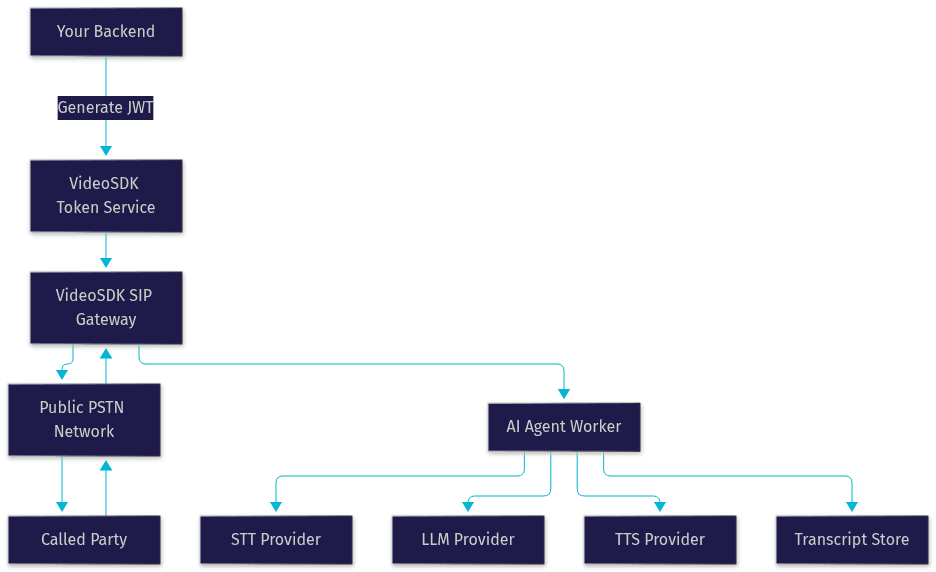
Before the implementation steps, it helps to name the five moving parts and what each one does. The architecture below shows how they connect: your backend generates a token, the SIP gateway bridges to the PSTN, and the Agent Worker processes audio through the STT, LLM, and TTS providers.
Agent Worker
The Agent Worker is the Python process that runs the AI pipeline inside a VideoSDK room. It manages the session lifecycle, receives the callee's audio, routes it through speech-to-text, sends the text to the LLM, and returns the generated response through text-to-speech. It also handles turn detection, so the agent knows when the human has finished speaking and it should respond.
SIP Inbound and Outbound Gateway
The SIP gateway is the bridge that translates traditional SIP signaling into VideoSDK's WebRTC-based rooms. For outbound calls, the Outbound Gateway places the call into the PSTN and connects the answered leg into the room where your agent is waiting. It works with standard SIP trunk providers, including Twilio, Telnyx, Vonage, and Plivo, so you are not locked into a single carrier.
Meeting Token
The Meeting Token is a JWT that authenticates a participant, human or AI, to a VideoSDK room. Tokens are generated server-side using your API key and secret and are never exposed to the frontend. For outbound calls, your backend generates the token that authorizes the agent's session before the call is placed.
Turn Detection and Voice Activity Detection
Turn detection decides when the human speaker has finished and the AI should respond. Voice activity detection (VAD) gates the audio stream so silence and background noise do not trigger the agent. Together they prevent the two most embarrassing failure modes in voice AI: the agent interrupting the human mid-sentence, and the agent responding to a passing truck.
Compliance Engine
Outbound calling is regulated. A compliance layer should enforce do-not-call list checks before dialing, restrict calls to permitted time windows in the callee's local timezone, honor opt-out requests immediately, and record consent where required. Building this yourself is a legal risk; using a platform with these checks built in, or available as configurable rules, removes a whole class of problems.
Implementation Steps for Outbound Call AI
Here is the full path from zero to a completed outbound call, described in plain language. Each step corresponds to a real action in the VideoSDK workflow, but no code is needed to understand or plan it.
Step 1: Provision a Phone Number
Start by provisioning a US-based phone number through VideoSDK's telephony setup. This number is the caller ID your recipients will see, so choose one consistent with your brand and register it properly to avoid carrier spam filtering. Once provisioned, the number is attached to your VideoSDK project and available for outbound campaigns.
Step 2: Generate a Secure Meeting Token
On your backend, generate a meeting token using your API key and secret. This token authenticates the AI agent's session in the VideoSDK room. Never generate tokens on the frontend or embed your API secret in a client application; the token generation belongs on a server you control. For a deeper treatment, see the authentication and token guide.
Step 3: Configure the AI Agent Pipeline
Configure the agent's voice pipeline: choose a speech-to-text provider to transcribe the callee's speech, an LLM to reason about it, and a text-to-speech provider to voice the response. VideoSDK's agent framework supports major providers across all three stages, including OpenAI, Google, Deepgram, ElevenLabs, and Cartesia, so you can mix and match for latency, cost, and voice quality. At this stage you also define the agent's system behavior: its role, its objective for the call, and what structured data it should extract by the end.
Step 4: Trigger the Outbound Call
With the number provisioned, token generated, and pipeline configured, your backend sends a request to the VideoSDK REST endpoint to place the outbound call. This request specifies the destination number, the room, and the agent configuration. If the x402 payment flow is active, the API responds with a payment requirement, your client settles it in USDC, and the call is placed. The callee's phone rings, they answer, and the conversation begins.
Step 5: Poll the Call Status
After the call starts, poll the call status endpoint until the call completes and the transcript is ready. The status moves through the expected lifecycle: initiated, ringing, answered, in-progress, and completed. Polling gives you the completion signal your orchestration logic needs before triggering follow-up actions.
Step 6: Handle the Transcript
Once complete, retrieve the turn-by-turn transcript. Store it in your database, analyze it for intent and outcomes, or feed it back into the LLM to generate a summary or a follow-up task. This is where outbound call AI pays for itself: every call returns structured data, not just a dialer log entry. For broader room and participant management, the VideoSDK REST API reference covers everything you need for orchestration.
Common Pitfalls and How to Avoid Them
Token expiry during long calls is the most frequent failure. If a session runs past the token's validity window, the agent can be disconnected mid-conversation. Generate tokens with a lifetime that comfortably exceeds your longest expected call, and refresh them proactively for campaigns with long average handle times.
SIP firewall and NAT traversal issues appear when your self-hosted components sit behind restrictive networks. Symptoms include one-way audio or calls that connect but carry no sound. Route your SIP traffic through properly configured trunk settings, and rely on VideoSDK's managed gateway rather than self-hosting signaling unless you have a specific reason.
Unexpected 402 payment retries can occur when a settlement attempt fails silently and your client retries the call request, accidentally placing duplicate calls. Make your payment submission idempotent: one payment attempt per call request, with a clear failure path that alerts you rather than silently retrying.
Voice quality degradation on low-bandwidth callee connections shows up as garbled transcription and confused agent responses. You cannot control the callee's phone network, but you can choose STT providers robust to noisy telephony audio and enable the SDK's de-noise processing on the agent side. Test with real PSTN calls, not just VoIP-to-VoIP, before launch.
Production Considerations
Moving from a working demo to production changes several things. First, all client-facing endpoints must run over HTTPS, and if you self-host any media components, TURN server connectivity is required so participants behind strict firewalls still exchange audio reliably.
Second, understand your concurrency limits. VideoSDK scales concurrent agent sessions, but your campaign throughput is bounded by both your plan's concurrent-call ceiling and the rate at which your LLM and TTS providers accept requests. Load-test with a realistic dialing pace, because a burst of a thousand simultaneous calls is also a burst of a thousand LLM requests.
Third, instrument everything. Pipeline observability in the Agent SDK integrates with OpenTelemetry, so you can trace latency across each pipeline stage and spot whether slow responses come from STT, the LLM, or TTS. Pair that with error tracking through Sentry so failed calls surface as alerts rather than silent gaps in your campaign log.
Fourth, model costs explicitly. With per-call USDC pricing, your cost is calls times price plus your STT, LLM, and TTS provider costs per call. Build that into your campaign math before you scale, and re-verify pricing as your volume grows.
Real-World Example: Appointment-Booking Bot
Consider a healthcare clinic with a persistent no-show problem. Manual confirmation calls worked, but staffing them cost more than the recovered appointments. The team built an outbound AI agent on VideoSDK: the agent dials each patient the day before their appointment, confirms attendance, offers to reschedule if the patient hesitates, and records the outcome as structured data.
The pipeline used a telephony-robust STT provider, a mid-tier LLM for conversation logic, and a natural-sounding TTS voice so patients did not perceive the call as a robocall. Turn detection let patients interrupt freely, which mattered: patients frequently changed the topic mid-sentence, and a rigid script would have failed there.
The results were concrete. No-shows dropped by roughly 30 percent within the first two months, because most no-shows were simply forgotten appointments, and a friendly reminder call recovered them. Each call cost about 0.25 USDC through the x402 model, plus provider costs, making the campaign decisively cheaper than the revenue recovered. The transcripts also surfaced a pattern the clinic had missed: a cluster of patients consistently rescheduling away from Monday mornings, which led to a schedule change. That insight came free with the structured call data.
Definitions Glossary
Agent Worker: The Python process that runs the AI pipeline inside a VideoSDK room, managing the session lifecycle and routing audio through STT, LLM, and TTS providers.
Meeting Token: A JWT that authenticates a participant, human or AI, to a VideoSDK room, generated server-side from your API key and secret.
x402 Payment: A pay-per-call settlement model where the client receives a 402 response prompting a signed USDC payment before the call proceeds.
SIP Gateway: The bridge that translates SIP signaling from the PSTN into VideoSDK's WebRTC-based rooms, enabling both inbound and outbound phone calls.
Turn Detection: The mechanism that decides when the human speaker has finished and the AI agent should respond, preventing interruptions and dead air.
Key Takeaways
- VideoSDK combines AI voice agents, SIP telephony, and a per-call x402 payment model in a single API, so you can launch outbound call AI without a separate PBX or call-center platform.
- Every call returns a turn-by-turn transcript, giving you structured call data you can store, analyze, and feed back into your LLM for follow-up actions.
- Proper token handling, SIP traversal, compliance checks, and observability are what separate a working demo from a production campaign.
- The pay-per-call USDC model keeps costs predictable and scales linearly with demand, making campaign economics easy to model before you scale.
Conclusion
Outbound call AI is no longer a futuristic concept. With VideoSDK you can build a production-grade voice agent that dials, converses, and returns structured data for every call, using the same room-based architecture that powers its video and audio calling SDKs. Start by provisioning a number, wiring the AI pipeline, and testing a single outbound call, then scale confidently with built-in compliance, monitoring, and x402 billing. The AI Agents documentation and Telephony guide are the best next stops, and you can create a free account at app.videosdk.live to start today. What outbound scenario will you automate first? Drop a comment, and join the VideoSDK Discord community to share your results and get support from other developers building outbound call AI.
Final Thoughts
Outbound Call AI is no longer futuristic. With VideoSDK + Twilio + FastAPI, you can build your own real-time voice agent that listens, understands, and soon — responds.
Whether you’re a solo developer or an enterprise team, this open architecture gives you everything you need to create intelligent, voice-driven workflows that scale.
Free $20 Balance for AI Voice Agents & Video Calls
FAQ