


An OpenAI Realtime Translator integrated with VideoSDK delivers low-latency speech-to-speech translation inside live video calls by routing participant audio through OpenAI's realtime model and injecting the translated audio back into the same VideoSDK room as a custom audio track. VideoSDK provides the rooms-based WebRTC infrastructure for media transport, while OpenAI handles translation. Together, they enable sub-300ms multilingual conversations without custom media servers.
Real-time language barriers in video calls cost businesses time, trust, and revenue. A telehealth doctor who cannot understand a patient, a support agent serving a global user base, or a remote team split across three time zones and two languages all hit the same wall: the conversation is happening, but comprehension is not.
The OpenAI Realtime API brings low-latency speech-to-speech translation to the table. VideoSDK provides the real-time communication infrastructure that gets audio in and out of the call. When you combine them, you get a multilingual meeting pipeline that works in production, not just in a demo.
By the end of this guide, you will understand the full architecture, the integration workflow, and the production considerations needed to ship a real-time translator inside a VideoSDK video calling app.
OpenAI Realtime Translator: How It Works
The OpenAI Realtime API is a family of multimodal models designed for low-latency voice interactions, including real-time speech-to-speech translation. The core models in this family, such as the gpt-4o-realtime model, process incoming audio streams and generate spoken output in a target language with minimal delay.
The Realtime API operates over a WebSocket connection, accepting raw audio chunks as input and returning translated audio chunks as output. This streaming architecture is what makes real-time translation feasible. Instead of waiting for a full sentence to complete before translating, the model processes audio incrementally, reducing round-trip latency to a range that supports natural conversation flow.
Key capabilities that matter for a translator use case include built-in turn detection, which identifies when a speaker has finished a phrase and the translation should be delivered, and multimodal support, which allows the same model to handle both speech recognition and speech generation in one pass. According to OpenAI's published documentation, the Realtime API targets response latencies in the low hundreds of milliseconds, making it suitable for live, interactive scenarios where traditional batch translation would introduce unacceptable delays.
For developers building with VideoSDK, this latency profile is critical. If the translation layer adds more than 500ms of delay, participants begin talking over each other and the conversation degrades. The OpenAI Realtime API's streaming architecture keeps the translation pipeline within acceptable bounds for real-time dialogue.
VideoSDK Real-Time Communication Basics
VideoSDK is a rooms-based real-time communication platform built on WebRTC. Participants join a room using a meeting token, share audio and video streams, and communicate with sub-300ms latency over a managed SFU (Selective Forwarding Unit) infrastructure.
The core building blocks are straightforward. A Room is the container that participants join. Each Participant has their own audio and video streams, accessible through SDK hooks and methods. Custom audio tracks allow developers to inject processed or generated audio into a room alongside standard microphone input, which is the mechanism that makes real-time translation possible.
VideoSDK uses token-based authentication to secure room access. Tokens are JWTs generated server-side using your API key and secret, then passed to the SDK on the client. This keeps your credentials off the frontend and allows you to scope access per participant.
Two additional features matter for translation pipelines. Network-adaptive streaming automatically adjusts bitrate and resolution based on real-time bandwidth conditions, which is essential when participants are on inconsistent mobile connections. The Prebuilt UI Kit lets you embed a working video call interface with minimal code, useful if you want to prototype the translation experience before building custom UI.
System Architecture: End-to-End Flow
The OpenAI Realtime Translator with VideoSDK involves three coordinated components: a frontend client, a backend token server, and a Python-based AI agent process. Each plays a distinct role in the translation pipeline.
The frontend client is what participants interact with. Built with React, React Native, Flutter, or any VideoSDK-supported SDK, it handles joining the room, displaying participant video, and playing audio. Participants speak normally, and the translated audio is played back through the same client.
The backend server handles two responsibilities. First, it generates VideoSDK meeting tokens for participants and the AI agent. Second, it orchestrates room creation and lifecycle management through the VideoSDK REST API. This server never handles media directly; it only manages authentication and room state.
The AI agent is the translation engine. It is a Python process that joins the VideoSDK room as a participant, subscribes to the audio tracks of human participants, streams that audio to the OpenAI Realtime API over a WebSocket connection, receives translated audio, and publishes it back into the room as a custom audio track. The agent does not have a camera or microphone in the traditional sense. It is a headless participant whose sole job is media transformation.
Here is how the components connect:
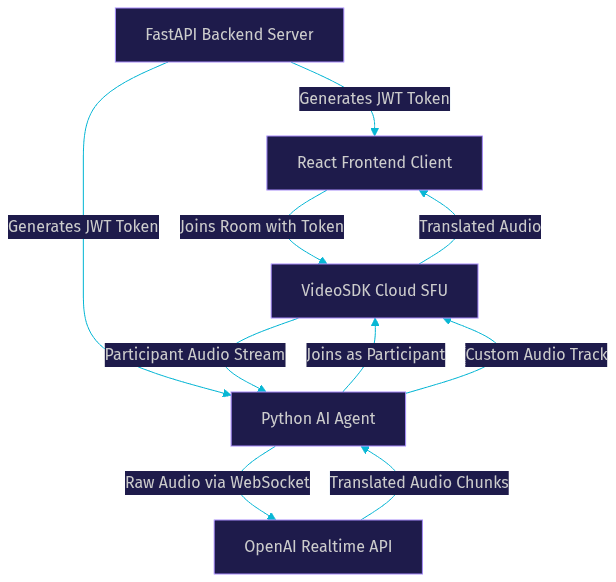
The data flow is circular. Audio leaves the human participant, travels through VideoSDK to the AI agent, gets translated by OpenAI, returns to the agent, and re-enters the room as a new audio track that all participants hear. This entire loop should complete in under 300ms for the conversation to feel natural.
Setting Up the Environment
Before building the translation pipeline, you need four things in place: a VideoSDK account with valid API credentials, an OpenAI API key with access to the Realtime API, a Node.js environment for the frontend, and a Python 3.8+ environment for the AI agent.
Your VideoSDK account gives you an API key and secret. You will use these to generate meeting tokens server-side. Never expose the API secret in your frontend code or commit it to a public repository. The token generation step should live entirely behind your backend server, which issues short-lived JWTs to clients on demand.
For the OpenAI side, you need an API key with Realtime API access. The Realtime API is billed based on audio minutes processed, so track usage carefully during development. OpenAI's pricing structure charges separately for input and output audio, which means a single translated sentence incurs both an input cost (the original speech) and an output cost (the translated speech).
On the infrastructure side, production deployments require HTTPS for WebRTC media access in browsers. Localhost development works without HTTPS, but the moment you deploy to a staging or production environment, a valid TLS certificate is mandatory. If participants are behind restrictive corporate firewalls, you will also need TURN server fallback, which VideoSDK provides as part of its managed infrastructure.
Regarding SDK versions, VideoSDK updates its SDKs regularly. Check the VideoSDK React SDK documentation for the current release before starting. The AI agent uses the VideoSDK Python SDK, which also receives periodic updates.
Integrating OpenAI with VideoSDK
The integration centers on one concept: the AI agent joins a VideoSDK room as a participant, processes audio, and publishes translated audio back. Understanding this flow in detail is what separates a working translation pipeline from a broken demo.
How the AI Agent Joins the Room
The AI agent authenticates to VideoSDK using a meeting token generated by your backend server. Once authenticated, it joins the room as a regular participant with a designated name (such as "Translator") and a specific role. The role determines what the agent can do: subscribe to other participants' audio, publish its own audio track, and listen to room events. VideoSDK's role-based access control lets you restrict the agent to audio-only operations, preventing it from accessing video streams or chat features it does not need.
Capturing Participant Audio
When a human participant speaks, their audio track is published to the VideoSDK room. The AI agent subscribes to that track and receives raw audio frames. VideoSDK delivers these frames through its SDK, giving the agent access to the audio data in a format suitable for forwarding to an external service.
The agent uses a custom audio track mechanism to handle this. Rather than using a standard microphone input, the agent's audio pipeline is programmatically controlled. It receives incoming audio from VideoSDK, buffers it appropriately, and prepares it for transmission to OpenAI.
Streaming Audio to OpenAI
The agent opens a WebSocket connection to the OpenAI Realtime API endpoint. As audio frames arrive from VideoSDK, the agent forwards them to OpenAI in chunks. The Realtime API processes these chunks incrementally, performing speech recognition and translation simultaneously.
The agent must specify the source and target languages when establishing the WebSocket session. For dynamic language switching (where participants change languages mid-call), the agent can send updated configuration messages to OpenAI without tearing down the connection.
Receiving and Injecting Translated Audio
OpenAI sends translated audio chunks back over the same WebSocket connection. The agent receives these chunks, assembles them into a continuous audio stream, and publishes that stream into the VideoSDK room as a new custom audio track.
Here is the data flow within the agent:
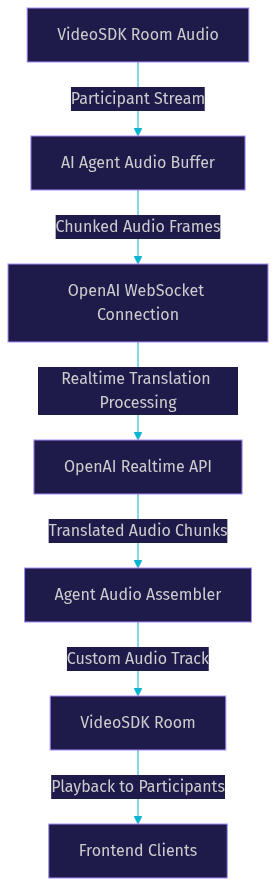
All participants in the room receive this translated audio track and hear the translation in real time. The original speaker's audio continues to play alongside the translation, or you can mute the original track depending on your UX preference.
Handling Turn Detection and Language Selection
OpenAI's Realtime API includes built-in turn detection that identifies when a speaker pauses or finishes a phrase. The agent relies on this signal to know when a translation segment is complete and when to expect the next segment. For multi-party calls with multiple speakers, the agent must track which participant is currently speaking and route their audio to the correct translation stream.
Language selection can be handled dynamically. Each participant can specify their preferred language through the frontend UI, and the backend communicates these preferences to the agent. The agent then configures OpenAI with the appropriate source and target languages per participant or per conversation.
Production Considerations
Shipping a real-time translator from demo to production introduces a set of challenges that quickstarts rarely address. Here is what you need to plan for.
One-to-One vs. Multi-Party Scaling
One-to-one translation (two participants, two languages) is the simplest scenario. The AI agent handles a single audio stream in each direction, and latency stays predictable. Multi-party meetings are harder. If five participants speak three different languages, the agent must manage multiple simultaneous translation streams, each with its own OpenAI WebSocket connection. This increases compute load on the agent process and OpenAI API costs linearly with the number of active streams.
A practical scaling strategy is to run one agent process per room, with the agent spawning internal sub-streams for each language pair. For high-concurrency deployments, consider running multiple agent workers on a container orchestration platform like Kubernetes, with each worker handling a bounded number of rooms.
Network Quality and Fallback
Participants on poor connections will experience degraded audio quality before the translation layer is affected. VideoSDK's network-adaptive streaming handles this by reducing audio bitrate when bandwidth drops. However, if the connection between the AI agent and OpenAI degrades, translation latency will spike. Monitor the WebSocket connection health between the agent and OpenAI, and implement reconnection logic with exponential backoff.
For participants behind corporate firewalls, VideoSDK's built-in TURN server fallback ensures media can traverse restrictive networks. Verify that your TURN configuration is active in production by testing with a participant on a locked-down network.
Security Best Practices
Never expose your VideoSDK API secret or OpenAI API key in frontend code. Both credentials must live on the backend. Meeting tokens should be short-lived (expire within hours, not days) and scoped to specific rooms. Use VideoSDK's role-based access control to ensure the AI agent can only access audio streams, not chat or recording features.
For the OpenAI WebSocket connection, use API key authentication through environment variables loaded at agent startup. Rotate keys periodically and monitor for unauthorized usage through OpenAI's dashboard.
Monitoring and Analytics
VideoSDK provides REST APIs for session analytics, including participant join/leave events, session duration, and media quality metrics. Use these endpoints to build a monitoring dashboard that tracks translation session health. Key metrics to watch include agent join latency, audio round-trip time, and participant-reported audio quality.
For the OpenAI side, track audio minutes processed per session to forecast costs. OpenAI bills per minute of input and output audio, so a 30-minute call with continuous translation in both directions consumes roughly 60 minutes of API usage.
Cost Estimation
VideoSDK offers a free tier with credits for development and testing. Production usage is billed per participant-minute. OpenAI Realtime API pricing is separate and based on audio minutes. For a typical one-to-one translated call, expect costs from both platforms to scale linearly with call duration. Build a cost calculator into your planning process before deploying at scale.
Real-World Use Cases
Real-time translation in video calls serves several high-value scenarios where language barriers directly impact outcomes.
Telehealth consultations are a primary use case. A doctor speaking English and a patient speaking Spanish can communicate directly through a translated video call, reducing the need for human interpreters and expanding access to care. The sub-300ms latency target ensures that the medical conversation feels natural, not stilted.
Global customer support benefits from real-time translation in video chat. A support agent in one country can serve customers in any language without routing through a third-party translation service. One startup building a multilingual support platform on VideoSDK reported reducing average resolution time by 40% after integrating real-time translation, because agents no longer needed to switch between a translation tool and the video call interface.
Live-streamed webinars with simultaneous translation are another scenario. Using VideoSDK's Interactive Live Streaming mode, a host can present in one language while the AI agent publishes a translated audio track that viewers can select. This turns a single-language webinar into a multilingual event without hiring human interpreters.
For more implementation examples, explore the VideoSDK code samples library, which includes starter projects for AI agent integrations.
Definitions Glossary
Room: A VideoSDK meeting container that participants join to share audio and video streams, identified by a unique room ID and secured by a meeting token.
Custom Audio Track: A VideoSDK feature that allows developers to publish programmatically generated or processed audio into a room, used here to inject translated audio from the AI agent.
AI Agent Worker: A Python process that joins a VideoSDK room as a headless participant, captures audio streams, forwards them to OpenAI, and publishes translated audio back into the room.
OpenAI Realtime API: A WebSocket-based streaming API that processes audio incrementally for low-latency speech-to-speech translation, with built-in turn detection and multimodal support.
Meeting Token: A JWT generated server-side using VideoSDK API credentials, authenticating a participant or agent's access to a specific room with a defined role and expiry.
Key Takeaways
- The OpenAI Realtime Translator integrated with VideoSDK routes participant audio through OpenAI's realtime model and injects translated audio back as a custom audio track, achieving sub-300ms round-trip latency for live multilingual conversations.
- VideoSDK's rooms-based architecture, custom audio tracks, and token-based authentication provide the infrastructure layer, while OpenAI handles the translation intelligence.
- The AI agent joins as a headless participant, subscribes to human participant audio, streams it to OpenAI over WebSocket, and publishes translated audio back into the room.
- Production deployments require HTTPS, TURN fallback for restrictive networks, server-side credential management, and monitoring of both VideoSDK session health and OpenAI API usage.
- VideoSDK's multi-platform SDK support (React, React Native, Flutter, Python, and more) means you can build the translation pipeline across web, mobile, and backend environments with a consistent API surface.
Conclusion
Combining the OpenAI Realtime API with VideoSDK gives developers a production-ready path to real-time multilingual video calls without building custom media servers or stitching together fragmented translation services. The architecture is clean: VideoSDK handles media transport, OpenAI handles translation, and a Python AI agent bridges the two. The result is a translation pipeline that works in telehealth, customer support, live streaming, and any scenario where language barriers block communication.
To get started, sign up for a VideoSDK free account, grab your API credentials, and explore the VideoSDK AI Agents documentation for the agent SDK. Pair it with an OpenAI API key and you have everything needed to build a working translator prototype today.
What multilingual scenario are you building? Drop a comment below, I would love to hear what kind of real-time translation use case you are working on.
Free $20 Balance for AI Voice Agents & Video Calls
FAQ