


Voice chat with AI is a real-time conversational interface where users speak to an application and receive spoken responses generated by artificial intelligence. It relies on a pipeline of speech-to-text, large language models, and text-to-speech components operating under a sub-second latency budget. Developers can build and deploy these pipelines efficiently using VideoSDK's AI Voice Agent SDK, which manages the real-time media transport and agent worker lifecycle.
Developers want natural voice interactions because typing and tapping feel slow compared to speaking. The rise of AI-driven voice chat has shifted user expectations from rigid command-based interfaces to fluid, human-like dialogue. Building a system that listens, understands, and responds in real time requires orchestrating multiple high-latency machine learning models into a single seamless experience. This guide breaks down the architecture, technical considerations, and production strategies needed to ship a reliable voice chat with AI in your application.
What Is Voice Chat with AI?
Voice chat with AI is defined as a real-time communication loop where spoken audio is captured, transcribed, processed by a language model, and converted back into spoken audio. Unlike text-based chatbots, voice chat demands strict latency management and continuous audio streaming. The system must decide when a user has finished speaking, process the intent, and generate a response before the conversational pause becomes noticeable.
VideoSDK provides voice chat with AI through its AI Voice Agent SDK, a Python-based framework that connects LLMs, STT, and TTS providers to real-time communication rooms. This architecture allows developers to focus on conversation logic and prompt engineering while the SDK handles the complexities of WebRTC media transport and audio processing.
Core Components
A functional voice chat with AI pipeline consists of several distinct components. Speech-to-Text (STT) converts spoken audio into text. A Large Language Model (LLM) processes that text to generate a conversational reply. Text-to-Speech (TTS) converts the LLM's text output back into audible speech. Voice Activity Detection (VAD) monitors the audio stream to determine when speech starts and stops. Finally, the transport layer, typically WebRTC or SIP, carries the audio bidirectionally with minimal latency.
Typical Architecture
The end-to-end flow begins at the user's microphone. The audio stream passes through a VAD module to filter out silence and noise. When valid speech is detected, the audio chunks are sent to an STT engine for real-time transcription. The resulting text is passed to an LLM, which generates a text response. This text is immediately forwarded to a TTS engine, which synthesizes audio and routes it back to the user's speaker.
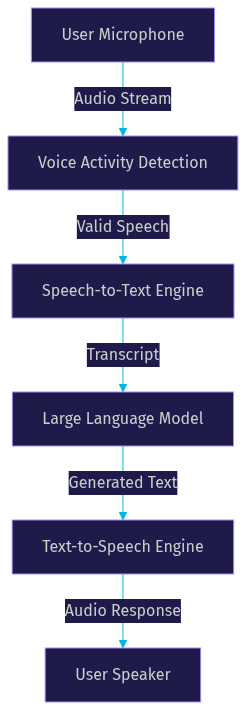
This linear representation is conceptually accurate, but production systems overlap these stages to reduce latency. VideoSDK's agent worker manages this pipeline, allowing developers to plug in different providers for each stage while maintaining a consistent real-time media connection.
How Voice Chat with AI Works
Understanding the mechanics of each pipeline stage is critical for optimizing performance and user experience. Every millisecond counts when trying to maintain a natural conversational rhythm.
Speech Capture & Voice Activity Detection
Speech capture relies on platform-specific microphone APIs that provide raw audio frames. The challenge is determining which frames contain actual speech and which contain background noise or silence. Voice Activity Detection (VAD) algorithms analyze audio energy and spectral characteristics to make this distinction. Semantic VAD goes a step further by using lightweight machine learning models to understand if the user has paused mid-thought or finished their sentence. Accurate VAD is crucial because false triggers cause the AI to interrupt, and missed triggers create awkward delays.
Real-Time Transcription (STT)
Real-time transcription converts the filtered audio stream into text. Developers must choose between streaming STT models, which provide partial transcripts as the user speaks, and batch models, which wait for a pause. Streaming models are essential for voice chat with AI because they allow the LLM to begin processing intent before the user finishes speaking. Providers like Deepgram and OpenAI Whisper offer optimized streaming endpoints. Latency tricks include selecting models with lower word error rates on conversational audio and configuring the stream to send small audio chunks frequently.
Language Model Processing
Once the STT engine provides a transcript, the LLM processes it to generate a response. Prompt engineering dictates the AI's persona, tone, and constraints. Turn-taking logic is often implemented here or in the orchestration layer, deciding whether the LLM should generate a full response or wait for more input. Model-agnostic routing allows developers to switch between providers like OpenAI, Anthropic Claude, or Google Gemini based on the task's complexity or cost constraints. VideoSDK's agent pipeline supports flexible LLM integration, enabling rapid swapping of models without rewriting the transport logic.
Text-to-Speech Generation
The final stage converts the LLM's text output into audio. Neural TTS engines like ElevenLabs, Cartesia, and Azure Speech provide highly natural voices with customizable personas. Latency tuning is vital; developers should configure the TTS engine to start synthesizing audio as soon as the first sentence boundary is detected in the LLM output, rather than waiting for the entire response to generate. This streaming approach dramatically reduces the time to first audio byte.
Key Technical Considerations
Building a production-grade voice chat with AI involves navigating trade-offs between latency, audio quality, and language support. Overlooking these factors leads to robotic interactions and user frustration.
Latency & Turn-Taking
Human conversation typically features pauses of 200 to 300 milliseconds between turns. To feel natural, voice chat with AI must deliver the first audio byte of a response within this window. Achieving sub-second end-to-end latency requires pipeline parallelism. Instead of running STT, LLM, and TTS sequentially, the system streams data between them. As the STT outputs partial transcripts, the LLM begins generating tokens. As the LLM outputs tokens, the TTS begins synthesizing audio.
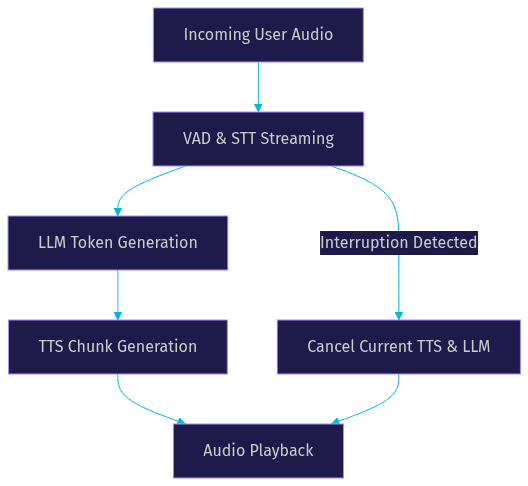
Turn-taking logic must also handle interruptions. If the user begins speaking while the AI is responding, the system must immediately halt TTS playback and cancel ongoing LLM generation to listen. VideoSDK's agent SDK includes built-in turn detection and preemptive response handling to manage these concurrent audio streams effectively.
Audio Quality & Noise Suppression
Clear audio is the foundation of accurate transcription. Echo cancellation prevents the AI's voice from being picked up by the user's microphone and fed back into the STT engine. Background-noise filters remove ambient sounds that could trigger false VAD detections. Codec choices also matter; Opus is widely preferred for real-time communication due to its low latency and adaptability to varying network conditions. VideoSDK includes built-in noise suppression and echo cancellation, ensuring the audio reaching your STT provider is as clean as possible.
Multilingual Support
Global applications require voice chat with AI to understand and speak multiple languages. This requires selecting STT and TTS providers with broad language coverage. Some models are optimized for specific languages and outperform general-purpose models in those domains. A robust fallback strategy involves detecting the primary language in the STT phase and routing the TTS generation to a voice model trained on that specific language's phonetic structure.
Choosing the Right Stack
Selecting the right combination of models and infrastructure defines the capabilities and cost of your voice chat with AI application.
Provider Landscape
The provider landscape for real-time AI voice is rapidly evolving. OpenAI Realtime offers a tightly integrated multimodal model that handles audio in and audio out natively, reducing pipeline complexity. Google Gemini Live provides similar native audio processing with strong integration into the Google Cloud ecosystem. For developers seeking granular control over each pipeline stage, combining Deepgram for STT, Anthropic Claude for LLM, and ElevenLabs for TTS offers top-tier quality and customization. Open-source alternatives like Pipecat allow for self-hosted pipelines, which can reduce variable costs but increase infrastructure management overhead.
Integration Options
Developers can integrate voice chat with AI using several approaches. An SDK-first approach using VideoSDK handles the WebRTC peer connections, media routing, and agent worker deployment, letting you focus on the conversation logic. REST API approaches require you to manage audio streaming and WebSocket connections manually, which offers flexibility but increases development time. Self-hosted Python worker approaches give you maximum control over the pipeline and data privacy but require you to scale the infrastructure as concurrency grows. VideoSDK supports both managed Agent Cloud deployment and self-hosted Docker deployments, accommodating various security and scaling requirements.
Building Voice Chat with AI in Your App
Implementing a voice chat with AI feature requires coordinating backend authentication, frontend media capture, and the AI pipeline itself. Here is a natural-language walkthrough of the implementation path.
Backend Token Management
VideoSDK uses token-based authentication to secure access to its real-time communication rooms. You must generate a JSON Web Token (JWT) on your backend server using your VideoSDK API key and secret. This token should be scoped to the specific room and have an appropriate expiration time to prevent unauthorized access. Never expose your API secret on the frontend client. When a user wants to initiate a voice chat, your frontend requests a token from your backend, which then passes it to the VideoSDK SDK to initialize the connection. You can read more about this in the VideoSDK authentication guide.
Frontend Media Handling
On the frontend, the application must request microphone permissions from the user. Once granted, the SDK establishes a WebRTC peer connection to the VideoSDK room. The local audio track is published to the room, where the AI agent worker is listening. Simultaneously, the frontend subscribes to the audio track published by the AI agent to play the TTS audio back to the user. The SDK manages the audio playback pipeline, but developers must handle UI states, such as showing a listening indicator when the VAD detects speech and a speaking indicator when the AI is responding.
Handling Interruptions & Context
A natural voice chat with AI requires robust interruption handling. VideoSDK's agent SDK provides semantic VAD and turn detection to manage this. When the user starts speaking while the AI is talking, the SDK triggers a preemption event. This event cancels the current TTS generation and flushes the audio buffer, allowing the system to listen to the new input. Context window management is equally important. The agent must maintain a history of the conversation to reference previous turns, but developers must implement strategies to summarize or truncate older context to avoid exceeding the LLM's token limit and increasing latency.
Production Readiness
Moving from localhost to production requires several adjustments. You must serve your frontend over HTTPS, as browsers restrict microphone access on insecure origins. If your users are behind restrictive corporate firewalls, you need to configure TURN servers to relay WebRTC traffic. Finally, implement monitoring to track agent worker health, latency metrics, and API usage to ensure the voice chat remains stable under load. VideoSDK provides session analytics and observability tools to help monitor these production deployments.
Common Pitfalls and How to Avoid Them
Even with a solid architecture, developers frequently encounter specific issues when building voice chat with AI. Latency spikes often occur when an LLM provider experiences high traffic. To mitigate this, implement timeout handling and consider a fallback LLM provider. Token leakage is another common issue where the context window fills up with irrelevant data, slowing down the LLM. Avoid this by implementing aggressive context summarization and clearing stale conversation turns.
Audio clipping or choppy playback usually results from network jitter or incorrect buffer sizing on the TTS output. Ensure your transport layer uses jitter buffers and that your TTS provider is configured to stream audio in small chunks. Finally, avoid the trap of relying solely on energy-based VAD, which often misinterprets background noise as speech. Switch to semantic VAD to ensure the system only responds to actual conversational input.
Future Trends in Voice Chat with AI
The landscape of voice chat with AI is moving toward real-time multimodal models that process audio and vision simultaneously. This allows an AI agent to view a user's camera feed and respond to visual cues, creating a more immersive interaction. Edge inference is also gaining traction, with developers running optimized STT and LLM models directly on user devices to eliminate network latency entirely. Additionally, avatar lip-sync integration is becoming standard, where the TTS audio output drives a 3D avatar's mouth movements, requiring precise timestamp mapping between audio chunks and viseme data. VideoSDK's ongoing support for vision and multi-modality in its agent SDK positions developers to take advantage of these emerging capabilities.
Definitions Glossary
Voice Activity Detection (VAD): An algorithm that analyzes audio streams to identify the presence of human speech. VideoSDK uses semantic VAD to distinguish between mid-sentence pauses and completed thoughts.
Speech-to-Text (STT): The process of converting spoken audio into text. Real-time streaming STT is essential for voice chat with AI to minimize latency.
Large Language Model (LLM): An AI model that processes text to generate conversational responses. In VideoSDK's agent pipeline, the LLM acts as the brain, determining the intent and crafting the reply.
Text-to-Speech (TTS): The process of converting generated text back into audible speech. Low-latency neural TTS providers like ElevenLabs are commonly used in VideoSDK agent pipelines.
Agent Worker: A Python process that runs the VideoSDK AI agent, managing the session lifecycle and orchestrating the STT, LLM, and TTS pipeline within a real-time communication room.
Key Takeaways
- Voice chat with AI requires orchestrating STT, LLM, and TTS components within a strict sub-second latency budget to feel natural.
- Pipeline parallelism, where audio and text are streamed concurrently between stages, is the most effective way to reduce time to first audio byte.
- Semantic VAD and robust interruption handling are critical for preventing the AI from talking over the user and maintaining conversational flow.
- VideoSDK's AI Voice Agent SDK abstracts the complexity of WebRTC media transport, allowing developers to focus on conversation logic and provider selection.
- Production deployments require HTTPS, TURN server configuration, and active monitoring to ensure stable performance under load.
Conclusion
Building a voice chat with AI application challenges developers to bridge the gap between high-latency machine learning models and real-time conversational expectations. By understanding the core components, optimizing pipeline parallelism, and leveraging a robust SDK to handle media transport, you can ship a natural and responsive voice interface. VideoSDK provides the infrastructure and AI agent SDK needed to build, deploy, and scale these experiences efficiently. Sign up at app.videosdk.live/login to start building. What are you building with VideoSDK? Drop a comment below, I'd love to hear what kind of voice chat use case you're working on.
Free $20 Balance for AI Voice Agents & Video Calls
FAQ