


Videocall AI is the integration of artificial intelligence capabilities like real-time transcription, voice agents, and visual avatars into real-time video communication. VideoSDK enables videocall AI through its rooms-based architecture, allowing developers to connect AI pipelines directly to media streams with sub-300ms latency. To start building intelligent video applications, explore the VideoSDK AI Agent documentation.
The surge of AI in video communication is reshaping how developers build real-time applications. Users now expect video calls to be more than just a live feed. They want live captions, intelligent meeting summaries, and AI assistants that can answer questions on the fly. For developers, this means the traditional video calling SDK is no longer enough. You need infrastructure that bridges real-time media streams with AI pipelines seamlessly.
Building videocall AI requires managing audio and video tracks, routing them through speech-to-text and large language model providers, and returning the output with imperceptible latency. VideoSDK provides the foundational real-time communication layer that makes this possible. By the end of this guide, you will understand the core components of a videocall AI system, how to choose the right platform, and the exact steps to integrate AI into your video calling application.
What is Videocall AI and Why It Matters
Videocall AI is defined as the enhancement of real-time video communication with artificial intelligence. A standard video call relies on WebRTC to transmit audio and video between participants. A videocall AI system intercepts these media streams, processes them through AI models, and returns actionable output or generated media.
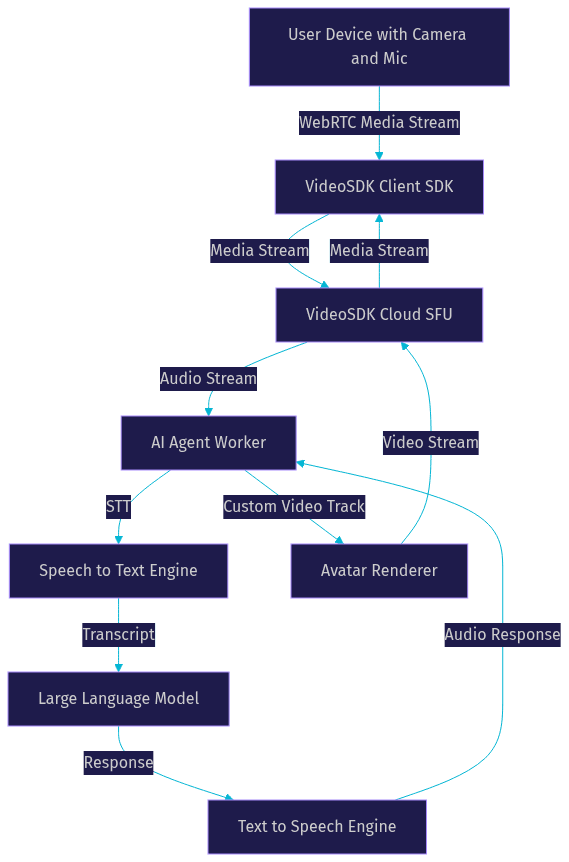
Videocall AI works by routing participant audio through a speech-to-text engine, passing the transcript to a large language model, and converting the model's response back to speech or text. This creates a conversational loop where the AI acts as an active participant.
The value proposition for developers is significant. Instead of building separate systems for communication and AI, you can unify them. VideoSDK provides videocall AI capabilities through its AI Agent SDK, which connects directly to the same rooms-based architecture used for standard video calling. This reduces integration complexity and ensures that AI interactions happen with the same low latency as human conversation.
Core Components of a Videocall AI System
A robust videocall AI architecture relies on several interconnected components. Each piece handles a specific stage of the media processing pipeline, from capturing user audio to rendering an AI avatar.
AI Voice Agents
AI voice agents are the conversational core of a videocall AI system. They combine speech-to-text (STT), large language models (LLMs), and text-to-speech (TTS) to create a real-time dialogue system. When a user speaks, the STT engine transcribes the audio. The LLM processes the transcript to generate a contextually relevant response. The TTS engine then converts that response into audible speech. VideoSDK manages this through an Agent Worker, a Python process that orchestrates the entire pipeline inside a VideoSDK room.
Real-Time Transcription and Summarization
Real-time transcription converts spoken words into text as the conversation happens. This requires high-accuracy STT models and speaker diarization to identify who is speaking. Post-call summarization takes these transcripts and uses an LLM to generate meeting notes, action items, or highlights. VideoSDK supports real-time transcription natively, allowing developers to display live captions in the user interface without managing separate transcription services.
Avatar Rendering and Lip-Sync
Visual AI avatars add a human-like presence to AI voice agents. Instead of a blank audio tile, the AI participant appears as a rendered face. Avatar rendering involves generating video frames of a digital face, while lip-sync technology aligns the mouth movements with the TTS audio output. VideoSDK handles this using Custom Video Tracks, allowing the rendered avatar video to be broadcast into the room alongside the generated audio.
Integration Layer (VideoSDK Rooms)
The integration layer ties everything together. VideoSDK uses a rooms-based architecture where participants join a unique room, share media streams, and communicate over WebRTC. In a videocall AI system, the AI Agent Worker joins the room as a participant. It receives audio streams from human participants, processes them, and publishes its own audio and video streams back to the room.
Benefits of Adding AI to Video Calls
Integrating AI into video calls delivers measurable improvements across productivity, accessibility, and user engagement.
Productivity gains are immediate. AI summarizers can generate meeting minutes instantly, eliminating the need for manual note-taking. AI voice agents can answer factual questions during a call without requiring participants to switch contexts or open a browser. In customer support scenarios, an AI agent can pull knowledge-base articles and suggest responses to human agents in real time.
Accessibility improves dramatically with real-time transcription. Participants who are deaf or hard of hearing can follow along with live captions. Non-native speakers benefit from real-time translation powered by LLMs. VideoSDK's built-in transcription features make this accessible to developers without requiring deep expertise in audio processing.
Engagement rises when AI acts as an active participant. In virtual tutoring, an AI tutor can provide interactive hints and live explanations. In live shopping events, an AI host can answer product questions from the audience. Data insights also improve. Developers can capture AI-driven analytics on participant sentiment, talk time, and topic frequency, providing valuable business intelligence.
Choosing the Right Platform: VideoSDK vs Alternatives
Selecting the right platform for videocall AI depends on SDK breadth, integration points, and scalability. VideoSDK is designed specifically for developers building real-time communication with AI extensions.
Feature Comparison
VideoSDK offers multi-platform SDKs covering React, React Native, Flutter, iOS, Android, JavaScript, Unity, and Python. This breadth ensures you can build videocall AI applications across web, mobile, and immersive environments. The Prebuilt UI Kit allows developers to ship a working video call interface instantly, which can then be augmented with AI features. Competitors like Agora and LiveKit offer strong RTC foundations but often require more custom wiring to connect AI pipelines. VideoSDK's Python SDK and AI Agent SDK provide a purpose-built bridge for LLM, STT, and TTS integration.
Cost and Scalability
Cost is a critical factor for AI applications, which consume both RTC minutes and AI model tokens. VideoSDK offers a free tier with credits, allowing developers to prototype videocall AI features without upfront cost. . Scaling a videocall AI system requires handling concurrent AI agent workers. VideoSDK's cloud infrastructure manages media routing, but developers must monitor their AI provider usage. VideoSDK's network-adaptive streaming ensures that media quality scales gracefully even as AI processing loads increase.
Ecosystem Support
A strong ecosystem accelerates development. VideoSDK maintains a 3,000-plus developer community on Discord, open-source repositories on GitHub, and comprehensive documentation. The AI Agent SDK supports plugins for major providers like OpenAI, Deepgram, ElevenLabs, and Cartesia. . This plugin architecture means you can swap STT or TTS providers without rewriting your core application logic.
Step-by-Step Implementation Guide
Building a videocall AI application involves connecting your frontend video SDK to a backend AI pipeline. Here is the implementation path using VideoSDK.
1. Set Up a VideoSDK Room
First, create a VideoSDK room from your backend server using the REST API. This returns a unique room ID. Next, generate a meeting token using your API key and secret. This token authenticates participants and defines their roles. Never expose your API secret on the frontend. Always generate tokens server-side and pass them to your client application. The client SDK uses this token to join the room and begin publishing media streams.
2. Connect the AI Pipeline
With the room active, launch your AI Agent Worker. The Agent Worker joins the VideoSDK room using the same meeting token. Configure the agent's pipeline by selecting your preferred STT, LLM, and TTS providers. The agent listens to audio streams from human participants, processes them through the pipeline, and publishes the resulting audio back to the room. VideoSDK handles the media transport, so you only need to configure the AI models.
3. Add an Avatar or Custom Video Track
To give your AI agent a visual presence, implement a Custom Video Track. Generate avatar video frames on your backend or through an avatar provider like Anam AI. Feed these frames into a custom video track and publish it to the VideoSDK room alongside the TTS audio. The VideoSDK SDK on the client side renders this track just like any other participant's camera feed. Synchronize the avatar rendering with the TTS audio timestamps to achieve realistic lip-sync.
4. Test Latency and Quality
Videocall AI lives or dies by latency. Conduct manual testing to measure the round-trip time from user speech to AI audio response. Aim for sub-300ms latency to maintain conversational flow. Test under various network conditions, including 3G and unstable Wi-Fi. Verify that the STT engine accurately captures speech over the WebRTC connection and that the TTS output does not introduce buffering delays. Use VideoSDK's session analytics to monitor packet loss and jitter.
5. Deploy to Production
Moving from localhost to production requires several adjustments. Ensure your frontend is served over HTTPS, as WebRTC requires secure contexts for camera and microphone access. Deploy your token generation server to a reliable cloud provider. Configure TURN servers to ensure media connectivity across restrictive firewalls. Implement token refresh logic to handle long-running sessions where the initial meeting token might expire. Monitor your AI Agent Worker processes for memory leaks or pipeline stalls.
Performance and Latency Considerations
Performance in videocall AI is a balance between media quality and AI processing speed. VideoSDK employs network-adaptive streaming, which automatically adjusts video bitrate and resolution based on real-time bandwidth detection. This prevents call degradation on poor networks.
AI response latency is the sum of STT processing time, LLM generation time, and TTS synthesis time. To minimize this, choose streaming STT providers that transcribe audio in chunks rather than waiting for silence. Use fast LLM inference providers like Cerebras or Groq if the task does not require complex reasoning. For TTS, select providers with low latency streaming outputs. According to the Artificial Analysis Speech Arena benchmark, latency differences between TTS providers can vary by hundreds of milliseconds. .
Security and Privacy Best Practices
Videocall AI introduces unique privacy considerations because user audio and video are processed by third-party AI models. Implement strict token scoping. Use VideoSDK's role-based access control to ensure that AI agents can only access the streams they need.
Enable end-to-end encryption (E2EE) for media streams where supported. Be aware that if an AI agent needs to process audio, E2EE must be terminated at the agent worker level. Clearly communicate to users when AI features like transcription or avatar generation are active. Comply with GDPR and other data protection regulations by configuring data retention policies with your AI providers and avoiding the storage of raw audio or transcripts beyond the necessary duration.
Real-World Use Cases
Videocall AI is transforming several industries by making video communication more interactive and intelligent.
Virtual Tutoring
In an edtech application, an AI tutor can join a video class alongside a human student. The AI agent uses real-time transcription to understand the student's questions. It queries an LLM for explanations and responds via TTS. Live captions help students who struggle with audio clarity. The AI tutor can also generate a post-session summary of topics covered.
Customer Support
A customer support video call can be augmented with an AI assistant that listens to the conversation. The AI agent transcribes the call, searches a knowledge base for relevant solutions, and displays suggested responses on the human agent's screen. This reduces resolution time and improves the accuracy of support interactions. VideoSDK's interactive live streaming mode can also be used for large-scale support webinars.
Remote Team Collaboration
For remote teams, a videocall AI summarizer can join meetings as a silent participant. It transcribes the entire meeting, performs speaker diarization, and generates structured meeting minutes with action items. This eliminates the need for a dedicated note-taker and ensures that all team members have access to accurate records immediately after the call ends.
Future Trends in Videocall AI
The future of videocall AI points toward fully multimodal agents. Current systems primarily process audio. Future agents will process video frames in real time, allowing an AI to react to user facial expressions, gestures, and shared screen content. This requires integration with vision models alongside STT and LLMs.
Real-time avatar rendering will also improve. Expect to see photorealistic avatars with sub-50ms lip-sync latency, making AI participants indistinguishable from humans on camera. Finally, edge-AI processing will bring computation closer to the user. By running lightweight STT and TTS models on edge servers, developers can reduce the round-trip latency of videocall AI to near-zero, enabling truly seamless human-AI interaction.
Definitions Glossary
Room: A VideoSDK meeting room that participants join to share media streams, identified by a unique room ID.
Participant: A user or AI agent connected to a VideoSDK room, with its own audio and video streams.
Agent Worker: The Python process that runs a VideoSDK AI agent and manages its session lifecycle inside a room.
Pipeline: The STT, LLM, and TTS chain that processes speech and generates responses in a VideoSDK AI agent.
Custom Video Track: A VideoSDK feature allowing developers to send processed video, such as an AI avatar or screen share, alongside a standard camera feed.
Key Takeaways
- Videocall AI integrates STT, LLM, and TTS pipelines into real-time video communication using a rooms-based architecture.
- VideoSDK's AI Agent SDK and multi-platform support make it easier to connect AI models directly to WebRTC media streams.
- Production deployment requires HTTPS, secure token generation, TURN server configuration, and careful latency monitoring.
- Real-world applications like virtual tutoring, customer support, and remote collaboration benefit immediately from AI transcription and voice agents.
- The future of videocall AI lies in multimodal processing, photorealistic avatars, and edge computing for minimal latency.
Conclusion
Building videocall AI applications requires a robust real-time communication layer capable of bridging human participants with AI pipelines. VideoSDK provides the SDKs, room architecture, and AI Agent framework needed to build these systems with low latency and high reliability. Whether you are adding live transcription to a collaboration tool or building an AI tutor with a virtual avatar, VideoSDK handles the media transport so you can focus on the AI experience. Explore the VideoSDK AI Agent documentation to start building, or join the VideoSDK Discord community to connect with other developers. What are you building with VideoSDK? Drop a comment below.
Free $20 Balance for AI Voice Agents & Video Calls
FAQ