


An android voice assistant is an AI-powered app or built-in service on Android devices that listens for a trigger phrase or button press, interprets spoken commands, and performs actions like calling, texting, controlling smart home devices, or answering questions. The major options in 2026 are Google Assistant, Google's Gemini, Samsung Bixby, and Amazon Alexa. Developers can also build custom assistants using Android's VoiceInteractionService or connect them to real-time infrastructure like VideoSDK.
Voice assistants have quietly become the primary interface for millions of Android users. What started as a novelty for setting timers has evolved into genuine AI-driven conversation, on-device processing, and deep system control. The shift from cloud-only assistants to on-device models has changed the game entirely, making responses faster and more private.
The android voice assistant landscape in 2026 is more crowded and more capable than ever. Google has split its own offering between the classic Google Assistant and the newer Gemini experience. Samsung doubles down on Bixby for device control. Amazon keeps Alexa relevant for smart home users. And a wave of third-party assistants now registers as the system default, opening the door to fully customized voice experiences.
By the end of this guide, you'll understand how Android handles assistants at the system level, which assistant fits your needs, every activation method available, and how to keep your voice data private.
What Is an Android Voice Assistant?
An android voice assistant is defined as software on an Android device that converts spoken language into actions or answers using speech recognition, natural language understanding, and task execution. It works by continuously or on-demand listening for a trigger, transcribing your speech, interpreting intent, and then either responding audibly or executing a system action.
The key distinction from Apple's Siri is openness. Android allows multiple apps to register as the default assistant, so Google Assistant, Gemini, Bixby, Alexa, and third-party options can all occupy the same system-level role. On iOS, Siri is the only system assistant. This openness is why the Android ecosystem supports hotword detection, power-button shortcuts, and accessibility-driven voice control from any qualifying app.
The core players are Google Assistant (the mature, task-focused default), Gemini (Google's AI-driven conversational successor), Samsung Bixby (deep Galaxy device control), and Amazon Alexa (optional install with a smart home focus).
How Android Handles Voice Assistants
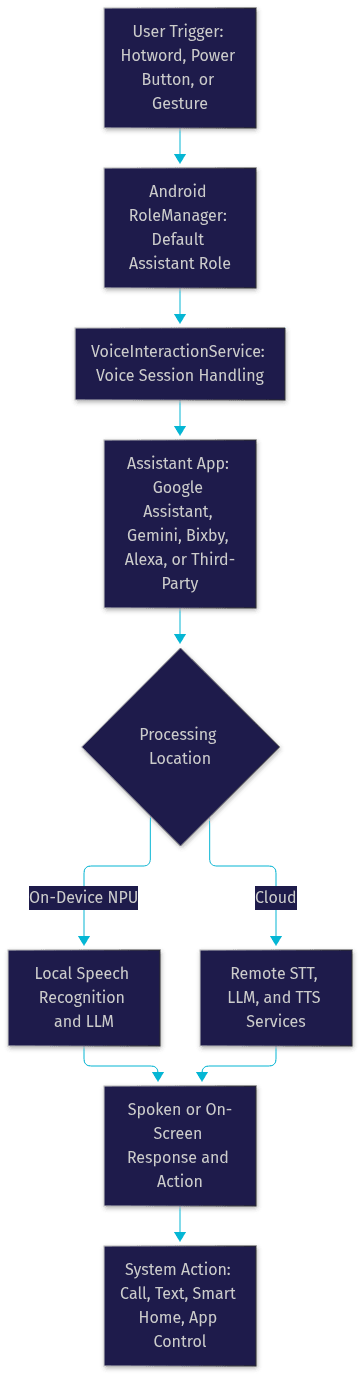
Android treats the voice assistant as a system role rather than a fixed app, which is what makes the ecosystem so flexible. The operating system manages this through a role-based mechanism often referred to as RoleManager, which designates one app as the current default assistant. When you long-press the power button or say a hotword, Android routes the interaction to whichever app holds that role.
The second layer is the VoiceInteractionService, the framework component an assistant app implements to receive voice sessions, display its UI overlay, and return results. Any developer can build an assistant that plugs into this layer, which is why third-party assistants can behave like first-class citizens on Android. This is also the same architectural pattern used by real-time voice AI platforms, where an agent pipeline handles speech-to-text, an LLM, and text-to-speech, as described in the VideoSDK AI agents documentation.
Alongside the assistant role, Android maintains a separate accessibility layer. Voice Access and TalkBack are accessibility services, not assistants, but they enable hands-free and eyes-free control that overlaps heavily with assistant functionality. Voice Access lets motor-impaired users control the entire screen by voice, labeling every tappable element.
Finally, there is the processing split. Cloud-based assistants send your audio to remote servers for transcription and reasoning, trading privacy for capability. On-device assistants run speech recognition and increasingly the language model itself on the phone's neural processing unit, keeping audio local and enabling offline operation.
Major Android Voice Assistants
Google Assistant
Google Assistant remains the most widely deployed android voice assistant, preinstalled on nearly every non-Samsung Android device. Its strengths are speed, reliability, and deep integration with Google services. You can call contacts, send texts, set timers and alarms, control smart home devices via Google Home, navigate with Google Maps, and ask general knowledge questions.
Activation methods include the classic "Hey Google" hotword, a long press of the power button, a corner swipe gesture on many devices, and a dedicated assistant key on some phones. It supports more than 30 languages and works on phones, tablets, Wear OS watches, Android Auto, and Google TV. As of 2026, Google is progressively transitioning Assistant users toward Gemini, but Assistant still handles many device-level tasks more consistently, particularly offline commands.
Gemini
Gemini is Google's AI-driven conversational assistant, and it now ships as the default on new Pixel devices. Unlike the command-oriented Assistant, Gemini excels at multi-turn conversation, complex reasoning, drafting text, summarizing documents, and generating images. It can be activated with the "Hey Gemini" hotword or the same power-button press, and it overlays the classic Assistant experience while retaining access to many Google actions.
Its conversational strengths come from a large multimodal model, which means it can discuss, refine, and follow up rather than just execute single commands. The tradeoff is that some granular device controls are still maturing compared to Assistant.
Samsung Bixby
Bixby is Samsung's assistant, preinstalled on Galaxy phones, tablets, and wearables. Its differentiator is deep device-specific control. Bixby can toggle advanced Galaxy settings that other assistants cannot reach, such as specific display modes, camera modes, and Bixby Routines, Samsung's automation engine. It also integrates tightly with SmartThings for smart home control. Bixby Voice Wake supports "Hi Bixby" detection, and the side button can be remapped to trigger it.
Amazon Alexa
Alexa is not preinstalled on Android but is a free install from the Play Store. Its value is almost entirely ecosystem-driven. If your home runs on Echo speakers, Ring cameras, and Alexa-compatible lights and thermostats, the Alexa app gives you consistent voice control on your phone that matches your speakers. Alexa can also register as a hands-free assistant with hotword support on many devices, though general phone control is weaker than Google's or Samsung's offerings.
Activation Methods for Android Voice Assistants
Power-Button Long Press
The most reliable activation method is a long press of the power button, which Android maps to the default assistant by default on most devices. You can change or disable this in Settings under the power button behavior options, remapping it back to the power menu if you prefer. The advantage is that it works instantly, even with the screen off on supported devices, and it never accidentally triggers. The downside is that it occupies the button's long-press function, so you lose quick access to the restart and shutdown menu unless you change the mapping.
Hotword "Hey Google" and "Hey Gemini"
Hotword detection lets your phone listen continuously for a trigger phrase like "Hey Google" or "Hey Gemini" and respond hands-free. You enable it in the assistant's own settings, typically under voice activation or Voice Match, where you also train it to recognize your voice so it responds to you and not everyone in the room.
The tradeoff is battery. Continuous hotword detection runs a small always-on model on the device's low-power DSP, which costs a modest but real amount of battery daily. On Pixel and flagship devices this is well optimized. On older or budget hardware, users often notice the drain and switch to button-based activation instead.
Accessibility Voice Access
Voice Access is Google's accessibility service for full hands-free phone control, downloadable from the Play Store. Once enabled in accessibility settings, it overlays numbers and labels on every tappable element so you can say things like "open Chrome" or "tap 7" to operate the entire interface by voice. It is designed primarily for users with motor impairments, but it is also popular in hands-busy scenarios like cooking or driving. Setup involves granting the accessibility permission and optionally enabling a persistent floating button for quick activation.
Custom Shortcuts and Gestures
Beyond the defaults, Android and manufacturer skins offer alternative triggers. Many devices let you double-press the power or side button to launch the assistant or camera. Samsung allows remapping the side button's double press. Third-party launcher and automation apps can bind volume-key sequences or floating on-screen buttons to launch any assistant app. These options matter when the power button is already mapped elsewhere or when a gesture feels faster than a long press.
Third-Party Triggers
Android's open assistant role means third-party apps can register as the default assistant and receive the same system triggers. Apps like Hark demonstrate this pattern, registering as a default assistant and using protocols like OACP (Open App Capability Protocol) to perform on-device actions. When you press the assistant trigger, Android launches whichever third-party app holds the role, giving it access to the voice session just like Google's own assistants.
Voice Assistant Use Cases on Android
Everyday tasks are where assistants earn their keep. Calling a contact by name while driving, sending a text by dictation, setting a pasta timer with wet hands, and asking for a unit conversion mid-cooking are the highest-frequency uses. Android Auto extends this to a full in-car voice experience.
Smart home control is the second pillar. A single spoken command can dim lights, adjust a thermostat, lock a door, or start a robot vacuum, routed through Google Home, SmartThings, or Alexa depending on your ecosystem. Multi-room commands, like turning off every downstairs light at once, work across all three platforms.
Productivity users lean on assistants for calendar queries, reminder creation, and email dictation. Gemini in particular has strengthened this area, able to draft and refine messages conversationally rather than just transcribing them. Voice-to-text transcription quality has also improved dramatically with on-device models, making dictation a genuine typing replacement for many users.
Accessibility is the most impactful use case. For users with motor impairments, Voice Access provides complete screen control by voice, and assistant integration handles calls, messages, and navigation. For visually impaired users, TalkBack combined with voice commands enables full device operation.
The newest frontier is on-device AI actions via OACP. With a third-party assistant like Hark holding the assistant role, spoken commands can trigger local app actions without cloud round trips, such as opening a specific playlist in a music app or starting a workout in a fitness app. This mirrors the broader industry move toward agentic voice AI, where assistants do not just answer but act. Developers building similar real-time voice experiences can reference the VideoSDK AI agent architecture, which handles the same speech-to-text, LLM, and text-to-speech pipeline over live sessions.

Privacy, Permissions, and Data Management
Every cloud-based assistant collects some voice data. Google stores voice recordings by default unless you opt out, and it links them to your account for personalization. Amazon retains Alexa voice history unless you configure auto-deletion. Samsung processes Bixby commands through its own servers for anything beyond on-device tasks.
To review and revoke, start with your Google account's voice activity settings, where you can disable saving, review past recordings, and delete history. In Android's settings, the privacy and permission panels show which apps hold microphone access, and you can revoke it per app. Samsung and Amazon offer equivalent history dashboards in their apps.
For privacy-focused users, the best practices are: prefer on-device processing where available, disable hotword detection when you do not need it, review stored recordings monthly, and use Gemini's on-device mode for sensitive queries. On-device assistants keep audio local by design, which is the strongest privacy posture available on Android today.
Choosing the Right Android Voice Assistant
The right choice depends on four factors: device brand, ecosystem, privacy needs, and feature priorities.
- Google Assistant is best for broad device compatibility, reliable task execution, and multi-language support.
- Gemini is best for conversational AI, drafting, summarizing, and complex questions on newer hardware.
- Bixby is best for Galaxy owners who want the deepest device-level control and SmartThings automation.
- Alexa is best for households already running Echo devices and Alexa-compatible smart home gear.
- Third-party assistants with OACP are best for tinkerers who want on-device actions and customization.
If privacy is your top priority, lean toward on-device processing. If smart home control dominates, match your assistant to your speaker ecosystem. If you own a Galaxy, try Bixby before assuming Google's options are better for device control.
Future Trends in Android Voice Assistants
The trajectory through 2026 and beyond points to three converging trends. First, on-device models are getting dramatically better, with compact multimodal LLMs running on phone NPUs, enabling private, offline, low-latency assistants. Second, Android 15 and later releases deepen assistant integration, expanding what third-party apps can do through the assistant role and app capability protocols. Third, multimodal AI means assistants that can see your screen and camera input, not just hear you. The result is a shift from command-and-response tools toward genuine agentic assistants that complete multi-step tasks across apps.
Definitions Glossary
Hotword Detection: The always-on, low-power listening mechanism that recognizes a trigger phrase like "Hey Google" and wakes the assistant. It runs on a dedicated signal processor to minimize battery impact.
VoiceInteractionService: The Android framework component an assistant app implements to receive voice sessions, show its overlay UI, and return results to the system.
RoleManager: Android's system mechanism that assigns the default assistant role to one app, routing power-button presses and hotword triggers to it.
OACP (Open App Capability Protocol): A protocol enabling on-device assistants to trigger actions inside other apps without cloud round trips, powering local voice-driven automation.
On-Device AI: Speech recognition and language model processing that runs entirely on the phone's neural processing unit, keeping audio private and enabling offline assistant behavior.
Voice Access: Google's accessibility service that labels every tappable screen element so users with motor impairments can control the entire phone by voice commands.
Key Takeaways
- Android treats the voice assistant as an assignable system role, so Google Assistant, Gemini, Bixby, Alexa, and third-party apps can all serve as the default android voice assistant.
- Activation options range from power-button long press and hotword detection to accessibility services and custom gestures, each with distinct battery and convenience tradeoffs.
- On-device AI processing is the biggest 2026 shift, delivering faster, private, offline-capable assistants that keep voice data on the phone.
- The best assistant depends on your device brand, smart home ecosystem, privacy priorities, and whether you need task execution or conversational AI.
- Developers building custom voice experiences can leverage the same pipeline patterns, from Android's VoiceInteractionService to real-time agent infrastructure like VideoSDK's AI agents.
Conclusion
The android voice assistant ecosystem in 2026 is defined by choice and by on-device intelligence. Google Assistant handles tasks with mature reliability, Gemini brings conversational AI, Bixby offers unmatched Galaxy control, and Alexa anchors smart home households, while third-party assistants push on-device automation forward through protocols like OACP. Try more than one: hold the power button, switch the default assistant in settings, and see which fits your workflow. If you're a developer inspired to build your own voice experience, explore the VideoSDK AI agents quickstart or join the VideoSDK Discord community to compare notes. What are you building with voice AI on Android? Drop a comment, I'd love to hear what kind of assistant use case you're working on.
Free $20 Balance for AI Voice Agents & Video Calls
FAQ