


An AI voice chat app is an application that lets users hold natural, spoken conversations with an AI assistant in real time, combining speech-to-text, a large language model, and text-to-speech into one low-latency loop. VideoSDK's AI Voice Agent SDK connects these components to real-time rooms over WebRTC, so you can ship a production voice experience across web, mobile, and even phone lines. This guide walks through the full architecture, platform choices, and pitfalls to avoid.
Real-time voice is quietly becoming the default interface for a whole category of apps. Language tutors that actually converse, telehealth intake that runs itself, hands-free productivity tools, and AI companions that feel present rather than scripted. What all of these share is a hard engineering problem: turning speech into understanding and back into speech fast enough that the conversation feels human.
An AI voice chat app solves exactly that. It listens continuously, transcribes what it hears, reasons over it with a large language model, and responds in natural synthesized speech, all within a window tight enough that users never feel like they are waiting. This guide covers the technologies, architecture decisions, security model, and platform trade-offs you need to build one that holds up in production.
What Is an AI Voice Chat App?
An AI voice chat app is defined as an application that enables real-time, two-way spoken conversation between a human and an AI system, where the AI both understands natural speech and responds with synthesized voice. It differs from a text-only chatbot in three fundamental ways: the input is audio rather than typed text, the output is spoken rather than displayed, and the interaction is synchronous, meaning latency is a first-class design constraint rather than an afterthought.
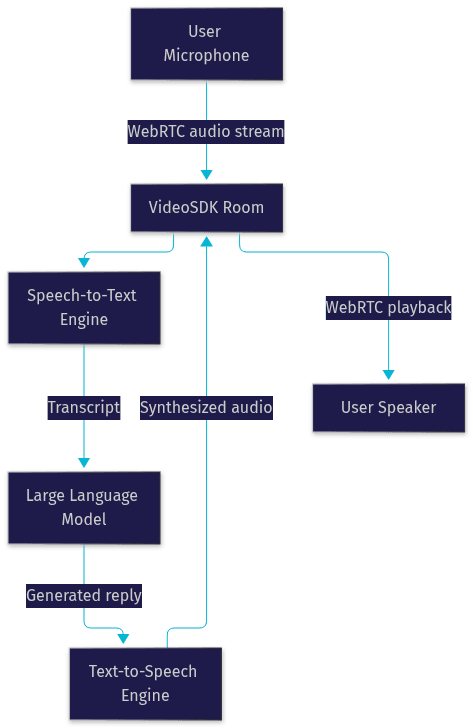
A text chatbot can take two seconds to respond and nobody notices. A voice assistant that takes two seconds feels broken, because spoken conversation has a natural rhythm with gaps of only a few hundred milliseconds. That rhythm is what an ai voice chat app must preserve. It works by capturing microphone audio, streaming it to a speech-to-text engine, passing the transcript to a language model that generates a reply, converting that reply to speech, and playing it back, all while managing turn detection so the system knows when the user has finished speaking.
VideoSDK provides this capability through its AI Voice Agent SDK, a Python-based agent framework that connects STT, LLM, and TTS providers to real-time rooms, so users on web, mobile, or even traditional phone lines can talk to your agent.
Core Technologies Behind AI Voice Chat
Every AI voice chat app is a pipeline of four cooperating systems. Understanding each one, and where its latency lives, is the foundation of good architecture.
Speech-to-Text (STT) Engines
Speech-to-text converts raw microphone audio into text, and it is usually the first place latency appears. Leading providers include OpenAI Whisper and its Realtime models, Deepgram's Nova series, Google Cloud Speech, and AssemblyAI's Universal model. Streaming STT engines matter most here: they transcribe audio incrementally as it arrives rather than waiting for the user to stop speaking, which can shave hundreds of milliseconds off perceived response time. Accuracy on conversational, noisy, or accented audio varies meaningfully between providers, so benchmark on audio that resembles your actual users, not clean studio recordings. According to Artificial Analysis's Speech Arena benchmark, top conversational STT models now achieve word error rates in the single digits on clean audio, but performance degrades noticeably on far-field and noisy input.
Text-to-Speech (TTS) Engines
Text-to-speech is the personality of your app. Providers like ElevenLabs, Cartesia, OpenAI TTS, Google Cloud TTS, and AWS Polly differ in naturalness, latency, voice variety, and multilingual coverage. Two factors dominate your choice: first-shot latency, the time from text being ready to the first audio sample playing, and streaming support, where the engine starts speaking the first words of a response before the full sentence is generated. Multilingual support also matters if your app targets more than one locale, since a single voice that can switch languages mid-conversation feels dramatically more natural than swapping voices per language.
Large Language Models (LLM) for Dialogue
The LLM is the brain. GPT-class models from OpenAI, Anthropic's Claude, and Google's Gemini handle the reasoning, persona, and knowledge behind the conversation. Two engineering concerns dominate. Prompt engineering defines the agent's persona, guardrails, and response style, and it is where most of the perceived quality difference between mediocre and excellent voice agents comes from. Context window management matters because a long voice session generates a large transcript; you need a strategy for summarizing older turns so the model stays coherent without exceeding token limits. For flows where every step must happen in order, such as loan applications or appointment booking, VideoSDK's Conversational Graph lets you define the conversation as a deterministic graph while the LLM only handles natural language generation.
Real-Time Streaming and WebRTC
The transport layer is what makes it a chat app rather than a batch processing job. WebRTC is the standard for low-latency, sub-second media transport between browsers, mobile devices, and servers. It handles audio capture, encoding, secure transport, and playback, with automatic adaptation to network conditions. This is where VideoSDK's Rooms-based architecture fits: your agent runs as a Python worker inside a VideoSDK room, and users connect to that same room from web, mobile, or via SIP telephony, exchanging audio in real time.
Key Features to Look For
The difference between a demo and a product lives in a handful of features that users now expect from any AI voice chat app.
Wake-word detection lets users start a conversation hands-free, either on-device for privacy and battery efficiency or in the cloud for flexibility. Continuous listening with voice activity detection keeps the session flowing, deciding when the user has finished a turn so the agent can respond without awkward pauses or interruptions. Language detection enables multilingual AI chat, where the system recognizes which language is being spoken and routes to the right STT and TTS models automatically.
Offline fallback matters for mobile apps used on planes, subways, or poor connections; even a degraded local mode is better than silence. Privacy controls, including visible indicators when the microphone is active and clear data retention policies, are increasingly regulatory requirements rather than nice-to-haves. Finally, usage analytics, covering session length, interruption rates, and latency percentiles, tell you where the experience breaks down before your users tell you.
Building Your Own AI Voice Chat App
Here is the implementation path, step by step, with the decisions that matter at each stage.
Choosing the Right Model
Your first decision is hosted APIs versus self-hosted models. Hosted APIs from OpenAI, Google, and Anthropic give you state-of-the-art quality, zero infrastructure, and predictable per-token pricing, at the cost of per-request latency and data leaving your environment. Self-hosted open-weight models give you data control and potentially lower cost at scale, but you own the GPU infrastructure and the operational burden. Most teams start hosted and revisit self-hosting only when volume or compliance demands it. For real-time voice specifically, multimodal models that accept audio directly, such as OpenAI's Realtime API and Google's Gemini Live, can collapse the STT-plus-LLM stages into one call, reducing latency at the price of flexibility.
Designing the Conversation Flow
Free-form LLM prompting is fast to prototype and works well for open-ended companions and assistants. But for structured flows, such as insurance claims, payment collection, or appointment booking, a deterministic approach wins: you define the steps, the branching rules, and the data to collect, and the LLM only phrases the words. VideoSDK's Conversational Graph implements exactly this pattern, with state management, extractors for structured data collection, checkpointing so a paused conversation can resume, and human-in-the-loop handoff when a real person needs to take over.
Managing Authentication and Tokens
Never expose API credentials in your client app. The standard pattern is a small backend service that authenticates the user, generates a short-lived token using your API key and secret, and hands that token to the client, which then uses it to join the session. VideoSDK uses this token-based model for room access, and its authentication guide covers the server-side generation flow. Role-based access control lets you distinguish, for example, a patient joining a telehealth voice session from a clinician who can monitor and intervene.
Handling Latency and Bandwidth
Target end-to-end response times under one second; above that, conversations start feeling sluggish. The levers that get you there: streaming STT and TTS so processing overlaps with speech, TTS caching for repeated phrases like greetings and confirmations, and geographic distribution so the media path is short. VideoSDK's network-adaptive streaming automatically adjusts bitrate and resolution to real-time bandwidth conditions, and its TURN infrastructure keeps sessions alive behind restrictive corporate firewalls. Design for network drops: buffer the last few seconds of audio, reconnect gracefully, and let the agent acknowledge the gap rather than pretending it did not happen.
Ensuring Privacy and Data Security
Voice data is biometric-adjacent and heavily regulated. GDPR and similar regimes require a lawful basis for processing, data minimization, and clear retention limits, so define a policy for how long transcripts and recordings persist and stick to it. On-device wake-word processing keeps the always-listening component local, sending audio to the cloud only after activation. For sensitive domains like healthcare, look at regional processing and geo-fencing options, which VideoSDK supports, to keep media within required jurisdictions. Encrypt transport end to end, scope tokens narrowly, and log access to recordings.

Selecting the Right Platform
Platform choice shapes your SDK options more than anything else. Native Android and iOS give you the deepest access to audio hardware, wake-word engines, and background processing, at the cost of two codebases. React Native and Flutter let one team ship both platforms, and both have mature real-time audio support through the right SDKs. Web-based apps reach every device with a browser and are the fastest to iterate on, with WebRTC handling capture and playback natively.
The practical filter is simple: pick the SDK that already supports real-time audio on your target platforms. VideoSDK's AI Voice Agent SDK covers web, React Native, Flutter, iOS, and Android integrations, and its telephony support extends the same agent to SIP trunks and providers like Twilio, Telnyx, and Vonage, so a phone caller and a web user can talk to the identical agent.
Monetisation Strategies
Voice AI has real per-minute costs, so your pricing model must map to them. Pay-as-you-go credits work well for utility apps where usage is sporadic. Subscription tiers suit companions and tutors with recurring engagement, and tiering by conversation minutes aligns revenue with your costs. In-app purchases fit consumer apps with premium voices, personas, or languages. Enterprise licensing, with volume commitments and data-residency guarantees, is where voice AI monetizes best in telehealth, contact center, and compliance-heavy verticals. A common pattern is a generous free tier to drive habit formation, a mid tier for regular users, and usage-based pricing above it, so heavy users fund the infrastructure they consume.
Real-World Use Cases
Telehealth leads adoption: AI voice agents handle intake, symptom triage, and follow-up calls, with human clinicians joining via warm transfer when needed. Language tutoring is arguably the most natural fit, since conversational practice with a patient, always-available partner is the thing learners lack most. Hands-free productivity tools serve drivers, cooks, and warehouse workers who cannot touch a screen. Accessibility assistants open voice-first computing to users with visual or motor impairments, where quality is not a feature but the entire product. Gaming companions and live shopping hosts round out the spectrum, where the voice agent entertains, guides, and sells. Each of these maps directly onto VideoSDK's agent architecture, and the code samples library includes working starting points for several of them.
Common Pitfalls and Best Practices
The same handful of failures show up in nearly every voice app launch. Token expiry mid-session drops users abruptly; use short-lived tokens with silent refresh before expiry. Microphone permission handling on mobile is the number one cause of first-run failure; explain why you need it before the system prompt appears, and handle denial gracefully. Network drops need explicit reconnection logic with audio buffering, not a silent restart. Echo cancellation must be enabled on the playback path, or your agent hears itself and spirals. Finally, LLM responses need guardrails: persona constraints, refusal policies, and bias review, because a spoken error feels far more jarring than a typed one. Test on real devices, on real networks, with real accents, before you believe your latency numbers.
Future Trends in AI Voice Chat
Three shifts are worth building for now. Multimodal agents that combine voice with vision, where the user can show the agent something with a camera mid-conversation, are already live in research models and moving to production. On-device LLMs and edge inference are shrinking the privacy-versus-quality trade-off, enabling genuinely offline AI voice chat for constrained tasks. And regulation is tightening: voice cloning consent rules, disclosure requirements for AI voices, and regional data-residency mandates will shape architecture decisions, favoring platforms with geo-fencing and flexible deployment. VideoSDK's agent architecture, with vision and multi-modality support plus both managed cloud and self-hosted deployment, is positioned for exactly this trajectory.
Definitions Glossary
Speech-to-Text (STT): The engine that converts spoken audio into text, ideally in a streaming fashion so transcription happens while the user is still speaking. Streaming STT is the single biggest latency lever in an AI voice chat app.
Text-to-Speech (TTS): The engine that converts generated text back into natural spoken audio. Streaming TTS that begins speaking before the full response is ready dramatically improves perceived responsiveness.
Turn Detection: The mechanism that decides when a user has finished speaking and the agent should respond, typically combining voice activity detection with semantic end-of-turn prediction.
Agent Worker: The Python process that runs a VideoSDK AI agent, managing its session lifecycle inside a VideoSDK room and orchestrating the STT, LLM, and TTS pipeline.
Conversational Graph: VideoSDK's deterministic flow engine for structured multi-turn voice conversations, where developers define nodes, transitions, and state while the LLM handles only natural language generation.
WebRTC: The W3C-standardized technology for real-time, low-latency audio and video transport between browsers, mobile apps, and servers, forming the media backbone of VideoSDK rooms.
Key Takeaways
- An AI voice chat app combines streaming STT, an LLM, and streaming TTS over a low-latency WebRTC transport, and end-to-end latency under one second is the threshold where conversation feels natural.
- Deterministic conversation graphs beat free-form prompting for structured flows like booking, claims, and payments, while free-form LLM prompting suits open-ended companions.
- Token-based authentication with server-side generation and role-based access control is non-negotiable; never ship API secrets in a client app.
- Privacy is architectural, not a policy document: on-device wake words, encrypted transport, retention limits, and geo-fencing for regulated verticals.
- VideoSDK's AI Voice Agent SDK connects your choice of STT, LLM, and TTS providers to real-time rooms across web, mobile, and SIP telephony, with Conversational Graph available for deterministic flows.
Conclusion
Building an ai voice chat app in 2026 is a genuinely good bet: the STT, TTS, and LLM layers are mature, WebRTC transport is solved, and users are now comfortable talking to software. The work is in assembling the pipeline well, keeping latency tight, securing tokens and data, and choosing the right conversation architecture for your use case. Start with the VideoSDK AI Voice Agent documentation, grab a starting point from the code samples, and sign up free at app.videosdk.live to get your first agent talking. What are you building with VideoSDK? Drop a comment, I'd love to hear what kind of voice experience you're working on.
Free $20 Balance for AI Voice Agents & Video Calls
FAQ