


An AI voice call app is software that lets an AI agent hold a real spoken phone conversation with a human, powered by a speech-to-text engine, a large language model, and a text-to-speech engine, all bridged to the phone network through a SIP telephony gateway. VideoSDK's AI Voice Agent SDK connects these components in real time with sub-second response latency, and you can have a working agent handling live calls in a single afternoon.
AI phone assistants have crossed from demo to production. In 2026, businesses run outbound sales agents that book appointments, clinics use voice AI to triage patient intake, and developers ship personal AI voicemail summarizers over a weekend. What changed is not the models alone, it is the infrastructure: real-time pipelines, managed telephony gateways, and open-source agent SDKs have collapsed the engineering barrier that used to require a dedicated WebRTC and telephony team.
If you are a developer evaluating how to build an ai voice call app, this guide covers the full picture: the core architecture, how to choose STT, LLM, and TTS providers, how SIP telephony fits in, a step-by-step walkthrough using VideoSDK's AI Voice Agent, security and edge-case handling, real-world use cases, and a realistic cost model.
What Is an AI Voice Call App?
An AI voice call app is defined as an application in which an AI agent, rather than a human, conducts a live voice conversation over a phone or web connection. The app works by capturing the caller's audio, converting speech to text, reasoning over that text with a large language model, generating a spoken response through text-to-speech, and streaming that audio back, all fast enough that the conversation feels natural.
Every AI voice call app shares four core components: a speech-to-text (STT) engine that transcribes the caller in real time, a large language model (LLM) that decides what to say next, a text-to-speech (TTS) engine that renders the reply as audio, and a telephony bridge that connects the pipeline to the public phone network or a web client. VideoSDK provides this entire stack as a managed room-based architecture, so the agent and the human caller meet inside a VideoSDK room and the media, transcription, and routing are handled for you.
Core Architecture of an AI Voice Call App
The end-to-end flow of an AI voice call app follows a consistent pattern regardless of provider: the caller's phone connects through a SIP or telephony gateway, which bridges traditional phone signaling into a WebRTC-based media server. The media server routes the caller's audio into an AI pipeline where speech is transcribed, interpreted by an LLM, and converted back into speech, then the response audio streams back to the caller's phone. The entire round trip must complete in well under a second, or the conversation starts to feel like a laggy satellite call.
The diagram below shows this flow using VideoSDK's architecture, where the AI Agent Worker runs as a Python process inside a VideoSDK room alongside the telephony bridge:
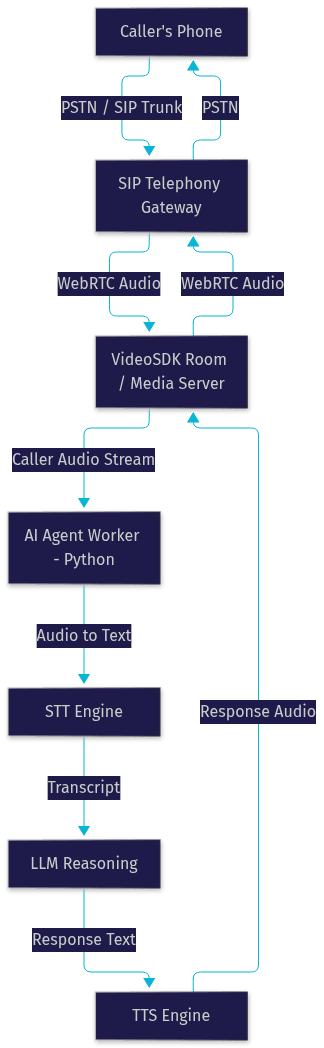
Two properties of this architecture matter most to developers. First, the AI pipeline is stateless per turn but stateful per session, meaning the agent maintains conversation memory across the call while each speech turn is processed independently. Second, the telephony bridge is bidirectional, so the same agent can serve inbound calls, outbound calls, and web-based callers without changing the pipeline.
The Role of a Real-Time Voice Agent
Real-time processing is what separates a usable AI voice call app from a frustrating one. Human conversation has a natural rhythm: when a person stops speaking, they expect a response within roughly 500 milliseconds, and anything beyond a second feels broken. A real-time voice agent achieves this by streaming audio in both directions, running speech-to-text incrementally as words arrive, and using turn detection to decide when the caller has finished a thought.
Turn detection, often paired with voice activity detection (VAD), is the quiet hero of the architecture. Without accurate turn detection, the agent either interrupts the caller mid-sentence or sits in awkward silence. VideoSDK's agent pipeline includes built-in turn detection and voice activity detection, plus features like preemptive response, which lets the agent begin replying the instant the caller's turn ends rather than waiting for full silence.
Telephony Integration Options
You have three main paths to connect an AI pipeline to the phone network. SIP trunking connects your infrastructure directly to a carrier through the Session Initiation Protocol, offering the most control and typically the lowest per-minute cost, but it requires you to manage gateway configuration, routing rules, and security. Managed voice APIs like Twilio Voice, Vonage, and Telnyx abstract the carrier relationship entirely, trading some per-minute cost for dramatically faster setup. Direct carrier APIs sit at the enterprise end, requiring negotiated contracts but offering volume pricing.
VideoSDK takes a fourth approach: a built-in SIP gateway with inbound and outbound call flows, routing rules, and integrations for Twilio, Vonage, Telnyx, and Plivo trunks. This means you can bring your existing phone numbers to a VideoSDK AI agent, or start with VideoSDK's telephony directly, without building a separate gateway service. The telephony documentation covers the full inbound and outbound flow.
Choosing the Right AI Models
Model selection is where most of your quality and cost trade-offs live. The three layers of the pipeline, STT, LLM, and TTS, can be mixed and matched, and the best combination depends on your latency budget, accuracy requirements, languages, and volume.
For speech-to-text, the leading options are OpenAI Whisper, Deepgram, and Google Speech-to-Text. Deepgram's current conversational models are widely regarded for low-latency streaming transcription, which matters enormously for voice agents since batch-style transcription adds hundreds of milliseconds of delay. OpenAI Whisper excels at accuracy across many languages but is heavier for real-time use. Google's STT offers strong multilingual coverage with solid streaming support.
For the reasoning layer, OpenAI's GPT-4o, Anthropic's Claude, and Google's Gemini are the primary choices. For voice agents, favor models with fast time-to-first-token and strong instruction following, since the LLM must generate a response in a fraction of a second. Real-time multimodal models like OpenAI's Realtime API and Google's Gemini Live can even collapse the STT and TTS layers into a single speech-native model, reducing pipeline latency at the cost of flexibility.
For text-to-speech, ElevenLabs leads in naturalness and voice cloning quality, AWS Polly and Azure Speech offer reliability and broad language coverage at lower cost, and Cartesia's Sonic models are strong contenders for low-latency conversational speech.
Your selection criteria, in priority order for a voice agent: latency first, accuracy second, multilingual support third, cost last. A cheap model that adds 800 milliseconds of delay will produce an app nobody wants to use.
Building an AI Voice Call App with VideoSDK
This walkthrough explains the complete build path using VideoSDK's AI Voice Agent SDK. No code is shown here; the goal is that you understand what each component does and what outcome to expect at every stage.
Step 1: Set Up a VideoSDK Account
Create an account at app.videosdk.live/login. The free tier includes usage credits sufficient to build and test your first agent . From your dashboard you obtain an API key and secret pair, which you will use for server-side token generation. Never expose the secret in a client application.
Expected outcome: you have credentials and access to the VideoSDK dashboard where rooms, recordings, and agent sessions are visible.
Step 2: Create a SIP-Enabled Room
A VideoSDK room is the meeting point between the human caller and the AI agent. For phone-based calling, you enable the room for SIP access, which gives it a dial-in identity on the telephony network. You can configure routing rules so that inbound calls to your Twilio, Telnyx, or Plivo number land in the room, and so the agent can place outbound calls through the outbound gateway.
Expected outcome: a phone number or SIP endpoint that, when dialed, places the caller into a room where your agent is listening.
Step 3: Deploy an AI Agent Worker in Python
The Agent Worker is a Python process that joins the VideoSDK room and manages the agent's session lifecycle: it listens to the caller's audio stream, sends it through the pipeline, and publishes the agent's spoken responses back into the room. You describe the agent's persona, instructions, and available function tools in natural language configuration, and the worker handles session management, turn detection, and speech handling. You can deploy it on VideoSDK's managed Agent Cloud or self-host it with Docker or Kubernetes.
Expected outcome: a running agent that joins rooms automatically when calls arrive and speaks with your configured voice and behavior.
Step 4: Connect STT and TTS Providers
Attach your chosen speech providers to the pipeline. VideoSDK's agent SDK supports plugins for major STT providers including OpenAI Whisper, Deepgram, and Google, and TTS providers including ElevenLabs, OpenAI TTS, AWS Polly, Cartesia, and Azure Speech . You can also enable built-in de-noising to clean up noisy phone audio before transcription, and TTS caching so repeated phrases like greetings and hold messages return instantly.
Expected outcome: a complete speech loop where the caller's words are transcribed, reasoned over, and answered in natural speech within sub-second timing.
Step 5: Handle Call Routing and Token Authentication
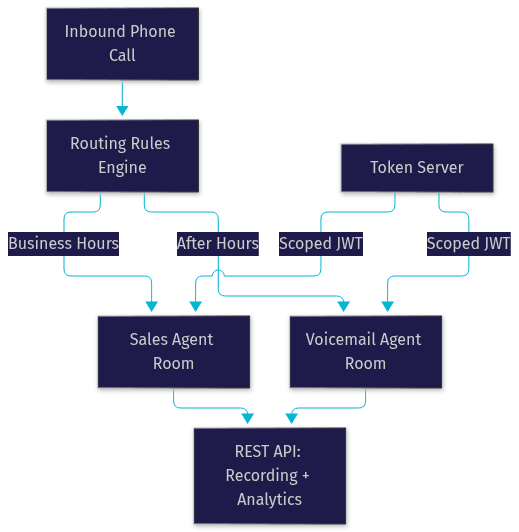
Finally, wire up the control plane. Generate meeting tokens server-side using your API key and secret, scoping each token to a specific room and participant role, following the authentication and token guide. Configure routing rules to direct different numbers, times of day, or caller intents to different agents, and use the REST APIs for room management, session analytics, and programmatic recording control, all documented in the API reference.
Expected outcome: a production-shaped deployment where calls route correctly, access is authenticated, and every session is observable.
Authentication and Security Best Practices
Treat the AI call path with the same rigor as any payment flow. Generate all VideoSDK tokens server-side and scope each token to a single room and role, so a leaked token cannot grant access to other sessions. Enable end-to-end encryption for media streams, and preserve caller-ID metadata carefully, since regulations in many jurisdictions restrict how caller identity may be stored and shared. If your app touches health information, HIPAA applies to call recordings and transcripts; if it serves EU callers, GDPR's data minimization and deletion requirements apply to both audio and transcripts. VideoSDK supports geo-fencing and IP whitelisting for SIP traffic, which helps satisfy data residency requirements.
Handling Edge Cases
The edge cases are where AI voice call apps earn or lose user trust. Missed calls should route to an AI voicemail agent that records a message and produces a summary, rather than dead air. Network drops require graceful reconnection: the agent session should resume with conversation memory intact rather than restarting the dialogue. VAD false triggers, where background noise is mistaken for speech, are mitigated with de-noising and a well-tuned turn detection threshold. Finally, define an explicit fallback: when the AI cannot confidently continue, transfer the call to a human using warm transfer, which keeps the caller connected while context passes to the human agent. VideoSDK's agent SDK includes voicemail detection, DTMF event handling, and call transfer as built-in capabilities.
Real-World Use Cases
Business calling. Appointment scheduling agents call patients or customers, confirm details, and write structured outcomes to your calendar system. Sales outreach agents qualify leads conversationally and book meetings, with every call transcribed and summarized for the CRM. A loan or insurance application flow, where every step must happen in order, is an ideal fit for VideoSDK's Conversational Graph, which enforces a deterministic call flow while the LLM handles only the natural language.
Accessibility. Voice AI opens calling to people with speech impairments: the caller types or uses assistive input, and the AI agent speaks on their behalf in a natural or cloned voice. Real-time transcription also serves deaf and hard-of-hearing users with live captions of the other party.
Personal productivity. An AI voicemail summarizer listens to your messages, extracts action items, and drafts replies. A personal assistant agent can make restaurant reservations or appointment calls on your behalf, handling hold music and DTMF menus.
Entertainment and social. AI characters for prank-adjacent fun calls, language-practice partners that converse at your level, and interactive voice games are all emerging categories where personality-rich TTS and low latency are the product.
Pricing and Cost Modeling
A realistic cost model for an AI voice call app has three layers. VideoSDK charges for room usage, including minutes and any recordings or transcription . AI providers charge per minute or per character: STT is typically priced per minute of audio, TTS per character of generated speech, and the LLM per input and output token. SIP carrier fees add a per-minute telephony cost that varies by destination.
As a worked example, imagine a scheduling agent making a 3-minute outbound call. You pay roughly 3 minutes of STT, a few thousand LLM tokens for the conversation, 3 minutes of TTS output, 3 minutes of SIP termination to a US number, and 3 minutes of VideoSDK room usage. Multiplied across thousands of calls per month, the per-call cost is usually a small fraction of a human caller's cost, but model choice dominates the bill: switching TTS providers alone can change per-call cost by several multiples. Model your costs against your actual call length distribution before committing.
Future Trends in AI Voice Calling
Three trends will shape the next wave of AI voice call apps. Multimodal agents that combine voice with vision, where an agent on a video call can see a document the caller holds up, are already possible with VideoSDK's vision and multi-modality support. On-device inference is pushing STT and even small LLMs onto phones, promising lower latency and stronger privacy for consumer apps. Dynamic voice cloning, where an agent adapts its voice mid-conversation or speaks in a user's own cloned voice for accessibility, is maturing rapidly alongside the regulatory guardrails around consent for cloned voices. On the regulatory front, expect continued tightening around AI disclosure requirements for outbound calls, with several jurisdictions already requiring agents to identify themselves as AI at the start of a call. Building with disclosure and consent in mind now is cheaper than retrofitting it.
Definitions Glossary
AI Voice Call App: An application in which an AI agent conducts live spoken conversations with humans over phone or web connections, combining STT, LLM, and TTS in a real-time pipeline.
Agent Worker: The Python process that runs a VideoSDK AI agent, managing its session lifecycle inside a VideoSDK room, including listening to caller audio and publishing spoken responses.
SIP (Session Initiation Protocol): The signaling protocol that bridges traditional phone networks to WebRTC-based rooms, enabling inbound and outbound AI calls through gateways and trunks.
Turn Detection: The mechanism that decides when a caller has finished speaking and the AI agent should respond, critical for natural conversational rhythm.
Voice Activity Detection (VAD): The technique that distinguishes human speech from background noise or silence, preventing the agent from responding to false audio triggers.
Conversational Graph: VideoSDK's deterministic flow engine for structured multi-turn voice conversations, where business rules rather than LLM judgment control branching.
Key Takeaways
- An AI voice call app combines four components: a telephony bridge, real-time STT, an LLM reasoning layer, and low-latency TTS, all of which must complete a round trip in under a second.
- Latency should be your first model-selection criterion, ahead of accuracy, language coverage, and cost, because slow responses destroy the calling experience.
- VideoSDK provides the full stack for AI calling: SIP telephony gateways, a Python AI Agent SDK, built-in turn detection, voicemail detection, call transfer, and REST APIs for orchestration.
- Edge cases like missed calls, network drops, and VAD false triggers must be designed for explicitly, with warm transfer to humans as the trust-preserving fallback.
- Deterministic flows such as scheduling and claims processing benefit from Conversational Graph, which keeps business rules out of the LLM's hands.
Conclusion
Building an ai voice call app in 2026 is a genuinely compelling proposition: the models are good enough, the telephony infrastructure is managed for you, and the developer tooling, like VideoSDK's open-source AI Agent SDK, has removed the hardest plumbing work. Start with the AI Voice Agent documentation, grab a free account at app.videosdk.live/login, and join the VideoSDK Discord community when you get stuck. What are you building with VideoSDK? Drop a comment, I'd love to hear what kind of AI voice call use case you're working on.
Key Features of AI Voice Call Apps
AI voice call apps are equipped with a range of features that make them powerful tools for communication and automation:
AI-Powered Voice Recognition and Natural Language Processing
At the heart of every AI voice call app is its ability to understand and process spoken language. AI-powered voice recognition converts audio into text, while natural language processing (NLP) enables the app to understand the meaning and intent behind the spoken words. This allows the app to respond appropriately, provide relevant information, and complete tasks efficiently. The accuracy and sophistication of these technologies are constantly improving, making AI voice call apps increasingly effective in handling a wide range of communication tasks.
Intelligent Call Routing and Automation
AI voice call apps can intelligently route calls to the appropriate agent or department based on the caller's needs. This ensures that customers are quickly connected to the right person, reducing wait times and improving satisfaction. In addition, these apps can automate routine tasks such as appointment scheduling, order processing, and information retrieval, freeing up human agents to focus on more complex and critical issues. This automation leads to significant cost savings and increased efficiency.
Personalized Voice and Tone Customization
Many AI voice call apps offer the ability to customize the voice and tone used in automated interactions. This allows businesses to create a consistent brand identity and tailor the communication style to their target audience. For example, a healthcare provider might choose a calm and reassuring voice, while a marketing agency might opt for a more energetic and engaging tone. The ability to personalize the voice and tone enhances the customer experience and reinforces brand messaging.
How AI Voice Call Apps Work: A Technical Overview
AI voice call apps rely on a complex interplay of technologies to function effectively. Here's a breakdown of the key components:
Speech Recognition
Speech recognition is the process of converting spoken audio into text. This is typically achieved using sophisticated algorithms that analyze the acoustic properties of the audio signal and identify the corresponding words. The accuracy of speech recognition technology has improved dramatically in recent years, thanks to advancements in deep learning and machine learning.
Natural Language Understanding
Natural language understanding (NLU) is the process of interpreting the meaning and intent behind the text generated by speech recognition. NLU algorithms analyze the syntax, semantics, and context of the text to understand what the caller is asking for or trying to communicate. This understanding is crucial for the AI voice call app to respond appropriately and provide relevant information.
Text-to-Speech Synthesis
Text-to-speech (TTS) synthesis is the process of converting text into spoken audio. TTS engines use sophisticated algorithms to generate realistic and natural-sounding speech. Modern TTS engines can even mimic human-like voices and emotions, making the interaction more engaging and personalized.
Python: Text-to-Speech Example
1from gtts import gTTS
2import os
3
4def text_to_speech(text, filename="output.mp3"):
5    """Converts text to speech and saves it as an MP3 file."""
6    try:
7        tts = gTTS(text=text, lang='en')
8        tts.save(filename)
9        os.system(f"mpg321 {filename}") # Requires mpg321 to be installed
10    except Exception as e:
11        print(f"Error during TTS: {e}")
12
13# Example usage
14text = "Hello, this is an AI voice call app speaking."
15text_to_speech(text)
16print("Speech generated and saved as output.mp3")
AI Voice Call Apps for Different Industries
AI voice call apps are transforming various industries by improving communication, automating tasks, and enhancing customer service:
Customer Service
In customer service, AI voice call apps can handle a high volume of calls simultaneously, reducing wait times and improving customer satisfaction. They can also provide personalized support and resolve common issues without the need for human intervention. This frees up human agents to focus on more complex and critical issues, leading to increased efficiency and cost savings.
Sales and Marketing
AI voice call apps can automate lead qualification, schedule appointments, and provide personalized product recommendations. They can also track customer interactions and provide valuable insights into customer behavior, helping sales and marketing teams optimize their strategies and improve their results. By automating routine tasks and personalizing interactions, AI voice call apps can help businesses close more deals and increase revenue.
Healthcare
In healthcare, AI voice call apps can automate appointment scheduling, provide medication reminders, and answer common patient inquiries. They can also be used to monitor patients remotely and provide early warnings of potential health problems. By improving communication and automating routine tasks, AI voice call apps can help healthcare providers deliver better care and improve patient outcomes.
Choosing the Right AI Voice Call App: Factors to Consider
Selecting the right AI voice call app requires careful consideration of several factors:
Features and Functionality
Consider the specific features and functionality that are most important to your business. Do you need advanced voice recognition, natural language processing, or call automation capabilities? Make sure the app offers the features you need to achieve your goals.
Pricing and Plans
Compare the pricing and plans of different AI voice call apps to find one that fits your budget. Some apps offer subscription-based pricing, while others charge per call or per minute. Choose a plan that aligns with your usage patterns and budget constraints.
Integration Capabilities
Ensure that the AI voice call app integrates seamlessly with your existing systems, such as your CRM, marketing automation platform, and phone system. Integration is crucial for streamlining workflows and maximizing efficiency.
Security and Privacy
Prioritize security and privacy when choosing an AI voice call app. Make sure the app complies with industry regulations and protects your data from unauthorized access. Look for features such as encryption, access controls, and audit logging.
The Future of AI Voice Call Apps
The future of AI voice call apps is bright, with ongoing advancements in technology and increasing adoption across various industries:
Enhanced Personalization and Contextual Understanding
AI voice call apps will become even more personalized and context-aware, providing tailored responses based on individual user preferences and real-time situations. They will be able to understand the caller's emotional state and adjust their communication style accordingly.
Improved Voice Quality and Naturalness
The quality and naturalness of AI-generated voices will continue to improve, making it increasingly difficult to distinguish between human and AI voices. This will lead to more engaging and realistic interactions.
Increased Integration with Other Business Tools
AI voice call apps will become increasingly integrated with other business tools, such as CRM, marketing automation platforms, and collaboration software. This will enable seamless workflows and improved data sharing.
Expansion into New Industries and Applications
AI voice call apps will expand into new industries and applications, such as education, entertainment, and government services. They will play an increasingly important role in our daily lives.
Conclusion: Embracing the Potential of AI Voice Call Apps
AI voice call apps are transforming the way we communicate and conduct business. By automating tasks, improving efficiency, and enhancing customer service, they offer a wide range of benefits for organizations of all sizes. As technology continues to advance and adoption increases, AI voice call apps will play an increasingly important role in our lives. Embracing the potential of these intelligent applications is crucial for staying competitive in today's rapidly evolving world.
Free $20 Balance for AI Voice Agents & Video Calls
FAQ