


An AI chatbot voice is a conversational agent that users talk to instead of typing, built by chaining speech-to-text, a language model, and text-to-speech into one low-latency pipeline. VideoSDK's AI Agent SDK connects all three layers inside real-time rooms, so developers can ship spoken chatbots on web, mobile, or phone in days rather than months. This guide covers the architecture, provider choices, and production steps you need to build one in 2026.
Voice is quickly becoming the default interface for conversational AI. The surge started with real-time multimodal models and accelerated as speech-to-text and text-to-speech services dropped to conversational-grade latency. Users now expect to speak to a support bot, a telehealth assistant, or a tutoring app the same way they speak to a person. For developers, that means an AI chatbot voice is shifting from a novelty to a must-have feature.
This article walks through what an AI chatbot voice actually is, the full pipeline behind it, how to choose STT and TTS providers, and a step-by-step build walkthrough grounded in VideoSDK's real-time communication platform. By the end, you'll know how to architect, build, and production-harden a voice-first chatbot.
What Is an AI Chatbot Voice?
An AI chatbot voice is defined as a conversational agent that accepts spoken input, reasons over it with a language model, and responds with synthesized speech rather than text on a screen. It is the spoken layer wrapped around the same LLM logic that powers text chatbots.
An AI chatbot voice works by combining two core components. Speech-to-text (STT) converts the user's microphone audio into transcribed text in real time. Text-to-speech (TTS) converts the language model's response back into natural-sounding audio. Between them sits the language model, which interprets intent, retrieves context, and generates the reply.
VideoSDK provides this capability through its AI Agent SDK, a Python-based framework that connects LLM, STT, and TTS providers to real-time rooms. Users connect from a web app, mobile app, or even a phone number, and the agent processes their speech through the full pipeline inside a managed session.
The key difference between a text chatbot and an AI chatbot voice is latency tolerance. A text chatbot can take two seconds to respond and feel fine. A voice chatbot that pauses for two seconds feels broken. Everything in the architecture below exists to keep that round trip short.
Core Architecture of an AI Chatbot Voice
Every production AI chatbot voice follows the same fundamental pipeline: audio capture, speech-to-text transcription, language model reasoning, text-to-speech synthesis, and audio playback back to the user. The diagram below shows how these stages connect in a VideoSDK-based deployment.
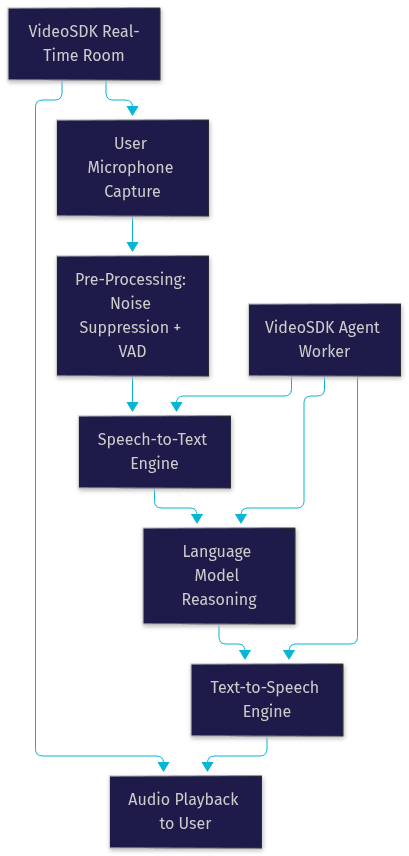
The Agent Worker is the Python process orchestrating the session. It manages turn detection, decides when the user has finished speaking, streams audio to the STT provider, passes the transcript to the LLM, and routes the generated response to the TTS provider. Each handoff adds latency, so the pipeline is streamed end to end rather than waiting for each stage to finish completely.
Audio Capture and Pre-Processing
Audio capture is where an AI chatbot voice succeeds or fails first. The microphone stream must be sampled consistently, and background noise must be suppressed before it reaches the STT engine, because noisy input degrades transcription accuracy directly. Voice Activity Detection (VAD) runs alongside capture to distinguish speech from silence, so the system only transcribes when the user is actually talking. VideoSDK's agent pipeline includes built-in de-noise and VAD components, which removes the need to wire these separately.
Speech-to-Text Options for Your AI Chatbot Voice
The STT layer converts spoken audio into text, and provider choice directly shapes both accuracy and perceived responsiveness. OpenAI Whisper is strong on accuracy across accents but was designed for batch transcription, so streaming deployments typically use its real-time variants. Deepgram's models are widely favored for streaming voice agents because they deliver low-latency, streaming-first transcription. Google Cloud Speech-to-Chirp offers solid multilingual coverage and tight integration with the Google ecosystem.
The two metrics that matter most are word error rate on conversational audio and time-to-first-token for streaming transcription. Independent comparisons on Artificial Analysis's Speech Arena provide a useful neutral baseline for these figures. VideoSDK's agent framework supports multiple STT providers, including OpenAI Whisper, Deepgram, and Google, so you can swap providers without rebuilding the pipeline.
Language Model Reasoning in an AI Chatbot Voice
Once transcribed, the user's utterance is passed to the LLM as the next turn in the conversation. The model's job is intent understanding, context retention, and response generation. Providers like OpenAI's GPT models, Google Gemini, and Anthropic Claude each offer different trade-offs between reasoning quality, cost, and response speed. For voice, response speed often matters more than marginal reasoning gains, because a brilliant answer delivered after a three-second pause still feels like a failure.
Context management is critical here. The agent must maintain conversation history, system instructions, and any retrieved knowledge without inflating the context window to the point where generation slows down. VideoSDK's agent pipeline includes context window management and memory features specifically for this problem.
Text-to-Speech Choices for Your AI Chatbot Voice
The TTS layer is the personality of your AI chatbot voice. ElevenLabs leads on naturalness and voice cloning, making it the default choice for consumer-facing products where the voice is part of the brand. AWS Polly and Azure Speech are the pragmatic enterprise picks: cheaper, reliably available, and easy to provision at scale. Cartesia's Sonic models have gained strong traction for real-time voice agents because of their low synthesis latency.
Voice customization is the key differentiator: the ability to select or clone voices, adjust speaking rate, and control emotional tone. TTS caching also matters in production, because frequently repeated phrases (greetings, disclaimers) can be pre-synthesized and replayed instantly. VideoSDK's agent SDK supports ElevenLabs, OpenAI TTS, Google TTS, AWS Polly, Cartesia, and several others as pluggable TTS providers.
Building an AI Chatbot Voice: Step-by-Step Walkthrough
Building an AI chatbot voice is less about writing a chatbot brain and more about wiring a real-time pipeline correctly. The walkthrough below covers the full path from SDK selection to production hardening, using VideoSDK's platform as the connective layer.
Step 1: Select your SDK and platform. Decide where users will talk to the chatbot: web, mobile, or phone. VideoSDK provides SDKs for React, JavaScript, React Native, Flutter, Android, and iOS, all built on the same real-time room architecture, so the voice experience stays consistent across platforms.
Step 2: Provision your AI providers. Create accounts with your chosen STT, LLM, and TTS providers and obtain API keys. Keep every provider key on the server side; the client should never hold them.
Step 3: Wire the pipeline. Configure the agent worker so that incoming user audio flows to STT, transcripts flow to the LLM, and LLM responses flow to TTS, with the synthesized audio streamed back into the room. VideoSDK's agent handles the streaming handoffs, turn detection, and preemptive response handling so the pipeline feels conversational rather than batch-like.
Step 4: Handle turn-taking. Turn detection decides when the user has finished speaking and when the agent should respond or interrupt itself. Poor turn detection is the single most common reason voice chatbots feel unnatural. VideoSDK's pipeline includes configurable turn detection and voice activity detection for exactly this reason.
Step 5: Test in a real client. Run the agent against a browser or mobile client over a real network, not a local loopback. Measure the full round trip from end of user speech to start of agent speech, and tune providers until it sits under your latency budget.
Selecting the Right SDK for Your AI Chatbot Voice
The SDK choice determines how much real-time plumbing you write yourself. A multi-platform SDK matters because most voice products ship on more than one surface: a web app for desktop users and a mobile app for everyone else. VideoSDK's breadth across React, Flutter, Android, iOS, and React Native means one agent backend serves every client, and the code samples library gives you working reference implementations for each platform.
Managing Tokens and Security for Your AI Chatbot Voice
VideoSDK uses token-based authentication. You generate a token server-side using your API key and secret, then pass it to the client SDK when the user starts a session. Never expose your API secret in frontend code. The same discipline applies to your AI provider keys: they belong in server-side environment configuration, referenced by the agent worker, never shipped to the browser. For detailed guidance, see the authentication and token documentation.
Handling Errors and Edge Cases in Your AI Chatbot Voice
The most frequent failure modes are invalid or expired tokens, poor network conditions causing choppy audio, and audio clipping when the user speaks over the agent. Mitigation is straightforward: refresh tokens before expiry, enable network-adaptive streaming so the connection degrades gracefully on weak bandwidth, and use the agent's preemptive response handling so the agent stops speaking when the user interrupts. Always provide a fallback text mode so users on very poor connections can still complete their task.
Real-World Use Cases for AI Chatbot Voice
Three scenarios illustrate where an AI chatbot voice delivers measurable outcomes.
E-commerce support. A voice-enabled support chatbot lets shoppers describe a problem naturally (
Free $20 Balance for AI Voice Agents & Video Calls
FAQ