


An open-source AI agent is an autonomous software system that uses a large language model as its reasoning core, integrates with external tools, maintains memory across interactions, and operates under a community-driven license. VideoSDK contributes to this ecosystem with its open-source Python Agent SDK for real-time voice AI. The frameworks below let you self-host, customize, and extend agent capabilities without vendor lock-in.
Open-source AI agents are hitting an inflection point in 2026. Developers want autonomous systems they can inspect, modify, and run on their own infrastructure, not black-box SaaS APIs that charge per token and hide their reasoning traces. The shift is driven by better local LLMs, standardized tool protocols like MCP, and a growing catalog of frameworks that handle the hard parts of agent engineering: memory management, tool orchestration, and safe execution.
An AI agent is more than a chatbot wrapped around an LLM. It perceives input, reasons about goals, selects and invokes tools, stores results in memory, and adapts its behavior based on outcomes. Open-source implementations give you full control over every layer of that pipeline, from the model provider to the sandboxing policy. This article walks through what open-source AI agents are, compares six leading frameworks, and gives you a practical selection framework and setup walkthrough.
What Is an Open-Source AI Agent?
An open-source AI agent is defined as an autonomous software system that uses a large language model as its reasoning engine, integrates with external tools and APIs, maintains persistent or episodic memory, and follows a policy that governs its actions. The open-source qualifier means the agent's core code is published under a permissive or copyleft license, allowing developers to inspect, modify, and redistribute the implementation.
An AI agent works by cycling through a perception-reasoning-action loop. The LLM core receives a user query or environmental signal, generates a plan or tool call, executes the action, observes the result, and updates its memory. This loop continues until the agent reaches a terminal state or the user intervenes. The key components are the LLM core (which handles natural language reasoning), the tool integration layer (which connects the agent to external capabilities like web search, code execution, or database queries), the memory system (which stores context across turns and sessions), and the policy engine (which enforces safety constraints and execution rules).
Open-source AI agents differ from proprietary SaaS agents in several critical ways. With a proprietary agent, you send your data to a vendor's servers, pay per API call, and trust their safety guardrails. With an open-source agent, you host the model locally or on your own cloud infrastructure, control the memory store, define the tool sandbox, and can audit every reasoning step. The trade-off is operational complexity: you manage model deployment, token budgets, security boundaries, and upgrades yourself.
VideoSDK contributes to this ecosystem through its open-source AI Agent SDK, a Python-based framework that connects LLMs, speech-to-text, and text-to-speech providers to real-time communication rooms. While the frameworks discussed in this article focus on text and task-based agents, VideoSDK's agent SDK specializes in voice-first autonomous interactions, making it a complementary tool for developers building conversational AI experiences.
The open-source landscape in 2026 includes frameworks ranging from minimal single-file agents to full orchestration platforms with reinforcement learning pipelines. Some prioritize token efficiency, others emphasize self-evolution, and a few focus on multi-agent swarms. Understanding these differences is the first step toward choosing the right one for your project.
Leading Open-Source AI Agent Frameworks
The open-source AI agent ecosystem in 2026 offers frameworks spanning multiple architectural philosophies, from reinforcement-learning-driven self-evolution to minimal token-efficient designs. Each framework targets a different point on the complexity-versus-control spectrum.
Youtu-Agent
Youtu-Agent is an open-source AI agent framework that combines workflow and meta-agent modes with an experience-learning pipeline. The workflow mode lets you define deterministic task sequences, while the meta-agent mode allows the LLM to dynamically plan and select tools based on the task at hand. The experience-learning component uses a reinforcement learning pipeline to improve agent performance over repeated task executions.
The framework has been benchmarked on WebWalkerQA and GAIA, two established evaluation suites for autonomous agents. WebWalkerQA tests web navigation and information extraction, while GAIA assesses general AI assistant capabilities across multi-step reasoning tasks. Youtu-Agent is best suited for developers who need agents that improve through repeated exposure to similar task types and who want the flexibility to switch between scripted and autonomous execution modes.
Prime Agent
Prime Agent introduces the Recursive Language Model (RLM) concept, where the agent decomposes complex tasks into sub-tasks and recursively applies its language model to each sub-task until it reaches a solvable granularity. The continual harness ensures that the agent persists across sessions, accumulating knowledge and refining its skill packages over time.
Prime Agent emphasizes coding-centric workflows, making it particularly strong for software development automation, code review, and repository management tasks. The skill package system lets you bundle related tools and prompts into reusable modules that can be shared across projects. Developers building CI/CD automation or developer productivity tools will find Prime Agent's recursive decomposition approach well-suited to multi-step coding tasks.
nanobot
nanobot is a lightweight open-source AI agent designed for multi-chat-app support, meaning it can operate across different chat interfaces (Slack, Discord, Telegram, and others) from a single configuration. Its persistent memory system stores conversation context and learned facts across sessions, so the agent remembers user preferences and prior interactions without requiring external state management.
nanobot also integrates with the Model Context Protocol (MCP), allowing it to connect to a growing ecosystem of standardized tool servers. This makes it a strong choice for developers who want a minimal-setup agent that can plug into existing chat infrastructure and gradually expand its tool capabilities through MCP-compatible servers. The VideoSDK Discord community is one example of where developers discuss agent integrations like these.
GenericAgent
GenericAgent takes a minimalist approach to AI agent architecture. The framework provides a small core that handles the perception-reasoning-action loop, and everything else is built around a self-evolving skill tree. The skill tree starts with basic capabilities and grows as the agent encounters new task types, automatically generating and testing new tool combinations.
The emphasis on token efficiency makes GenericAgent particularly attractive for developers running agents on local LLMs with limited context windows. By keeping the core architecture small and only loading relevant skills on demand, the agent reduces the token overhead that plagues more monolithic frameworks. GenericAgent is best for developers who want a lean, extensible foundation without the overhead of a full orchestration platform.
OmniAgent
OmniAgent focuses on full-dimensional self-evolution, meaning the agent can improve not just its task execution but also its memory strategies, tool selection policies, and reasoning prompts over time. The proactive memory system anticipates what information will be needed in future interactions and pre-loads relevant context, reducing latency during active sessions.
The safety harness is a standout feature, providing configurable boundaries that prevent the agent from taking actions outside its authorized scope. This makes OmniAgent suitable for deployment scenarios where autonomous agents need guardrails, such as customer-facing applications or environments with sensitive data access. Developers who need agents that can safely operate with minimal human supervision will appreciate the built-in safety controls.
Ouroboros
Ouroboros is named after the serpent that eats its own tail, reflecting its self-referential architecture where agents can spawn and manage other agents. The framework maintains durable memory across restarts, so agent state survives process crashes and system reboots without external state management infrastructure.
The swarm-of-specialist-agents model lets you deploy multiple agents, each optimized for a specific domain, and have them collaborate on complex tasks. Cross-platform binaries mean you can run Ouroboros agents on Linux, macOS, and Windows without dealing with platform-specific dependency issues. Ouroboros is best for developers building multi-agent systems where durability and cross-platform deployment are requirements.
Comparative Feature Matrix
Choosing between these frameworks requires comparing them across the dimensions that matter most for production deployments. The matrix below summarizes architecture, memory model, tool integration approach, scalability characteristics, licensing, and community size for each framework.
[LINKABLE ASSET — comparison table]
| Framework | Architecture | Memory Model | Tool Integration | Scalability | Licensing | Best For |
|---|---|---|---|---|---|---|
| Youtu-Agent | Workflow + meta-agent | Experience-learning with RL | Custom tool definitions | Medium (single-agent focus) | Apache 2.0 | Tasks requiring performance improvement over time |
| Prime Agent | Recursive decomposition | Continual harness with skill packages | Coding-focused tool ecosystem | Medium | MIT | Software development and code automation |
| nanobot | Lightweight multi-chat | Persistent cross-session | MCP-compatible | High (stateless core) | MIT | Chat app integration with minimal setup |
| GenericAgent | Minimal core + skill tree | On-demand skill loading | Self-evolving tool combos | High (token-efficient) | Apache 2.0 | Local LLM deployments with limited context |
| OmniAgent | Full-dimensional evolution | Proactive pre-loading | Configurable safety harness | Medium | GPL v3 | Safety-critical autonomous deployments |
| Ouroboros | Swarm of specialists | Durable across restarts | Cross-platform binaries | High (multi-agent) | MIT | Multi-agent systems needing durability |
The matrix reveals clear specialization patterns. nanobot and GenericAgent excel at lightweight, token-efficient deployments, while OmniAgent and Ouroboros target more complex autonomous and multi-agent scenarios. Prime Agent carves out a niche in coding automation, and Youtu-Agent bridges scripted and autonomous execution with its reinforcement learning pipeline.
For developers who also need voice-based AI agents, VideoSDK's open-source Agent SDK offers a complementary approach. It handles the real-time communication layer (WebRTC rooms, audio streams, participant management) while connecting to the same LLM, STT, and TTS providers that power text-based agents. This makes it possible to build agents that interact through voice channels alongside text-based task agents.
How to Choose the Right Open-Source AI Agent
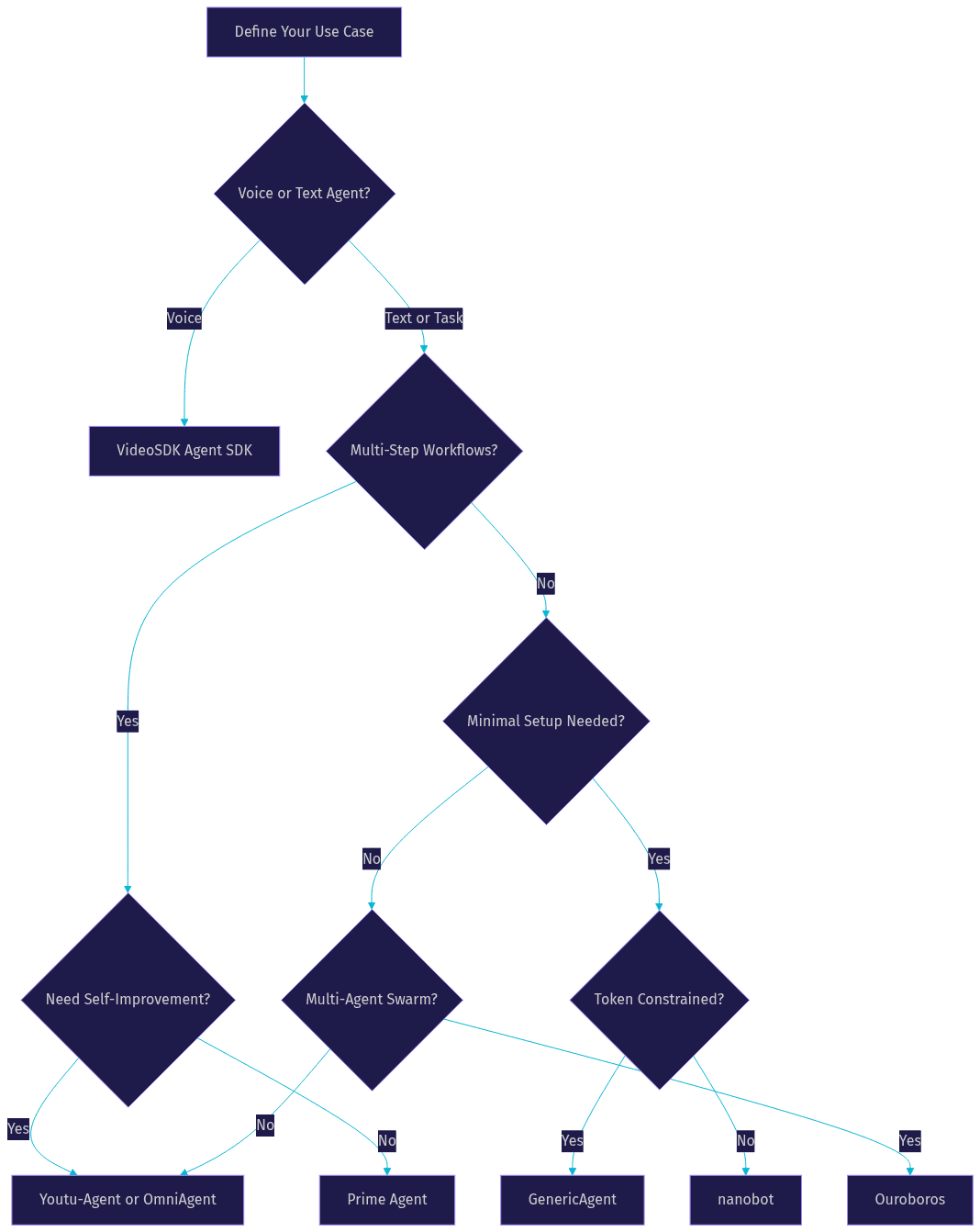
Selecting the right open-source AI agent framework depends on five factors: use-case complexity, required tool ecosystem, hardware constraints, community activity, and licensing compatibility. No single framework wins across all dimensions, so the decision should be driven by your specific project requirements.
Start by evaluating use-case complexity. If your agent needs to handle simple, single-step tasks like answering questions or fetching data, a minimal framework like GenericAgent or nanobot will serve you well. For multi-step workflows with branching logic, Prime Agent's recursive decomposition or Youtu-Agent's workflow mode provides the structure you need. If you are building a system where multiple agents collaborate, Ouroboros is the natural choice.
Next, consider your required tools. If you need coding tools, Prime Agent's skill packages are purpose-built for that domain. If you need broad tool compatibility through standardized protocols, nanobot's MCP integration gives you access to a growing ecosystem. If you need voice interaction capabilities, VideoSDK's AI Agent SDK handles the real-time audio layer that text-based frameworks do not cover.
Hardware constraints matter especially if you plan to run local LLMs through platforms like Ollama. GenericAgent's token efficiency makes it the best fit for resource-constrained environments. Frameworks with heavier orchestration overhead, like OmniAgent's proactive memory system, benefit from more capable hardware.
Community activity determines how quickly you can get help and how fast the framework evolves. Check GitHub issues, pull request velocity, and discussion forums before committing. Frameworks with active maintainers and regular releases will save you from debugging abandoned code.
Licensing compatibility is non-negotiable for commercial projects. Apache 2.0 and MIT licenses permit commercial use with minimal restrictions. GPL v3, used by OmniAgent, requires derivative works to also be open-sourced, which may conflict with proprietary product plans.
The decision tree below provides a visual shortcut for navigating these factors:
Setting Up a Sample Agent: Practical Walkthrough
This walkthrough uses nanobot as a representative example because its minimal architecture and MCP integration make it accessible for developers new to open-source AI agents. The same general principles apply to other frameworks, with differences in configuration details and tool interfaces.
Step 1: Install Dependencies
Begin by ensuring your environment has a compatible Python version and package manager. nanobot requires Python 3.10 or later. Install the framework through its official package distribution channel, which pulls in the core agent runtime, the MCP client library, and the chat interface connectors. The installation process also creates a default configuration directory where you will place your agent settings.
Step 2: Configure Model Provider
nanobot supports multiple LLM providers, including OpenAI, Anthropic, and local model servers like Ollama. You specify your provider choice, API key or local endpoint, model name, and token limits in the configuration file. For local deployments, point the provider URL to your Ollama or LM Studio instance. For cloud providers, store your API key in an environment variable rather than hard-coding it into the configuration.
If you are also building voice-based agents, VideoSDK's authentication guide explains how to generate tokens server-side for secure SDK initialization. The same principle applies here: never expose credentials in client-facing code.
Step 3: Launch the Agent Interface
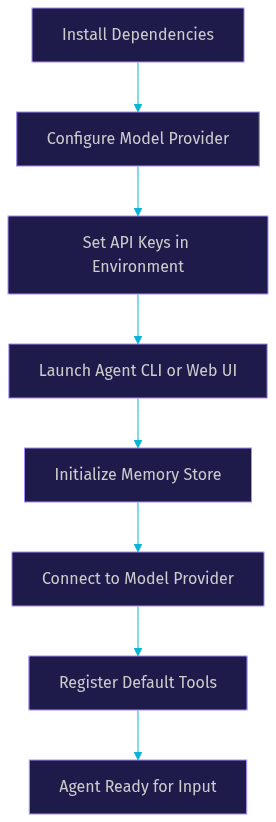
After configuration, start the agent through its launch command. nanobot provides both a CLI interface for terminal-based interaction and a web UI for browser-based testing. The first launch initializes the memory store, connects to the configured model provider, and registers any default tools. You should see a confirmation message indicating the agent is ready to accept input.
The startup sequence follows this flow:
Step 4: Add a Custom Tool
nanobot's MCP integration lets you add tools by connecting to MCP-compatible tool servers. To add a web search capability, for example, you configure the agent to connect to an MCP search server, specifying the server endpoint and the tool schema. The agent automatically discovers available tools from the connected server and incorporates them into its reasoning loop.
Step 5: Test with a Simple Task
Start with a straightforward task like asking the agent to search for a recent news topic and summarize the results. The agent should parse your request, select the search tool, execute the query, process the results through the LLM, and return a summary. If the agent fails to select the correct tool, check that the tool schema is properly registered and that the model provider supports tool-calling capabilities.
Production Considerations
Moving from local testing to production introduces several requirements. First, ensure your agent runs behind HTTPS if it exposes a web UI, as browser APIs and WebRTC connections require secure contexts. Second, set token budgets to prevent runaway costs when the agent enters long reasoning loops. Third, use persistent storage for the memory store rather than in-memory state, so agent context survives restarts. Fourth, sandbox tool execution to prevent the agent from accessing files or network resources outside its authorized scope.
For voice-based production agents, VideoSDK's Conversational Graph provides deterministic flow control that complements open-source agent frameworks. You can use a text-based agent for task execution while routing voice interactions through VideoSDK's pipeline for real-time audio processing.
Common Pitfalls and Best Practices
Building production-grade open-source AI agents involves navigating several common failure modes. Understanding these pitfalls before deployment saves significant debugging time.
Token-budget management is the most frequent source of unexpected costs. Agents that enter long reasoning loops or load excessive context into prompts can consume tokens rapidly. Set hard limits on tokens per request and total tokens per session. Monitor usage patterns and adjust budgets based on observed behavior. GenericAgent's on-demand skill loading is one architectural approach that naturally limits token consumption.
Model compatibility issues arise when agent frameworks assume specific model capabilities like tool calling or extended context windows. Not all LLMs support function calling, and local models may have smaller context windows than cloud providers. Test your agent with your chosen model before committing to a framework. If you plan to use local models through Ollama, verify that the model supports the tool-calling format your framework expects.
Tool sandboxing is critical for security. Agents with access to file systems, shell commands, or network APIs can cause real damage if their actions are not constrained. Use container-based isolation for tool execution, restrict file system access to designated directories, and limit network access to whitelisted domains. OmniAgent's safety harness provides a built-in mechanism for defining these boundaries.
Memory bloat occurs when agents accumulate context without pruning. Over time, the memory store grows until it exceeds the model's context window or degrades retrieval performance. Implement memory compaction strategies that summarize older interactions and discard low-value entries. Ouroboros's durable memory system includes built-in compaction for this reason.
Upgrade migrations can break working agents when framework APIs change. Pin your framework version in production and test upgrades in a staging environment before deploying. Follow the framework's changelog and community discussions to anticipate breaking changes. The VideoSDK GitHub repository maintains release notes for its agent SDK that follow this practice.
For debugging, start by enabling verbose logging on the agent's reasoning loop. This shows you the tool calls being generated, the results being returned, and the memory updates being made. Community support channels, including GitHub issues and developer Discord servers, are valuable resources when you encounter framework-specific issues.
Future Trends in Open-Source AI Agents
The open-source AI agent ecosystem is evolving rapidly, with several research directions shaping the next generation of frameworks. Self-evolution capabilities are moving from research prototypes into production frameworks, allowing agents to improve their own prompts, tool selection strategies, and memory management policies without human intervention. OmniAgent and GenericAgent already demonstrate early versions of this capability, and broader adoption is expected through 2026 and beyond.
Multi-modal agents that process text, images, audio, and video simultaneously are gaining traction. Current frameworks primarily handle text-based interactions, but the integration of vision models and audio processing is accelerating. VideoSDK's AI Agent SDK already supports vision and multi-modality through its pipeline architecture, pointing toward a future where agents seamlessly switch between text, voice, and visual inputs.
Reinforcement-learning-based safety is an emerging research area where agents learn safe behavior through controlled RL training rather than relying solely on hardcoded rules. Youtu-Agent's RL pipeline demonstrates how experience-based learning can improve task performance, and the same techniques are being applied to safety boundary enforcement.
Federated learning for agent training could address privacy concerns by allowing agents to learn from distributed data without centralizing sensitive information. This is particularly relevant for agents deployed in healthcare, legal, or financial contexts where data residency requirements restrict cloud-based training.
The ecosystem is also shifting toward tighter integration with open-source LLMs like Llama 3 and local model servers like Ollama. As local models approach the performance of cloud-based alternatives, the case for self-hosted agent stacks becomes stronger. Frameworks that prioritize token efficiency and local model compatibility, like GenericAgent and nanobot, are well-positioned for this shift.
Definitions Glossary
LLM Core: The large language model that serves as the reasoning engine for an AI agent, processing natural language input and generating plans, tool calls, or responses.
Agent Memory: The storage system that allows an AI agent to retain context, facts, and learned behaviors across interactions and sessions, enabling continuity without re-establishing context from scratch.
Tool Integration: The mechanism by which an AI agent connects to external capabilities such as web search, code execution, database queries, or API calls, extending its reasoning beyond text generation.
Self-Evolution: The capability of an AI agent to improve its own performance over time by modifying its prompts, tool selection strategies, or memory management policies based on observed outcomes.
MCP (Model Context Protocol): A standardized protocol for connecting AI agents to external tool servers, enabling interoperability between different agent frameworks and tool providers.
Agent Worker: In VideoSDK's architecture, the Python process that runs an AI agent session inside a VideoSDK room, managing the STT-to-LLM-to-TTS pipeline and handling real-time audio streams.
Key Takeaways
- Open-source AI agents provide full control over the reasoning core, tool integration, memory, and safety policy, unlike proprietary SaaS agents that hide their internal logic behind API calls.
- Framework selection should be driven by use-case complexity, required tools, hardware constraints, community activity, and licensing compatibility rather than popularity alone.
- nanobot and GenericAgent excel at lightweight, token-efficient deployments, while OmniAgent and Ouroboros target complex autonomous and multi-agent scenarios.
- VideoSDK's open-source Agent SDK complements text-based frameworks by handling the real-time voice communication layer that connects agents to users through audio channels.
- Production deployments require attention to token budgets, tool sandboxing, memory compaction, and HTTPS configuration to avoid common failure modes.
Conclusion
Open-source AI agents in 2026 offer developers unprecedented control over autonomous systems, from the reasoning core to the tool sandbox. The six frameworks compared here each occupy a distinct niche, and the right choice depends on your specific use case, hardware, and licensing requirements. Start by defining your task complexity, evaluate two or three frameworks against your requirements, and prototype with a simple task before scaling up.
For developers building voice-based agents, VideoSDK's open-source Agent SDK provides the real-time communication infrastructure that text-based frameworks do not cover. You can sign up for a free account at app.videosdk.live/login and explore the code samples to get started.
What are you building with open-source AI agents? Drop a comment below. I'd love to hear what kind of autonomous agent use case you're working on, whether it is a personal assistant, a research bot, or a multi-agent swarm.
Free $20 Balance for AI Voice Agents & Video Calls
FAQ